
QuickBooks Web Connector Setup: Connect to Codeblix E-Invoicing
Add a company QWC file, review permissions and run a manual QuickBooks Web Connector exchange. The demo uses localhost; production uses approved HTTPS.

MRA e-Invoicing onboarding for Economic Operators in Mauritius
Follow the Codeblix process for Economic Operator access, Test User setup, Transmission User/API credentials, TEST verification and LIVE fiscalisation.
Once your business setup is complete, this tutorial shows the separate CSV, TSV or TXT invoice import workflow inside Codeblix EBS. It does not demonstrate Secure Hub registration or API credential setup.
These Desktop clips concern the separate invoice exchange after business setup. They do not demonstrate Secure Hub registration or prove an accepted live MRA transaction.
Add a company QWC file, review permissions and run a manual QuickBooks Web Connector exchange. The demo uses localhost; production uses approved HTTPS.

See the QuickBooks Desktop daily invoice-sync routine and a demo fiscal PDF. A completed Web Connector exchange does not establish MRA acceptance.
This is the Codeblix onboarding guide for connecting a Mauritius Economic Operator to the MRA e-Invoicing Secure Hub. It explains who signs in, the two ways Codeblix can be authorised, what company information is required and how the setup moves from TEST to LIVE.
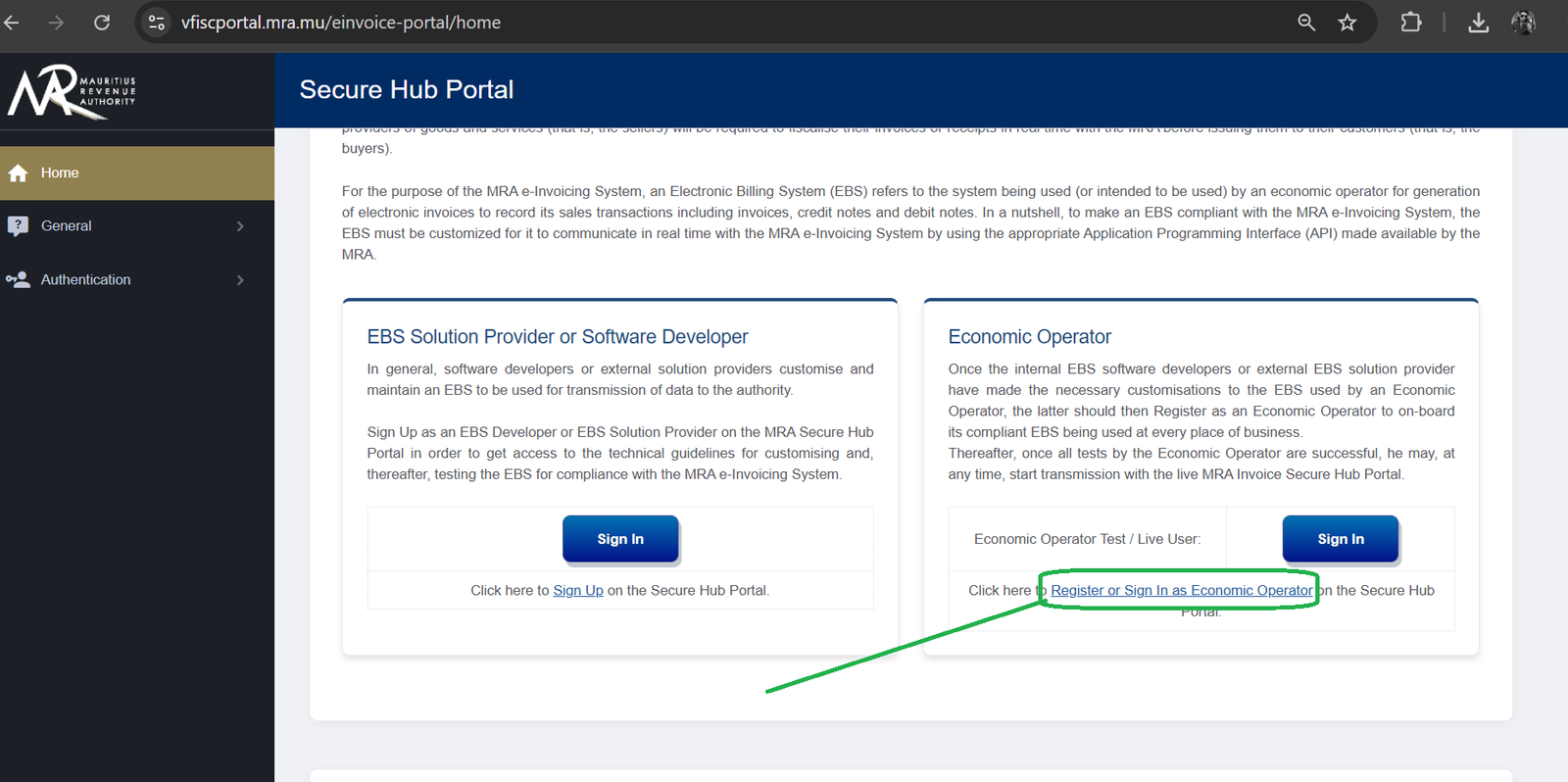
The company registers or signs in on the official MRA e-Invoicing Secure Hub Portal using its TAN and MRA e-Services password. This portal access belongs to the Economic Operator and is separate from the Transmission User/API credentials used by the EBS.
For managed onboarding, the company securely provides its Economic Operator TAN and portal password so Codeblix can complete the portal steps. For assisted onboarding, the company signs in and adds Codeblix as the Test User using identity details supplied privately at the start of onboarding. The assisted route requires the company contact to stay available for verification and approvals.
Economic Operator registration, Test User access, Transmission User credentials, TEST verification, LIVE activation and successful invoice fiscalisation are separate states. Codeblix checks each state before moving to the next and does not treat portal registration alone as proof that the EBS is ready for production.
Read the MRA e-Invoicing guide, review MRA reports, or browse the Codeblix documentation library.
The MRA Portal integration is built into Codeblix. There is no separate plugin, no third-party middleware, and no annual licence. You connect your MRA Portal account from the Integrations screen, authorise Codeblix to access your data, and the sync runs in the background.
Two-way sync means data flows both ways. When you create a record in Codeblix, it appears in MRA Portal. When something changes in MRA Portal, it reflects in Codeblix. No double entry, no copy-paste, no CSV exports.
Start by registering or signing in as an Economic Operator with the company TAN and MRA e-Services password. You can then choose one of two onboarding routes: let Codeblix manage the portal process, or add Codeblix as a Test User and work through the checks with us.
We use these details to create the correct company workspace, seller identity and onboarding record.
The Economic Operator login opens the company portal. The Transmission User/API credentials are separate and allow the configured EBS to communicate with the MRA e-Invoicing service.
If the Transmission User credentials are created or received on your side, they must also be shared with Codeblix through the agreed secure method. We test them in the correct MRA environment before any LIVE activation.
After TEST checks pass and the MRA setup is switched to LIVE, Codeblix and the client will fiscalise one or two genuine business invoices. We verify the legal seller details, customer data, items, VAT treatment, totals, payment/account mappings, MRA result, QR code and final customer PDF before normal daily use.
These are real fiscal records, so the client must approve the invoices and their source data before submission. Any correction follows the proper fiscal-document process.
Use the company TAN and MRA e-Services password on the official MRA e-Invoicing Secure Hub Portal.
Securely authorise Codeblix to handle the portal process, or add Codeblix as the Test User and stay available for the guided checks.
Provide the legal name, BRN, TAN, VAT number, registered address and authorised contact details.
These credentials are separate from the Economic Operator login and must be securely shared with Codeblix if they are issued on the client side.
Codeblix validates connectivity, seller identity, customer, item, VAT, total, payment and account mappings in the MRA test environment.
LIVE fiscalisation is enabled only after the required portal, credential and EBS checks pass.
Fiscalise 1-2 client-approved real invoices, verify the MRA result, QR code and customer PDF, then issue Codeblix login details to authorised users.
You can securely give Codeblix the Economic Operator TAN and portal password so we manage the process, or you can sign in yourself and add Codeblix as the Test User. The assisted route needs your attention for portal screens, verification and approvals.
No. The authorised person's name, NID, mobile number and email are provided privately when onboarding starts. The public Test User label is Codeblix.
Yes, if those credentials are created or received on your side. They are separate from the Economic Operator login and must be transferred using the secure method agreed with Codeblix.
The controlled LIVE check confirms the legal seller, customer, item, VAT, total, payment and account mappings, MRA response, QR code and final customer PDF before normal daily use. The client approves these genuine invoices before submission.
Codeblix login details are issued to authorised users after onboarding, company configuration and access checks are complete.
New to e-invoicing? Start with the Mauritius Revenue Authority’s video, ‘Tout savoir sur le e-Invoicing’, then explore what it means for your business.
Video by the Mauritius Revenue Authority. Codeblix helps businesses set up and use an MRA-compliant billing system.
Watch on YouTube →Your developer can send invoices, credit notes and debit notes from your software to the Codeblix API. After successful live fiscalisation, it returns the MRA IRN and QR image. Keep your invoice numbering and branded layout. Codeblix remains your EBS provider, and each issuing business completes its own MRA onboarding.
Start with a simulated sandbox that does not submit invoices to MRA. Live access follows MRA onboarding and activation.
Before your first invoice, tour the sign-in, dashboard and daily e-invoicing workflow using a demo company. Complete the separate onboarding process for your own business.