
Know which number the meeting is discussing.
A weighted estimate, a manager commitment and a sales target answer different questions. Define each measure before comparing them.
Keep the forecast period reproducible
Bind the estimate to an as-of time, a closing period, an amount basis and a currency policy. Preserve the imported opportunity IDs and probability edition. A later CRM correction should create a visible change in the next snapshot rather than silently rewrite what the team reviewed last week.
Separate evidence from confidence
Track the expected close date, forecast category and supporting evidence independently. A representative may keep an opportunity in commit while its evidence requires review. Decide whether that record is held, included with a warning or escalated, and make its treatment explicit in the rollup.
Explain movement without counting twice
Show the opportunities added, removed, increased, decreased, won, lost or moved between periods. Preserve the prior contribution and the current contribution for each ID. Manager adjustments need a reason and a clear rule for replacing an estimate or adding a separate adjustment.
Follow the estimate back to the deal.
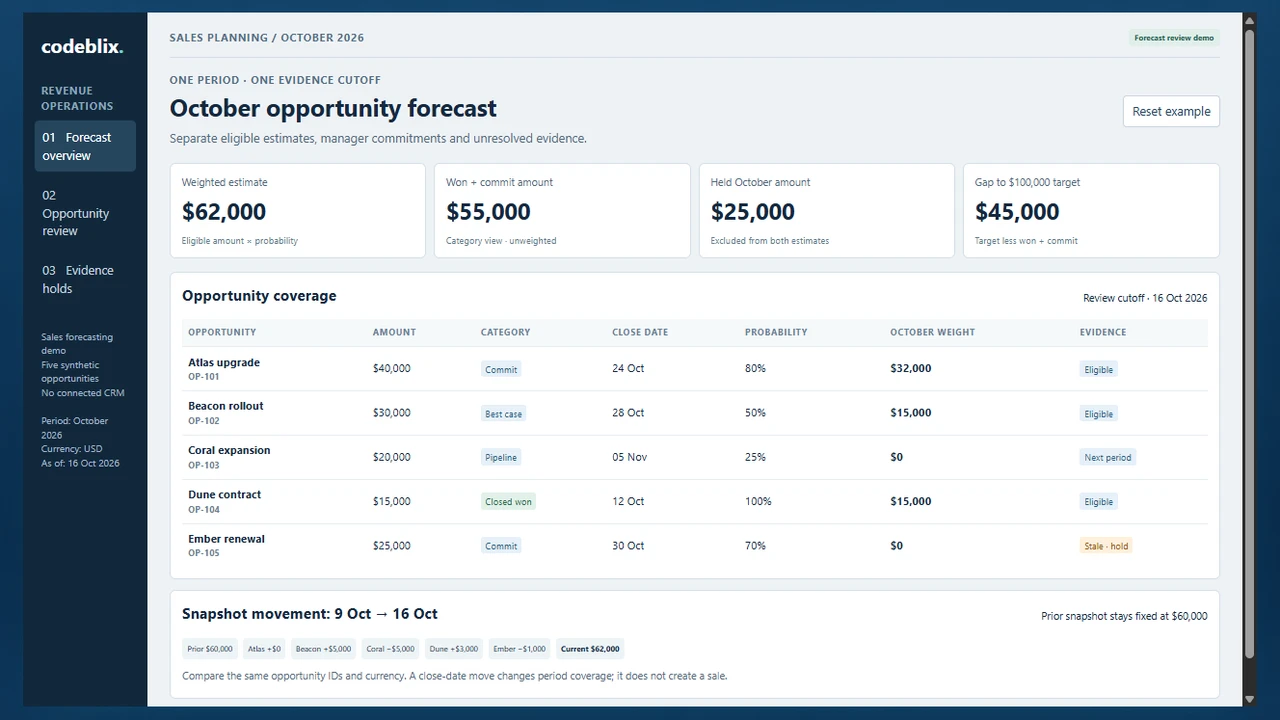
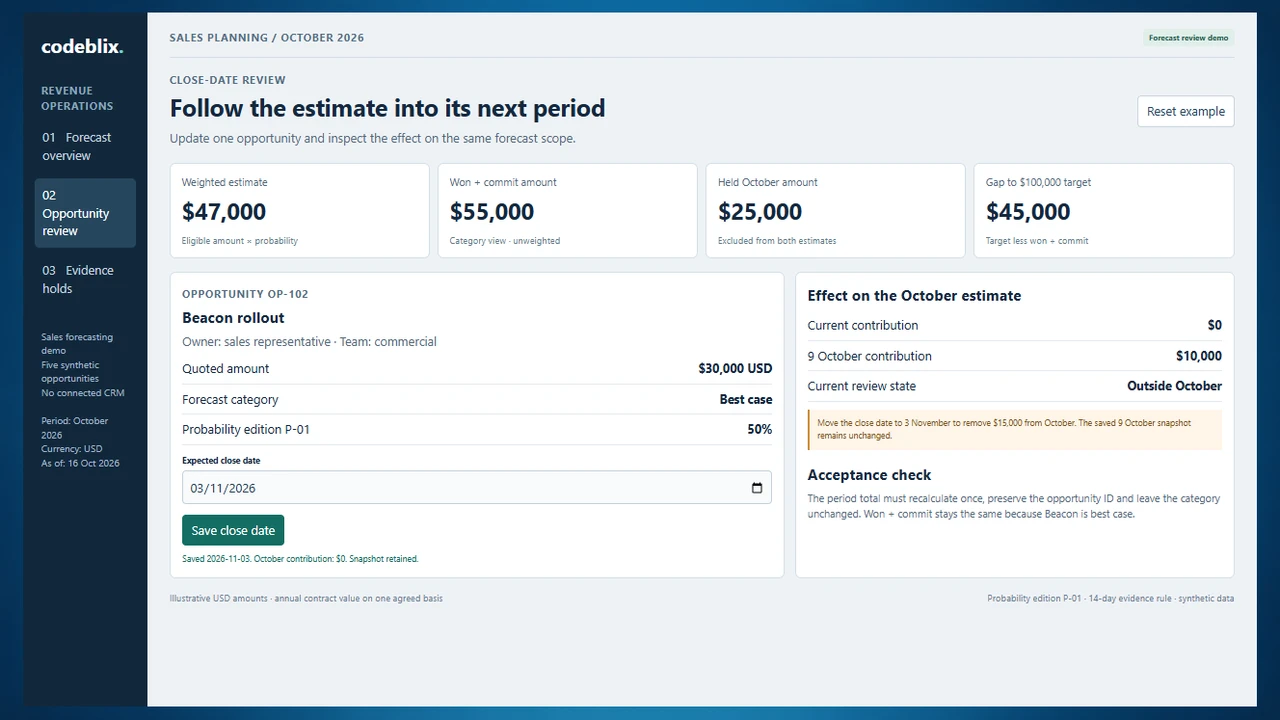
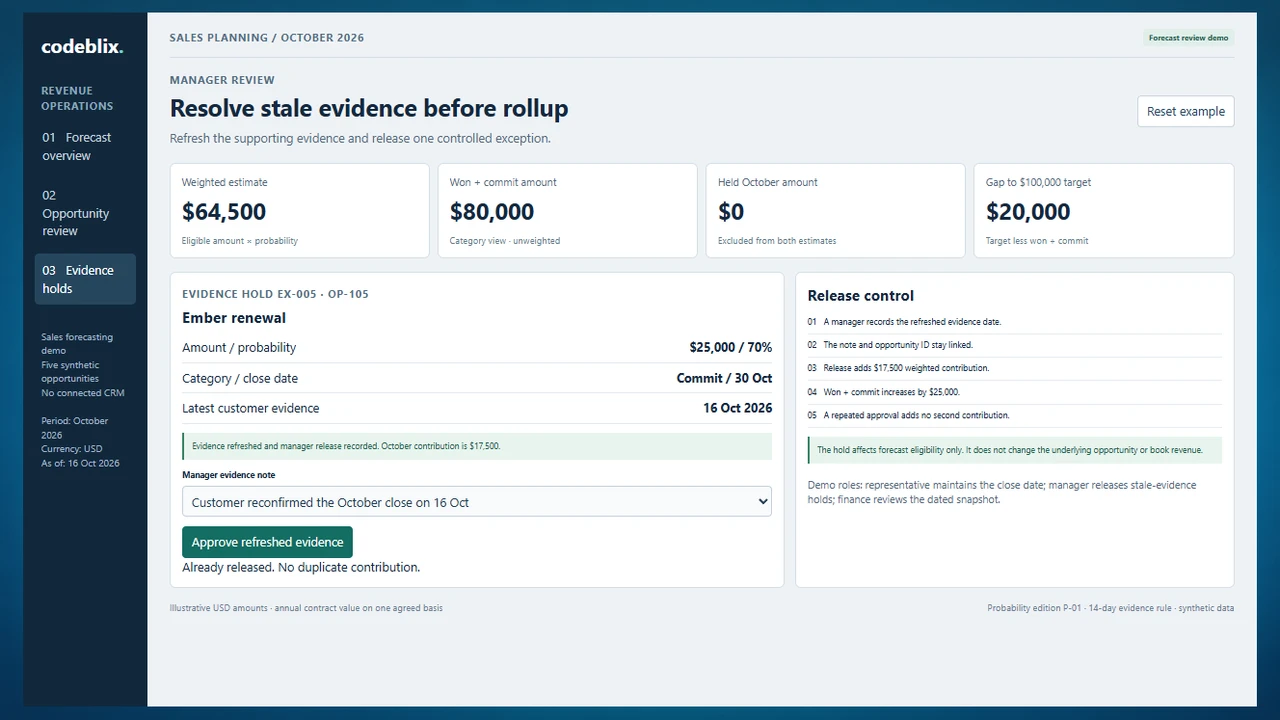
Explore three screens from the forecast review demo: October coverage, a close-date move into November and a manager release of refreshed evidence. Each view uses the same five synthetic opportunities.
Prepare for a useful product review.
Use these checks to compare fit, evidence and implementation before committing to a product.
Try the close-date and evidence cases
Open the working example, move Beacon from 28 October to 3 November and save the change. October loses its $15,000 weighted contribution. Next, record Ember’s refreshed evidence and release its hold. Compare the weighted estimate with won plus commit after each decision.
Try the sales forecast review demoConnect sales execution to the forecast extract
Sales execution owns the customer actions, opportunity updates and order handoff. Forecasting takes a dated view of those records and explains the estimated period outcome. Define the source-system owner and the snapshot cutoff so these two workflows share identities without competing edits.
Review the sales execution handoffKeep compensation tied to its agreed earning event
An estimated sale is different from an earned commission. Use the compensation rules, eligible transactions and approval process to determine commission amounts. A forecast can inform planning, while the commission workflow retains its own evidence and payout authority.
Compare sales commission controlsFrom opportunity extract to a dated sales forecast
Agree the calculation and review responsibilities before connecting more data sources. Use the same opportunity set at every step.
Define the sales measure and calendar
Choose bookings, annual contract value or another agreed sales measure. Specify the closing period, time zone, reporting currency and treatment of renewals and split credits. Document whether a target is compared with gross commit, a weighted estimate or a separate manager submission.
Validate the opportunity snapshot
Import stable IDs, owners, amounts, stages, close dates and evidence timestamps. Reconcile row counts and amount totals with the source extract. Quarantine duplicate IDs, missing dates, unknown currencies and inconsistent won or lost states before publishing the estimate.
Apply the effective probability rules
Identify the probability edition used by each row. Map stages or approved deal-specific probabilities to an estimate, and keep forecast category separate. Evaluate period eligibility and evidence rules before summing eligible contributions. Show excluded amounts and reasons alongside the total.
Review changes with the deal owner
Compare the current extract with the saved prior snapshot using opportunity ID. Inspect changed amounts, close dates, probabilities and categories. Ask the representative for the next customer milestone and resolve conflicting source values before the forecast meeting.
Record manager decisions and exceptions
Name the authority for stale-evidence release, category changes and manual adjustments. Require a reason, evidence time and affected period. Repeated submissions must return the same decision. Keep the original row, calculated contribution and manager decision available for review.
Freeze the call and reconcile outcomes
Save the approved forecast edition with its exact inputs and submission time. Export the agreed sales estimate to the receiving planning process, with acknowledgement where required. Compare the dated call with subsequent won and lost outcomes using the same measure; explain late corrections without replacing the earlier snapshot.
Representatives, managers and finance reviewers
- Representatives maintain permitted opportunities and record close-date evidence. Managers inspect their teams, approve exceptions and submit a forecast call. Finance reviewers compare approved editions with targets and outcomes.
- Restrict cross-team opportunity details, customer notes and exports by role. Keep service-account import permissions separate from review and approval authority.
- Log the prior value, new value, actor, reason and effective time for overrides. Specify who may reopen a submitted period and how a corrected edition is identified.
Data migration and CRM integration
- Bring an anonymised opportunity extract, stage definitions, currency fields, historical snapshots and the current forecast spreadsheet. Reconcile old IDs, deleted deals, reassigned owners and changes in the amount basis.
- Agree which CRM or source file owns amounts, stages and close dates. Scope each import or API interface around available permissions, field mappings, refresh timing, deletions, retries and reconciliation reports.
- Start with one pipeline and one currency. For multiple currencies, specify the rate source, rate date and frozen conversion edition before comparing periods. Historical model evaluation also needs dated data that was available at the time.
Pilot, deployment and ongoing support
- Pilot one review cycle with sales operations, a manager and a finance reviewer. Compare the saved forecast with the existing process and resolve data differences before expanding teams.
- Price the application, source-data preparation, interfaces, access setup, hosting and training separately. Agree backup restoration, monitoring, support hours, import-failure escalation and ownership of probability-rule changes.
- Define acceptance for simultaneous edits, lost or reopened opportunities, late extracts, approved-period locks and repeat submissions. Add predictive modelling only with suitable historical data, an agreed validation method and explicit evaluation criteria.
Six records that make a sales forecast reviewable
Use this model to compare packaged software or prepare a Codeblix development scope. It connects a period estimate to the exact opportunity, calculation and review decision.
| Record | Example inputs | Required output and control |
|---|---|---|
| Forecast scope | Period, as-of time, team, measure, currency, target and calendar | Compare like-for-like estimates and record the source cutoff. |
| Opportunity observation | Stable ID, source edition, owner, amount, category, close date and evidence date | Validate one current observation per source identity; retain rejected rows for resolution. |
| Probability rule edition | Edition ID, effective dates, stage mapping and approved deal probabilities | Reproduce the contribution using the rules effective for that snapshot. |
| Eligibility and evidence hold | Opportunity ID, period test, evidence-age rule, reason and responsible reviewer | Show the excluded amount and release authority; never disguise a hold as a zero-value deal. |
| Manager submission | Team, period, calculated estimate, adjustments, reason and approval time | Distinguish the computed figure from the manager call and avoid duplicate adjustments. |
| Snapshot and movement line | Snapshot IDs, opportunity ID, prior/current contribution and change reason | Freeze submitted inputs and reconcile individual movements to the total difference. |
The illustrative October demo uses USD annual contract values and probability edition P-01. Atlas contributes $40,000 × 80% = $32,000; Beacon contributes $30,000 × 50% = $15,000; Dune is closed won at $15,000 × 100% = $15,000. Coral closes in November and Ember has a stale-evidence hold, so both contribute $0 to October. The weighted estimate is $62,000. Won plus eligible commit is $15,000 + $40,000 = $55,000, leaving a $45,000 gap against the $100,000 target. The fixed 9 October snapshot totals $60,000: Atlas $32,000, Beacon $10,000, Coral $5,000, Dune $12,000 and Ember $1,000. Current movements of $0, +$5,000, −$5,000, +$3,000 and −$1,000 reconcile to +$2,000. Moving Beacon into November reduces the current weighted estimate to $47,000. Releasing Ember after refreshed evidence adds $17,500 weighted and $25,000 commit: the resulting figures are $64,500 weighted, $80,000 won plus commit and a $20,000 target gap. None of these estimates represents an invoice or recognized revenue.
Ask each provider to explain the same forecast change
These current primary product pages describe their forecasting focus. Use the demo questions to test your own requirements with each provider.
| Option | Published focus | Ask in your demo |
|---|---|---|
| Anaplan | Connected sales planning, pipeline visibility and opportunity-level scenario analysis. | Can a reviewer reproduce the submitted figure with its original opportunity snapshot, rate edition and probability rules? |
| Salesloft / Clari Forecast | Team forecasts, pipeline movement, deal risk and actions informed by sales activity. | Show a deal moving to the next period and a stale-evidence release. Which movements and manager decisions explain the change? |
| HubSpot | Forecasting around CRM pipeline data, deal stages and team sales reviews. | Can our amount basis, category rules, permissions and approval cycle be configured, and how are historical calls preserved? |
Choose a packaged CRM forecast when its calendars, categories and review process fit the team. Consider custom development when a dedicated approval workspace, several source systems or a specific snapshot reconciliation needs its own application. Compare setup and licensing with data preparation, interfaces, training and maintenance. Ask vendors to demonstrate the same date move, evidence hold, repeat approval and prior-snapshot reconciliation; a product-page omission is a question to investigate, not proof that a feature is absent.
Category reference: Anaplan: sales forecasting and opportunity scenario planning. Primary product references accessed 16 October 2026. The five-opportunity calculation, record model and acceptance checklist are original Codeblix decision aids.
Connect forecast decisions with your wider sales operations.
Review related service workflows, then identify which customer and opportunity records should supply the forecast.
Explore professional services softwareQuestions to settle before your forecasting build
Bring the sales measure, a dated extract and the decisions your forecast meeting needs to make.
What should sales forecasting software calculate?
It should estimate expected sales for an identified period and show which opportunities contribute. Define the amount basis, currency, close-date test and probability edition first. Keep weighted estimates, category totals, manager calls and targets as separate measures with clear labels.
Can Codeblix build a forecasting workspace around our existing CRM?
Yes. Bring the CRM fields, export or API access options, review roles and an anonymised opportunity extract. Codeblix can scope a focused forecast application, the required interfaces and the acceptance cases for your sales process.
What is the difference between pipeline value and a weighted forecast?
Pipeline value sums opportunity amounts within an agreed scope. A weighted forecast applies a probability to each eligible amount before summing. A manager commitment is a separate judgment or category view. The demo shows all three concepts through defined records; they should not be added together.
What happens when an opportunity moves into next month?
Re-evaluate its period eligibility and show the contribution leaving the current period and entering the next. Preserve the opportunity identity and the earlier submitted snapshot. Record whether the change came from a revised close date, an amount update or a different probability rule.
How should stale or incomplete deal evidence be handled?
Agree an evidence-age policy and a responsible reviewer. Show the amount and hold reason rather than treating the underlying deal as worthless. Require a dated evidence update and approval before release. The demo uses an illustrative 14-day rule; your team sets the actual policy.
Does this require AI forecasting?
A reproducible rules-based estimate and review cycle can be a useful first release. Predictive modelling requires suitable historical observations, clear outcome labels and evaluation against an agreed baseline. Include data quality, validation and monitoring in the scope before selecting a model.
Is this the same as demand planning or cash-flow forecasting?
Sales-opportunity forecasting estimates the commercial pipeline outcome. Demand planning estimates product quantities for supply decisions; cash-flow forecasting considers receipts, payments and liquidity. Define any handoff between these processes and retain their distinct measures and approvals.
What information is needed for a development quote?
Share team sizes, one opportunity extract, calendar and currency rules, your current spreadsheet, approval roles and a difficult review case. Identify source systems, history, hosting and support needs. The quote can then separate the pilot, migration, interfaces, training and ongoing maintenance.