
Codeblix Construction · Mauritius & international contractors
From the BOQ to the final cost. One connected project.
Price the work, control what gets ordered, record what arrived and follow the cost into your accounts. Construction management software for the quantity surveyor, site team, procurement desk and director.
Explore all 180 capabilities →BOQ estimating, procurement, project accounting and site controls, configured for your business.
 Start here: the new complete construction guideSet up → estimate → buy → receive → account → review
Construction project management software
Give every team the same project story.
Estimate and approve
Build the resource library, price the BOQ and approve the budget that buying will use.
Request and buy
Let site request the required quantity, review the remaining allowance and approve the order.
Receive and account
Record accepted deliveries, match supplier bills, inspect the posting and prepare payment.
Review the position
Compare budgets, commitments, certified work and recorded costs before the next decision.
BOQ software and construction estimating
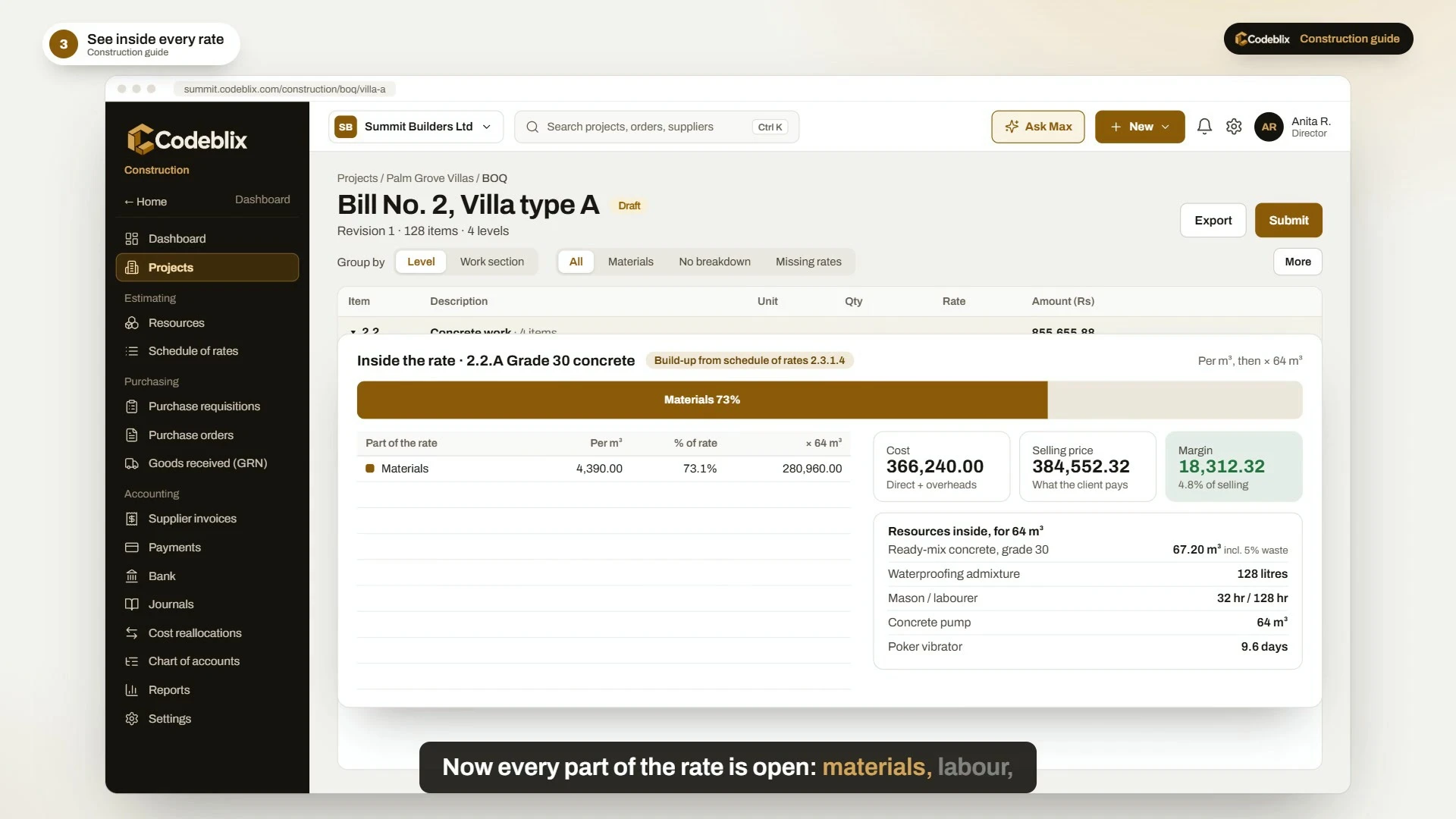
Know what sits inside the rate.
Keep the bill of quantities linked to the materials, labour, plant and other cost components behind it. Review the quantities and selling rates alongside the project structure.
- Resource costs, schedule of rates and reusable rate templates.
- Supported Excel imports, source references and review warnings.
- Rate build-ups with waste, overhead and profit settings.
- Approved BOQ versions, allowances and controlled variations.
180 capabilities / 15 areas
Explore the whole construction workflow.
A searchable catalogue for contractors, quantity surveyors, project managers and accounts teams. Choose a workflow to see what it covers.
Company setup, people and approvals
Give each person the right workspace and put company controls in place before the first purchase.
Explore →02 / 12 capabilitiesProjects, sites and work structure
Connect the commercial job, the physical site and the people doing the work.
Explore →03 / 12 capabilitiesResources, schedule of rates and estimating
Build prices from the resources your company buys and uses, with reviewable rate history.
Explore →04 / 12 capabilitiesBOQ software, imports and quantity breakdowns
Move from client quantities to a structured, traceable bill of quantities.
Explore →05 / 12 capabilitiesBudgets, allowances and variations
Keep approved allowances separate from proposed changes and current commitments.
Explore →06 / 12 capabilitiesPurchase requisitions, orders and procurement
Take a site need through approval and into an order with a traceable project and BOQ link.
Explore →07 / 12 capabilitiesGoods receiving, site stock and transfers
Record what reached site, what was accepted, and where materials went next.
Explore →08 / 12 capabilitiesSupplier invoices, matching and payments
Match the bill to the actual purchasing evidence, then prepare a controlled supplier payment.
Explore →09 / 12 capabilitiesConstruction accounting, bank and journals
Keep the accounting entry connected to the project and the document that created it.
Explore →10 / 12 capabilitiesProgress claims, certificates and retention
Maintain the measured work, certification and retention trail for the client-facing contract.
Explore →11 / 12 capabilitiesSubcontract agreements and commercial review
Keep subcontract commitments, variations, claims and certified work connected.
Explore →12 / 12 capabilitiesSite diaries, RFIs, quality and coordination
Keep daily evidence and open site questions with the project.
Explore →13 / 12 capabilitiesProgrammes, progress, equipment and site work
Compare the plan with recorded progress and the resources used on site.
Explore →14 / 12 capabilitiesJob costing, forecasts and management reports
Answer practical questions about the budget, buying, supplier balances and recorded project results.
Explore →15 / 12 capabilitiesImports, source review and document traceability
Bring existing records into the system through a reviewable import process.
Explore →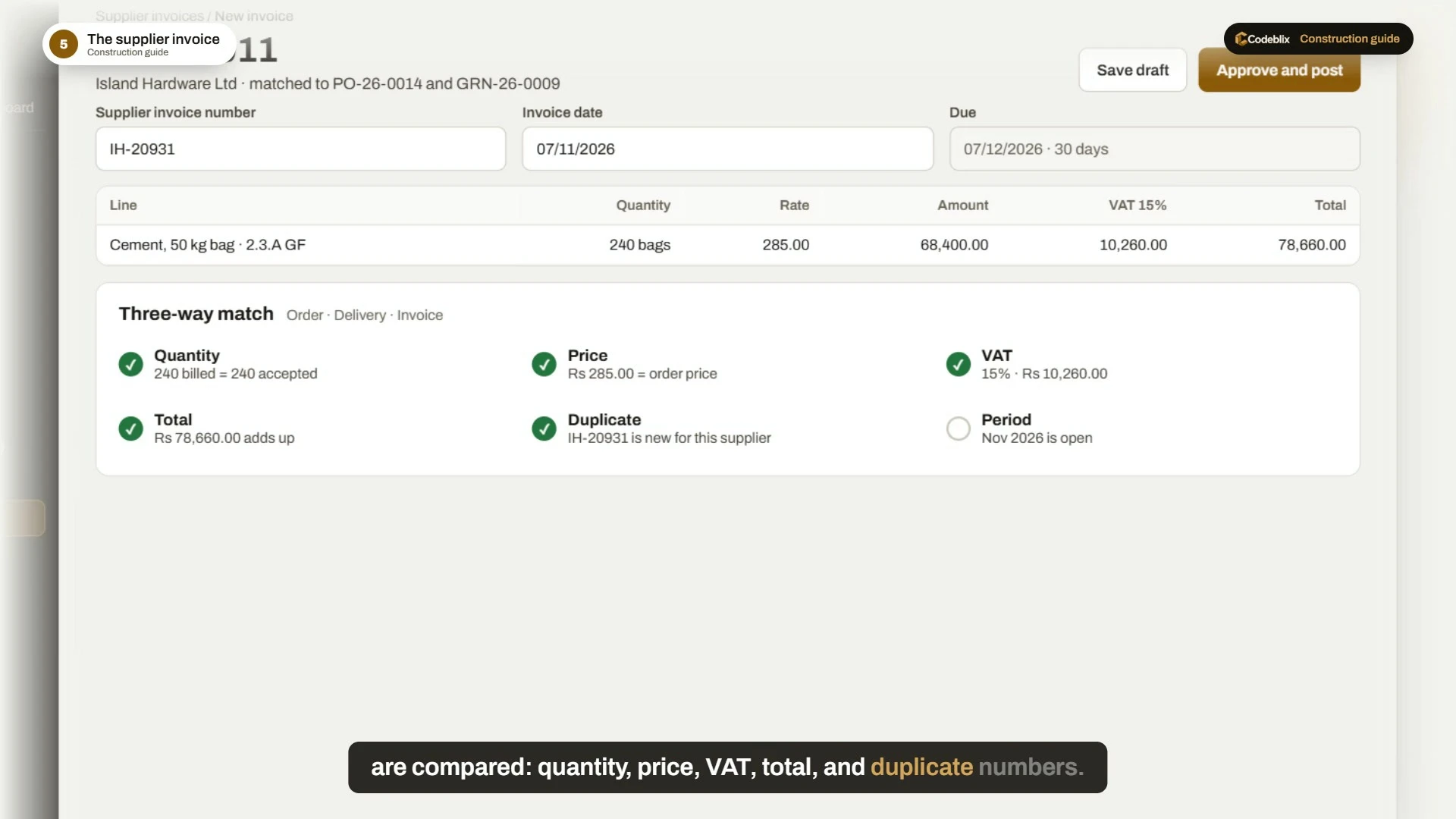
Construction procurement and accounting software
Follow the cost from the order to the books.
Keep the supplier invoice connected to the purchase order, accepted receipt and project. Review quantity and price differences, the proposed accounting entry and the supplier balance.
Use the connected bank, journal and reporting workflows to understand the project's recorded costs. Corrections retain a traceable history.
See invoice matching and payment controls →The new complete guide
Follow one building job from the beginning.
The guide follows the fictional Summit Builders company and Palm Grove Villas project. See the setup, BOQ, buying, delivery, accounting and reporting story, then the illustrated Max AI scenarios.
Watch with chapters and transcriptSee Max in the guide
A clearer way to explain assisted construction work.
The illustrated Max chapters show how a team could ask for the right screen, review a BOQ, investigate late orders, prepare a requisition, check accounts or discuss a project position.
Use those scenarios to discuss the enabled modules and AI workflows for your company. Authorised people remain responsible for review, approval, posting and payment.
Watch the Max scenarios →
Plan your rollout
Bring your BOQ, buying process and reporting questions.
Tell us about your projects, sites, users and existing accounting data. We will walk through the relevant modules, imports, approvals and implementation scope.
Book a construction demonstrationExplore construction industry workflows · Review app pricing
Can we manage multiple projects and sites?
Yes. Use the project register, project sites, assigned access and the supported multi-project reporting views. Company permissions determine who can see quantities and commercial costs.
Can we import our BOQ and existing data?
Supported spreadsheet and document imports include a review stage, source references and exception handling. Confirm the format, mapping and opening-data scope with Codeblix.
Does the guide demonstrate all 180 capabilities?
The recording explains the main construction cycle and illustrated assistant scenarios. The catalogue covers the wider application, including commercial, site, planning, reporting and import workflows.
Does it support international contractors?
The estimating, procurement, project-cost and reporting workflows can be scoped for international teams. Confirm currency, local tax rules, accounting requirements and configuration before rollout.
Which tax rate should we use?
Use the treatment applicable to your business and payment. The film's 3% withholding example is illustrative; the current MRA contractor/subcontractor TDS guidance lists 0.75%, subject to the applicable rules. Confirm it with your accountant.