
Make allocation decisions explainable.
A fast handoff helps only when the intended recipient can accept it and the team can recover an exception.
Respect existing account relationships
Check account identity before choosing a new recipient. Define whether an established owner takes priority, who can resolve two possible account matches and what happens when that owner is unavailable. Preserve the evidence behind the decision instead of silently treating an uncertain match as a new account.
Allocate within real recipient capacity
Separate territory eligibility from shift availability and active workload. Agree which assignments count toward capacity, when they are released and how ties between eligible recipients are resolved. A queue should show a held enquiry and its next responsible action when no recipient qualifies.
Recover delivery without allocating twice
Keep intake identity, assignment identity and delivery acknowledgement separate. Replaying the same incoming enquiry should return the existing decision. A failed notification or receiving-system response needs a retry of that assignment, with a visible delivery state and escalation owner.
See why a lead reaches its recipient.
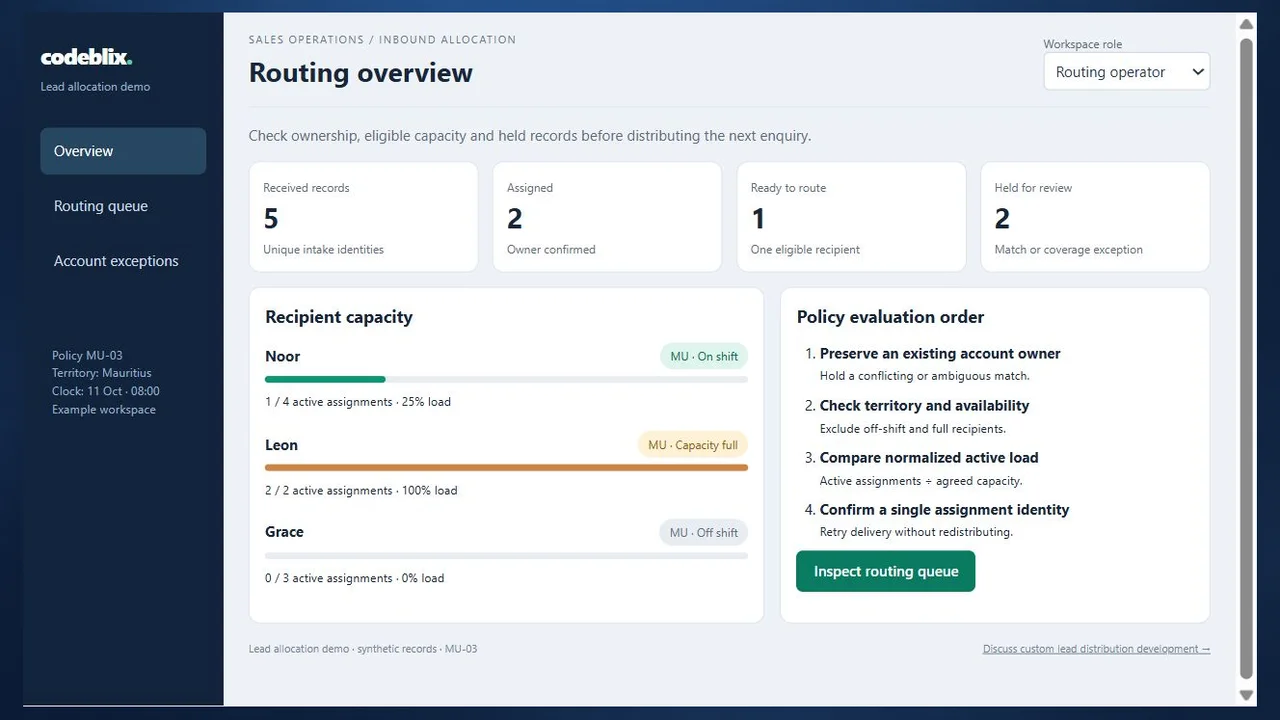
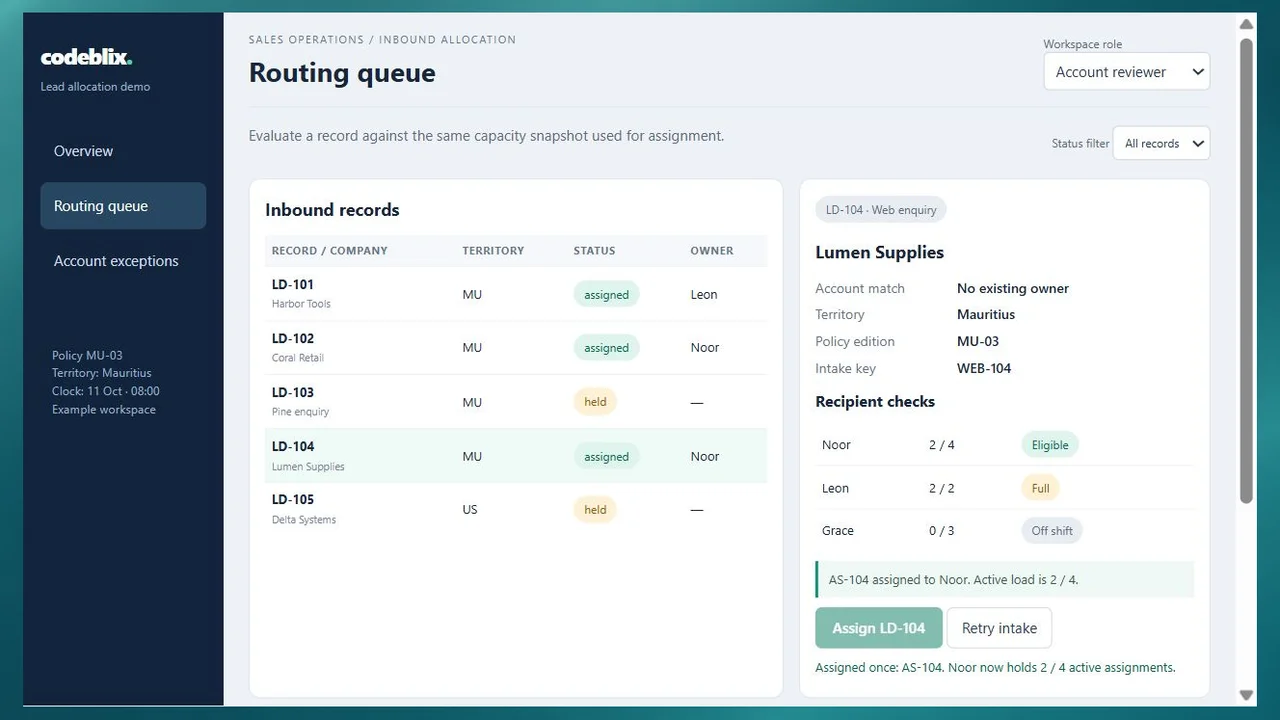
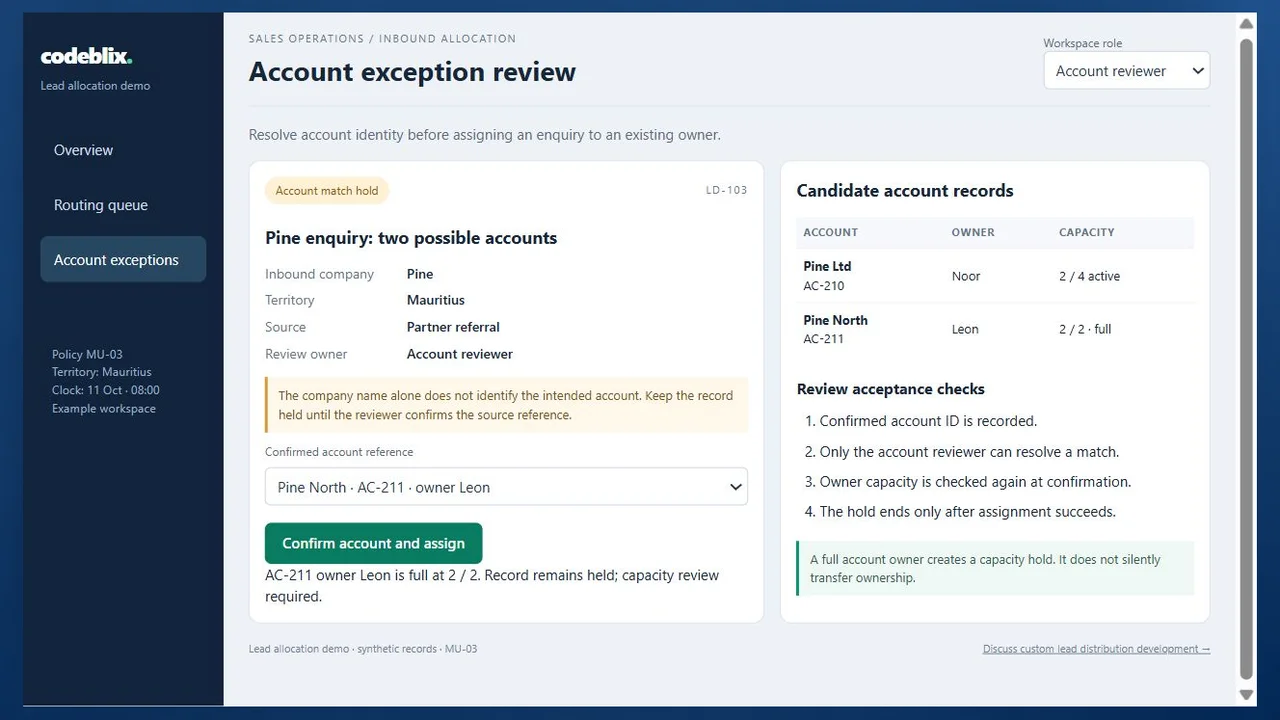
Follow the lead allocation demo from the intake overview to an assigned enquiry and an account-ownership exception. The screens use the same five synthetic enquiries and capacity rules.
Prepare for a useful product review.
Use these checks to compare fit, evidence and implementation before committing to a product.
Try the capacity and account-review workflow
In the example workspace, assign Lumen Supplies, retry the same intake and review the two possible Pine accounts. Compare a full recipient with an off-shift recipient, then switch roles to see which review actions are available.
Open the lead allocation demoPass accepted work into the sales process
Lead allocation decides who receives an enquiry. Sales-force automation manages the subsequent activity, opportunity and follow-up work. Agree the recipient identifier and assignment reference passed between those responsibilities so a downstream update can be reconciled to its origin.
Review sales-force automation workflowsEstablish partner eligibility before assigning leads
For a partner network, onboarding establishes the approved organisation, territory, contacts and effective access. Allocation then checks that eligibility and the partner’s agreed receiving capacity. Include suspension and expiry dates in the recipient decision.
Define partner onboarding and eligibilityKeep opportunity claims distinct from inbound allocation
Deal registration records a partner’s opportunity claim and the decision about its protection. Reference that existing relationship when allocating a related enquiry, while retaining separate registration and assignment identities.
Compare deal registration and opportunity ownershipFrom incoming enquiry to acknowledged assignment
Define these six steps with sales operations, account owners, recipient managers and the people responsible for your source systems.
Define the intake and allocation boundary
Identify the forms, imports or authorised interfaces that create enquiries. Agree required fields, source identity, territory vocabulary and the business clock used for availability. Decide when an enquiry is eligible for allocation, and separate allocation from qualification scoring, opportunity management and lead purchasing.
Reconcile identity and account ownership
Validate the incoming record and check whether its source identity has already been processed. Compare the account reference with the authoritative account list. Route ambiguous matches to an account reviewer; record the confirmed account, owner and resolution rather than changing an unrelated customer record.
Evaluate eligible recipients
Apply the effective policy edition to territory, team membership, shift status and active assignment limits. Check owner-priority rules before fair-share allocation. Show the capacity snapshot used for the decision and define deterministic tie-breaking. Hold a record when coverage or policy data is incomplete.
Create one assignment and deliver the handoff
Commit the selected recipient, assignment identity and capacity reservation together. Send the minimum agreed enquiry fields to the receiving system or recipient. Track pending, acknowledged and failed delivery states independently of allocation so a notification failure does not select another salesperson.
Resolve acceptance and exception decisions
Agree acceptance deadlines, decline reasons, escalation ownership and reassignment authority. Release the previous reservation before an authorised reassignment and preserve its history. An account-ownership dispute, full team or off-shift owner needs a named next action rather than an invisible queue timeout.
Reconcile outcomes and revise the policy
Compare intake counts, unique assignments, held enquiries and delivery acknowledgements. Review response times using the agreed working hours and distinguish acknowledgement from a sales conversion. Introduce territory, capacity or fairness changes as a dated policy edition; retain the rule version behind earlier decisions.
Roles, permissions and exception ownership
- Routing operators review assigned territories and handle permitted retries. Account reviewers confirm identity conflicts; policy administrators maintain dated rules separately from routine assignment.
- Representatives or partner recipients see only their permitted enquiry fields and assignments. Define access to contact information, cross-territory records and assignment history before importing data.
- Use explicit authority for overrides, reassignment and capacity changes. Record the operator, reason, previous recipient and policy edition; agree approval limits for a disputed existing account.
- Name the escalation owner for duplicate source identities, unknown territories, conflicting accounts, unavailable owners, failed acknowledgements and capacity exhaustion.
Migration and integration requirements
- Inventory enquiry sources, recipient lists, account owners and current allocation spreadsheets. Reconcile source IDs, account references, territory codes and the active assignments that contribute to capacity.
- Review the available CSV or API interfaces and permissions during consultation. Define which system owns account identity and which owns assignment status; specify field mapping and refresh frequency.
- Start with agreed imports or one receiving-system handoff. Request sample acknowledgements, failure responses and retry behaviour before quoting a connector; interface development is scoped around the actual systems.
- Set retention, consent and access requirements for the enquiry data. Use anonymised samples for scoping and specify the minimum fields each recipient needs to respond.
Deployment, demonstration and support
- Pilot one intake channel, one territory and a small recipient group with known account and capacity exceptions. Compare decisions with the existing process before expanding coverage.
- Specify concurrent-arrival behaviour: two enquiries competing for the last capacity slot must not both reserve it. Agree persistence, operational authentication and audit retention in the implementation acceptance criteria.
- Define hosting, backup restoration, availability monitoring and support hours around the team’s working calendar. Name the person who can pause allocation and manage urgent held records.
- Ask the quote to separate application development, source-data cleanup, interfaces, migration, access setup, training and launch support. Changes to scoring, lead purchasing or opportunity forecasting need their own requirements.
Six records behind a reproducible assignment
Use this record model to compare providers and scope a Codeblix project. It connects an incoming enquiry to the exact recipient, capacity decision and recovery action.
| Record | Example inputs | Required output and control |
|---|---|---|
| Enquiry intake | Enquiry ID, source key, received time, account reference, territory and permitted contact fields | Validate required inputs and keep a stable source identity; return the existing record on a replay. |
| Account ownership resolution | Candidate account IDs, current owner, match evidence, reviewer and decision time | Resolve ambiguous identities explicitly; retain the account and ownership decision used for allocation. |
| Recipient eligibility and capacity | Recipient ID, territory, shift status, active load, limit and eligibility effective dates | Distinguish full from off shift; reserve capacity atomically and define when it is released. |
| Allocation policy edition | Policy ID, effective period, owner priority, eligibility rules, tie-break and exception actions | Use one identifiable edition per decision; assess changes against representative cases before activation. |
| Assignment and acknowledgement | Assignment ID, enquiry ID, recipient, capacity snapshot, delivery state and acknowledgement | Create one allocation identity; retry its failed delivery without choosing a second recipient. |
| Exception and reassignment history | Reason, responsible role, deadline, reviewer action, prior assignment and override authority | Escalate held records visibly; release and replace assignments only through authorised transitions. |
The demo starts with five enquiries: two assigned, one ready and two held. Recipient load includes older active assignments outside this five-record intake batch. Noor has 1 of 4 active slots, Leon has 2 of 2, and Grace is off shift. Lumen Supplies has no existing account owner and belongs to Mauritius, so assigning LD-104 reserves Noor’s second slot: 2 ÷ 4 = 50% capacity. The intake remains five records and AS-104 remains one assignment when WEB-104 is retried. Pine enquiry has two candidate accounts. Confirming Pine North identifies Leon, whose capacity is full, and leaves the enquiry held for review. Confirming Pine Ltd instead identifies Noor; after LD-104, that path would reserve slot 3 of 4. Delta Systems remains held because this example has no eligible US recipient. Changing an account match does not grant permission to bypass its owner or capacity rule.
Compare software with the same five-enquiry case
These primary product pages describe different allocation contexts. Ask each provider to demonstrate your ownership, capacity and recovery rules with the same records.
| Option | Published focus | Ask in your demo |
|---|---|---|
| Default | Rule-based distribution using round robin, territory, capacity, availability and account ownership. | Can you explain the rule edition and capacity snapshot behind a decision, then replay a failed handoff without a second allocation? |
| Pipedrive | Lead and deal assignment within its CRM using defined rules, people and teams. | How are conflicting account matches and a full existing owner handled before an incoming lead reaches the sales pipeline? |
| Channelscaler | Partner allocation using eligibility criteria, routing rules, acceptance and lifecycle tracking. | Can the demonstration distinguish partner eligibility, receiving capacity, acceptance expiry and an authorised reassignment? |
A packaged platform can suit a team whose CRM or partner process fits its available configuration. Custom development can connect a focused allocation decision to existing tools when ownership rules, exception review or receiving-system acknowledgements need a dedicated workflow. Compare licensing and configuration with data preparation, interfaces, operating support and the cost of changing a policy. Include the ambiguous account, full owner and repeated intake in every demonstration.
Category reference: Default: lead distribution methods and rule-based assignment. Primary provider pages accessed 11 October 2026. The original record model, working allocation example and acceptance checklist support software selection and a development consultation.
Questions for your lead distribution consultation
Bring one real allocation problem, an anonymised intake sample and the rules your team applies today.
What does lead distribution software do?
It decides which eligible sales representative or partner receives an incoming enquiry and records that assignment. Useful allocation rules consider account ownership, territory, availability and capacity. A complete workflow also explains held records, acknowledgement failures and authorised reassignment.
How can we request a lead distribution development quote?
Share the intake fields, account-owner source, recipient territories, capacity limits and one difficult exception. Add anonymised import samples and the receiving-system handoff you need. Codeblix can scope a focused pilot with the roles, interfaces, operating requirements and acceptance cases needed for your team.
Should we use round robin or capacity-based allocation?
Round robin rotates between eligible recipients; capacity-based allocation also considers active load and agreed limits. Define eligibility first, including shifts and territories. Test how either method treats an existing account owner, a declined assignment and a recipient who reaches the limit during a simultaneous intake.
How should existing customers and duplicate enquiries be handled?
Confirm the account identity before applying owner priority. A source replay should return the same enquiry and assignment rather than add another capacity reservation. An ambiguous account match needs a reviewer and a visible hold. Agree when a genuinely new enquiry from the same account should become a separate record.
Can leads be allocated to external partners?
Include approved partner identity, territory, effective eligibility, receiving capacity and permitted contact fields in the project requirements. Define acceptance deadlines, decline reasons and reassignment authority. Partner onboarding establishes eligibility; allocation evaluates it for each enquiry.
Can the application connect to our existing CRM or forms?
Review the systems’ available exports, APIs, permissions and acknowledgement behaviour during scoping. Map source identities and recipient identifiers and agree which system controls account ownership. The quote specifies the interfaces to implement, their data direction and how failures will be reconciled.
What should happen when nobody is available?
Hold the enquiry with a clear reason, responsible role and next action. Distinguish missing territory coverage, a full owner and an off-shift recipient. Set escalation timing using your working calendar, and record the authority needed to use a backup recipient or approve an override.
What determines development cost and ongoing support?
Intake channels, account-data quality, rule complexity, recipient permissions, concurrency and receiving-system interfaces shape the scope. Ask for separate estimates for the pilot, migration, hosting, training and support. Include backup restoration, operational monitoring and policy changes in the acceptance and maintenance discussion.