
Customer journey mapping software
Customer journey mapping software connects the steps a customer takes with their goals, pain points, supporting evidence and the teams responsible for improvement. Codeblix develops custom journey mapping applications for organisations that need a specific research model, approval process or operational handoff. Explore an evidence-linked onboarding journey, test a changed source and use the selection checklist to scope your application.
Make every mapped pain point explainable.
Service designers, research leads and customer experience owners need a shared account of what the customer is trying to do, where friction appears and which team can respond. A useful map preserves the evidence behind that account as the service changes.
Keep the customer scenario bounded
Separate the persona, goal, channel and observation period before adding touchpoints. An administrator activating an account has a different task from a returning employee completing routine work. Keep those journeys connected where useful while preserving their different needs.
Expose assumptions and ageing evidence
Place source references beside the step they explain. Show a workshop assumption, a current observation and a stale source as different states. Give research owners a way to withdraw or replace evidence without erasing why an earlier decision was made.
Give improvement work a decision trail
Connect a pain point to an accountable action, the journey edition used for approval and a measurement definition. When the source or handoff changes, return the dependent action for review. Follow the subsequent observation with its denominator and review owner.
See the experience and the evidence behind it.
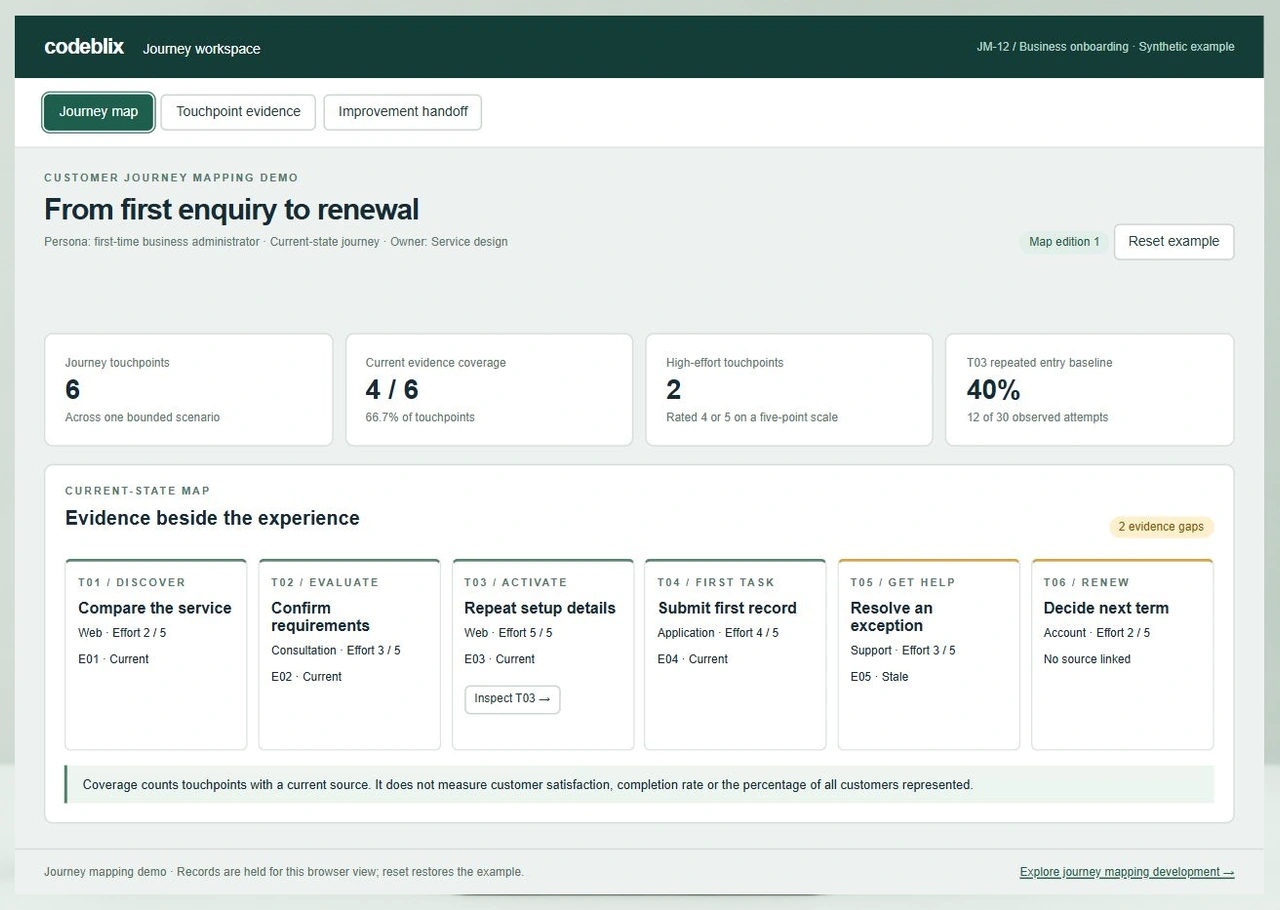
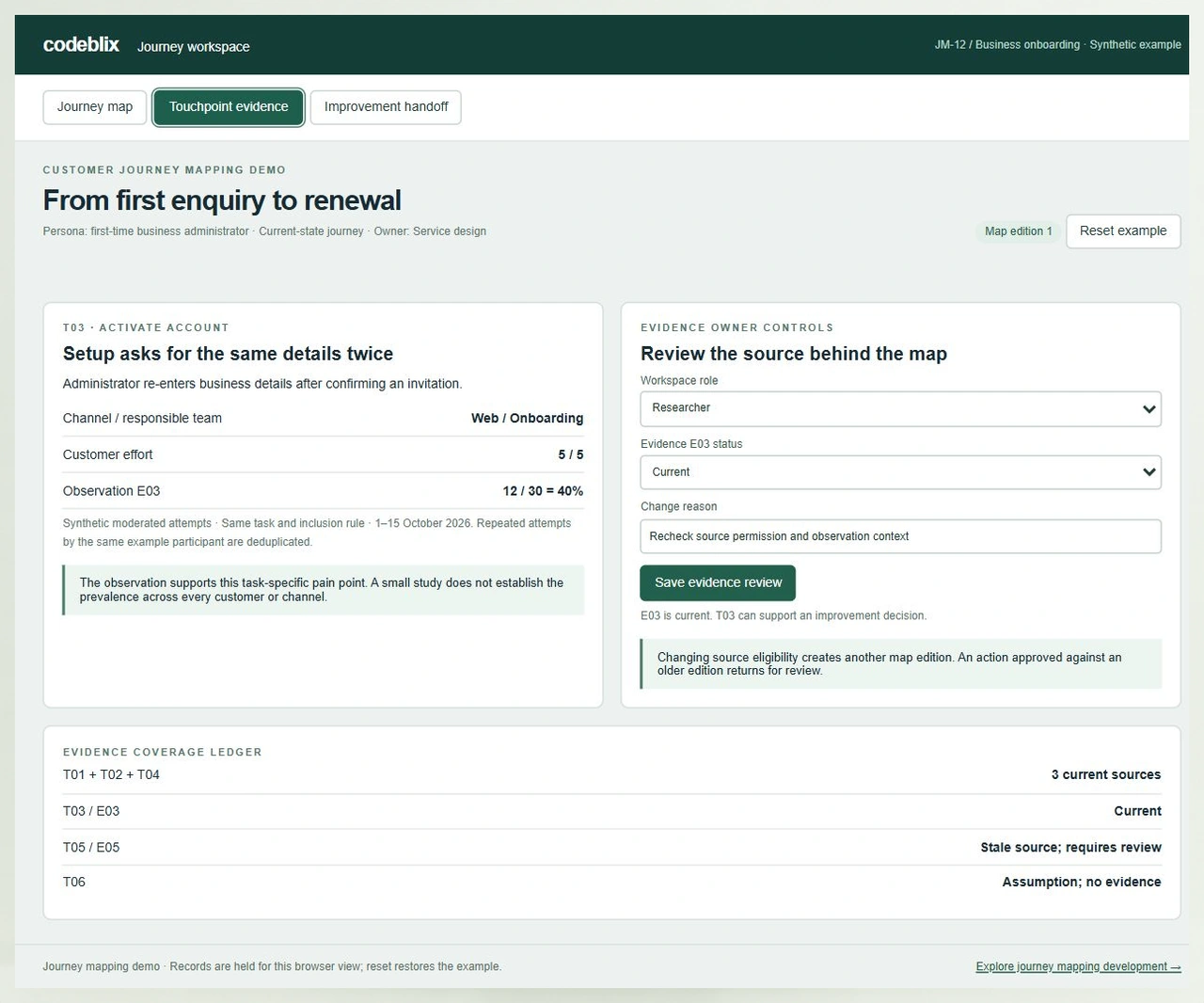
The JM-12 onboarding example follows a first-time business administrator from discovery to renewal. Inspect six touchpoints, review the source for a difficult setup step and give the improvement owner a measurable handoff.
Try a six-touchpoint evidence check
Open the journey demo. Four of six touchpoints have current evidence, giving 66.7% coverage. T05 has a stale source and T06 remains an assumption. Inspect T03 to see the specific observation behind the repeated setup-entry pain point.
Open the journey mapping workspaceWithdraw a source after approving an action
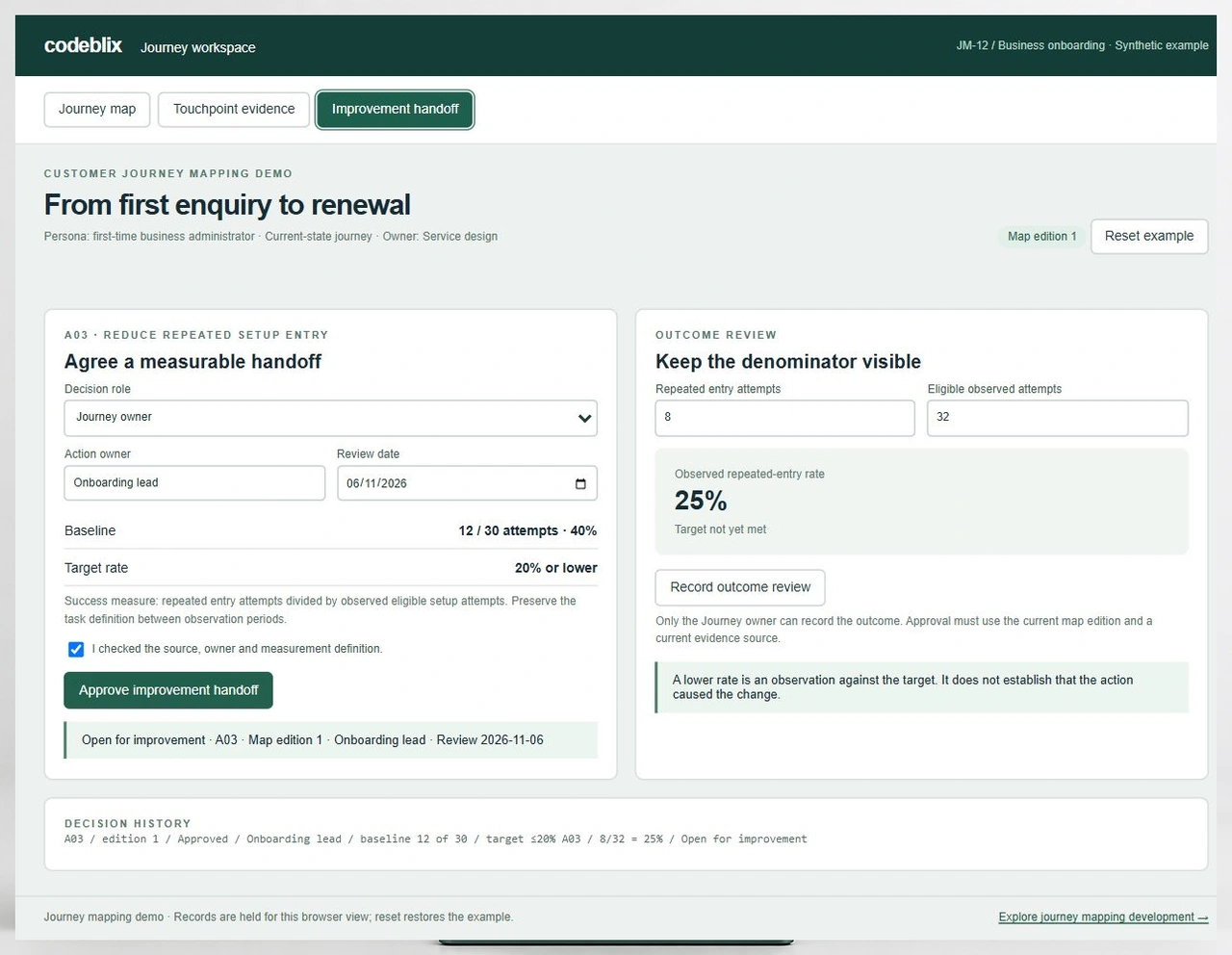
In Improvement handoff, confirm the checks as Journey owner and approve A03. In Touchpoint evidence, use the Researcher role to withdraw E03 with a reason. Coverage falls to three of six, the map advances to edition 2 and the earlier A03 approval is retained as superseded. A fresh decision needs current evidence.
Inspect a target with a changing denominator
JM-12 starts with 12 repeated-entry attempts out of 30 eligible attempts, or 40%. The target is 20% or lower. A later observation of 8 out of 32 is 25%, so the action remains open. Six out of 32 is 18.75%, which meets the numerical target without proving that the action caused the change.
Connect journey context to feedback analysis
Feedback analysis groups observations into themes across sources. A journey map places those insights within a specific customer scenario and sequence. Link the original feedback reference to the touchpoint so researchers can inspect both the theme and its context.
Compare feedback analysis workflowsFrom a customer scenario to a reviewed improvement
Use these six stages to define a journey mapping application around the work of research, service design and operational teams.
Set the persona and journey boundary
Name the customer, their goal, the starting trigger and the point where this journey ends. Record the channel, service context and current-state or future-state view. Agree who owns the map and which teams need editing or viewing access.
Build the stages and touchpoints
Arrange customer actions in a meaningful sequence. For each touchpoint, capture the customer goal, interaction channel, expectation, observed friction and responsible service team. Preserve stable touchpoint IDs when the map is reorganised.
Attach evidence with its context
Link observations, research notes or permitted aggregate measures to the relevant touchpoints. Record source date, scope, eligibility and ownership. Mark unsupported statements as assumptions and schedule stale sources for another review.
Agree which opportunity deserves action
Bring the customer need, evidence quality and operational impact together. Record the decision and its rationale, including cases where more research is needed. A high effort rating helps discussion; it does not establish how widespread the problem is.
Approve a measurable improvement handoff
Assign an action owner and review date, retain the approved journey edition and define the baseline and intended outcome. Decide whether a source change should suspend the handoff. Include a named owner for a failed transfer into another work system.
Review the outcome and refresh the map
Record the follow-up observation using the agreed task definition. Keep numerator, denominator and observation period visible. Explain whether the target was met, which questions remain and whether the current map should change before the next improvement cycle.
Choose a canvas, a journey platform or a custom application
- A collaborative canvas can suit a workshop where participants need flexible drawing and discussion. A dedicated journey platform becomes useful when maps share personas, sources, opportunities, ownership or a portfolio hierarchy.
- Consider custom development when the evidence permissions, service taxonomy, approval rules or operational handoff require an application shaped around your organisation. Begin with one bounded journey and inspect the difficult changes before expanding to a journey library.
- Compare the cost of editor and viewer access, research storage, history, export, interfaces, deployment and support together. Ask the shortlisted provider to run the same source-withdrawal and changed-approval exercise with the edition under consideration.
Research permissions and decision authority
- Define researcher, journey owner, service owner, viewer and administrator permissions independently. Specify who can see raw notes, edit a persona, withdraw a source, approve an action or export a journey. Anonymise examples and agree retention before importing research material.
- Keep published journey editions and their decision references inspectable. A replacement source should retain the relationship to the older observation. Define how withdrawals, restricted attachments and removed collaborators affect access and dependent actions.
- The interactive role selectors explore these responsibilities. Include authenticated server-side authorisation, durable revision history, access checks and recovery in the application acceptance scope.
Migration and integration scope
- Inventory journey boards, spreadsheets, persona libraries and research repositories. Map source IDs, touchpoint IDs, stage order, timestamps, attachments and owner references. Reconcile record counts and preserve unresolved mappings for an assigned reviewer.
- For each research, analytics, CRM or work-management connection, establish the authorised interface, permitted fields, direction, refresh timing and error owner. Test a repeated import, a withdrawn observation and a failed handoff. Confirm access and the required vendor edition during scoping.
- Keep research coverage, customer satisfaction and task completion as separate measures. Store their definitions and population boundaries so a dashboard cannot silently present a coverage percentage as a customer outcome.
Quote, rollout and operating support
- Bring one anonymised journey, the evidence fields you use and an example of a contested action. Specify the number of maps, editors and viewers, research sensitivity, migration sources, required interfaces and the person who accepts the first release.
- Scope map editing, evidence control, approval history and reporting as a coherent first release. Agree hosting ownership, backups, restore verification, export formats, accessibility and administrator training before rollout.
- Set support responsibilities for source refreshes, overdue action reviews, import failures and access changes. Quote application development, historical migration, vendor licences, integrations and ongoing support as identifiable items with acceptance criteria.
Six records behind an evidence-linked journey
Use this model to compare what remains traceable when research evidence changes after an improvement decision.
| Record | Example inputs | Required output and control |
|---|---|---|
| Journey scenario | JM-12; first-time business administrator; onboarding; discovery to renewal | Keep persona, goal, channel boundary, map owner and current-state view together. |
| Touchpoint | T01–T06; stage, customer action, channel, effort and responsible service team | Preserve the ID and evidence relationship when a stage or label changes. |
| Evidence source | E03; 12 of 30 eligible setup attempts; observation period; Researcher | Retain source eligibility and reason; distinguish current, stale, withdrawn and superseded material. |
| Journey edition | Edition 1; four supported touchpoints; edition 2 after E03 withdrawal | Bind a decision to the edition and return dependent actions for review when its basis changes. |
| Improvement handoff | A03; Onboarding lead; review 6 November; repeated-entry target ≤20% | Require owner authority, current evidence and explicit confirmation; prevent duplicate approval. |
| Outcome observation | 8/32 = 25%; later 6/32 = 18.75%; unchanged eligible-task definition | Validate whole counts and denominator; preserve each review and distinguish observed target achievement from causation. |
Four supported touchpoints divided by six mapped touchpoints gives 66.7% evidence coverage. Withdrawing E03 reduces that coverage to 50% and supersedes an A03 approval tied to the earlier map edition. Separately, the setup observation is 12/30 = 40%. An 8/32 follow-up gives 25%, above the 20% target; 6/32 gives 18.75%, below it. These synthetic examples demonstrate record and percentage handling, not customer results or representative research findings.
Shortlist with the same journey and evidence change
These primary product pages describe established approaches. Ask each provider to demonstrate the source, version and handoff cases that matter to your team.
| Option | Published focus | Ask in your demo |
|---|---|---|
| Smaply | Journey maps, research evidence, portfolio prioritisation, ownership and metrics in journey context. | Withdraw one source after an improvement decision and show the effect on its map and action history. |
| TheyDo | Structured journey building blocks, reusable libraries, nested journeys and connected customer insights. | Move a touchpoint between stages and demonstrate which evidence and dependent decisions retain their references. |
| UXPressia | Collaborative journey mapping, linked journeys, personas and presentation of the customer experience. | Show evidence access, a retained map edition and the measured outcome associated with an improvement handoff. |
Treat the exercises as buying questions and confirm the answers in a current vendor demonstration. Compare collaboration, evidence access, journey hierarchy, history, export and implementation costs against the same scenario.
Category reference: Smaply’s journey mapping and evidence overview. The JM-12 scenario, six-record model, working source-withdrawal exercise and acceptance checklist are original Codeblix buyer resources.
Connect customer understanding to service operations.
A useful journey application brings research and accountable service teams into the same improvement cycle.
Explore professional services workflowsQuestions before choosing journey mapping software
Resolve the research context, operating responsibilities and application boundaries before requesting a quote.
What should customer journey mapping software contain?
It should connect a defined customer goal and persona to stages, touchpoints, channels, evidence and accountable teams. Useful selection checks include how assumptions are labelled, how maps change over time and how an improvement remains linked to its original decision.
Can Codeblix build a tailored journey mapping application?
Yes. Codeblix offers custom software development for evidence-linked journeys and operational handoffs. The interactive example helps establish the records, source controls and approval behaviour to include in a scoped project.
How is a journey map different from a feedback dashboard?
A feedback dashboard compares themes or measures across observations. A journey map places a customer’s actions and needs within a bounded sequence. Linking them helps the team inspect the original source while retaining the context of the particular customer task.
What does the demo’s 66.7% coverage mean?
Four of six mapped touchpoints have current evidence. The percentage describes that map’s evidence coverage. It does not represent satisfaction, completion rate or the proportion of all customers included in a study.
What happens when evidence is withdrawn?
The source loses eligibility, the journey advances to another edition and an active approval based on the earlier edition becomes superseded. The example retains that decision in history. A new approval requires a current source and confirmation of the handoff.
Can research notes and customer data have different access rules?
Yes. Define access separately for raw research, permitted summaries, personas, journey editing and action decisions. Include source permissions, export rights, retention, attachment access and authenticated authorisation in the agreed development scope.
How would our research or work-management tools connect?
First establish the available interface and permission to use the necessary records. Then agree field ownership, data direction, refresh frequency, retries and exception handling. Include source withdrawal and repeated handoff cases in each integration’s acceptance criteria.
What affects development cost and ongoing support?
Journey hierarchy, evidence sensitivity, editing and approval rules, history, migration and interfaces affect the estimate. Include hosting, backups, restore tests, exports, accessibility and administrator training. Name the owners for evidence refreshes and operating exceptions after launch.