
Quote the desktop operation.
An Export action crosses from a user selection into an operation with file and permission consequences. Define both sides before commissioning the change.
Retain what the user actually selected
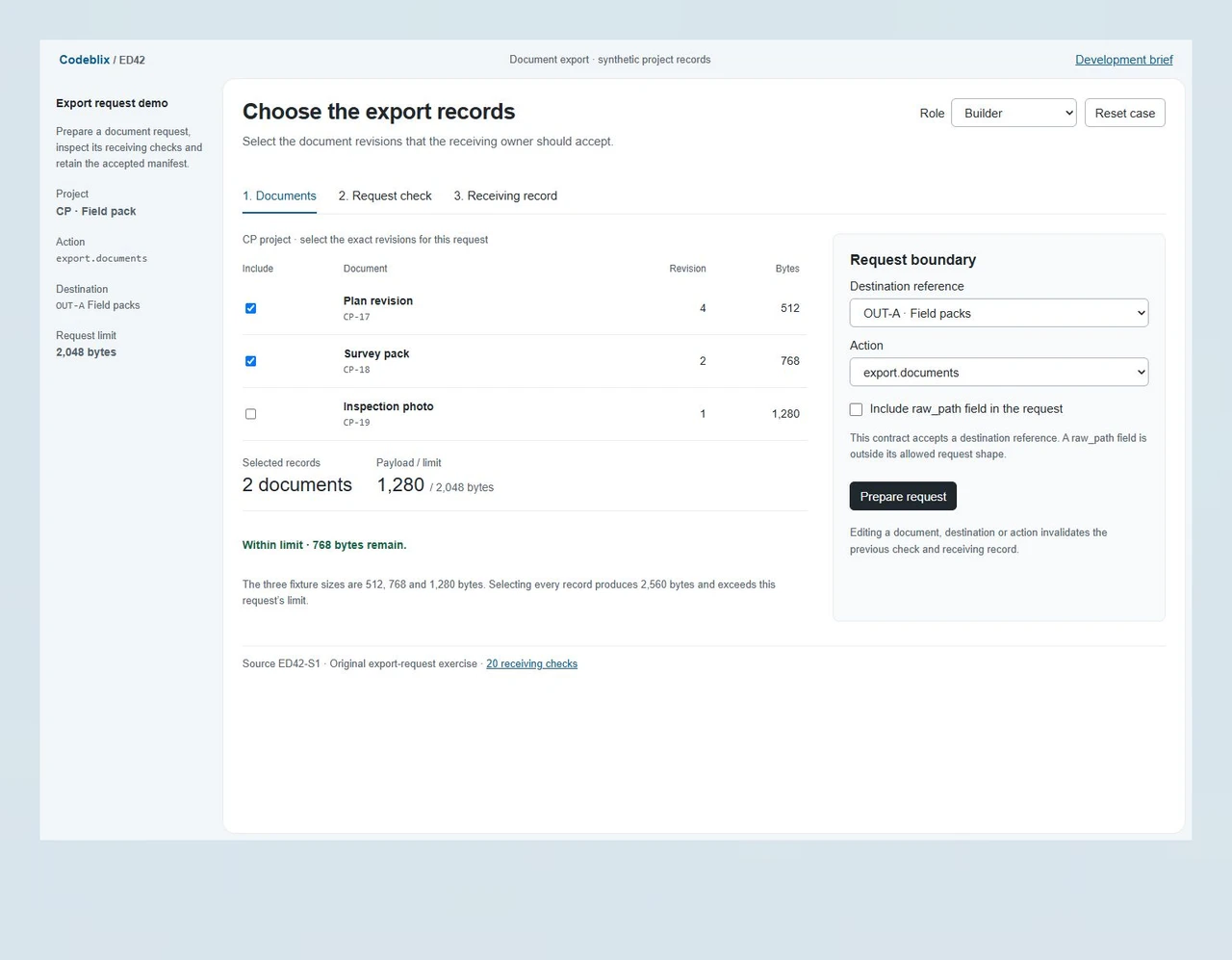
The ED42 fixture contains CP-17 Plan revision, revision 4 at 512 bytes; CP-18 Survey pack, revision 2 at 768 bytes; and CP-19 Inspection photo, revision 1 at 1,280 bytes. The initial selection totals 1,280 bytes. Its prepared request retains document IDs, revisions and sizes so the receiving owner can inspect the same selection.
Reject an operation outside the agreed contract
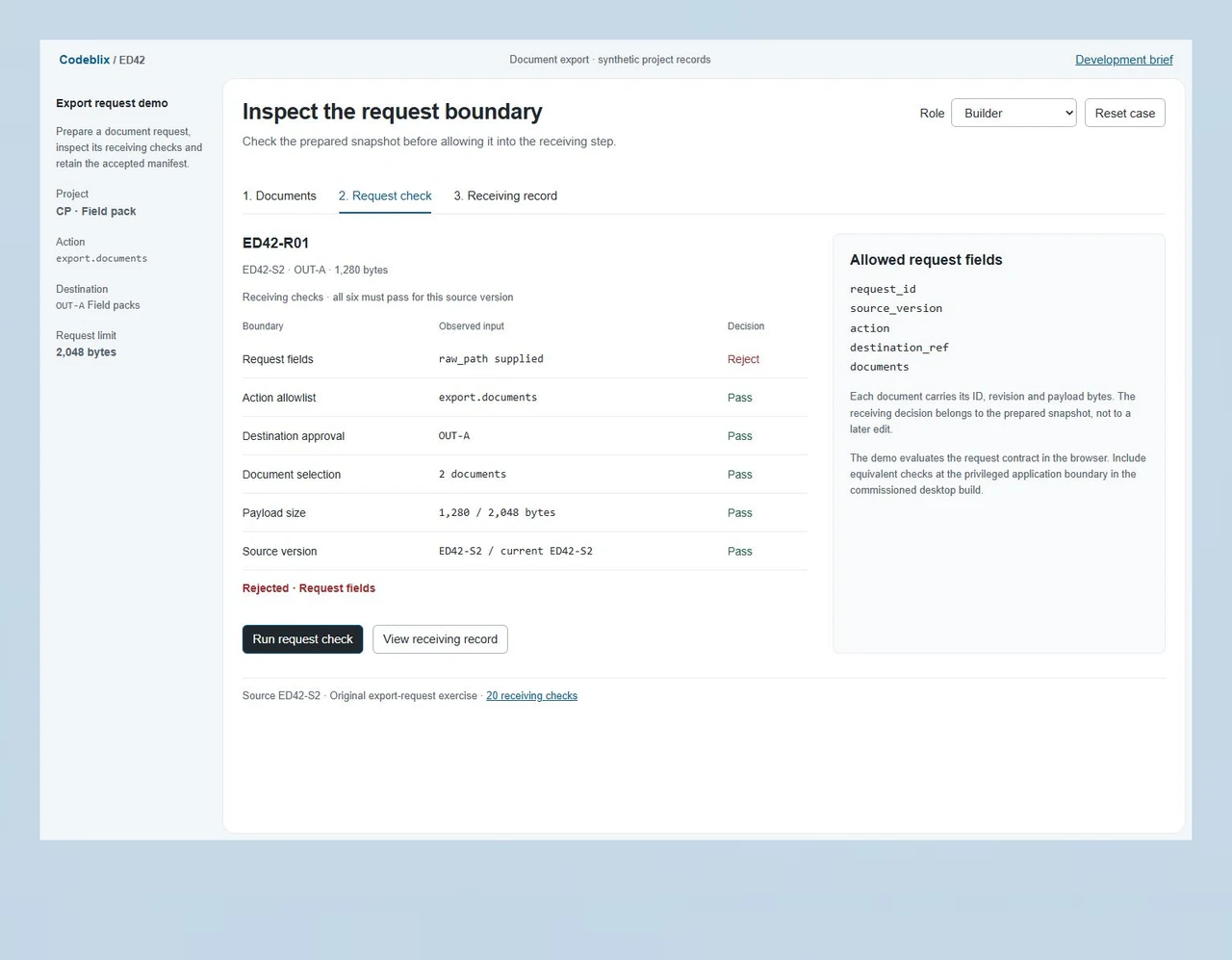
The exercise accepts export.documents with an approved destination reference and five allowed request fields. A raw_path field, fs.write action or unapproved OUT-X destination produces a rejected check. Selecting all three records totals 2,560 bytes and exceeds the 2,048-byte request limit. These explicit decisions give the desktop milestone a receiving condition beyond a successful button click.
Keep the approval attached to its source version
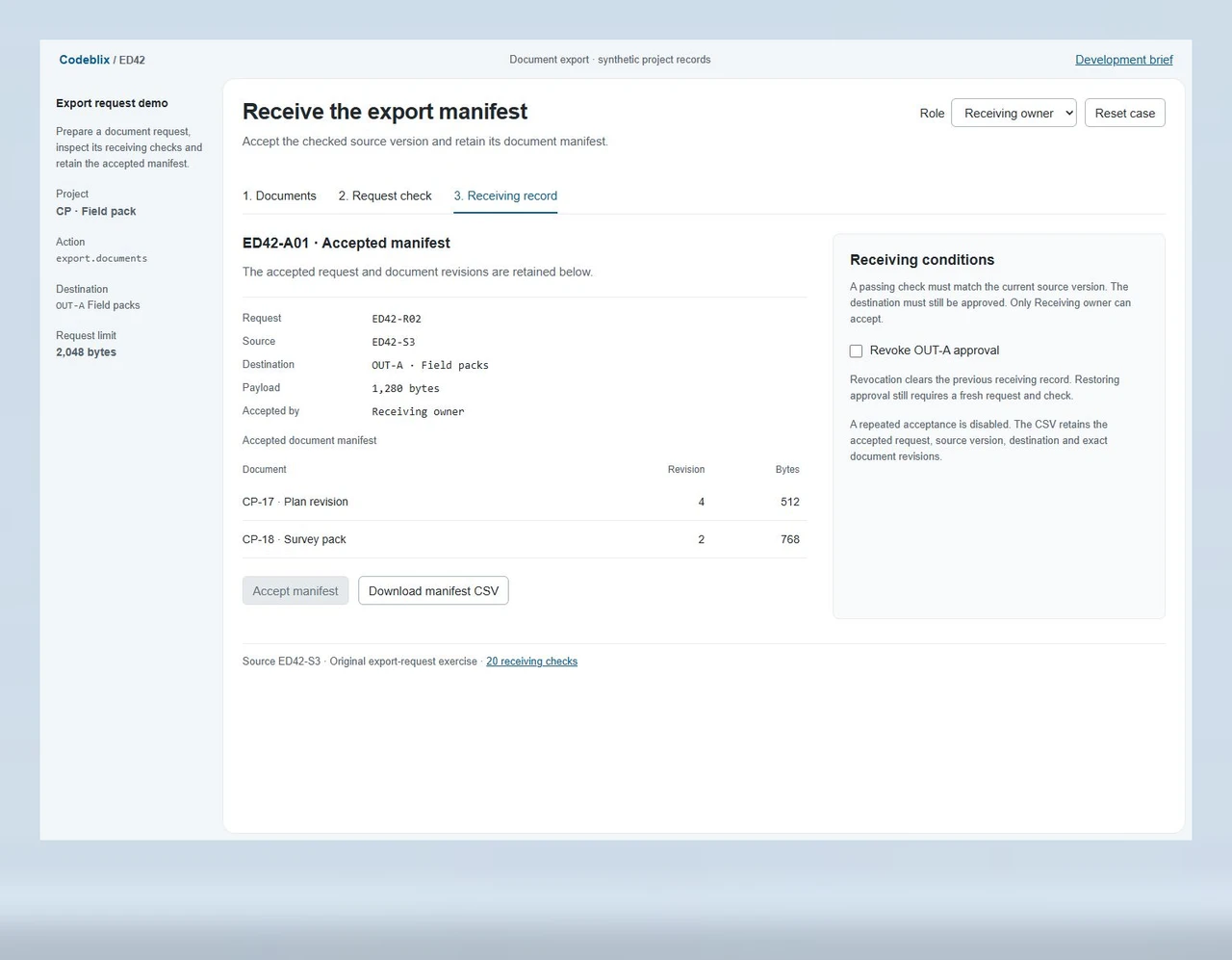
Builder prepares and checks the request. Receiving owner can accept only a passing, current snapshot with an approved destination. Editing the selection or revoking destination approval clears the earlier check and receiving record. The accepted manifest retains the request ID, source version, destination and each document revision; a repeat acceptance is disabled.
Make the desktop boundary inspectable.
ED42 is an export-request demo using three synthetic project documents. Prepare a 1,280-byte request, inspect its six receiving checks and accept the exact manifest as Receiving owner. Add a raw_path field or exceed the 2,048-byte limit to inspect a rejected request.
Start with one desktop operation.
Use the request exercise and primary Electron references to make the first deliverable concrete.
Inspect a rejected export request
Keep CP-17 and CP-18 selected, add raw_path and prepare the request. Run the check to see Request fields rejected. Remove the extra field, prepare a fresh snapshot and check again. Switch to Receiving owner to accept the passing manifest and download its two document rows.
Open the export request demoLocate the desktop privilege boundary
The Electron Process Model reference describes main and renderer responsibilities and the role of preload scripts. Use that boundary to identify which project operations require desktop access and which values the renderer may request. Include the reviewed process design in the commissioned source handover.
Consult Electron’s primary process-model referenceInclude application security checks in the scope
Electron’s security recommendations cover isolation, sandboxing, permissions, navigation and IPC sender validation. Ask the quotation to cover the relevant checks in the actual application, including the approved sender and operation-specific payload. Keep framework and dependency maintenance responsibilities visible in the delivery agreement.
Review Electron’s primary security checklistConnect the exported records to their service owner
If the desktop workflow reads records from an API or database-backed application, name its contract, authentication owner and revision rules. Include any service change needed for stable identifiers or output fields in the project scope, alongside the desktop development allocation.
Scope the surrounding record serviceSix decisions before the desktop milestone
Connect the development allocation to a specific operation, its privileged boundary and the application build your team will receive.
Name the desktop targets and source owner
Identify supported operating systems, architectures, Electron version, packaging tools and the application repository. Supply the current build procedure and dependency lockfile. Name the owners of signing certificates, update distribution and target-device testing; include build recovery or dependency investigation as explicit work when required.
Describe the operation and its data
Provide the source records, selection rules, permitted output format and expected receiving result. For a document export, identify document IDs and revisions, size limits, destination references and what happens when no records qualify. State whether source changes invalidate an earlier check or require a new request.
Review the privileged application boundary
Electron separates its main process from renderer processes; preload scripts can expose selected capabilities through contextBridge. Ask the development scope to identify the permitted operations, caller validation and input checks at that boundary. Electron’s security checklist recommends context isolation, sandboxing and sender validation, among other controls. Review their application to the actual project.
Specify rejection and recovery outcomes
Include unknown fields, unauthorized destinations, oversized requests, missing records and a destination revoked after preparation. Define the user-facing response and whether a retry creates a new request. For the desktop build, also agree disk-full, permission-denied, interrupted-write and destination-unavailable behaviour, with partial-output cleanup and recovery ownership.
Receive the operation in the target build
Use ED42 to agree the request and manifest decisions, then include equivalent receiving cases in the commissioned Electron application. Verify the narrow preload interface, main-process checks and resulting output on the agreed operating systems. Attach observed results to the tested source revision and package; include representative file sizes and permissions.
Hand over the executable and its operating notes
Agree source delivery, repeatable build instructions, dependency review and the signed or internally distributed package where included. Name the release approver, update channel and recovery route. Request the receiving fixtures, diagnostic instructions and support terms needed when document formats, dependencies or operating-system permissions change.
Bring the first desktop task
- Identify the first desktop operation to commission, the requested development allocation and the person who approves its result. Include review availability, priority order and the billing basis you need quoted. Capacity and start conditions are confirmed through the engagement discussion.
- Provide sanitized document fixtures, supported formats and representative sizes. State whether the application works offline, how a source revision is identified and what an interrupted operation should leave behind. Arrange repository and environment access through an approved project channel.
- List native modules, helper executables, embedded web content and external services touched by the operation. Include their license and maintenance owners. Include installer behaviour, operating-system permissions and native dependencies in the same receiving brief.
- Define the destination policy: user-picked folder, managed application directory or an approved reference resolved by the desktop application. State who grants or revokes access and what the receiving owner expects after a destination changes.
Include the package and support responsibilities
- For an existing web application moving into a desktop shell, identify which actions require native access and which content remains remote. Quote the process boundary, authentication behaviour, offline needs and platform-specific receiving cases as explicit implementation work.
- For packaging and updates, name the intended operating systems, architectures, distribution accounts and update channel. Agree signing, installation, update verification and recovery responsibilities. Confirm any external account or certificate work with its authorized owner.
- For performance acceptance, supply the workload, hardware and measurement to receive. Startup, memory use and long-running exports need their own observed result in the agreed build; the development quotation should identify the conditions and measurement responsibility.
- Request changed source, dependency and build notes, receiving results and support contacts in the handover. Define the diagnostic information your team can share, the handling of sensitive filenames and the process for later changes to document formats or destination permissions.
Six records joining a request to its manifest
The export exercise keeps selection, permission and receiving evidence separately inspectable.
| Record | Example inputs | Required output and control |
|---|---|---|
| Document revision | CP-17 / revision 4 / 512 bytes | Retain a stable document ID and the revision included in the request. |
| Source version | ED42-S1 / selected CP-17 and CP-18 | Invalidate prepared checks and receiving records when request inputs change. |
| Prepared request | ED42-R01 / export.documents / five allowed fields | Reject a raw_path field or an action outside the operation allowlist. |
| Destination permission | OUT-A Field packs / OUT-X unapproved | Require approval at checking and acceptance; revocation invalidates the receipt. |
| Request check | Six boundaries / payload limit 2,048 bytes | Require a nonempty selection and every receiving check to pass. |
| Receiving manifest | ED42-A01 / request ID / source version / document rows | Allow Receiving owner to accept once and retain exact revisions and bytes. |
Begin with CP-17 and CP-18: 512 + 768 = 1,280 bytes. Include raw_path, prepare ED42-R01 and run the request check. Request fields is rejected and acceptance stays blocked. Return to Documents, remove the extra field and prepare a fresh request. All six checks pass for its source version. Builder cannot accept. Select Receiving owner, open Receiving record and accept ED42-A01. The downloaded manifest contains the two selected IDs, revisions 4 and 2, and their individual sizes. Changing the selection clears the receipt. Select all three records to inspect the 2,560-byte rejection; select CP-18 and CP-19 to check the exact 2,048-byte boundary. Revoking OUT-A approval clears the previous result and requires a fresh request even after approval is restored.
Quote the same desktop operation.
Use a common request contract and receiving fixture when discussing allocation, implementation and support with providers.
| Option | Published focus | Ask in your demo |
|---|---|---|
| Citta Solutions | Dedicated-team and fixed-price engagement options, application customization, migration and support enquiries. | Which destination permission and request-field rejection cases belong to the quoted desktop operation? |
| Moon Technolabs | Electron developer hiring, project consultation, collaboration arrangements and post-launch maintenance. | Will acceptance retain the checked source version and the exact output manifest from the target build? |
| The One Technologies | Dedicated or project-based Electron engagements, desktop migration, integration and scope-dependent estimates. | Who receives the package, verifies privileged operations and owns signing, update recovery and support? |
Give providers the same selected records, permitted operation, destination policy and failure cases. Request separate responsibilities for implementing the desktop boundary, running target-platform receiving checks and handing over the release. ED42 supplies an inspectable request exercise; include the corresponding operation and output evidence in the commissioned Electron build.
Category reference: Electron primary reference: inter-process communication. Electron Process Model, Security and Inter-Process Communication references accessed 3 November 2026. ED42’s records, sizes, request limit, permissions and receiving rules are original exercise assumptions. Review platform and framework requirements for the application being commissioned.
Connect the desktop record service.
Include the data contract and operating responsibilities needed to receive the complete development result.
Explore Codeblix marketplace servicesAgree the Electron development milestone
Resolve source access, target platforms and the operation to receive before confirming the allocation.
What should an Electron development enquiry include?
Describe the desktop application, supported operating systems and first operation to commission. Include the source boundary, current build tools, requested allocation and application owner. A sanitized input fixture and expected output help Codeblix review dependencies and prepare a written development quotation.
Can the engagement cover an existing Electron application?
Identify the current Electron version, dependencies and reproducible change request. Provide the build procedure and any native components affected. The quotation can cover investigation, implementation, target-platform receiving checks and release assistance for that bounded change.
Which parts of the allocation affect the quotation?
The operation’s scope, platform coverage, review overlap and dependency condition affect the required work. Build recovery, native integration, packaging and update distribution may add responsibilities. Request the billing basis, capacity, start conditions and approval route for additional work in writing.
What can our owner inspect in the export request demo?
ED42 prepares a snapshot of selected document revisions, checks its fields, action, destination, selection, size and source version, then lets Receiving owner accept a passing manifest. Unknown fields, an unapproved destination or an oversized payload block acceptance. Editing request inputs clears the previous receiving record.
Where do the desktop security checks enter the scope?
Identify the renderer’s permitted request and the preload and main-process responsibilities in the actual application. Include sender and payload validation, relevant isolation and sandbox settings, and operating-system permission cases. Ask for observed results from the reviewed Electron build as part of the receiving milestone.
Can a browser-based workflow become a desktop application?
Provide the existing workflow and identify operations needing desktop access, offline behaviour or local output. The scope should distinguish the web content from native permissions, packaging and update distribution. Confirm authentication, dependencies and platform-specific receiving cases before agreeing implementation.
Who supplies signing and update distribution access?
Name the authorized owners of certificates, distribution accounts and the update channel. Agree which packaging, signing, installation and recovery tasks belong to Codeblix’s engagement and which remain with your team. Arrange required access through the approved project process.
What should accompany the accepted desktop change?
Request the source revision, dependency and build instructions, agreed package and observed receiving results. For the export operation, retain the request contract, failure cases and manifest checks. Include release recovery notes, diagnostics and support ownership so later platform or document changes have a clear handover.