
Resolve the discrepancy without losing the store boundary.
The example isolates calculation order from product prices, currency and the other website settings.
Explain a USD 2.40 difference
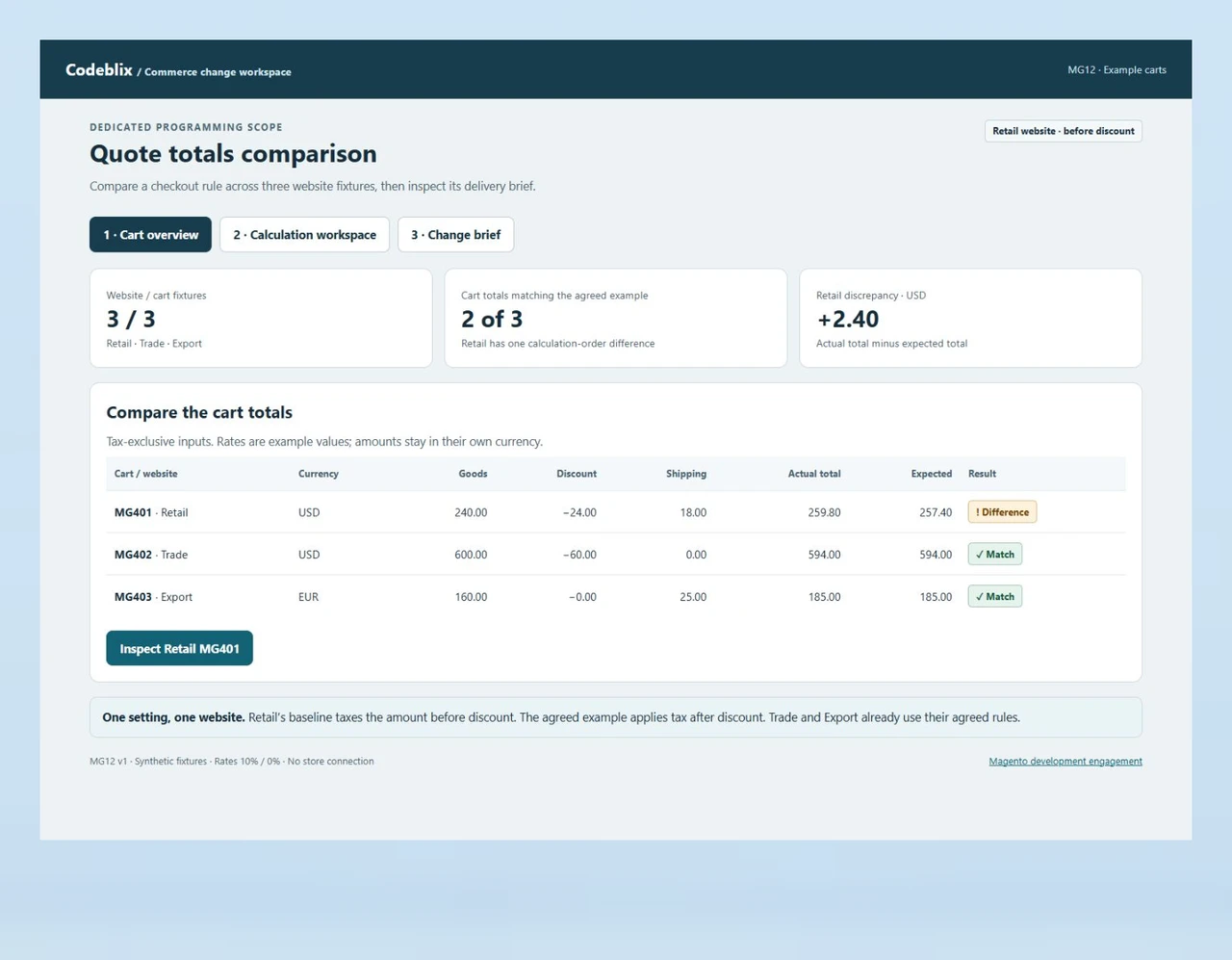
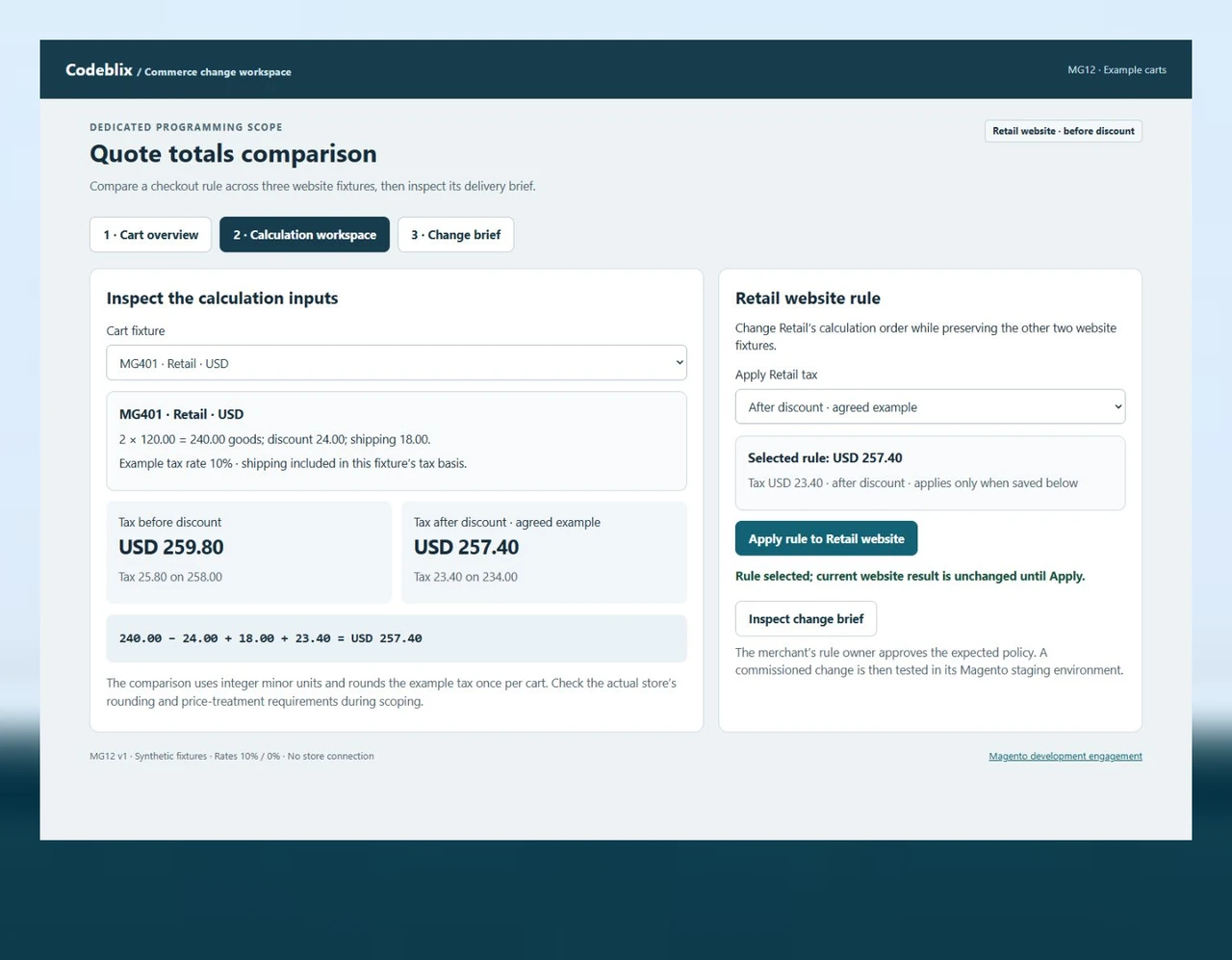
Retail cart MG401 contains USD 240.00 of goods, a USD 24.00 discount and USD 18.00 shipping. With the example 10% rate applied after discount, the taxable amount is USD 234.00, tax is USD 23.40 and the expected total is USD 257.40. Applying tax before the discount instead produces USD 259.80. A visible total alone would hide the reason for that difference.
Keep website policies independent
The working screen changes the Retail website’s calculation order. Trade remains USD 594.00 and Export remains EUR 185.00. Currency amounts are never combined into a misleading batch total. Include website, store view, customer group and currency identifiers in the real implementation cases so a fix cannot silently become a global change.
Receive the difference and its recovery action
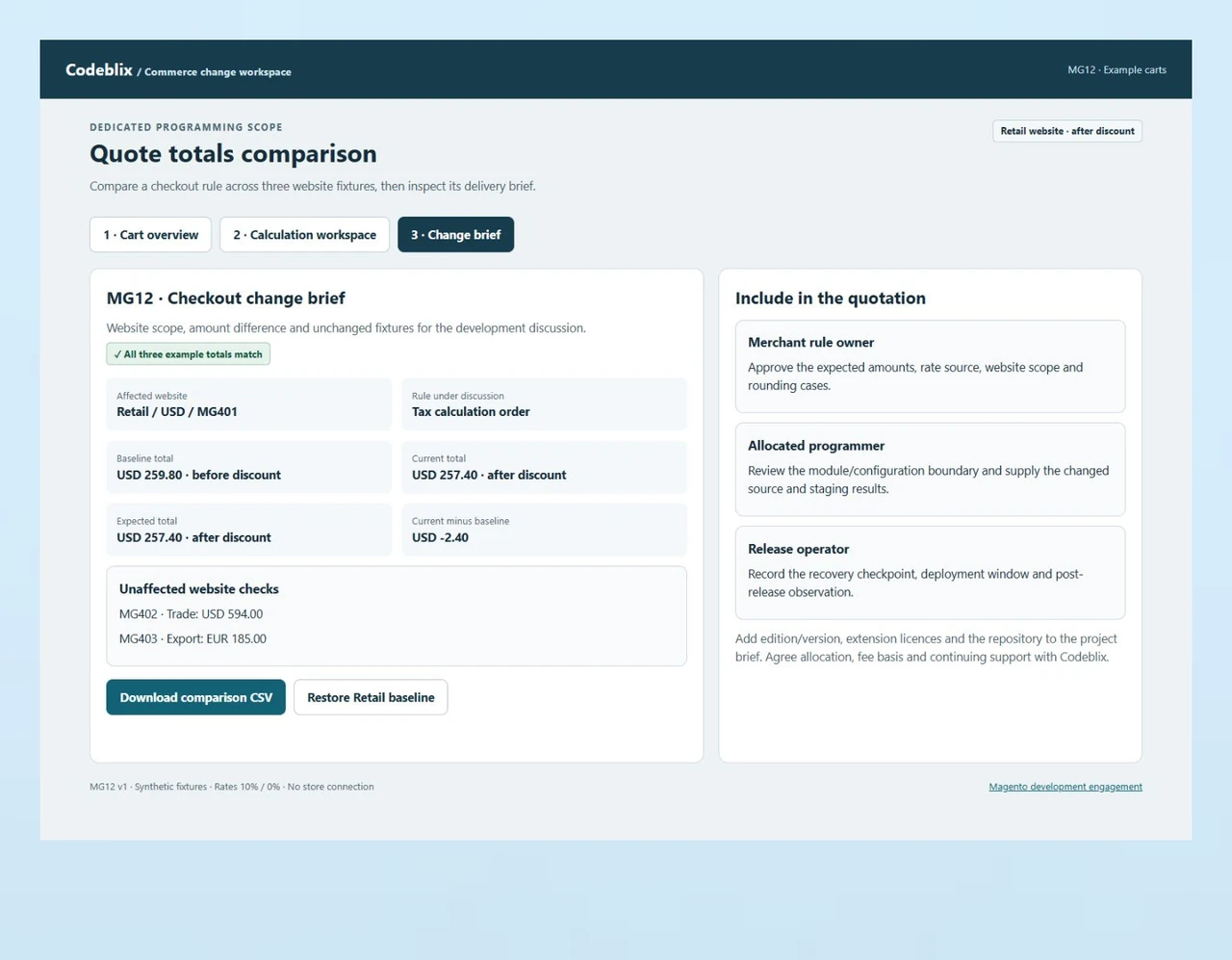
The change brief preserves the baseline and current Retail totals, the two unaffected carts and the setting being discussed. Restore the Retail baseline to reproduce the original discrepancy. For a commissioned module or configuration change, receive equivalent staging observations, the source revision and a tested recovery route before authorising release.
Follow the amount that changed.
MG12 compares three example carts across Retail, Trade and Export websites. Retail calculates tax before its discount and differs from the agreed example by USD 2.40. Change the Retail calculation order, compare the resulting totals and inspect the change brief without altering the other websites.
Take a reproducible checkout case into the engagement.
Use the working comparison and the twenty-case checklist to describe a commissioned change. Replace the example rates and amounts with approved store fixtures when defining your actual acceptance criteria.
Try the three-cart comparison
Select Retail MG401, compare the before- and after-discount amounts, and apply the agreed order to that website. Inspect the change brief and restore the baseline to reproduce the discrepancy.
Open the quote totals demoConfirm the merchant’s calculation choices
Adobe’s tax configuration reference, updated 27 October 2026, distinguishes before- and after-discount calculation and the website/store target. Agree those choices with the merchant’s authorised rule owner before implementing a checkout change.
Adobe: tax configuration settingsKeep checkout customisation maintainable
Adobe’s checkout developer guidance describes custom module boundaries and the checkout stages. Include the relevant extension points and compatibility checks in the programming brief, rather than budgeting for an unexplained core-file edit.
Adobe: checkout customisation referenceGive dependent frontend values an explicit save boundary
When a separate application editor exchanges values with the store, distinguish the editable draft from the server-confirmed record. Agree which application validates the amount and which response proves the requested save.
Discuss a dependent-value application editorCommission the behaviour, its checks and its handover.
The requested programming capacity should connect to a defined Magento outcome, with someone accountable for the business rule and someone authorised to release it.
Send a store-specific programming request
Describe the requested outcome, Magento Open Source or Adobe Commerce edition, installed version, hosting and storefront technology. List the affected custom modules, extensions and integrations. Include a sanitized cart or order example and the collaboration capacity you want to commission.
Set the engagement and decision owners
Agree available developer allocation, fee basis, start arrangements, review frequency and approval for extra work in the quotation. Name the merchant rule owner, code reviewer and release operator. Separate an initial investigation from implementation when the cause or compatibility is still to be established.
Write the calculation and scope contract
Record input amounts, discounts, shipping, tax treatment, rounding precision and expected results per currency. Identify the configuration level and which websites must remain unaffected. Include guest and signed-in paths where they differ, plus the cart, checkout, order and refund observations relevant to the requested change.
Implement in a representative staging store
Provide authorised access to the repository and an isolated staging environment with synthetic or approved test data. Review whether the requirement belongs in configuration, an existing extension or a custom module. Adobe’s checkout guidance places customisations in a module rather than edits to default application code.
Reconcile the changed and unchanged paths
Run the agreed fixtures through the actual storefront and receiving order flow. Compare amounts in minor units, record any rounding difference and check the other websites. Exercise coupon removal, shipping changes, currency handling and failed payment paths that belong to the scope. Keep unresolved differences visible to the merchant approver.
Release with a recoverable handover
Agree the deployment window and recovery checkpoint, then receive the source revision, configuration changes and accepted cases. Include cache or index actions only where the change requires them. Define post-release observation, incident ownership and how further backlog items or continued allocation will be commissioned.
Define the work the allocated programmer will own
- Bound the initial item: a custom extension, checkout rule, storefront behaviour, integration repair or upgrade task. Identify the repository, expected deliverable and the code that falls outside the request. A clear first item makes the proposed allocation and progress easier to assess.
- For an existing store, inventory the edition, runtime, extension licences and customisations before agreeing compatibility. Ask how discovery findings affect the estimate, which changes require separate approval and how the merchant receives the work at each review.
- Compare a focused delivery item with a continuing dedicated allocation against your actual backlog. Put collaboration hours, source ownership, review arrangements and continuation or notice terms into the commercial agreement. Codeblix confirms capacity and terms in the written quotation.
Set data, integration and access boundaries
- Use sanitized cart fixtures during scoping. Keep customer details, payment credentials and live purchase activity outside the demonstration. The authorised store owner controls repository and staging access, extension entitlements and any external provider setup.
- An integration request should name its system owner, permitted fields, direction, authentication responsibility and error response. Define how a retry avoids creating a second order or repeating a downstream action. Estimate that implementation separately from the visible checkout adjustment when responsibilities differ.
- For migration or upgrade work, agree representative historical and current records, identifier preservation and the reconciliation window. Document the source export, target import and recovery point. Include custom module and theme compatibility in the receiving criteria rather than assuming an installed extension covers them.
Specify release evidence and continuing support
- Receive results from the staging store with the same extension set and relevant configuration as the intended release. Test the affected currencies and websites separately. Add cart-to-order, invoice or refund cases according to the merchant workflow being changed.
- Define who deploys, who approves the business result and who can restore the prior code and configuration. Record required scheduled jobs, queues, cache invalidation and index work where relevant. Keep the release window and any interruption allowance explicit.
- Agree the support period, response arrangements and the boundary between defect correction and further development. Request documentation of the delivered module, configuration, source revision and unresolved items. Hand over the approved cases so future maintainers can reproduce the behaviour.
Six records for a Magento programming quotation
A merchant can describe the desired result and supply inspectable examples without exposing a production customer record.
| Record | Example inputs | Required output and control |
|---|---|---|
| Development item | Business change, repository, allocation request, deliverable and approvers | Quote investigation, implementation and receiving responsibilities explicitly. |
| Store boundary | Edition/version, website, store view, customer group and currency | Identify both the changed scope and the websites that must remain unchanged. |
| Cart fixture | Quote ID, quantity, unit price, discount, shipping and example rate | Use synthetic input amounts and preserve the original currency and precision. |
| Calculation rule | Before/after discount, tax-exclusive or inclusive inputs, shipping treatment and rounding | Have the merchant’s authorised owner approve the expected rule. |
| Observed comparison | Expected tax/total, actual tax/total and delta in minor units | Explain each discrepancy and test the cart-to-order result in staging. |
| Release brief | Source revision, configuration change, unaffected cases and recovery checkpoint | Record acceptance, deployment authority and continuing support responsibility. |
MG401 starts with 24,000 cents of goods, a 2,400-cent discount and 1,800 cents of shipping. The agreed example applies 10% to 23,400 cents, giving 2,340 cents of tax and a 25,740-cent total. The baseline instead taxes 25,800 cents, producing 2,580 cents of tax and a 25,980-cent total: a 240-cent discrepancy. Switching Retail to after-discount calculation resolves that case while Trade stays USD 594.00 and Export stays EUR 185.00. The demonstration uses illustrative rates and does not select the merchant’s tax policy.
Put the same store boundary into each development enquiry.
These provider pages describe direct developer engagements. Ask each provider to quote the deliverable and its receiving evidence, as well as capacity.
| Option | Published focus | Ask in your demo |
|---|---|---|
| Brainvire | Developer selection, codebase audit, store customisation, sprint reviews and release support. | Which cart fixtures, website scope and amount reconciliations form the first accepted delivery item? |
| Dinarys | Custom store and extension work, migration, candidate interviews and support arrangements. | How are calculation-order differences and unaffected currencies recorded before the merchant accepts the change? |
| Webkul | Hourly, monthly and project engagement models with Magento development, integrations and QA. | Who supplies the staging fixtures, approves the expected rule and verifies the recovery checkpoint? |
Choose the engagement around a reproducible store outcome and the responsibilities needed to receive it. Confirm available allocation, commercial terms and any third-party licence costs directly with the provider.
Category reference: Adobe sales configuration paths, updated 8 October 2026. Bring MG12 and the acceptance cases to the scoping discussion, then replace them with approved fixtures for your store.
Connect store programming with the surrounding application work
Give each frontend editor, store module and receiving service a clear owner and an observable delivery result.
Explore marketplace development offersQuestions for your Magento programming engagement
Agree the first store outcome and the terms for the capacity you want to commission.
What should I send for a dedicated Magento programming quote?
Send the business change, Magento edition and version, storefront technology, affected modules and preferred allocation. Include a sanitized example of the current and expected behaviour, the website/currency boundary and the people who approve code, business rules and releases.
How will Codeblix agree developer allocation and price?
We review the environment and requested work before quoting capacity and delivery terms. The quotation should state the fee basis, start arrangements, review cadence, included discovery/testing and approval for extra work. Confirm the first deliverable and any continuing allocation in that agreement.
Can the first item be an existing checkout or extension change?
Bring the module, configuration or checkout behaviour for assessment with a reproducible example. Identify the extension licences and customisations involved. A bounded first item can include investigation, implementation and staging evidence, with wider compatibility or upgrade work estimated separately where needed.
What does the quote totals demo demonstrate?
MG12 separates three website/cart fixtures and shows the arithmetic behind one discrepancy. Applying the agreed example calculation order changes Retail by USD 2.40, while Trade and Export keep their amounts. Use the comparison to describe the observations your commissioned Magento change must produce in staging.
Who decides the store’s discount and tax rules?
Your authorised merchant rule owner approves those requirements. Record calculation order, input price treatment, shipping treatment, precision and website scope before the programmer implements them. The demonstration supplies example numbers for acceptance discussion; your store fixtures must use its approved policy.
Are Adobe Commerce and extension licences included?
List the required edition, extensions, themes and service entitlements during the review. State which licences your organisation supplies and whether any agreed setup or procurement task belongs in the quotation. Confirm compatibility against the actual installed versions before scheduling the change.
How are external order or payment integrations scoped?
Name each system, permitted data, authentication owner and receiving response. Agree duplicate handling, retries, failure visibility and reconciliation with the other provider. Use authorised test environments for acceptance, and identify who approves the transition to live service credentials and transactions.
What handover should the engagement include?
Request the accepted source revision, module/configuration notes, staging results and deployment/recovery instructions. Record unresolved items and the merchant’s receiving decision. Agree post-release observation, support terms and how subsequent backlog work will be prioritised and commissioned.