
Receive the library boundary alongside its content.
Use document counts, persona access and a current mapping revision together when deciding whether a migration or document workflow is ready for acceptance.
Make the destination explicit
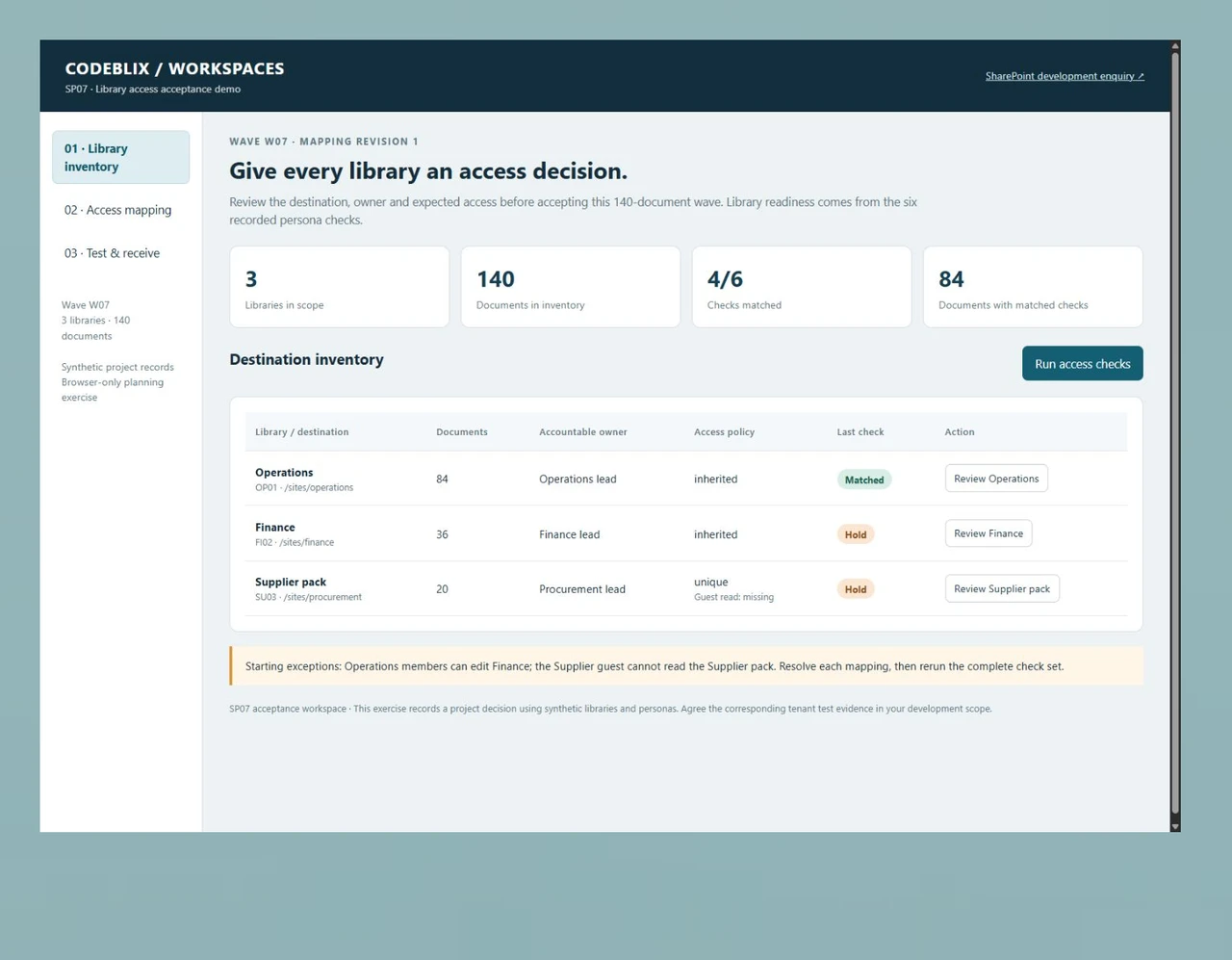
SP07 inventories Operations at /sites/operations with 84 documents, Finance at /sites/finance with 36, and the Supplier pack at /sites/procurement with 20. Each library has an accountable business owner. The same inventory in your brief should include the source location, metadata, version requirements and destination that the administrator approves.
Test an unintended permission as well as a missing one
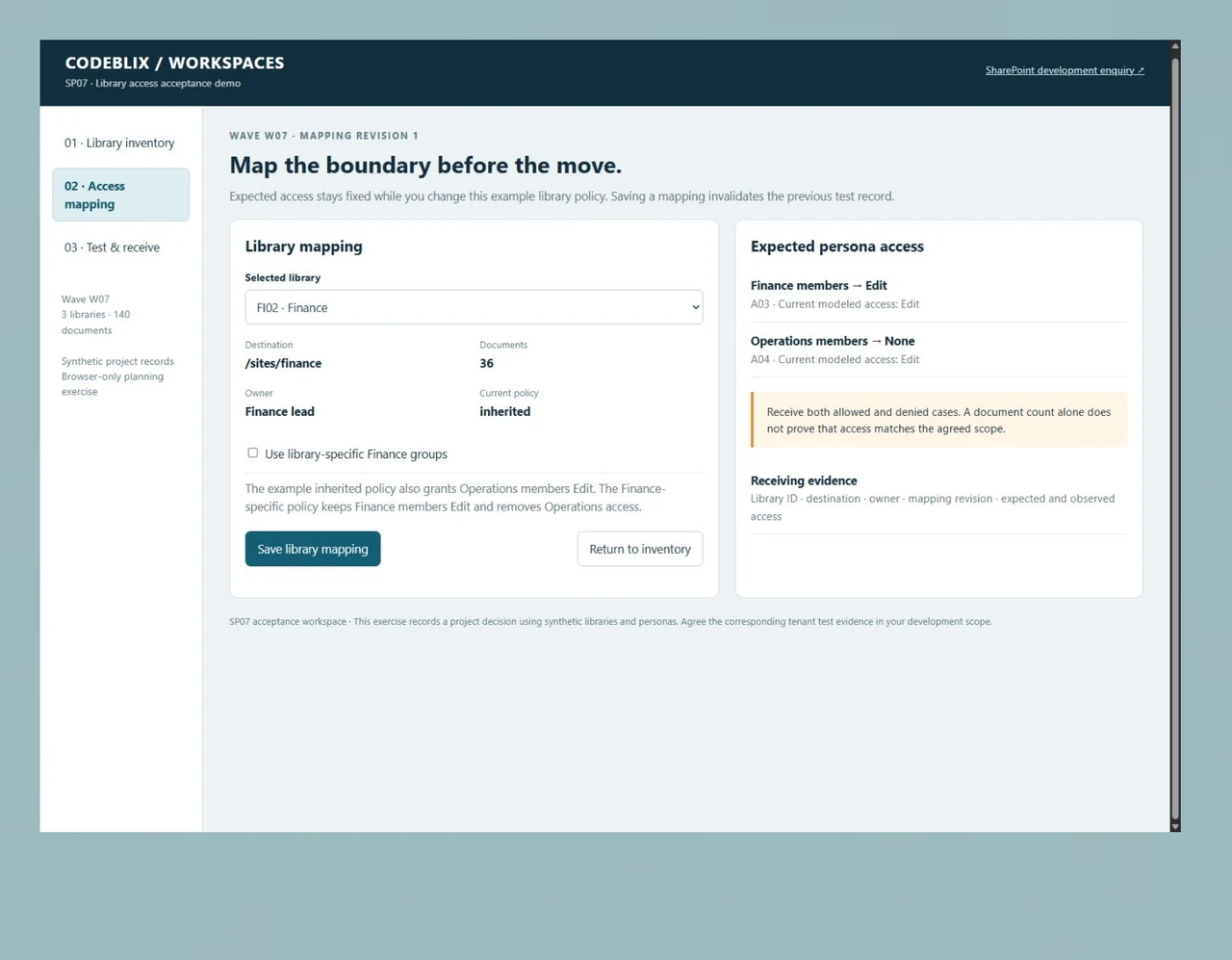
The first test record matches four of six cases. Operations members unexpectedly have Edit on Finance, while the Supplier guest has None instead of Read on the Supplier pack. Finance-specific groups resolve the first example; an explicit guest Read mapping resolves the second. Keep the expected business access separate from the mapping being changed.
Invalidate old evidence when the mapping changes
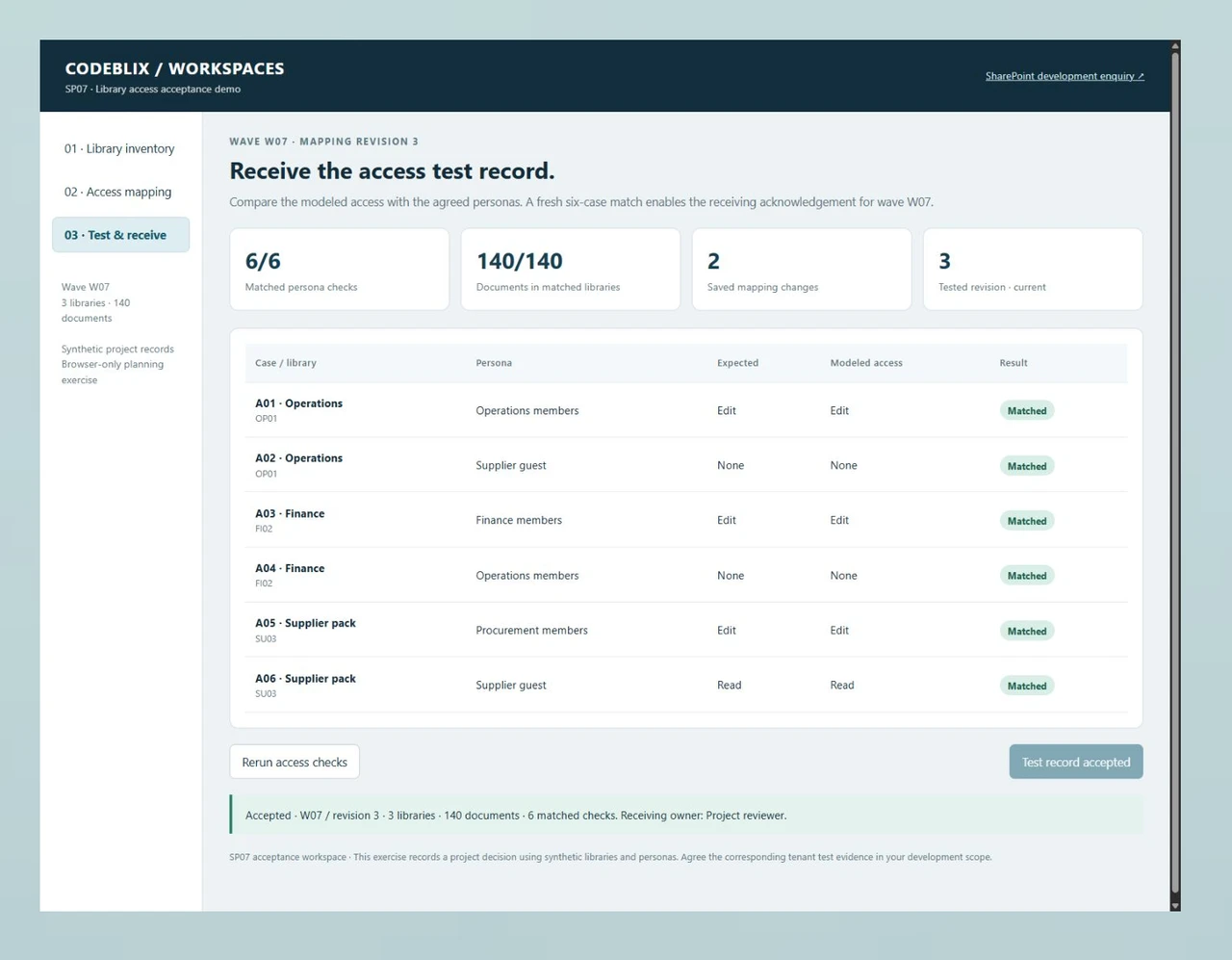
Saving the two library changes advances the mapping from revision 1 to revision 3. The old four-of-six result cannot be received. A fresh six-case run matches every expected persona and covers all 140 example documents, then enables the project reviewer’s acknowledgement. Ask for equivalent revision-linked evidence from the actual staging environment.
Give the access boundary a visible test.
The SP07 workspace follows three libraries containing 140 example documents. Finance has an unintended editor; the Supplier pack is missing its intended guest reader. Change those two mappings, rerun the six persona checks and receive the current test record.
Use a small access matrix to make the engagement assessable.
Work through the library decisions and take the acceptance checklist to your project discussion. Agree the corresponding Microsoft 365 staging tests, content checks and receiving owner before estimating the wider backlog.
Try the library access acceptance workspace
Inspect the three destinations, change Finance and Supplier mappings, and rerun the persona matrix. The exercise keeps a stale result from being acknowledged after a mapping change.
Open the library acceptance demoConfirm the site’s permission owner
Microsoft distinguishes group-connected team sites, communication sites and channel sites. Its guidance says private and shared channel site permissions are managed through Teams. Identify the site type before deciding which administrator should implement the agreed access changes.
Microsoft: sharing and permissions in the modern experienceSpecify the migration permission behavior
Microsoft’s SharePoint Migration Tool guidance explains that source location, user mapping and preservation settings affect destination permissions. Include those settings and representative access checks in the migration scope instead of assuming that copying files preserves the intended audience.
Microsoft: permissions when migrating files and foldersDefine an external application boundary separately
When a SharePoint workflow must exchange data with another business application, identify the source of truth, permitted data and receiving acknowledgement. Scope that API contract alongside the site work so each implementation has a clear owner.
Discuss a separate application API contractConnect the requested capacity with a defined tenant outcome.
A dedicated developer scope needs more than a list of technologies. Establish the site structure, decision owners and evidence required for the first delivery item.
Describe the Microsoft environment and business backlog
Identify SharePoint Online or the installed Server version, the site types, Microsoft 365 tenant ownership and the requested development item. Include document volumes, forms, flows, custom web parts and external data boundaries. Supply a sanitized inventory and name the administrator who can approve staging access.
Agree the dedicated engagement terms
Request a quotation stating the available developer allocation, scope, fee basis, start date, review cadence and extra-work approval. Separate discovery, implementation, testing and release support where their responsibilities differ. Confirm collaboration hours, source ownership, notice terms and the first demonstrable milestone.
Build the destination and persona matrix
For each library, record the destination, business owner and intended reader or editor groups. Include an explicit denied case for a person outside the library’s audience. State which policy is inherited and which requires a deliberate library boundary. Identify guest collaboration and the tenant-level approvals it requires.
Implement against an approved staging boundary
Have the authorised administrator provision the agreed test access and representative content. Review the implementation plan for metadata, forms, automation and migration settings. Record any change to group membership, sharing or inheritance with its approver and recovery decision before applying it to the target environment.
Receive content and access evidence together
Check source and destination counts, required metadata, versions and representative file behavior. Run both the permitted and denied persona cases through authorised test accounts. Rerun affected checks after mapping changes and retain the current configuration revision, observed result and unresolved exceptions.
Approve the release and continuing allocation
Receive the source revision, configuration inventory, deployment steps, accepted cases and open backlog. Agree the release window, content freeze or delta handling, recovery checkpoint and support owner. Use the accepted milestone to decide the next development item and continued allocation.
The tenant, content and integration scope
- Prepare a site and library inventory with document counts, file sizes, required metadata, retention or version requirements, and business ownership. Distinguish a modernisation item from a content migration. Identify custom forms, web parts and automation that must be retained, replaced or separately estimated.
- Your tenant administrator controls approved access, app consent, sharing policy and release authorisation. Confirm the required Microsoft licences and any third-party tooling directly for your environment. The quotation should state who supplies licences, staging accounts, migration tools and operational administration.
- For an integration, list the external system, permitted fields, authentication owner, direction, frequency and error recovery. Include flow identities, connector requirements and monitoring ownership in the review. Describe a requested connection as project scope until its implementation and receiving checks have been agreed.
The acceptance and support agreement
- Specify a representative staging sample before transferring the full library. Record content and metadata checks separately from persona access. A migration count and a successful upload do not settle whether the intended audience can read or edit the result.
- Agree a cutover window, source freeze or delta process, recovery copy and owner for reopened content. State how links, forms, notifications and scheduled flows are checked after release. Include the method for recording exceptions and the person who can accept a remaining item.
- Define the response arrangements for development questions, release incidents and ongoing tenant administration. Record the source and configuration handover, support period and access removal process. Put capacity changes, urgent requests and the continuation decision in the engagement terms.
Six records for a SharePoint development quotation
Give the delivery team an exact library decision and a named person who can receive its evidence.
| Record | Example inputs | Required output and control |
|---|---|---|
| Engagement item | Requested allocation, prioritised backlog, fee basis, review cadence and first milestone | Confirm the written development scope and commercial terms with Codeblix. |
| Destination library | Library ID, source, destination site, document count, metadata and business owner | Approve the intended destination and reconcile the agreed content sample. |
| Access expectation | Library, persona, expected Read/Edit/None and business approver | Include both a permitted role and an unintended reader or editor. |
| Mapping revision | Site type, inherited or library-specific groups, guest mapping and revision number | Record an authorised mapping change and invalidate the previous test record. |
| Observed test case | Case ID, library, persona, expected result, observed access and configuration revision | Run the agreed cases in staging and preserve mismatches for resolution. |
| Receiving decision | Current test record, content checks, source revision, release owner and outstanding items | Acknowledge only current evidence and define who authorises cutover. |
Wave W07 contains 84 + 36 + 20 = 140 documents. Initially, Operations passes both cases, Finance fails its denied Operations-editor case, and the Supplier pack fails its guest-reader case: four of six checks match and only the 84-document Operations library has a complete match. Save Finance-specific groups and Supplier guest Read as two changes. At revision 3, rerun the six checks; all match, covering all three libraries and 140 documents. The reviewer can then accept the example test record.
Ask providers to quote the same receiving responsibilities.
Use the same environment inventory and first milestone when making a development enquiry. These provider offers describe hiring models and SharePoint delivery services.
| Option | Published focus | Ask in your demo |
|---|---|---|
| ManekTech | Dedicated, part-time, hourly and fixed scopes covering SharePoint development and migration. | Which site-type, access-mapping and tenant receiving checks are included in the allocation? |
| Vidi Corp | Dedicated developer engagements, migration, customisation and post-migration support. | Will each library’s allowed and denied persona cases be linked to the delivered mapping revision? |
| Prismetric | Hourly, fixed and dedicated hiring with workflow, integration and migration services. | Who supplies staging access, verifies the content and accepts unresolved cutover exceptions? |
Choose a development agreement with a specific initial outcome, explicit tenant responsibilities and inspectable acceptance evidence. Confirm staffing allocation, price and start date directly in the quotation.
Category reference: Microsoft guidance on modern SharePoint permissions. Bring the SP07 library matrix and its checklist to the scoping discussion; replace the examples with an approved inventory and staging tests for your own environment.
Connect the site workflow with its application owners
Scope each library, automation and receiving application with clear data and access responsibilities.
Explore marketplace development services