
Give recurring development a clear definition of done.
Use each monthly work item to connect a website change with the person receiving it and the evidence needed to release it.
Make the request reproducible
Name the component, page, user profile and action involved. Attach a synthetic example and the result the site owner expects to receive.
Resolve permission conflicts deliberately
Record inherited groups and the asset path behind an action decision. A visible article and an editable article are different acceptance questions.
Keep website continuity in the scope
Identify template overrides, extension dependencies, published URLs and deployment ownership before a change reaches the live site.
Receive content visibility and edit permission separately.
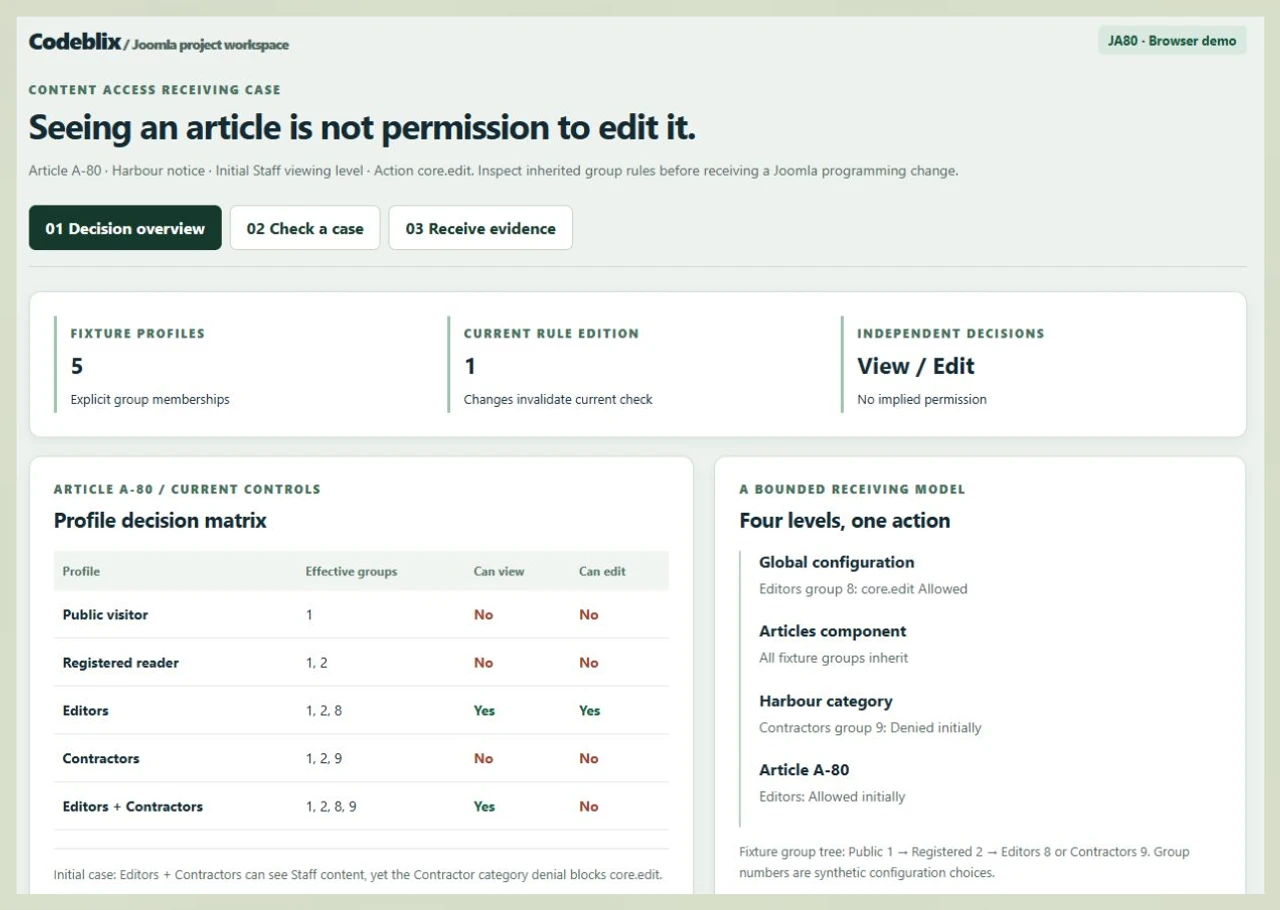
The JA80 demonstration follows one article through a profile matrix, a rule check and an owner receiving record. Try the conflicting-group case before agreeing the behavior required on your Joomla installation.
Put the first monthly item on a firm footing.
Choose a bounded improvement and supply enough context for technical assessment and a written offer.
Start with the installation
List the Joomla and PHP releases, hosting environment, installed extensions and template overrides. Include the relevant source repository and identify any locally modified packages. Give the developer a controlled way to reproduce the issue.
Specify the changed journey
Describe the route from entry page to completed action. For an editorial request, identify the article or category, the affected profiles and whether the change concerns visibility, editing, publishing or another action.
Try the content access receiving case
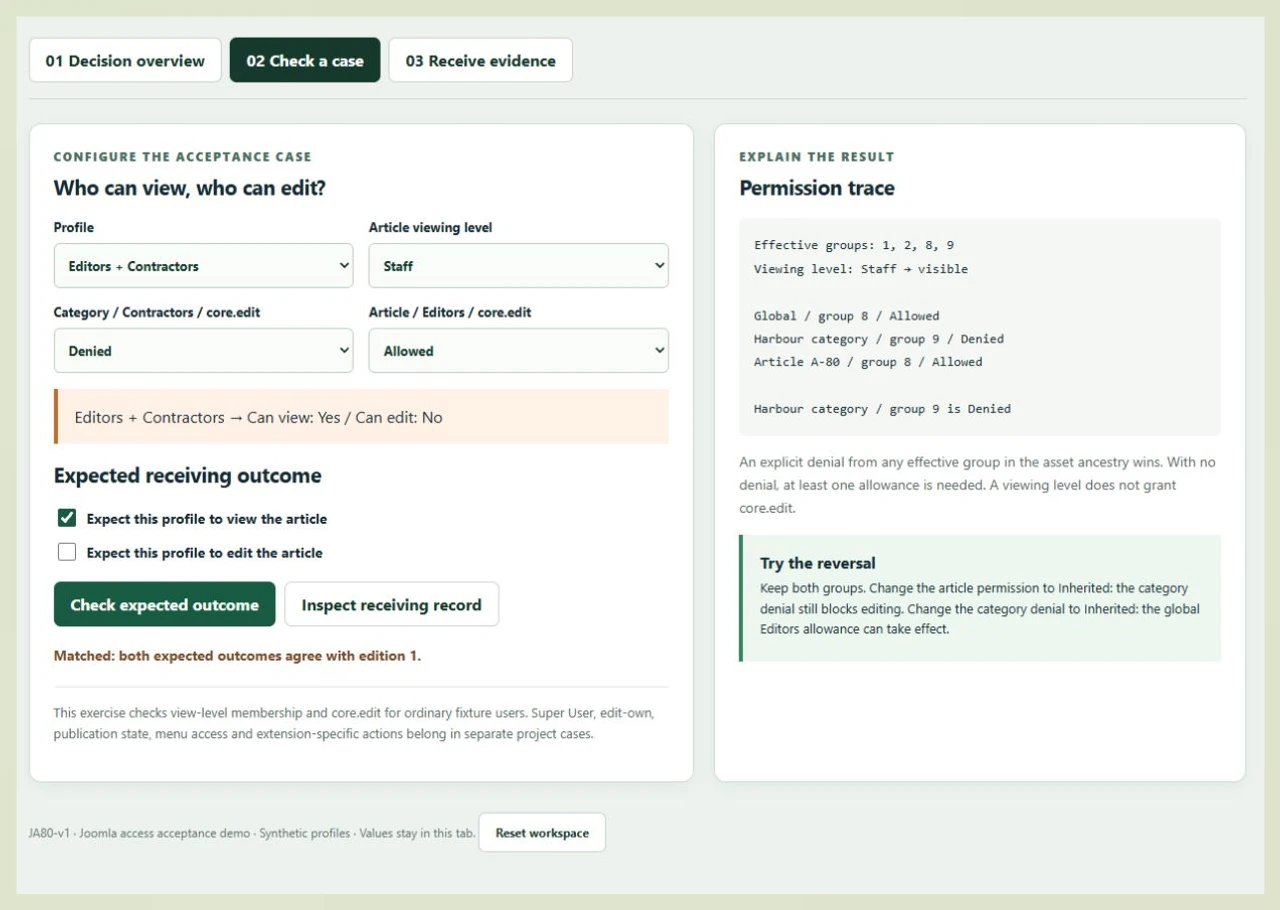
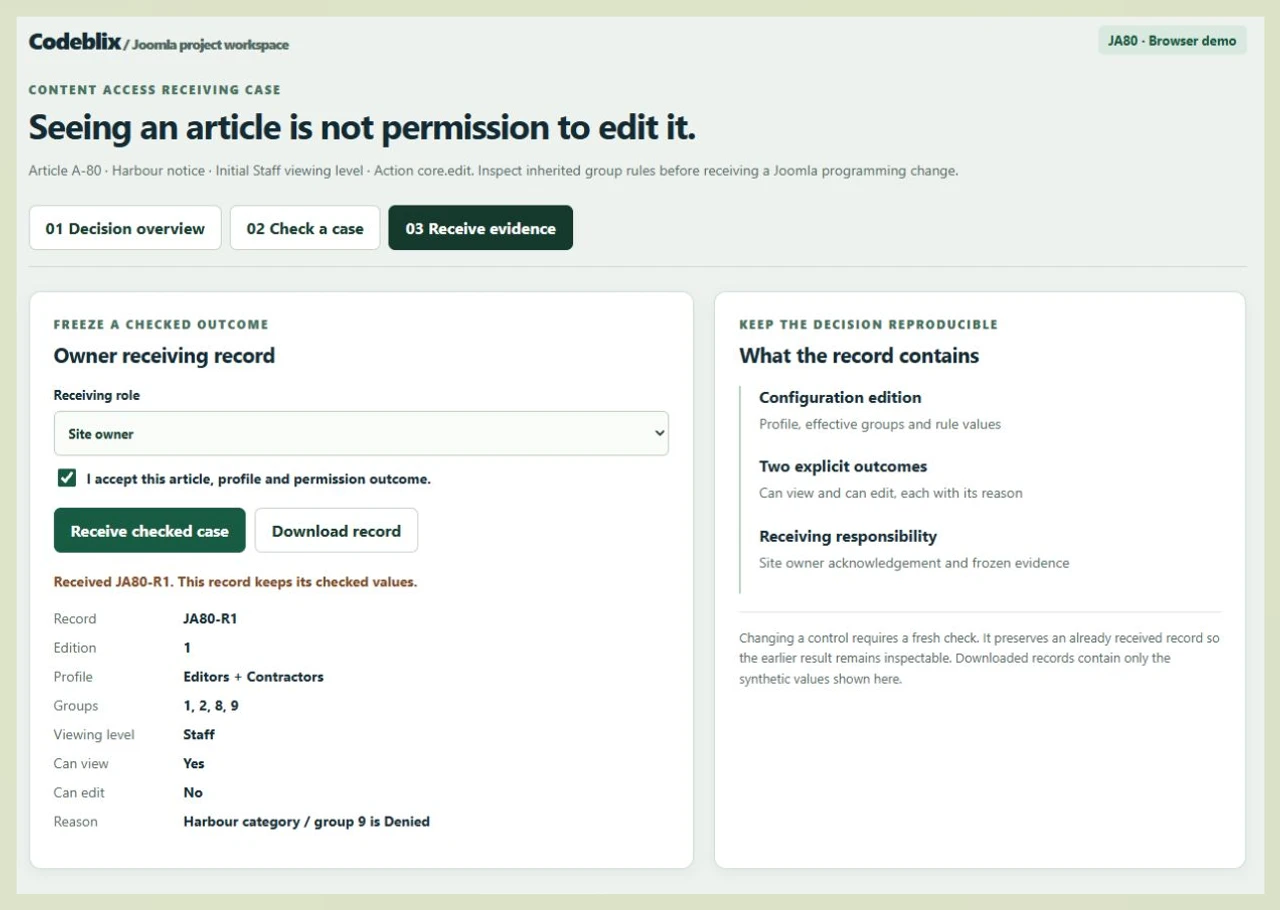
Select the dual-membership profile in JA80 and follow the rule trace. Check both expected outcomes, receive the case and then change a rule to see why a new edition needs its own check.
Open the Joomla access acceptance demoKeep store pricing in its own work item
When Joomla also hosts a VirtueMart store, retain the shopper-group and price-selection cases with that store request. Content editing permissions need their own receiving evidence.
Scope a VirtueMart programming changeUse the platform distinction in the brief
Joomla documents viewing access and action permissions as separate checks. Ask for the relevant component implementation to apply both where required, including its custom routes.
Joomla permission checks and asset ancestryCommission, verify and hand over each Joomla item.
A monthly arrangement works best when technical discovery, changes and receiving time all have an agreed place in the allocation.
Prioritize one outcome
Rank the backlog with the site owner and define the first behavior to change. Record urgency, acceptance owner and the dependency that could prevent work from starting.
Assess code and compatibility
Review the affected component, overrides and extension contracts in the supplied environment. Confirm whether the request is a local correction, a larger redesign or an upgrade dependency before agreeing its estimate.
Agree the commercial boundary
Set the monthly allocation, fee or rate, communication overlap and review cadence. Decide who may reorder work and authorize additional effort when discovery changes the estimate.
Implement against named cases
Carry the accepted behavior into a source-controlled change and test it on staging. Include refused actions and overlapping group memberships as well as the straightforward successful journey.
Receive the exact revision
Have the nominated owner check the agreed profiles, routes and outputs against the delivered package. Keep the revision and unresolved observations together so a later change does not blur the earlier decision.
Release and plan the next item
Follow the agreed backup, deployment and recovery procedure. Hand over configuration notes and operational ownership, then use receiving feedback to prioritize the next monthly task.
Joomla records, actions and exceptions
- For access changes, supply the affected items, categories, viewing levels, directly assigned groups and inherited memberships. Identify the action being controlled; editing, editing one’s own content, publishing and administration require different cases.
- Map the permission-bearing asset ancestry and state where each allowance or denial is configured. Include a profile belonging to more than one group, a profile without an explicit allowance and an ordinary reader who may see content but cannot edit it.
- Include menu visibility, publication state, language, cache behavior and custom extension routes when they affect the requested journey. Set special administrative cases apart from the ordinary-profile exercise so their expected behavior is explicit.
Monthly capacity, access and project costs
- Choose a development allocation around the backlog and the review time your team can provide. Confirm the start date, available working overlap, billing basis and treatment of unused or additional capacity in the quotation.
- Define how investigation, meetings, dependency upgrades and defect correction use the allocation. Name the person who approves an estimate and the person who can resolve a blocked access or business-rule question.
- Arrange project access through the agreed secure channel. Keep hosting, licensed extensions, external services and any separate migration effort visible in the commercial scope rather than assuming they are included in a monthly fee.
Upgrade, migration and support handover
- An upgrade needs an extension compatibility inventory and staged checks for templates, routes, content and editorial tasks. Establish the target release and acceptance evidence after examining the installed system.
- A content transfer needs stable identifiers, category mapping, media handling and a plan for preserving public addresses. Reconcile the agreed record population and access assignments before authorizing the destination launch.
- Agree whether Codeblix executes deployment or supplies a package to your operator. Set backup verification, recovery responsibility, source ownership, operational documentation and support response expectations in the handover.
A receiving model for the Joomla work you commission.
Use JA80 to discuss an access change with concrete records rather than a general request to fix permissions.
| Record | Example inputs | Required output and control |
|---|---|---|
| Article and visibility | A-80 Harbour notice / Staff viewing level | Check membership in the configured viewing level independently of action permissions. |
| Effective groups | Public 1; Registered 2; Editors 8; Contractors 9 | Include ancestor memberships and a profile assigned to both child groups. |
| Action ancestry | Global → Articles component → Harbour category → A-80 | Inspect core.edit rules along the full path and retain the location of an explicit denial. |
| Expected outcome | Editors + Contractors / view Yes / edit No | Match both expectations before enabling the receiving step. |
| Changed configuration | Category denial becomes Inherited / global Editors allowance remains | Require a new check for the changed edition; the earlier receiving record stays intact. |
| Owner record | JA80-R1 / edition 1 / effective groups 1,2,8,9 | Keep the selected values and reasons together in the downloadable synthetic record. |
The initial Editors profile belongs to groups 1, 2 and 8, so it can view Staff content and edit A-80. Adding Contractors group 9 leaves Staff visibility intact but introduces a category denial for core.edit. An article-level allowance does not remove that denial. Changing the category rule to Inherited lets the global Editors allowance take effect when no other denial applies. JA80 preserves the earlier received edition while a later scenario is being checked.
Ask providers to quote the same Joomla change.
Use the installation inventory, affected journey and receiving cases to make commercial discussions specific.
| Option | Published focus | Ask in your demo |
|---|---|---|
| JoomConsultant | Describes custom components, templates and upgrades, with weekly or monthly dedicated engagement. | Which profiles and extension routes will be demonstrated before we receive our access change? |
| Rsquare Technologies | Describes hourly, monthly and fixed arrangements, onboarding stages and monthly billing. | How will discovery, compatibility work and owner review time be treated in the monthly allocation? |
| Karmick Solutions | Describes Joomla modules, templates, portals and maintenance with flexible engagement and enquiry stages. | Which source revision, test cases and deployment responsibilities will accompany the completed item? |
The JA80 exercise lets your team inspect a conflicting-group outcome and retain an acceptance record. Add your actual component’s other actions and privileged users to the project checklist.
Category reference: Joomla viewing access documentation. The primary documentation distinguishes viewing levels from action permission checks. Confirm the corresponding behavior in your installed release and custom components.
Plan connected website and application work.
Explore marketplace development offers for the systems that exchange content or business records with your Joomla project.
Browse marketplace development servicesAgree the details before booking Joomla programming.
Use the quotation to settle allocation, technical dependencies and who receives the result.
Can we commission monthly work for an existing Joomla website?
Share the current installation details and a prioritized list of changes with Codeblix. The technical assessment establishes a workable scope and allocation, followed by a quotation covering the commercial arrangement and receiving milestones.
What should we send for the first estimate?
Provide the installed versions, affected extension or template, reproduction steps and the expected behavior. Include representative synthetic content and the profiles needed to check it. Identify who can arrange staging access and approve the business result.
What sets the monthly programming fee?
The quotation depends on the required allocation, codebase condition, technical dependencies and responsibilities included. Confirm the fee or rate, billing cycle, change authorization and treatment of blocked work before committing.
Can the engagement cover a custom component or plugin?
Describe its inputs, outputs, user actions and dependencies. The scope can then identify the code changes, permission checks, error cases and maintenance documentation required for that component or plugin.
How will our content access change be accepted?
Agree a matrix of representative profiles and expected outcomes on the actual installation. Check viewing, editing and any other affected actions separately. Attach the relevant source revision and observations to the owner’s receiving decision.
What does the JA80 demo demonstrate?
It operates on five synthetic ordinary profiles and one article. You can change viewing levels and edit rules, inspect the reason for a denial and receive a matched case. Use the example to write the actual permission cases required by your project.
Can an upgrade or content migration be included?
Specify that work as a separate deliverable with its target environment, extension compatibility, mapping and reconciliation requirements. Agree staging checks, address preservation, backups and launch authority before scheduling the change.
What happens after a monthly item is received?
Receive the agreed source changes, configuration instructions and test evidence. Confirm deployment ownership, recovery steps and support coverage. Record unfinished observations and decide which follow-up requests enter the next allocation.