
Make developer time accountable to an accepted result.
Use a shared backlog and concrete record-level checks to decide what belongs in the next review.
Separate allocation from an unlimited scope
Specify the development time, working overlap, technical contact and review cadence you are requesting. Rank the first tasks and define how new requests enter the backlog. Agree whether unused allocation, urgent work and changes in priority affect the commercial arrangement.
Name the owner of each synchronized field
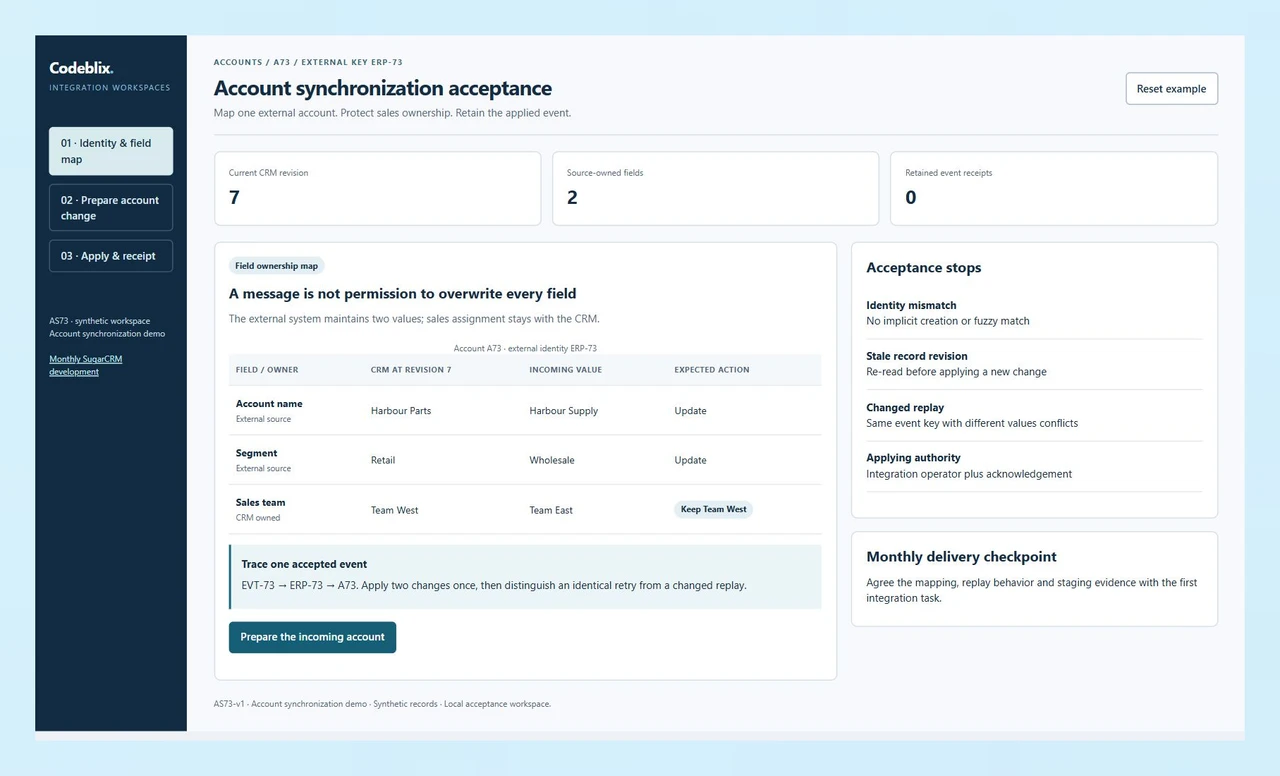
A source system may maintain the account name and segment while the sales team owns assignment. Record that boundary before a feed writes to the CRM. The AS73 case changes two source-owned values and leaves the requested team change unapplied.
Expose retry and concurrent-edit behavior
An integration can receive the same event twice or meet a record edited after it was read. Decide which messages should be repeated safely, which should be held for investigation and what evidence the receiving operator needs to resolve them.
Trace the account update before accepting the integration.
AS73 follows an external account message into a controlled CRM change. Inspect the field map, prepare a two-field update and apply it as Integration operator. The record keeps its sales team, while the event receipt makes a repeated message distinguishable from a new change.
Give the developer one integration case to reproduce.
Use the interactive exercise and the installed platform references to discuss identity, access and acceptance.
Try the account synchronization exercise
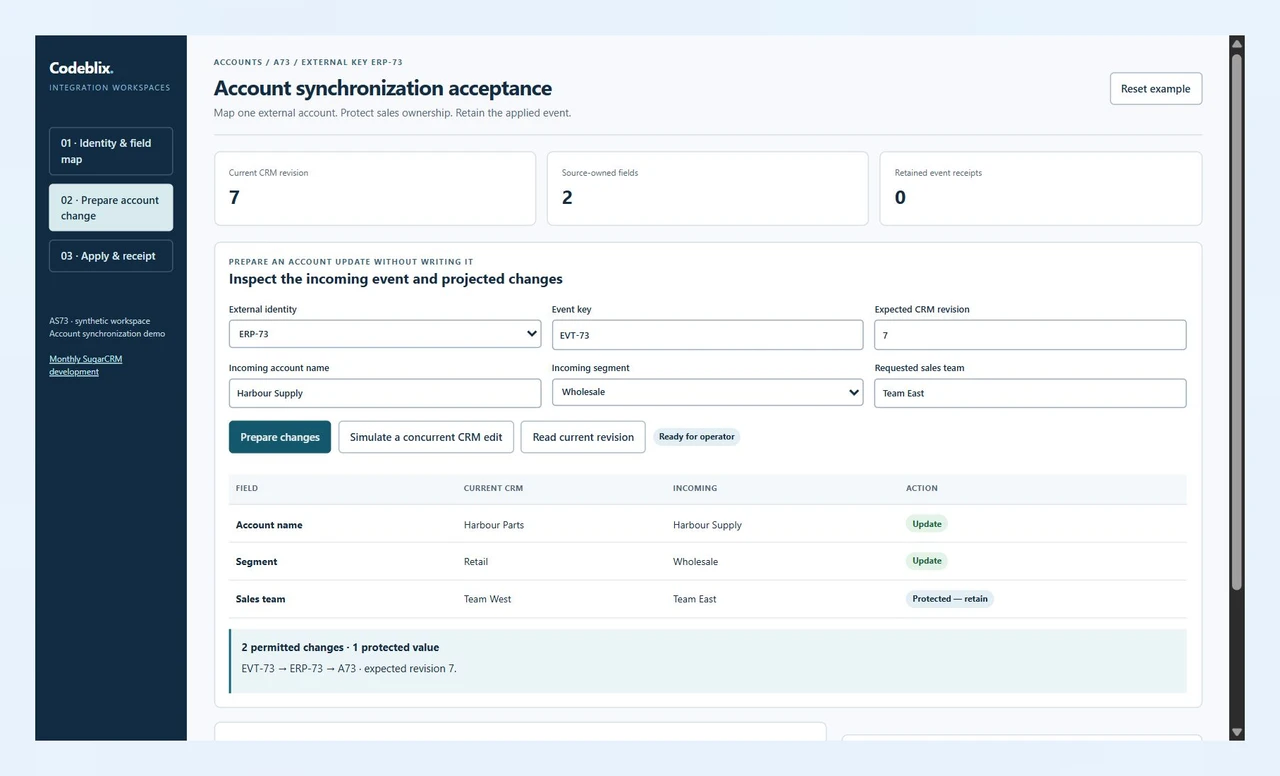
Inspect the original account and incoming values, then prepare a difference view. Change the external key, advance the CRM revision or replay a changed payload to inspect the stops. Use a valid Integration operator case to create a retained event receipt.
Open the account synchronization demoMatch customization access to the hosting arrangement
The Sugar Developer Guide distinguishes direct server customization from the access available to cloud-hosted customers. Identify the permitted development and packaging path for your deployment before allocating work.
Sugar primary reference: development accessCheck the installed release and API together
Sugar’s web-services reference maps releases to API versions and retains some older entries for reference. Give the developer the installed release and its endpoint help so the integration assessment uses the relevant contract.
Sugar primary reference: release and API versioningKeep store-specific programming in its own backlog
If your project also maintains a Joomla/VirtueMart storefront, specify that store’s shopper groups and price restrictions separately. Its price-selection exercise supplies a focused cart-development acceptance case.
Scope a VirtueMart store changeOrganize the monthly engagement around a reviewable backlog
Set the first deliverable and the receiving responsibilities before reserving continuing development capacity.
Inventory the Sugar installation and development access
Identify the Sugar edition, release, hosting model, licensed extensions and current source arrangement. Describe who can authorize access and provide a representative development copy. Bring the integration documentation and the people responsible for the CRM and the sending system.
Agree monthly capacity and the first backlog outcome
Ask for the proposed allocation, start window, work tracking and meeting schedule. Put a named acceptance owner against each task. Define review, invoicing, renewal, termination, additional effort and release assistance in the written agreement.
Map the external account to one CRM record
AS73 links external key ERP-73 to account A73 at revision 7. The original account is Harbour Parts in the Retail segment, assigned to Team West. The incoming event requests Harbour Supply, Wholesale and Team East. Only the name and segment belong to this source.
Prepare changes and challenge the exceptions
Evaluate event EVT-73 against the current revision. Inspect the two permitted changes and the protected team value. Advance the CRM revision to rehearse a concurrent edit; an outdated evaluation must not apply. An unexpected external key must also stop the case.
Apply once and inspect the repeat receipt
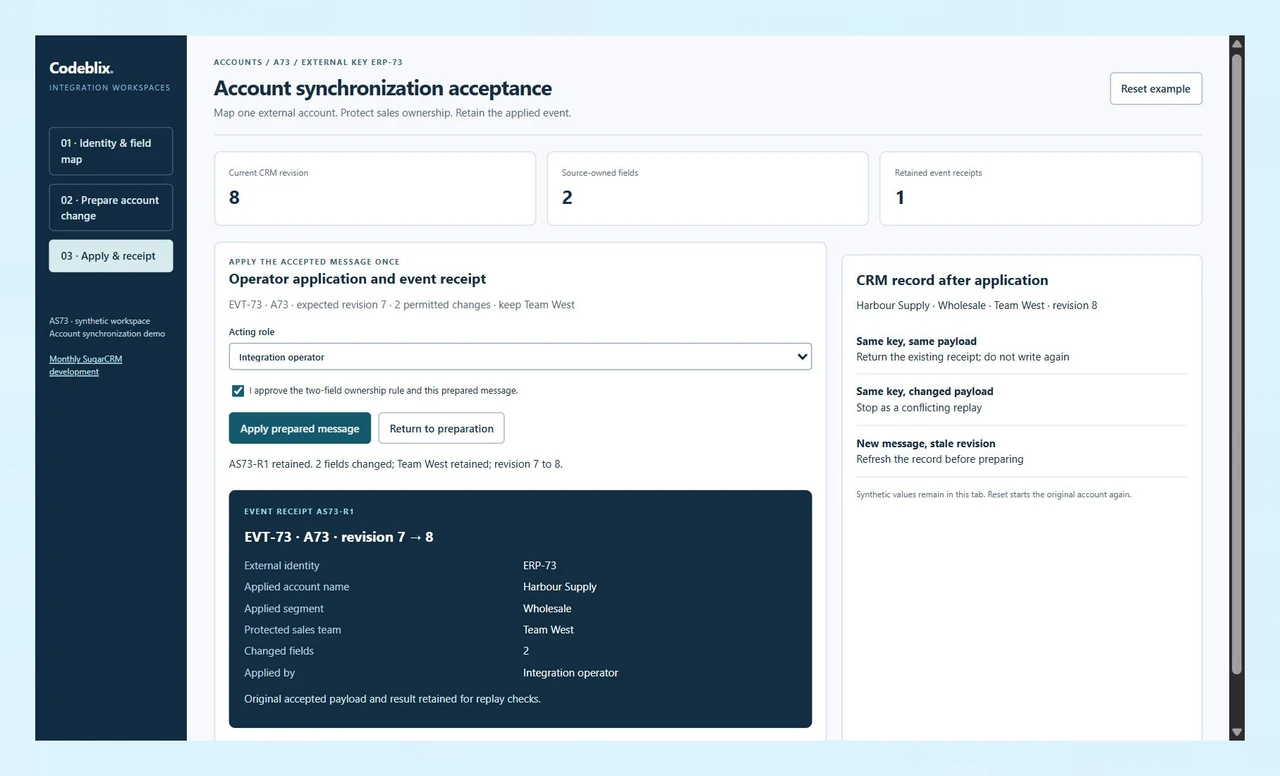
The Integration operator acknowledges the current prepared update. Applying it writes Harbour Supply and Wholesale, retains Team West and advances the record from revision 7 to 8. Repeating the same event returns the existing receipt; changing its payload while keeping EVT-73 raises a conflict.
Review the implementation and reprioritize the next month
Run the agreed cases against the actual integration in staging, including permissions, retries and record changes. Receive source revisions, mappings, operating notes and completed checks. Review remaining work, support responsibilities and the next allocation with the backlog owner.
The backlog and working agreement
- Describe the business result for the first task, its acceptance owner and the data that reproduces it. Separate defects, enhancements, integrations and operational incidents so each item has an explicit priority and receiving team.
- Confirm the allocation, collaboration hours, reporting frequency and source repository access. State who approves a task to start, who reviews the result and how a new request affects work already in progress.
- Include billing, renewal, cancellation notice, additional effort, third-party licences and access revocation in the quotation. Ask how absence, handover or a change in assigned personnel will be handled.
- Request source changes, configuration instructions and test evidence at agreed review points. Keep a record of accepted work and remaining decisions, rather than treating a time report alone as proof that the CRM behavior is correct.
Integration, migration and release boundaries
- For an account feed, define the external key, CRM identity, field mapping, direction of ownership and handling of missing values. Document whether the source may create a new record, update an existing one or only submit changes for approval.
- Specify how duplicate events, changed replays, concurrent edits and interrupted requests are handled. The AS73 model uses a revision check and a retained event receipt; the commissioned implementation must prove its own server-side behavior and recovery path.
- For migration, reconcile a trial set of account identities, relationships and ownership fields before a wider transfer. Agree validation reports, rejected-record handling, cutover access and the point at which the receiving team may roll back.
- Name the staging environment, release approver and operator responsible for backups and smoke checks. Define defect support, monitoring and future compatibility work in the engagement; identify any hosting, licence or vendor work that the receiving organization supplies.
Six records that make the account-sync task quotable
Use one traceable external event and a small field map to settle what the developer must deliver.
| Record | Example inputs | Required output and control |
|---|---|---|
| Development baseline | Sugar edition, release, hosting, extensions and access path | Assess the actual customization and integration boundary before assigning the task. |
| Identity link | ERP-73 → account A73 | An unexpected external identity stops the update; no implicit account creation. |
| Record revision | CRM revision 7; message expects 7 | A concurrent CRM change invalidates preparation and prevents an outdated write. |
| Field ownership | Name and segment: source; sales team: CRM | Write Harbour Supply and Wholesale; keep Team West despite the requested Team East. |
| Applying authority | Integration operator and acknowledgement | Sales editor may inspect changes; only the operator can apply a current prepared case. |
| Event receipt | EVT-73; A73; revision 7→8; two changes | Identical replay returns the existing result; changed payload under the same key conflicts. |
The incoming ERP-73 message changes Harbour Parts to Harbour Supply and Retail to Wholesale. Its Team East request is protected, so A73 remains with Team West. A valid operator application creates receipt AS73-R1, updates two fields and moves the CRM revision from 7 to 8. A repeat of the same EVT-73 payload leaves that revision at 8. A different payload using EVT-73 is held as a conflicting replay. This local exercise supplies acceptance requirements for the commissioned integration.
Request the same monthly responsibilities from each provider.
Compare allocation terms with the record-level acceptance evidence and the handover your team receives.
| Option | Published focus | Ask in your demo |
|---|---|---|
| Citta Solutions | Describes dedicated development, custom modules, integration, migration and maintenance services. | Who owns the field map, acceptance cases and source handover within the allocation? |
| ManekTech | Offers monthly dedicated development alongside module, logic-hook, API and migration work. | How will the team demonstrate stale-change and duplicate-message handling on our release? |
| Nestack | Publishes monthly developer plans and part-time or full-time allocation with customization and support. | Which review, support and unfinished-backlog responsibilities belong in the monthly agreement? |
Ask providers to price a defined allocation and the first accepted integration outcome together. Compare the working overlap, review cadence, release responsibilities and source access. Confirm what happens to incomplete tasks and operational support when an allocation changes or ends.
Category reference: Sugar web-services reference: release-specific API versions. Use the installed edition, endpoint contract and authorized access path for implementation. AS73 demonstrates the acceptance model to discuss with the developer.
Bring an existing codebase and a concrete delivery outcome.
Explore Codeblix marketplace development services and discuss the people, access and records your engagement needs.
Explore marketplace development servicesSet the monthly engagement before development capacity is reserved
Discuss the installation, the first change and the terms that keep continuing work reviewable.
What does a monthly SugarCRM developer agreement need to specify?
Request the development allocation, collaboration hours, technical contact and review cadence. Include backlog approval, billing, additional effort, source delivery, renewal and termination terms. Put a named acceptance owner and an observable result against the first task.
Can the monthly backlog include custom modules and integrations?
Bring those requirements for an assessment of the installed edition, release, hosting model and extension constraints. Agree which work can be delivered through the permitted customization path and how its implementation, regression checks and release assistance use the allocation.
Which account fields does the AS73 exercise change?
The source owns account name and segment, so the valid example writes Harbour Supply and Wholesale. The sales team remains CRM-owned and stays Team West even though the incoming message requests Team East. The prepared view identifies both the changed fields and the protected value.
What happens if the CRM record changes during preparation?
Advancing the source record revision clears the prepared decision. The operator must evaluate a fresh context before applying it. Include the equivalent concurrent-edit and interrupted-request cases in the actual integration’s acceptance scope.
How does the example distinguish a retry from a conflicting message?
It retains the event key with the external identity and incoming values. An identical EVT-73 replay returns AS73-R1 without another record change. Different values under EVT-73 produce a conflict. Ask for durable server-side replay evidence when the commissioned connection is tested.
How are the monthly fee and start window confirmed?
Discuss the assessed installation, required allocation and first backlog outcome in a quotation. Confirm availability, billing, review meetings, support and the treatment of urgent or additional work. The monthly arrangement begins on the terms agreed by both parties.
Can the engagement cover legacy editions or cloud-hosted Sugar?
Provide the exact edition, release and hosting arrangement for review. Access, supported customization methods and API versions differ. The assessment should identify the permitted development path, vendor dependencies and any upgrade or packaging work that belongs in the quote.
What should our team receive before the next monthly review?
Receive the agreed source revisions, field mapping, configuration instructions and completed acceptance evidence. Keep rejected-message handling and recovery steps with the integration handover. Review completed outcomes, unresolved decisions and the priority of the remaining backlog with its owner.