
Make an ownership change measurable.
The CRM lead should be able to reconcile which records moved, who received them and why others remained unassigned.
Keep a lead visible when nobody can receive it
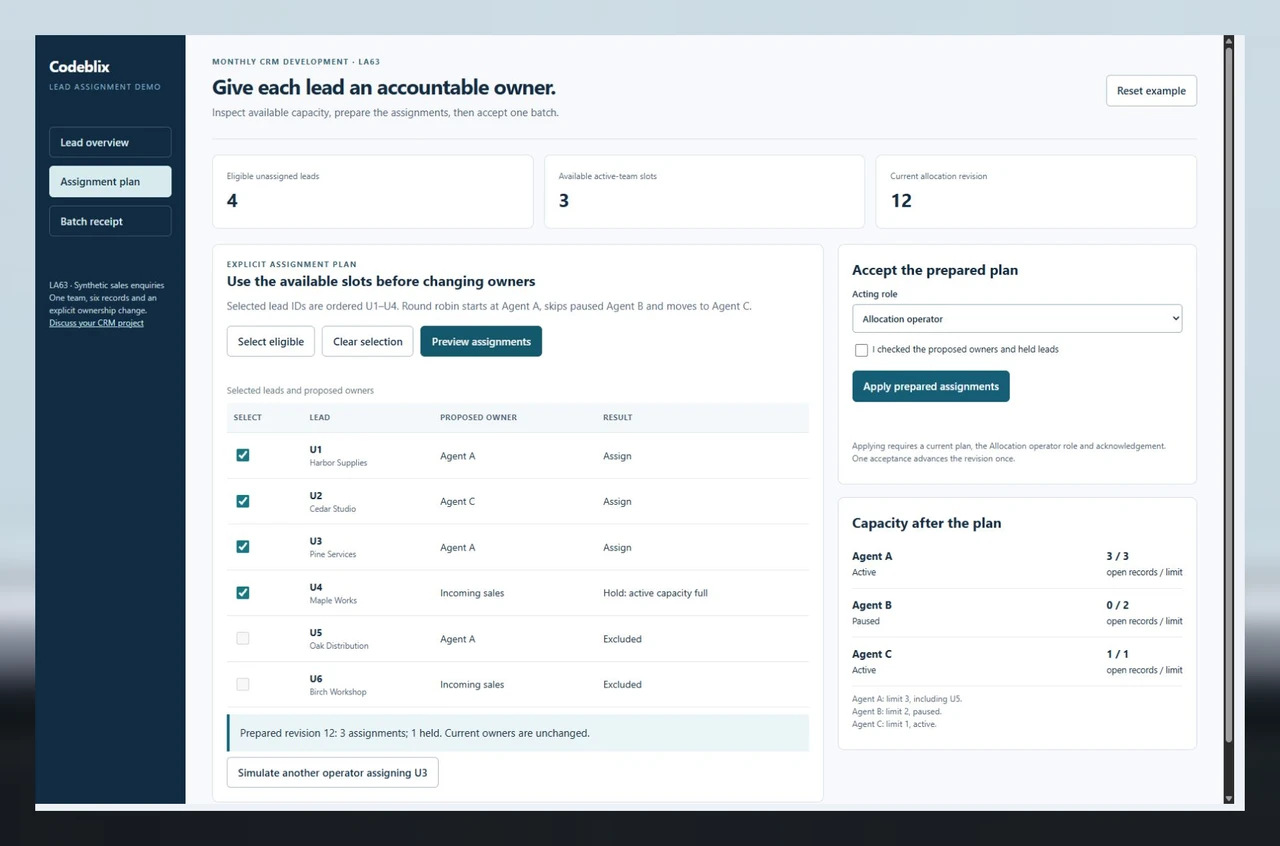
A full team should produce an explicit hold. LA63 leaves U4 with Incoming sales after three assignments use the available slots. The receiving user sees the held ID and reason alongside the accepted changes, so the outstanding enquiry can be followed up rather than disappearing from the queue.
Count existing ownership before allocating new records
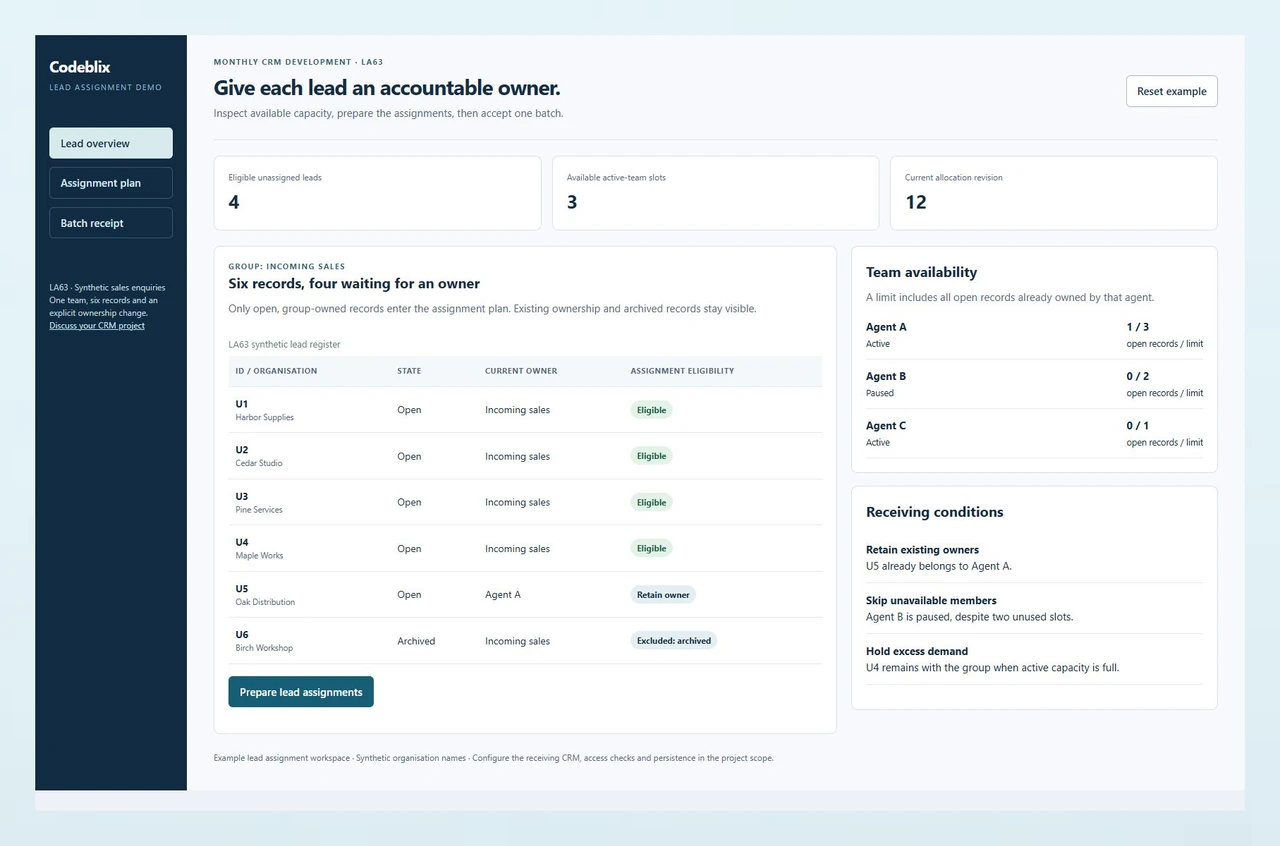
Agent A starts with U5 and a limit of three open records, leaving two slots. Agent C has one empty slot. Agent B is paused with a nominal limit of two. The plan uses A, C, then A; it retains U5 and excludes archived U6. These are distinct business conditions to agree in a development task.
Accept the current plan once
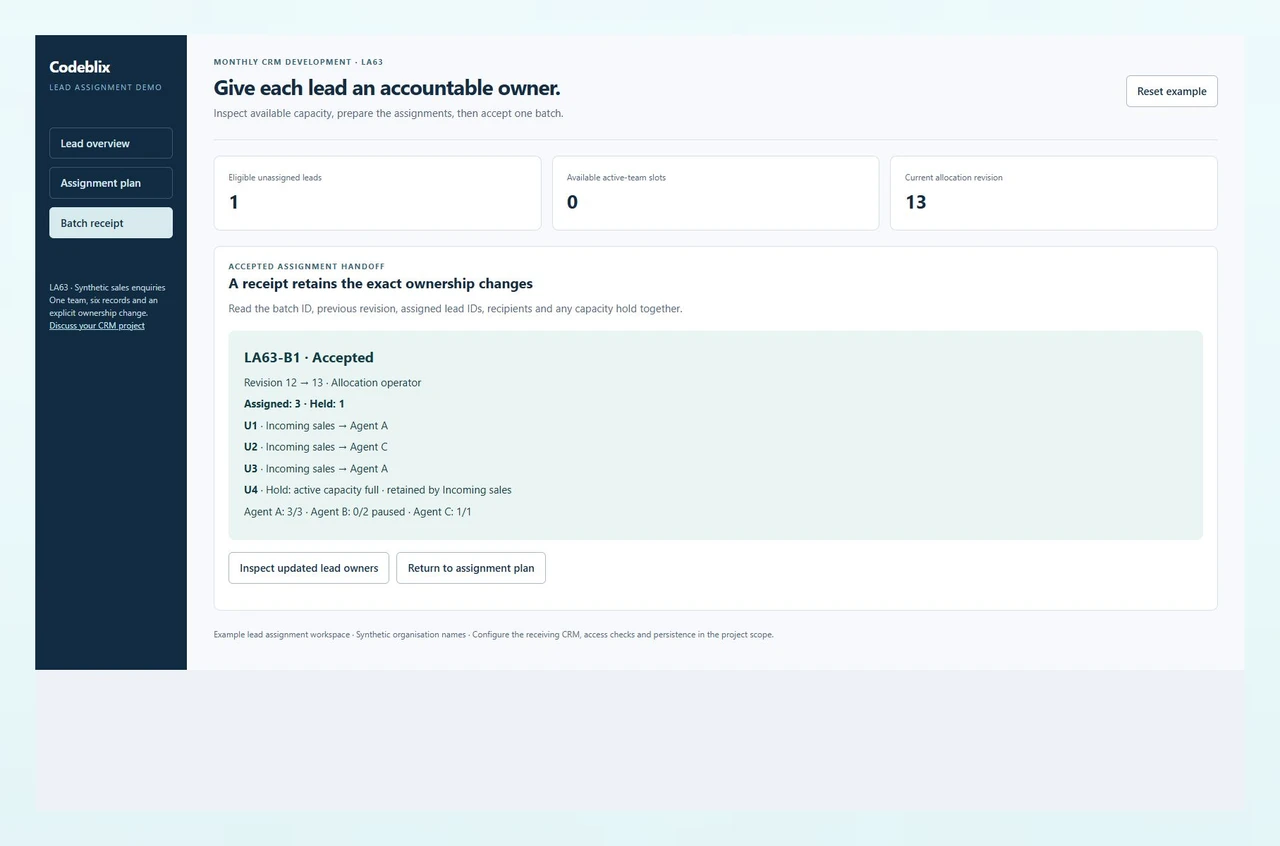
The workspace separates preparation from application. It checks the Allocation operator role, acknowledgement and current revision before changing owners. LA63-B1 records revision 12 to 13, U1/U2/U3 and the U4 hold. A changed selection or concurrent ownership update requires a fresh preview.
Assign the work your active team can receive.
LA63 contains six synthetic sales enquiries. Four open leads belong to Incoming sales, one already belongs to Agent A and one is archived. Preview U1 to Agent A, U2 to Agent C and U3 to Agent A. U4 stays with the group because the active agents are full; paused Agent B receives nothing.
Connect the monthly engagement to a receiving result.
Use the working assignment exercise and its checklist to explain the CRM change. Check your edition and development access against the primary Vtiger references.
Run the lead assignment exercise
Inspect the six records, prepare the capacity-limited plan and accept its batch receipt. Try the Viewer role, a changed selection or the concurrent-assignment control to see why a prepared plan needs a current receiving check.
Open the lead assignment demoCheck group assignment against your edition
Vtiger’s assignment-rules reference describes Round Robin and Least Loaded modes and group-owned record conditions. Confirm the feature availability and module rules for your own edition. Agree the capacity, pause and receipt requirements shown here explicitly in the project scope.
Vtiger primary reference: assignment rulesConfirm the extension and integration route
Vtiger publishes developer resources for its cloud and open-source offerings. Use the documentation relevant to your installation when discussing source access, extensions and integration responsibilities.
Vtiger primary reference: development resourcesKeep another CRM platform in its own engagement
If a separate team maintains SugarCRM, specify its account synchronization and monthly allocation against that application. Use the account-change exercise for that scope rather than assuming the two CRMs share an implementation.
Discuss a SugarCRM monthly allocationScope the allocation, assignment rules and receiving evidence
A monthly allocation needs a named delivery priority. The first change should have concrete records, permissions and an expected result your CRM owner can check.
Identify the CRM edition and permitted development access
Supply the Vtiger edition, installed release, hosting arrangement, existing extensions and the application owner. Identify whether the change uses supported configuration, an allowed extension or application code. Provide a sanitized example of the current behavior and name the person authorized to approve access.
Put the monthly allocation around a finite first delivery
List the first CRM change, its business owner, dependencies and receiving date. Request a quotation that defines the allocation, availability, communication, review cadence and support responsibilities. Agree how later backlog items enter the month and how changed scope is estimated before development begins.
Define the eligible records and team limits
LA63 begins with U1 Harbor Supplies, U2 Cedar Studio, U3 Pine Services and U4 Maple Works open and group-owned. U5 Oak Distribution already belongs to Agent A. U6 Birch Workshop is archived. A can hold three open records, C one and paused B two. Existing U5 leaves A two usable slots.
Preview owners and explain capacity holds
Select the four eligible IDs and prepare the ordered assignment plan. U1 goes to A, U2 to C and U3 to A. U4 remains in Incoming sales because A and C have reached their limits. Show that B is unavailable rather than consuming its unused capacity, and keep the current owners unchanged during preparation.
Check authority and record drift before application
Apply only as Allocation operator after acknowledging the prepared owners and holds. Recheck the selected IDs, record eligibility, recipient availability and expected revision at the receiving boundary. In the concurrent example another operator assigns U3 first; the old preview must be refused and replaced.
Reconcile the accepted batch and deliver the handover
Retain LA63-B1 with the old and new revisions, three changed lead IDs, their receiving agents and U4’s capacity hold. The updated register has one eligible unassigned lead and no active slots. Agree how your actual CRM stores the audit, exposes held work, supports later reassignment and returns an accepted or refused result.
Agree the monthly development and integration boundaries
- State the time allocation, delivery priorities, named approver, progress reviews, source delivery and change-control arrangement in the quotation. Confirm availability and commercial terms with Codeblix after the application assessment.
- List the installed extensions, relevant APIs, authentication owner and systems that supply or receive lead records. Map the fields, permitted operations and failure responses before an integration is estimated. Quote any connector or migration work against verified access and a defined interface.
- Use synthetic or sanitized records for development. Identify the deployment owner, staging environment, backup and rollback procedure, test accounts and permitted release window. Agree who approves the production change and receives the operating instructions.
Specify ownership, migration and support behavior
- Define your eligibility filters, agent availability, capacity unit, assignment order and hold reason. Explain whether already owned leads may ever be reassigned and who can approve that action. LA63 uses open-record counts; define your real capacity measure separately.
- For migrated records, reconcile source IDs, existing owners, group membership and closed or archived states before enabling assignment. Resolve unknown users and duplicate external keys in a named exception queue. Preserve records that should retain their current owner.
- At handover, receive the code or supported extension package, configuration values, acceptance results, audit fields, deployment steps and agreed defect-support period. Include a procedure for held leads, agent absence, integration failure and a change that is refused because the record has moved.
Six records that define a lead assignment change
Give the developer the starting ownership, receiving capacity and expected acceptance evidence.
| Record | Example inputs | Required output and control |
|---|---|---|
| CRM baseline | Edition, release, extensions, hosting and permitted customization access | Choose the supported development and deployment path for the installed application. |
| Lead eligibility | U1–U4 Open / Incoming sales; U5 Open / Agent A; U6 Archived | Allocate eligible group-owned records while retaining existing owners and archived state. |
| Recipient capacity | Agent A 1/3 active; Agent B 0/2 paused; Agent C 0/1 active | Use three available active slots and skip B despite its nominal free capacity. |
| Prepared assignment | U1→A, U2→C, U3→A; U4 capacity hold; expected revision12 | Preview the selected IDs and recipients before modifying current owners. |
| Acceptance authority | Allocation operator; acknowledged current plan; unchanged revision | Refuse a Viewer, a stale preview, an empty selection or an unacknowledged apply. |
| Batch receipt | LA63-B1; revision12→13; three assignments; one hold | Retain the exact ownership changes and reconcile one remaining unassigned enquiry. |
At revision 12, Incoming sales holds U1–U4. Agent A already owns U5 and has room for two more open leads; Agent C has room for one. B is paused. The prepared round robin assigns U1 to A, U2 to C and U3 to A, holding U4 with the group. Acceptance creates LA63-B1 at revision 13. A now owns three open records and C one. U5 retains A, U6 stays archived, and U4 remains visible for follow-up.
Ask for an allocation and a demonstrable receiving result.
Use the same CRM baseline and six-record assignment case in your development enquiries.
| Option | Published focus | Ask in your demo |
|---|---|---|
| iFlair | Monthly, hourly and fixed-cost engagements; modules, migration, customization, integration and support; quotation enquiry. | Which ownership, capacity and stale-preview cases are included in the monthly deliverable? |
| Nestack | CRM setup, custom fields and modules, upgrades, migration, hosting and development delivery stages; contact enquiry. | How will the delivery handover reconcile existing owners, archived records and held enquiries? |
| IConflux | Dedicated monthly and hourly options, customization, consulting, data migration, developer interview and a project quote. | Who accepts the assignment result, and what code and batch evidence are delivered? |
Give each provider the installed edition, permitted development access, first backlog item and exact receiving cases. Ask the quotation to define the monthly allocation, dependencies, acceptance owner and handover. Keep access assessment, custom behavior and any integration work explicit so the allocation produces a checkable delivery.
Category reference: Vtiger primary reference: assignment modes and conditions. The primary Vtiger reference describes platform assignment behavior. The LA63 capacity limits, paused-member rule, preview guard and receipt are application requirements to agree for your project.
Explore other development engagements
Keep each application change connected to the system and business owner that will accept it.
Browse marketplace solutionsAgree the monthly engagement and lead ownership rules
Bring the application baseline and first acceptance case to the development consultation.
What should I send with a monthly Vtiger development enquiry?
Send the edition and version, hosting arrangement, relevant extensions, authorized access owner and first backlog priority. Include sanitized records, the current result and the result your team needs. Codeblix assesses the implementation route, allocation, dependencies and delivery handover before quoting.
How is the monthly developer allocation agreed?
The quotation should specify the reserved allocation, responsibilities, availability, delivery period and review arrangements. Identify the person who can prioritize work and accept it. Agree how new tasks, additional dependencies, leave or support needs affect the allocation and delivery plan.
Can a monthly engagement cover an existing CRM?
Yes. An engagement can be scoped around an existing installation after its edition, dependencies and access have been assessed. Explain which records, screens, rules or integrations need to change. Define a finite first delivery and retain the current behaviors that the business still relies on.
How does the assignment example handle a full or paused agent?
The example counts open records already owned by active agents and skips paused members. A starts at one of three, C at zero of one and B is paused. Three leads receive A/C/A; the fourth remains group-owned with a capacity hold. Your actual availability and capacity policy belongs in the requirements.
What happens if a record changes after the preview?
The exercise checks the expected revision before applying. If another operator assigns U3, the older plan is refused. The user prepares a fresh plan against the updated record ownership and remaining capacity. Agree the corresponding receiving check and user response in the actual CRM implementation.
Does the working exercise connect to my CRM?
The lead assignment demo uses its own six synthetic records. Use it to confirm the behavior you want to commission. Connecting your installation requires an agreed edition, permitted access, field mapping, authentication owner and staging acceptance plan in the project scope.
What should migration and integration work include?
Identify the source records, external IDs, ownership mapping, destination fields and allowed operations. Reconcile missing users, duplicates and archived records before assignment. Define failure handling, audit storage, replay behavior and the person responsible for each external system as part of the quotation.
What will my team receive at handover?
Agree source or extension delivery, configuration, tested acceptance cases, deployment instructions, rollback steps and support responsibilities. For assignment work, include the accepted and held IDs, recipient owners and audit fields. Confirm who resolves held enquiries and how later changes are authorized.