

See what was checked, what failed and who acts next.
A completed visit is useful only when the required observations and outstanding actions are easy to interpret.
Give each outlet the right assignment
Specify the outlet, authorized assortment, visit window and question-set edition before the rep leaves. A supermarket, independent shop and temporary display can require different checks. Keep a blocked visit visible with its reason so an unavailable store does not become a completed shelf audit.
Keep observations separate from assumptions
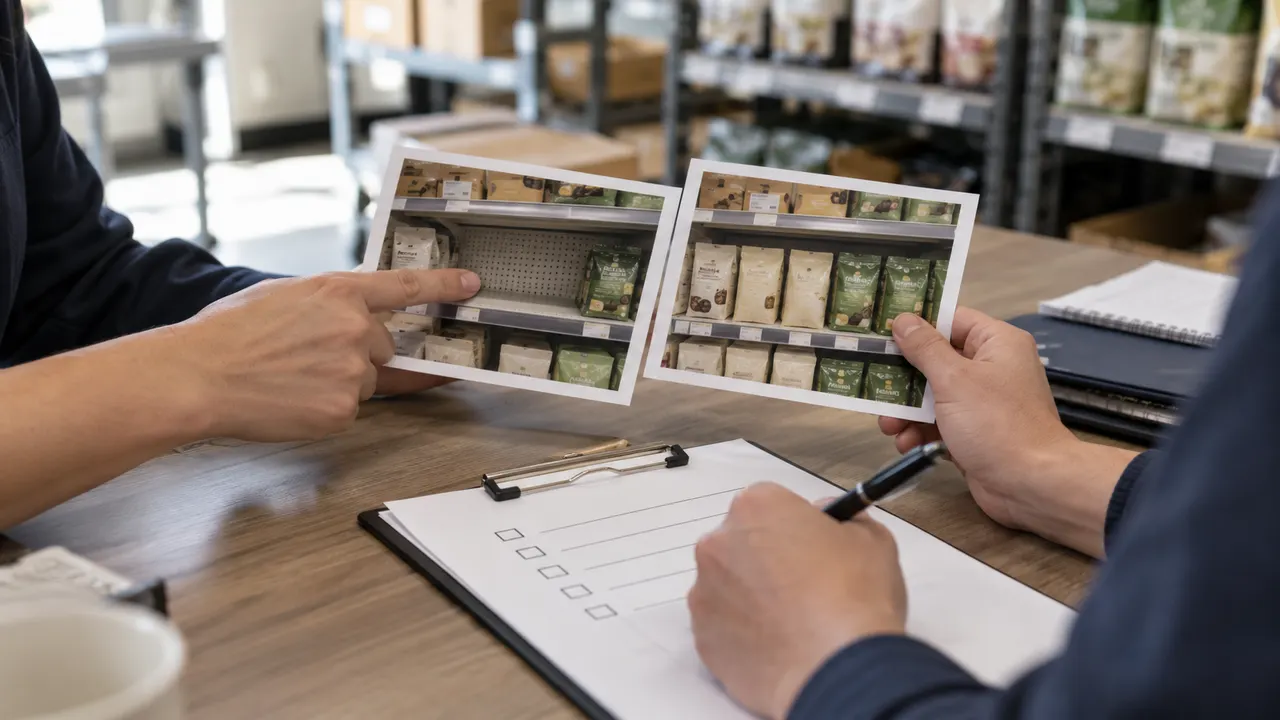
Record visible facings, shelf availability, observed price and display condition against the relevant SKU. A shelf gap is an observation; warehouse availability and a retailer replenishment decision belong to their own sources. Attach permitted photos and explain unchecked items rather than converting missing evidence into a pass.
Verify the fix instead of closing on a message
Assign a shelf, pricing or display issue to a named owner with a due date and required closure evidence. A rep's update can mark work submitted; the supervisor's verification completes the action. Preserve the original observation and any rejected correction so recurring issues remain understandable.
Turn a shelf observation into a traceable action.
The field rep records what is visible, the store team helps explain the gap, and the supervisor checks the evidence behind the follow-up.

Prepare for a useful product review.
Use these checks to compare fit, evidence and implementation before committing to a product.
Separate store execution from promotion funding
A promotion plan defines the commercial commitment and authorized activity. Retail execution checks whether the agreed display or shelf task happened at an outlet and what follow-up is needed. Link the store observation to the promotion reference while leaving funding approvals and claim settlement with their existing owner.
Explore promotion agreements and fundingChoose an existing platform or a focused custom app
Start with the field team's hardest visit rather than a dashboard tour. A packaged platform can fit when its task forms, mobile behavior and reporting match the operation. Discuss custom development when outlet rules, client separation, evidence review or existing-system handoffs require a more specific design. Compare implementation and ongoing ownership together.
Discuss a field workflow development scopeRun the same field scenario in every demo
Take one outlet with a shelf gap, an outdated task pack and a failed photo upload. Require the presenter to show the rep's saved work, server acknowledgement, supervisor decision and verified corrective action. Record which steps come with the platform, require configuration or need separate development.
Download the retail execution demo worksheetKeep sales incentives linked to their calculation records
Outlet visits and shelf actions describe field execution. If a commercial incentive depends on a sales result, retain the agreed qualifying event, participant credit and plan edition in the commission process. Keep visit evidence separate from commission approval and payment reconciliation.
Explore sales commission developmentCompare a retailer-led store assessment program
A retailer evaluating its own locations needs controlled standards, applicable question sets and an explainable grade. Compare store audit scoring and independent corrective review with the brand-led outlet visits and shelf observations of a field merchandising team.
Explore store audit scoring and reviewConnect the field visit to the approved shelf arrangement
An outlet visit can observe how the shelf is presented; a planogram application determines the measured arrangement assigned to that fixture. Compare product dimensions, facing capacity and layout editions before passing the approved reference into the field team’s visit workflow.
Explore shelf fit and planogram publicationSix steps from outlet planning to verified shelf follow-up
Use this sequence when comparing retail execution software or specifying a custom mobile workflow for field merchandising.
Publish the outlet visit pack
Select the territory, store identifier, visit window, assigned rep and approved SKU list. Freeze the task questions, display instructions and applicable promotion reference for that visit. Record reassignment and cancellation reasons. Agree which information must be available on the device before a low-connectivity visit starts.
Confirm access and capture shelf observations
Identify the correct outlet and record the visit outcome: accessed, closed, refused or another defined exception. For an accessible store, capture each required SKU observation, facings count, observed shelf price and display result. Separate not ranged, out of stock, not checked and unavailable evidence; they answer different buying questions.
Attach evidence and reconcile the sync
Link each photo or note to its outlet, visit, task and capture time. Where offline capture is required, retain a local operation ID, upload state and server acknowledgement. A saved form and its photo can arrive separately. Keep an incomplete attachment visible and retry with the same identity rather than creating a second visit.
Review the result against the visit instructions
Check required answers, photo relevance, SKU mappings and the task edition used. Ask for clarification when an image is blurred, a shelf is obscured or the observed price uses a different pack size. Keep submission and supervisor acceptance as separate states. Flag an outdated instruction for review without rewriting the rep's original observation.
Assign the corrective action and confirm closure
Create an action for each accepted exception that needs follow-up, with a responsible rep, store contact or internal team. Specify the due date, allowed response and evidence needed to verify the fix. Record refusal or a supply dependency explicitly. Reopen a verified action when a subsequent visit establishes that the same issue has returned.
Report coverage, evidence quality and unresolved work
Show planned, accessed, submitted and accepted visits with the reporting period and denominator. Calculate shelf results only from eligible accepted observations. Separate corrective work reported complete from work verified closed. Export unresolved actions and mapping errors to their owners; an observation or replenishment request should not silently change an ERP stock balance.
People, access and evidence
- Territory planners assign outlets and issue task editions. Field reps see only their permitted outlets, brands and visit packs.
- Supervisors accept observations, return incomplete evidence and verify corrections. Account teams receive the retailer issues relevant to their accounts.
- For agencies serving several brands, define client-level separation for questionnaires, photos, reports and exports. A shared outlet must not expose another client's records.
- Agree store permission for photography, location collection, retention and sharing. Keep shoppers and unnecessary personal information out of shelf evidence; use the minimum location detail the operating process needs.
Offline and exception cases
- Test a form saved without signal, a photo uploaded later, an interrupted retry and a second device editing the same visit. Choose explicit conflict handling and acknowledgement states.
- Use task editions and effective dates when head office changes instructions during a field round. Decide whether an in-progress visit finishes the old pack or receives a replacement.
- A closed outlet, denied photo permission, unavailable SKU or cancelled promotion requires an explained status. None should silently count as a passed check.
- Define device access removal, local cache expiry and recovery of unsent work when a rep changes territory or leaves. Select the mobile architecture around the actual offline and device requirements.
Migration, interfaces and operating support
- Prepare outlet IDs, territory assignments, SKU and pack-size mappings, question editions, open actions and permitted historic evidence. Resolve duplicate outlets before importing schedules.
- Map the source of assortment, promotion references, prices and order requests. Review available CSV or API interfaces, direction, refresh times, access permissions and failed-job ownership before agreeing an integration.
- Pilot a representative territory with accessible, blocked and low-connectivity outlets. Agree mobile device support, hosting ownership, backups, restore checks, evidence storage, training and response coverage.
- A quotation depends on rep and outlet counts, visit frequency, form complexity, offline duration, image volumes, languages, agency-client separation and external interfaces. Include recurring storage and support requirements in the selection.
Six records that connect an outlet visit to its result
Define these identities and review rules before selecting a retail execution app. They give planners, field reps and supervisors a shared way to test the workflow.
| Record | Example inputs | Required output and control |
|---|---|---|
| Outlet and authorized assortment | Outlet O-17; territory East; brand B-2; SKU P-40; 500 g pack; range edition A-3. | Retain one outlet identity and effective assortment dates. Distinguish an unranged SKU from a ranged item missing at the shelf. |
| Visit assignment | Visit V-81; outlet O-17; rep R-6; planned window; access outcome; cancellation or reassignment reason. | Keep the original plan and assignment history. Accessed, blocked, submitted and accepted are separate milestones. |
| Task and instruction edition | Pack T-4; required questions; SKU list; target facings; applicable display instruction; effective period. | Bind answers to the issued edition. Revised instructions require an explicit decision for an in-progress visit. |
| Observation and evidence receipt | Observation OB-9; P-40; two facings; shelf gap; photo E-8; capture time; operation ID; upload acknowledgement. | Preserve the observed result and photo link. A local save does not imply the server has received every required attachment. |
| Supervisor assessment | Assessment RV-3; reviewer; accepted or returned evidence; reason; eligible checks; exception category. | Exclude unaccepted or inapplicable checks from the agreed result denominator. A reviewer correction retains the earlier answer. |
| Corrective action and verification | Action AC-6; shelf replenishment follow-up; owner; due date; response photo; verifier; closure or reopening time. | Distinguish work reported complete from evidence-verified closure. Link repeat issues to the earlier observation and action. |
Illustrative field round: 12 visits are planned, 10 outlets are accessed and 2 are blocked. All 10 accessed visits are submitted; 8 have accepted evidence, with 6 meeting the defined shelf checks and 2 failing. Report visit coverage as 10/12 = 83.3%, evidence acceptance as 8/10 = 80%, and shelf-check pass rate as 6/8 = 75%. Keep the 2 blocked outlets and 2 unaccepted submissions visible. If 3 corrective actions are opened and only 2 are verified closed, the third stays outstanding even when its owner has sent a completion message.
Compare the field workflow behind the feature list
These primary vendor references cover visit planning, mobile activity and store evidence. Use the questions alongside the original record model and worksheet to test your own operation.
| Option | Published focus | Ask in your demo |
|---|---|---|
| Salesforce Consumer Goods Cloud | Visit routing, offline mobile work, store surveys, shelf checks and field sales within a wider consumer goods platform. | What happens when the rep submits a visit but its required photo arrives after the task instructions have changed? |
| Pepperi | Distributor field activities, custom audit forms, shelf and promotion checks, mobile access and reporting. | How are blocked visits, unaccepted evidence and verified corrections represented in the outlet and rep reports? |
| VisitBasis | Mobile store activity, configurable checklists, offline capture and field-team evidence for brands and agencies. | Can an agency demonstrate client-separated evidence, a duplicate upload retry and a correction reopened after another visit? |
Request a pilot using your outlet list, representative SKU packs and anonymized task forms. Compare mobile licensing or development, data migration, offline behavior, device support, image storage, interface work and ongoing review responsibilities. Agree the exceptions and reporting definitions before approving the wider rollout.
Category reference: Salesforce: consumer goods retail execution and store checks. The original outlet model, worked field-round example and downloadable checks turn a broad software category into a practical buying decision.
Promotion funding and retailer agreements
Keep the commercial agreement alongside the store evidence while assigning each funding, execution and settlement decision to its owner.
Open the related solutionConnect field evidence to distribution operations.
Decide how outlet observations, product records and retailer commitments fit your wholesale and distribution workflow.
Explore wholesale distribution requirementsQuestions to settle for your field execution project
Include planners, merchandising reps, supervisors and system owners when agreeing the pilot and quotation.
What does retail execution software manage?
It connects planned outlet visits to in-store tasks, SKU observations, evidence review and corrective follow-up. For a brand or distributor, the useful result is a clear account of what the field team checked and which shelf or display issues still need action.
How can we commission a retail execution app from Codeblix?
Bring an outlet list, visit plan, sample task form and a difficult field scenario to a consultation. We can define the record identities, mobile requirements, review roles and acceptance checks, then prepare a custom software development quote with migration, deployment and support scope.
Should the app work without an internet connection?
Decide from the stores and devices your reps actually use. If offline work is required, specify what the visit pack contains, how long it remains available and how forms and images are acknowledged after reconnection. Test interrupted uploads, stale instructions and conflicting edits during the pilot.
Is a shelf gap the same as an inventory shortage?
A shelf gap records what was visible at the outlet during the visit. Stock may still exist in a back room or another location. Record the observation separately from stock-system quantities and the replenishment decision so a field answer cannot silently change inventory.
How should a blocked or refused visit affect reporting?
Retain it in the planned-visit view with an explicit outcome and reason. Report accessed coverage separately from accepted evidence and shelf-check results. Agree which exceptions affect each denominator; a closed store or a denied photo request should never become an automatic passed check.
Can a merchandising agency manage several client brands?
Define client permissions for outlet assignments, SKU lists, questions, images and reports. Include a shared-outlet test that proves one client's users cannot read another client's observations or exports. Scope any agency-wide operational view separately from client reporting.
Can the workflow exchange data with our ERP or promotion system?
Review the interfaces those systems provide and identify the authoritative source for stores, products, prices and agreements. Agree exchange direction, frequency, duplicate handling and reconciliation. Keep order or replenishment requests separate from confirmed external transactions until the receiving system acknowledges them.
What affects the cost and support scope?
Outlet and rep counts, visit frequency, task complexity, offline duration, device platforms, languages, photo volumes and external interfaces influence the scope. Also specify client separation, historical migration, hosting, backup ownership, training and support coverage. The 20 demo checks provide a concrete pilot brief for the quotation.