
CEMS fiscal receipts
See how a CEMS-Betting receipt links a bookmaker transaction to the MRA response, QR code and Invoice Registration Number.
Watch this chapter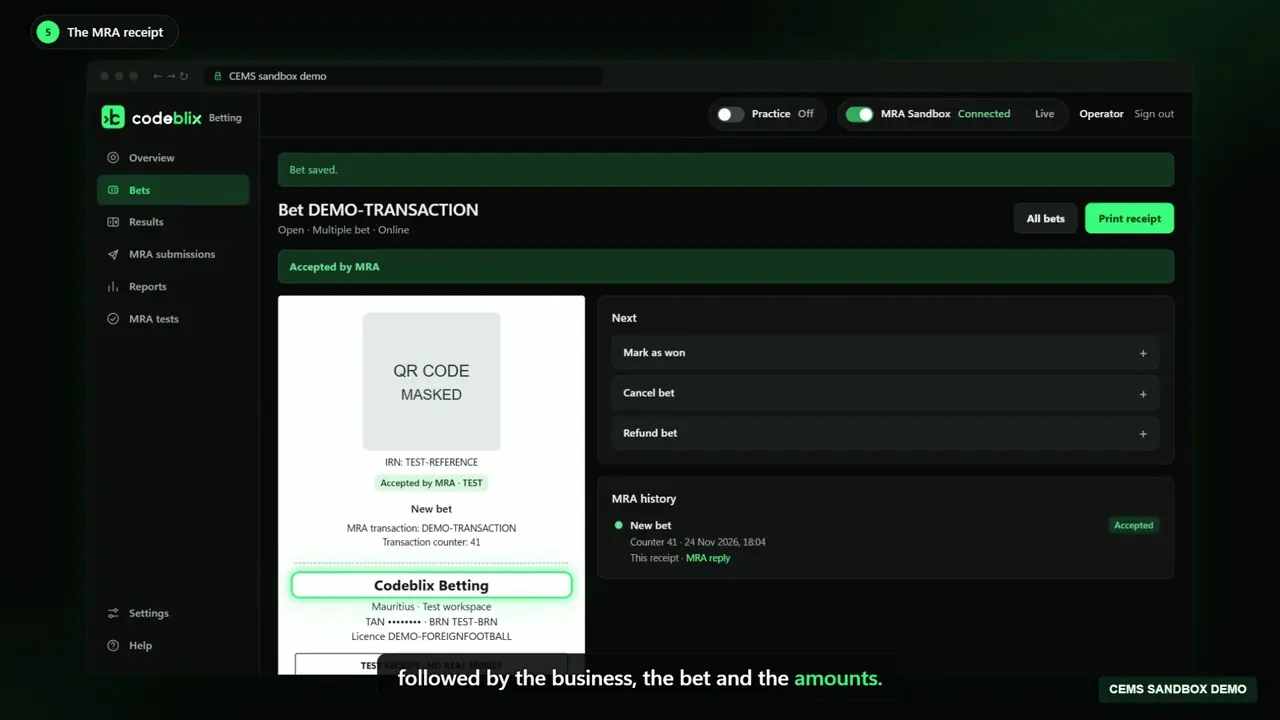
Follow one receipt
The demo starts with a saved foreign-football transaction. When the matching test response has arrived, the receipt places the MRA QR code and Invoice Registration Number (IRN) above the operator and transaction details. Staff can use these fields to connect the printed record to its source. The public film masks the test identifiers.
Keep the latest event in view
A win or payout is recorded as a separate event linked back to the original bet. The tour also follows cancellations and refunds. When reviewing a receipt, compare the latest event, the referenced original and the receipt status so the record matches the action the team just took.
Check print readiness
In the demonstration, printing unlocks after the latest transaction has a matching response with an IRN and QR code. A waiting transaction shows “Not Yet Fiscalised”. Use the timed chapter to see when the print button becomes available, then review the queue guide for delayed or unclear replies.
Discuss your CEMS setup
Tell us your licence category and which receipt, submission and reporting workflows your team needs.
Contact Codeblix