
Facilities management software
Facilities management software connects buildings and spaces with the requests, service providers, approvals and follow-up needed to run them. Codeblix develops custom facilities applications for organisations coordinating work across locations. Explore a service request from its room and access window through estimate approval, dispatch and occupant acceptance, then use the checklist to compare a platform purchase with a custom build.
Give every request a location, an owner and a clear next decision.
An office services team needs to see more than a list of completed tasks. It needs to reconcile the requested outcome, the visit arrangement, the spending decision and the occupant’s experience.
Find the affected space without losing context
Relate the site, building, floor and room to the request. Keep the service category and occupant contact available while suppliers and coordinators work on the same issue. A location name should stay stable when departments move or room labels change.
Authorize the current service estimate
Retain the supplier quotation, net amount, cost centre and estimate edition. Compare the request with the remaining site allowance before dispatch. A revised amount or visit arrangement should reopen the relevant decisions and preserve the superseded history.
Make acceptance a separate operational step
A supplier may report a finished visit while the room still needs attention. Record service completion and the occupant’s decision separately, with a route for follow-up. Show the reporting denominator so managers can distinguish closed services from work awaiting a response.
Connect the site request to its spending and service outcome.
FM-06 follows six requests across three synthetic locations. Inspect the portfolio, resolve the Meeting Suite access conflict and review the occupant’s response to the completed service.
Open the three-location service register
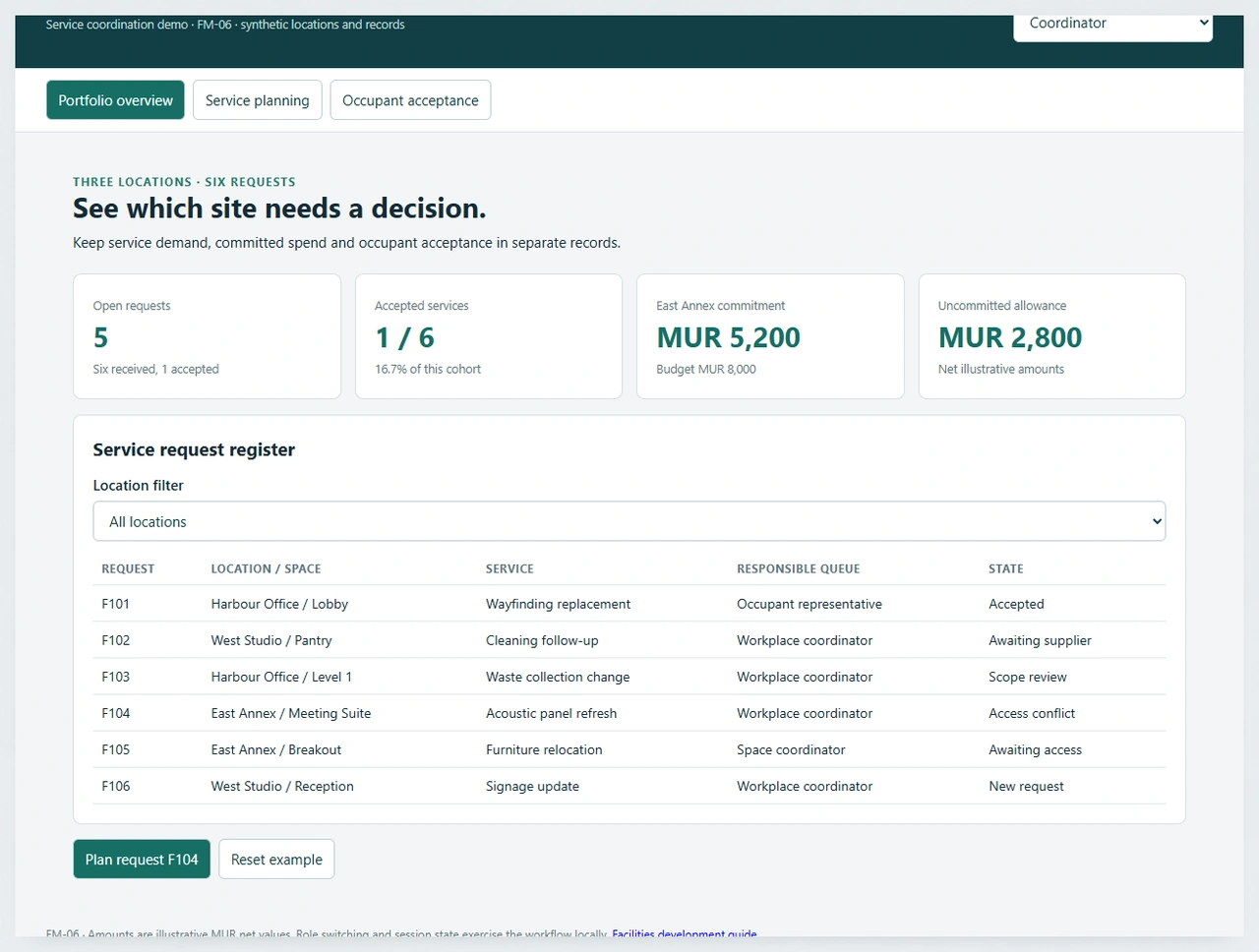
FM-06 contains six requests: signage, cleaning, waste collection, acoustic panels and a furniture move. One is already accepted, giving 1 ÷ 6 = 16.7% acceptance coverage. Filter East Annex to isolate F104 and F105 while the portfolio totals retain their six-request denominator.
Try the facilities service coordination demoResolve the room conflict before dispatching F104
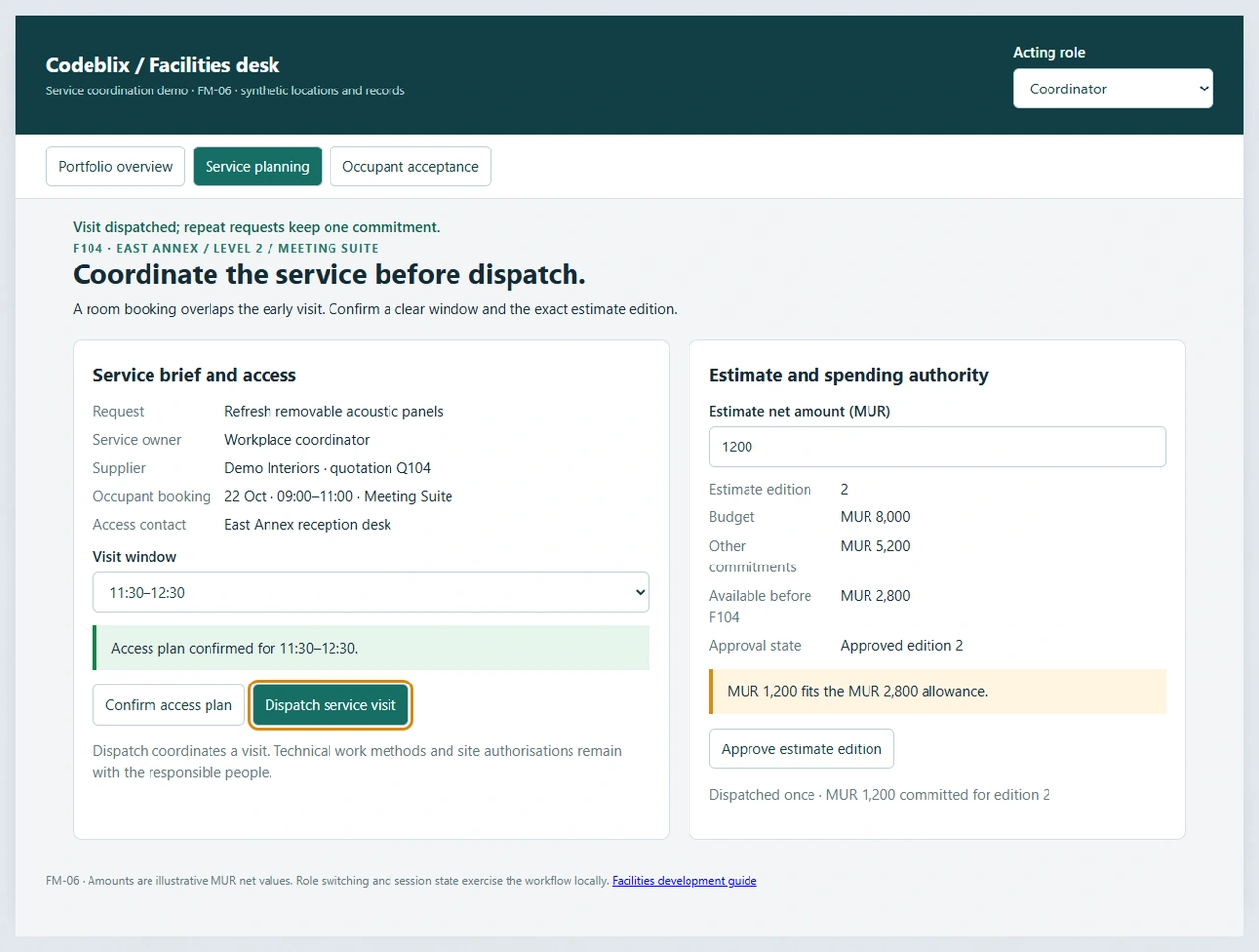
The Meeting Suite is reserved from 09:00 to 11:00. The initial 09:00–10:00 visit conflicts; select 11:30–12:30 and confirm the access plan as Coordinator. Finance approver can approve the MUR 1,200 net estimate within the MUR 2,800 uncommitted allowance. Coordinator then dispatches the visit once.
Change an estimate and inspect the consequences
The East Annex budget is MUR 8,000, with MUR 5,200 already committed. Dispatching F104 reserves another MUR 1,200, leaving MUR 1,600. Revising the estimate releases that request’s commitment and renews its access, finance and outcome decisions. Test MUR 3,200 to trigger the allowance hold.
Ask an occupant to accept the room outcome
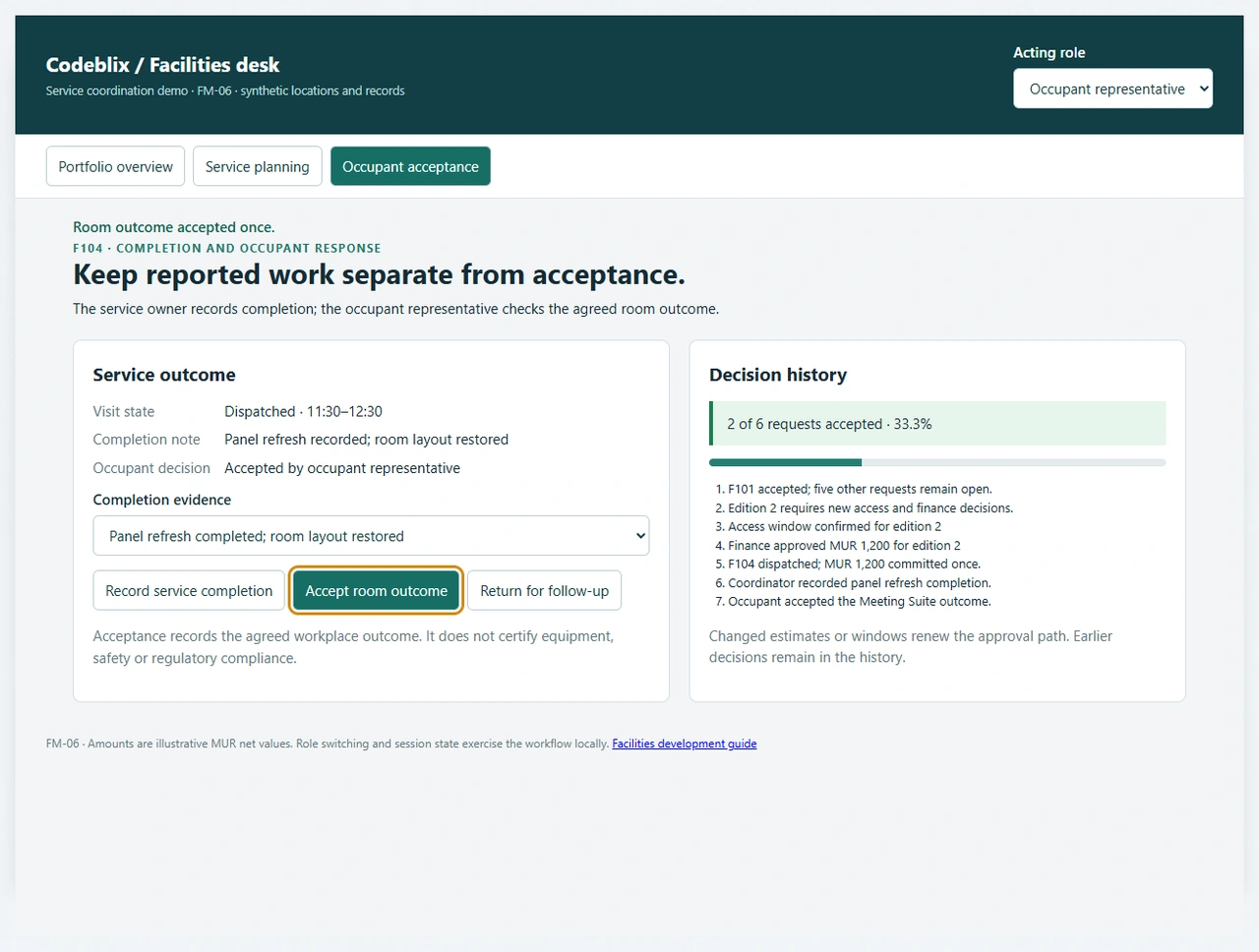
After dispatch, select the panel completion note and record it as Coordinator. Switch to Occupant representative to accept the room outcome. Coverage becomes 2 of 6, or 33.3%, with repeated acceptance leaving the figure unchanged. Returning the service for follow-up restores 1 of 6 and keeps the commitment visible.
Keep equipment work on its maintenance path
Use the facilities desk to coordinate site demand, suppliers and occupant outcomes. Retain work instructions, test evidence and technical release decisions in the maintenance workflow where those responsibilities belong.
Review the maintenance management workflowFrom a building request to an accepted service outcome
Use this sequence to agree responsibilities across occupants, site coordinators, finance and external providers.
Register the place and requested outcome
Identify the location, room, service category, requester and observable problem. Record the outcome the occupant expects, attachments permitted for the job and the responsible queue. Keep urgent operational escalation available through your established site procedures.
Review scope, ownership and access
Confirm who owns the request and whether it concerns cleaning, furniture, signage, maintenance or another service. Check room use, access contacts and visit windows before asking a supplier to attend. Route technical maintenance work to the appropriate maintenance record.
Compare the supplier estimate with the allowance
Attach an identifiable quotation edition, currency, tax treatment, service scope and cost centre. Separate estimated, approved, committed and actual amounts. Apply the organisation’s financial authority rules to the edition that will be dispatched.
Dispatch the reviewed service visit
Arrange the visit only after access and spending decisions are complete. Provide the accepted brief, location and responsible contact. Retain failed notifications, rescheduling reasons and supplier acknowledgement according to the agreed operating process.
Collect completion and occupant feedback
Record what was done and which evidence supports the report. Ask the authorised occupant representative to accept the agreed room outcome or return it for follow-up. A completion note should not silently replace the acceptance decision.
Reconcile spend and unresolved service demand
Compare the accepted outcome with the invoice handoff and outstanding commitments. Report requests by location, category and waiting reason. Review repeated service issues without merging away the original requester’s record or rewriting historical decisions.
Choose the records before choosing the interface
- Agree a durable site/building/floor/space hierarchy and the owner of location changes. Decide how requests link to room bookings, departments, service agreements and the staff who can accept an outcome.
- Separate Occupant, Coordinator, Finance approver, Supplier and Administrator permissions. Define which role can see attachments, approve spending, revise a dispatched brief and export the portfolio. Commissioned access controls should be enforced and tested on the server.
- The demonstration exercises role decisions in local session state. Your implementation specification should include identity, concurrent edits, durable decision history, recovery and the evidence needed to test unauthorised access.
Compare service coverage with the system you already use
- List which jobs belong in the facilities application and which remain in CMMS, asset inventory, procurement or visitor reception. Link stable references between systems instead of making several applications the owner of the same decision.
- Specify notification recipients, acknowledgement rules and waiting reasons. A queued email, a delivered message and an accepted visit are different observations; choose which ones operators need to act on.
- Evaluate location filtering, accessible mobile input, time zones and restricted attachments with realistic examples. Use a changed quote, a room conflict and an occupant rejection in every supplier demonstration.
Prepare migration and integration as identifiable work
- Inventory spreadsheets, request IDs, room labels, supplier records and open commitments. Reconcile imported counts by location and retain source references for records whose historic decision trail is incomplete.
- For each directory, booking calendar, procurement tool or finance application, verify the exact provider interface, authentication owner, data direction and failure recovery. Include tax and invoice handling only after confirming the actual accounting handoff.
- An integration estimate should name the trigger, fields, retry policy and reconciliation owner. Avoid treating a successful one-off import as proof of a continuous connection.
Make rollout and support part of the buying decision
- Choose a first site and a bounded service category, then agree synthetic acceptance cases before migration. Test interrupted saves, repeated dispatch, changed estimates, delayed supplier replies and backup restoration.
- Price location setup, roles, workflow variations, reporting, migration, interfaces, hosting and operator training separately. Agree the currency, tax basis and third-party running charges in the quote rather than inferring a price from the demo amounts.
- Assign service operations to business owners and application maintenance to the agreed support team. Define response targets, restore testing, release approval and ownership when an external provider changes its interface.
Six records for a facilities service request
Use the FM-06 model to inspect what changes when a room is occupied, an estimate is revised or an occupant asks for further work.
| Record | Example inputs | Required output and control |
|---|---|---|
| Location and space | East Annex / Level 2 / Meeting Suite; site owner; room booking | Keep a stable space identity and the access contact attached to the service request. |
| Facilities request | F104; acoustic panel refresh; Workplace coordinator; expected room outcome | Record the occupant’s job separately from a supplier’s visit and the technical maintenance record. |
| Access plan | 22 Oct; room occupied 09:00–11:00; visit 11:30–12:30; coordinator review | Check the proposed visit against the known room use before dispatch. |
| Supplier estimate | Q104; current edition; MUR 1,200 net; scope; Demo Interiors | Retain the exact estimate and renew its decisions after a change. |
| Allowance and commitment | Budget MUR 8,000; other commitments MUR 5,200; F104 MUR 1,200 | Approve within MUR 2,800 and commit the dispatched request once. |
| Completion and occupant outcome | Panel completion note; occupant acceptance; follow-up reason; six-request cohort | Distinguish the supplier report from the accepted outcome and retain a route back to follow-up. |
The synthetic East Annex allowance starts at MUR 8,000 − MUR 5,200 = MUR 2,800. Dispatching the approved MUR 1,200 F104 edition leaves MUR 1,600; repeating dispatch does not reserve it twice. A revision supersedes that edition and releases its commitment before a new approval. Initially 1 of 6 requests is accepted (16.7%). Accepting F104 gives 2 of 6 (33.3%); returning it for follow-up restores 1 of 6. Amounts are illustrative net values, not a software quote or an invoice.
Compare facilities platforms with the same service scenario
These current supplier pages describe broader facilities products. Bring the same request, estimate revision and occupant follow-up scenario to each demonstration.
| Option | Published focus | Ask in your demo |
|---|---|---|
| FMX | Maintenance, capital planning, utility costs, facility reservations and parts records. | Change the estimate after dispatch and show the old commitment, new authority and room-access decision. |
| Eptura | Portfolio views, service requests, floor plans and vendor/invoice coordination. | Return a supplier-completed service for occupant follow-up without counting it as accepted. |
| FM:Systems | IWMS coverage across space, moves, maintenance, assets and workplace analytics. | Move a department to another room and retain the request’s original location and acceptance history. |
The questions test buying requirements rather than asserting missing supplier features. Compare the actual edition, permissions, implementation work, migration support and total operating cost supplied in each proposal.
Category reference: FMX facilities management overview. The FM-06 service desk, six-record model, commitment arithmetic and 20 acceptance exercises are original Codeblix buyer resources.
Connect site operations with the people who own each decision.
Discuss the service queues, locations and outside systems your facilities application needs to coordinate.
Explore service business softwareQuestions before buying or commissioning facilities software
Use the answers to define the service boundary and the first site rollout.
What does facilities management software organise?
It relates buildings and spaces to service requests, responsible teams, suppliers, planned visits, spending decisions and outcomes. The useful scope depends on your estate: a small office may need a service desk, while a larger portfolio may need space, maintenance and procurement connections.
Can Codeblix develop a custom facilities application?
Yes. Codeblix offers custom development for facilities service coordination. Start with the location structure, first service category, roles, approval rules and the request-to-acceptance path. The FM-06 example helps make those decisions concrete before a quote.
How is the facilities desk different from a CMMS?
The facilities desk coordinates demand across places, suppliers and occupants. A CMMS concentrates on maintenance assets, work planning and the evidence surrounding maintenance execution. Connect the records where a site request needs maintenance work, with a clear owner for each decision.
What happens when a supplier changes its estimate?
Retain the previous estimate edition and renew the decisions affected by the change. In FM-06 a revision releases the request’s commitment, clears access and finance decisions, and restarts dispatch and outcome review. Your commissioned rules should also cover actual costs and any work already performed.
Does completed service mean the request is accepted?
Service completion records the provider’s reported work. Occupant acceptance records whether the agreed workplace outcome was achieved. Keep both states, with a reasoned follow-up path when the occupant still needs attention.
Can it connect with our calendar or finance software?
Review the exact providers, available interfaces and access requirements during discovery. Agree ownership, data direction, notification semantics and reconciliation before including a connection in delivery scope. A booking display and a finance posting need different acceptance evidence.
What data should we prepare for migration?
Prepare location identifiers, room labels, supplier references, request history, open estimates, commitments and unresolved outcomes. Include source files and responsible owners so imported totals can be reconciled by site and service category.
What determines the software cost and support scope?
Location count, roles, service variations, migration, external connections and reporting shape the project. Include hosting, backup restoration, accessible mobile use, training and continuing maintenance. The example’s MUR amounts illustrate service budgeting and do not price the application.