
Desk booking software
Desk booking software lets employees reserve an available workstation for a defined time, with rules for equipment, access and arrival confirmation. Codeblix develops custom desk reservation applications for workplaces whose allocation rules need a tailored workflow. Try the working desk demo, compare established platforms and use the acceptance checklist to define the application you want to commission.
Allocate the workstation that fits the person and the time.
A free-looking desk is useful only when its equipment, availability and allocation policy agree. Start the software decision with those constraints.
Check the whole reservation interval
Compare start and end times with every active booking for the desk and the employee. Define the time zone, opening hours and boundary rule. An adjacent reservation can start when another ends if no turnover buffer is required.
Match equipment and eligibility
Keep desk identifiers, zones, equipment and bookable status together. Apply team restrictions from authenticated identity in the delivered application. Document who may close a desk or book on behalf of another person.
Explain release and reporting
Decide how arrival is recorded, the grace period and the treatment of missing evidence. Retain a released booking in history. A reservation or check-in count should state its denominator and must not be confused with a physical occupancy measurement.
See which desk can be booked, and why.
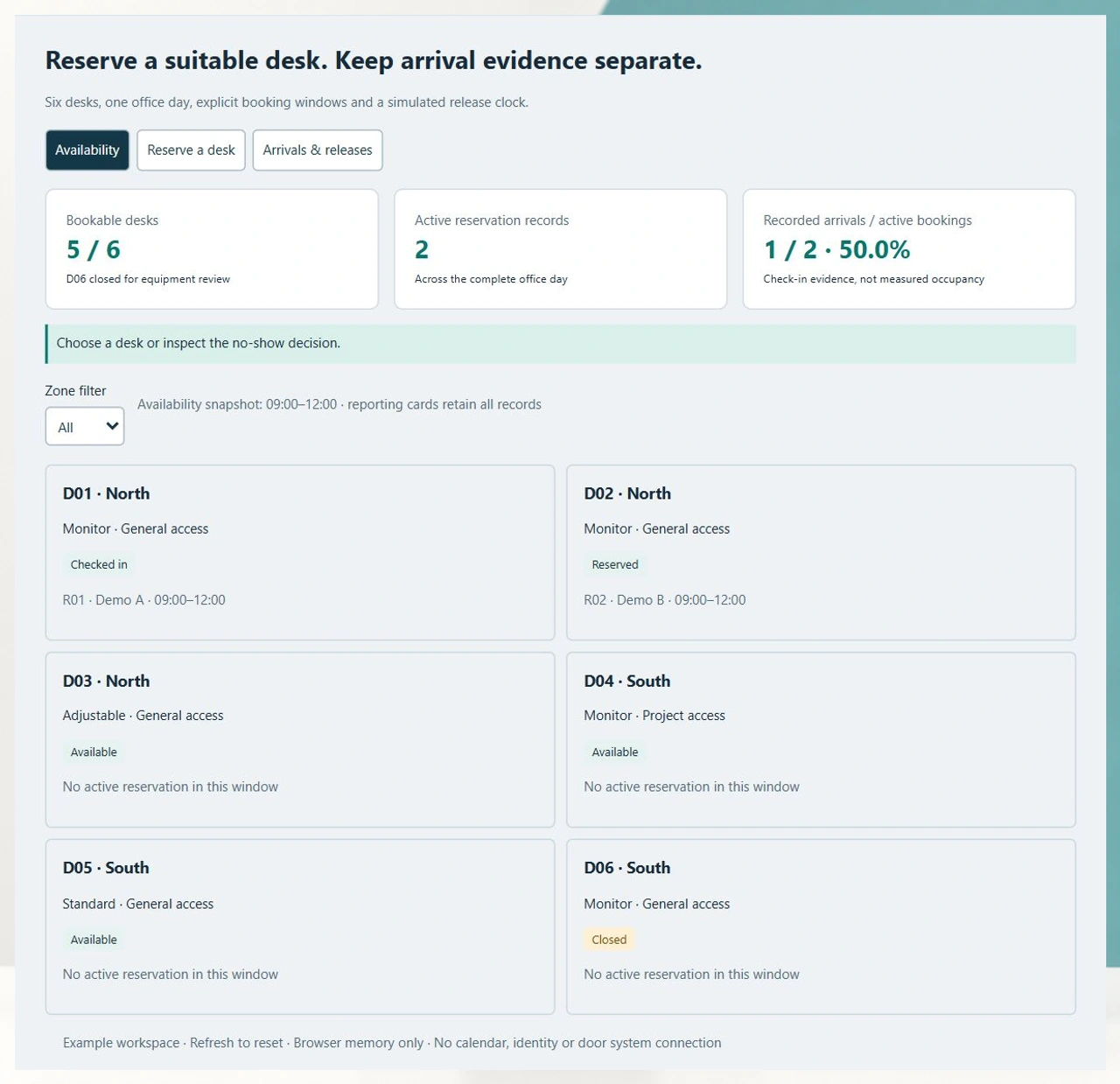
The DB-06 example uses six synthetic desks at Harbour Office. Follow a suitable workstation booking and a no-show release while keeping the recorded-arrival denominator visible.
Try DB-06 with the same scenario in every supplier demo
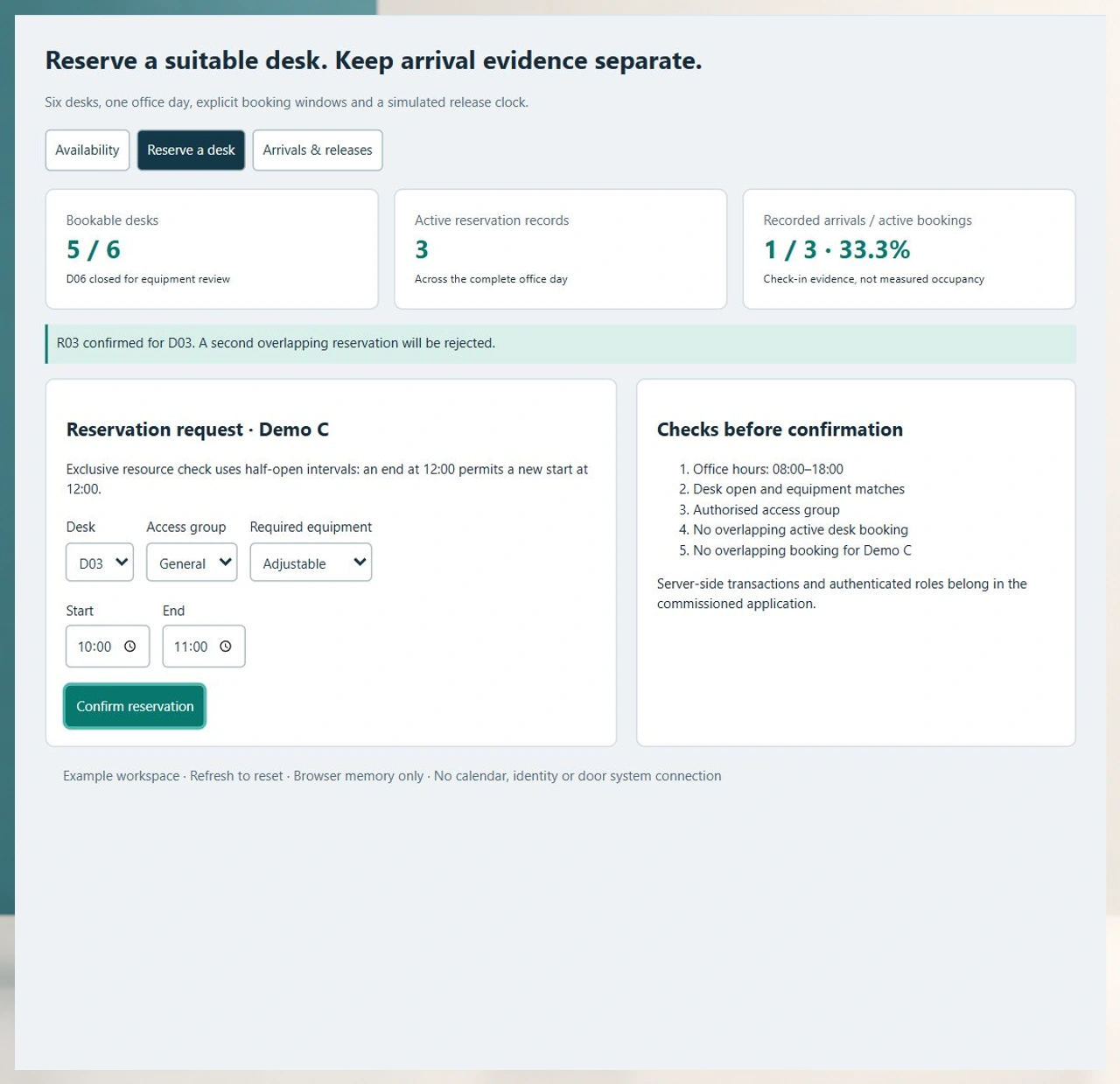
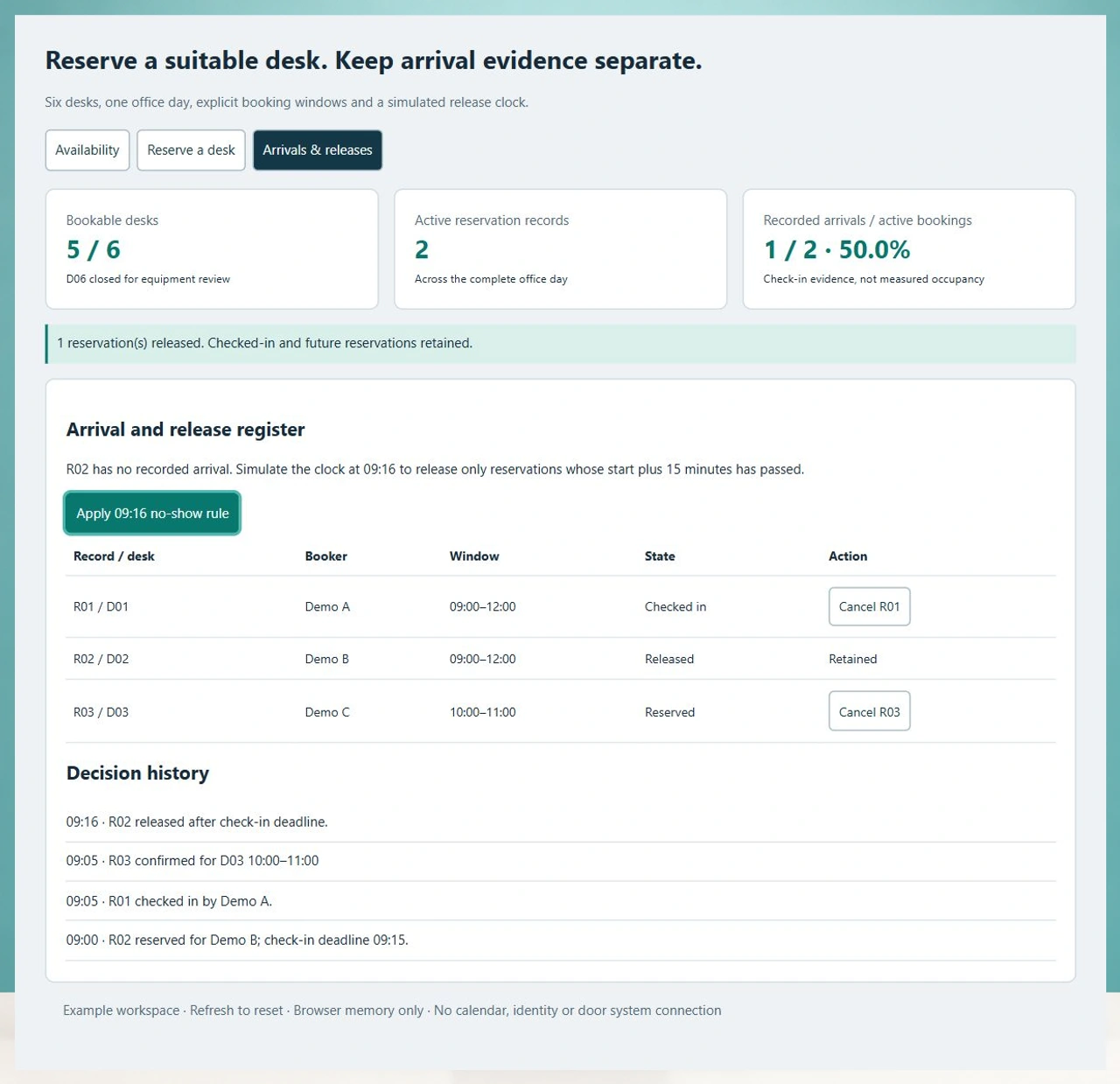
Attempt D01 at 10:00–11:00 to see an overlap rejection. Confirm D03 with Adjustable equipment, then apply the 09:16 release rule. R02 is released; R01 and the future R03 remain. Refresh the example to start again.
Open the desk booking demoKeep employee reservations distinct from coworking memberships
A workplace desk request allocates a workstation to an employee. Coworking operations also manage membership editions, usage entitlements and billing relationships. Keep those records with their existing operating owner when both workflows are needed.
Explore coworking operationsConnect desk closures to the facilities queue
An equipment fault may make a workstation unavailable. Link the desk closure reason to a service request without turning a facilities completion note into proof that the employee used the desk.
Review facilities service coordinationFrom a desk request to a retained booking history
Agree each transition with workplace operations, employees and the system owner before commissioning the first office rollout.
Register the bookable workstation
Assign a stable desk ID, site, zone and equipment list. Mark permanent allocations and temporary closures explicitly. Confirm which desks are bookable during each office opening window.
Identify the employee and booking policy
Resolve the employee, eligible zones and permissions through your agreed identity source. Specify booking lead times, recurring requests, delegate bookings and whether colleague names are visible.
Validate the requested interval
Check opening hours, equipment requirements, eligibility and overlaps for both the desk and the employee. A production reservation needs an atomic server transaction so simultaneous requests cannot both claim the final desk.
Confirm and communicate the allocation
Create a durable reservation ID and display the desk, local date and start/end time. Define notification retries and calendar reconciliation separately from the confirmed booking. A failed message must not silently remove the reservation.
Record arrival or release an unused booking
Choose the arrival evidence source and grace rule. Give authorised staff a reasoned exception route. Run release jobs with an explicit site clock and idempotent updates, retaining their decision history.
Review changes and workplace demand
Allow cancellation and amendments within policy. Separate reserved desk-hours, recorded arrivals and measured occupancy. Reconcile the eligible inventory when desks close, zones change or employees leave.
Roles, privacy and application authority
- Employees manage their own reservations; delegates need explicit authority for another booker.
- Workplace administrators own inventory, closures, zone rules and exception reasons.
- Identity administrators manage joiner, mover and leaver synchronisation; the reservation service enforces eligibility.
- Agree colleague visibility, retention, audit access and aggregated reporting without collecting unnecessary arrival details.
Migration and connection decisions
- Import stable site, floor, zone and desk identifiers before future bookings; reconcile permanently assigned and closed desks.
- Define the exact identity, calendar and notification providers, data direction and reconciliation rules during scoping.
- Review recurring-booking collisions, daylight-saving transitions, duplicate imports and identity changes using anonymised examples.
- A workstation reservation does not itself grant building entry; any door-control scope needs separate integration and acceptance work.
Deployment, support and buying economics
- Compare a configured platform against a custom build using the same users, desks, sites and operational rules.
- Include hosting, monitoring, backup restoration, incident response and policy-change ownership in the quote.
- Run a pilot office with agreed concurrency, accessibility and mobile acceptance criteria before migrating every site.
- Subscription units, implementation fees, integration work and ongoing maintenance all affect total cost; obtain current supplier quotes.
Six records to bring to a desk booking project
Use this original model and repeatable scenario to compare products or scope custom development. Synthetic desk and employee references keep the example free of personal records.
| Record | Example inputs | Required output and control |
|---|---|---|
| Office day | Harbour Office; 23 October 2026; UTC+04; 08:00–18:00 | Evaluate all intervals against the same site clock and opening window. |
| Workstation | D01–D06; North/South; Monitor, Adjustable or Standard | Retain a stable ID and closure state independently of the desk label. |
| Booker and eligibility | Demo A, B and C; General or Project allocation group | Validate eligibility from trusted identity in the delivered service. |
| Reservation | Record ID; desk; booker; start; end; Reserved or Checked in | Reject overlapping desk and employee claims in a single atomic write. |
| Arrival or release decision | Check-in record; start plus 15 minutes; simulated clock 09:16 | Release only overdue unclaimed reservations and preserve the decision once. |
| Change history and reporting cohort | Cancellation/release reasons; all active records; excluded closed desk | Retain historical records and identify the denominator behind every rate. |
Initially five of six desks are bookable, with two active reservations and one recorded arrival: 1 ÷ 2 = 50.0%. Reserving D03 for Demo C at 10:00–11:00 produces three active records: 1 ÷ 3 = 33.3%. At the simulated 09:16 clock, only unclaimed R02 has exceeded its 09:15 deadline. Releasing it leaves two active records and restores 1 ÷ 2 = 50.0%. These are synthetic booking ratios, not measured occupancy or customer results.
Compare established desk booking platforms
These supplier overviews answer the basic booking, employee experience and administration questions. Ask each supplier to run the same boundary and exception cases.
| Option | Published focus | Ask in your demo |
|---|---|---|
| Archie | Desk maps, colleague scheduling, group visibility and configurable check-in policies. | Show simultaneous requests for one desk, followed by a change in the booker’s eligible group. |
| Envoy | Hot, permanent and unavailable desks, amenities, booking windows and team neighbourhoods. | Close a desk that already has a future booking and show the employee’s resolution path. |
| Robin | Recurring office schedules, automatic desk choices, communication tools and arrival options. | Reconcile a missed arrival signal, a released reservation and a delayed calendar update. |
The questions are evaluation scenarios, not claims that a supplier lacks a feature. The useful decision asset is a shared desk, booker, interval and release model that can be tested across proposals.
Category reference: Archie desk booking product overview. The DB-06 interaction, six-record allocation model, worked reporting example and acceptance checklist are original Codeblix buyer resources.
Plan desk reservations alongside workplace operations.
Connect the people, workstations and service owners needed for a useful first office deployment.
Explore service business softwareQuestions when buying or commissioning desk booking software
Resolve allocation, arrival and operating responsibility before comparing implementation quotes.
What is desk booking software used for?
It allocates a workstation to an employee for a specified date and time. Useful controls cover equipment, eligible zones, overlapping bookings, cancellations and arrival handling. Some workplaces also need permanent desk assignments and recurring office schedules.
Can Codeblix build a tailored desk reservation application?
Yes. Codeblix offers custom software development for workplace desk allocation. Begin with one office, a reliable desk inventory and the policies that a configured platform would need to support. The working DB-06 example helps turn those requirements into acceptance cases.
Are hot desking and desk reservations separate software purchases?
They often describe the same workstation allocation job. Hot desking emphasises shared desks; advance reservations emphasise planning ahead. Compare the timing, assignment and arrival rules you need rather than commissioning duplicate applications for the terms.
How should simultaneous booking attempts be handled?
The server must validate and commit the desk interval atomically so that only one conflicting request succeeds. Employee overlap and eligibility checks belong in the same authoritative path. Test retries, recurring requests and cancellation races before rollout.
When should an unused reservation be released?
Agree a site-specific grace period and arrival evidence source. DB-06 demonstrates a 15-minute rule using an explicit simulated clock. Your operating policy should include delayed signals, staff exceptions and a retained reason for any release.
Does a desk reservation prove someone is in the office?
A reservation expresses intent. A check-in records a particular arrival signal. Physical occupancy may require a separately agreed evidence source and measurement method. Keep those definitions and denominators distinct in workplace reports.
Can the application use our identity and calendar systems?
Review the exact systems and permitted interfaces during scoping. Agree identity ownership, delegated booking authority, calendar direction, notification retries and reconciliation. Include connection-specific implementation and support in the quote.
What determines project price and support?
Desk and site counts, role rules, recurring bookings, identity/calendar connections, migration and reporting shape the delivery effort. Add hosting, backup recovery, training and support response requirements. Request comparable scope and current terms from every shortlisted supplier.