
Hire a dedicated CS-Cart developer for your seller workflows
Hire a dedicated CS-Cart developer through Codeblix for an agreed program of marketplace changes. Define the seller workflow, installed edition and development backlog, then agree allocation, milestones and commercial terms in a quotation. For a catalog import engagement, make vendor ownership, category permissions and repeat-request behaviour explicit before the first batch reaches the store.
Connect developer allocation to accepted marketplace changes.
A continuing engagement needs an ordered backlog and clear evidence that each delivered change respects the marketplace's seller boundaries.
Keep each seller's records separate
Identify the vendor along with every imported product, image and category decision. A product code shared by two vendors must not silently select the wrong record. Specify how the implementation resolves missing vendor context and conflicting rows within one source file.
Give reviewers a reproducible acceptance case
Choose a compact source batch containing an update, a new listing and a rejected row. Record the category mapping, excluded rows and expected catalog values. Ask the developer to demonstrate those decisions under both seller and administrator roles.
Tie continuing work to a release decision
Agree the change backlog, allocated development time and the person authorized to reprioritize it. Define what must be demonstrated before a release, how an incomplete task carries forward and which operational issues belong to maintenance coverage.
Resolve the source rows before changing the catalog.
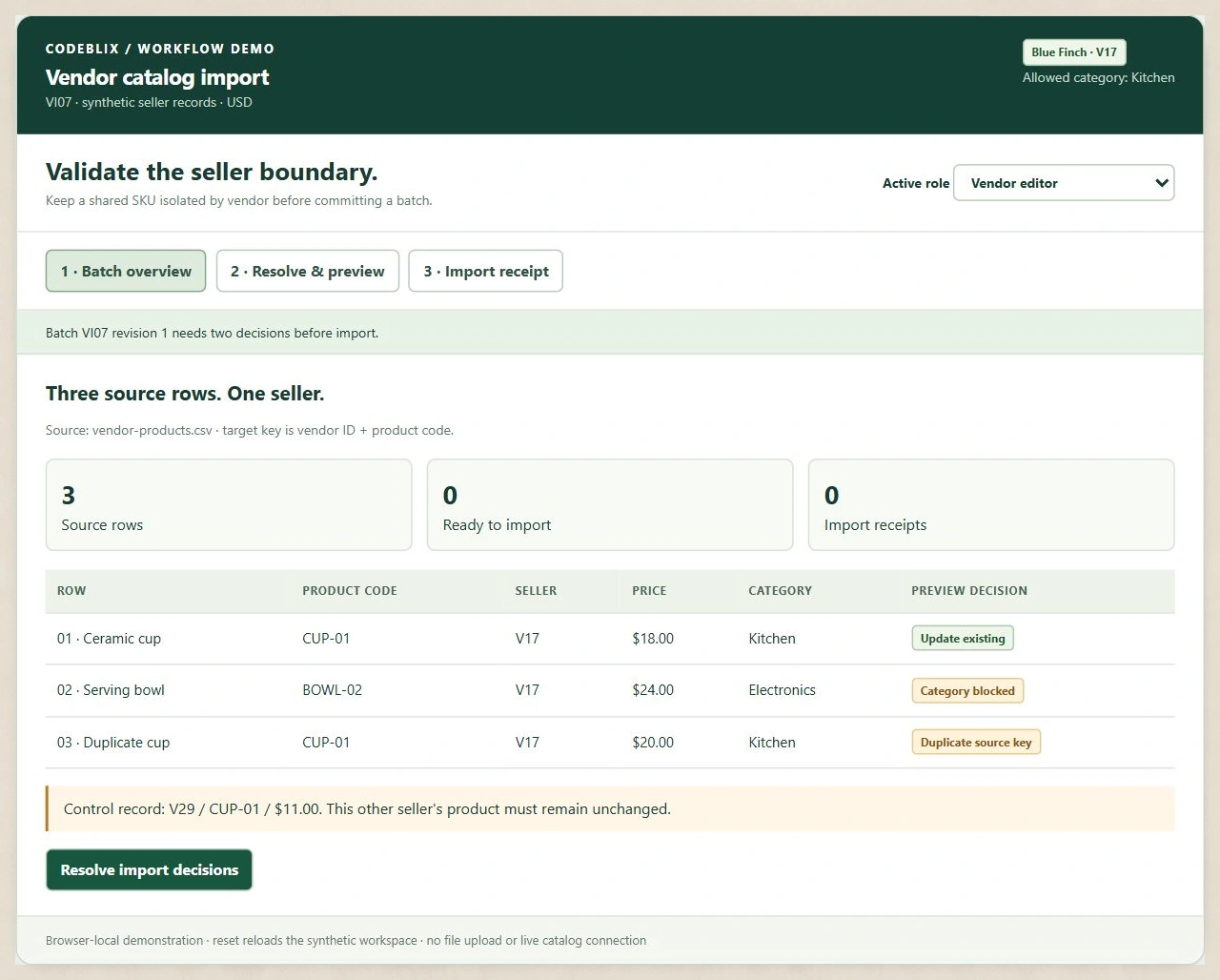
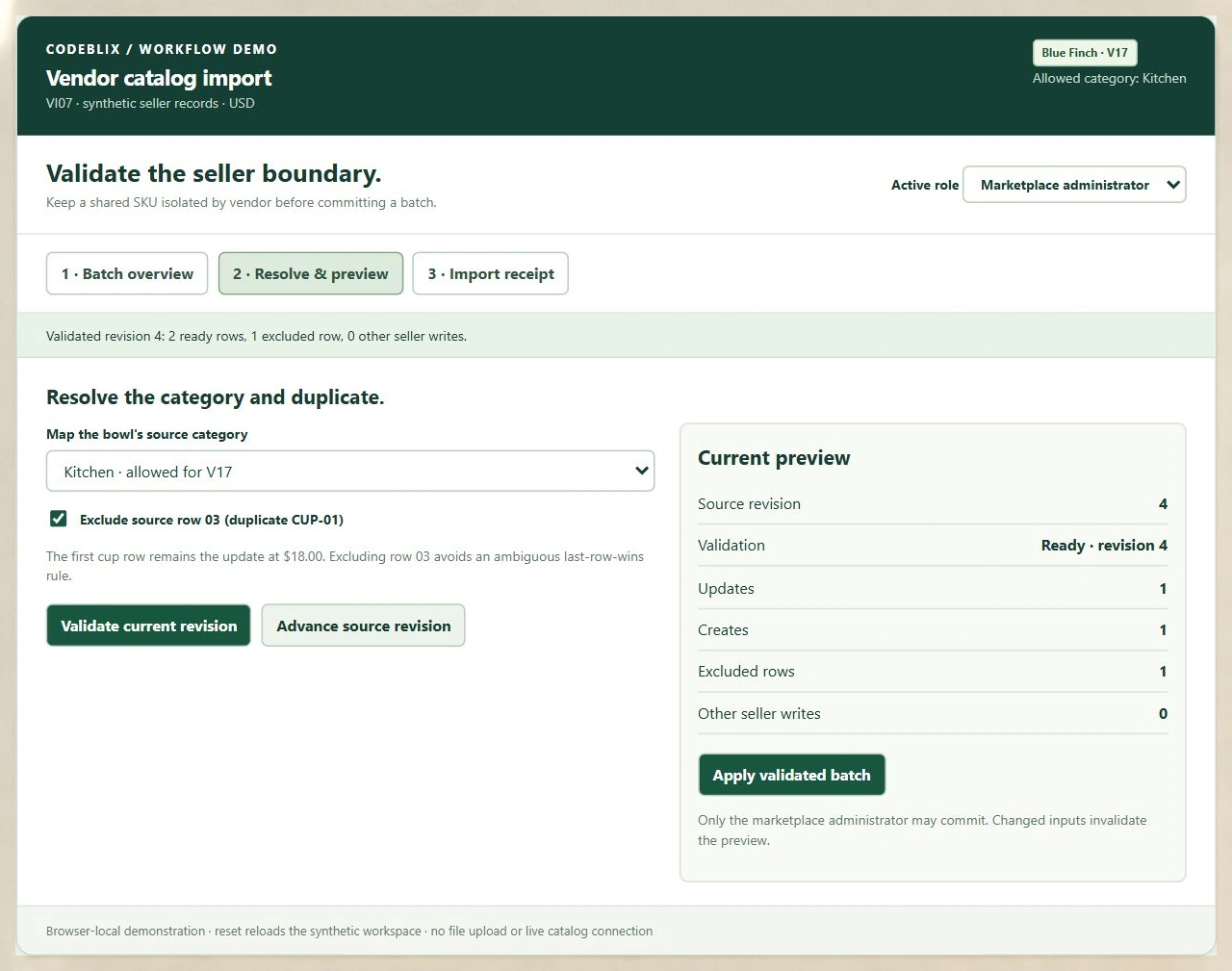
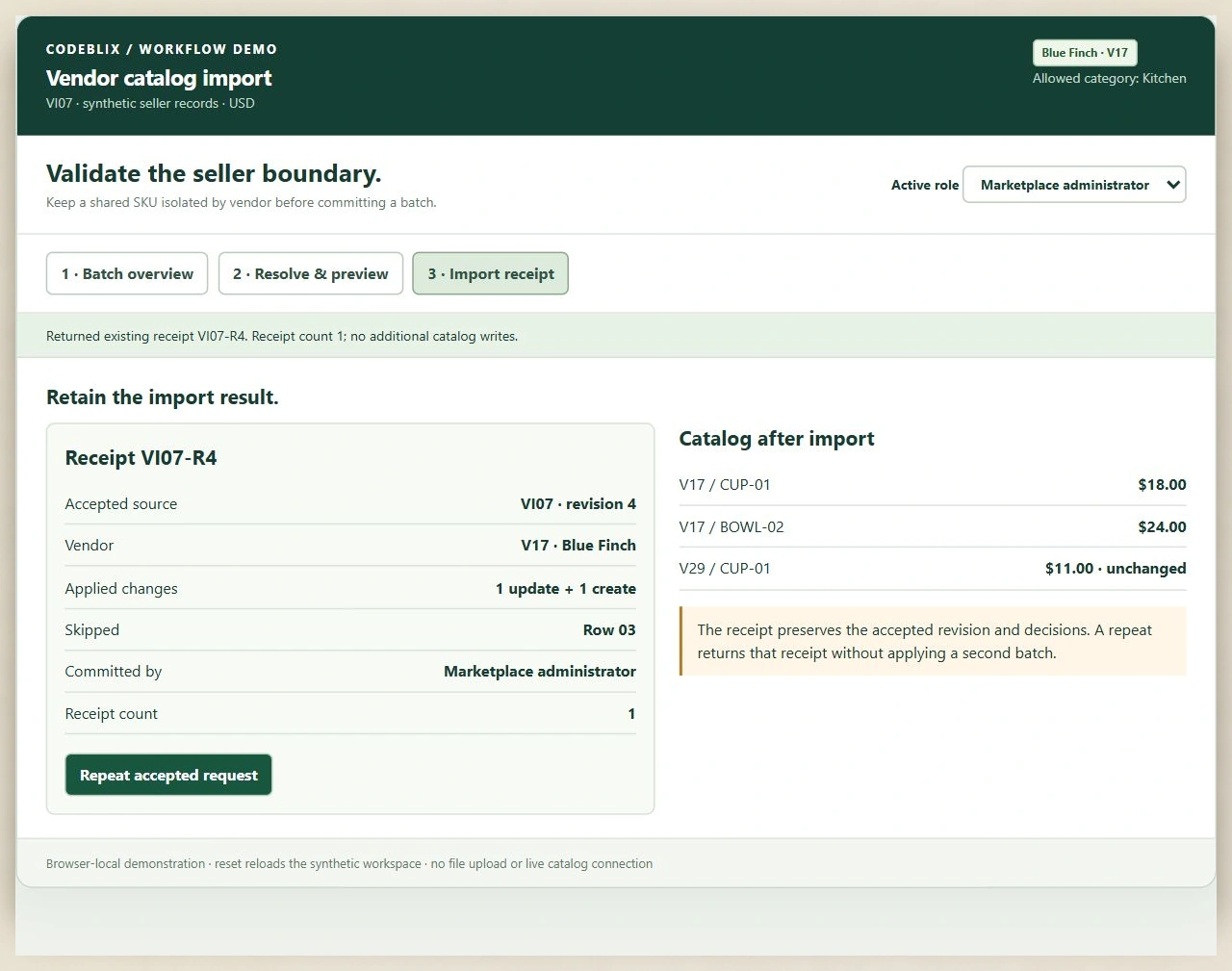
VI07 is a working vendor catalog import demo. Blue Finch has a category restriction and a duplicate product code in its source file. Resolve both decisions, validate the revision and apply the batch as the marketplace administrator. A second seller's matching code stays untouched.
Try the vendor import acceptance case
The exercise starts with a blocked category and a duplicate source key. Map the bowl to Kitchen, exclude the duplicate cup row and validate. Check that a vendor editor cannot commit, then apply as the marketplace administrator and repeat the accepted request.
Open the working vendor import demoUse the installed import facilities as the starting point
CS-Cart's primary documentation explains Multi-Vendor import presets and field modifiers. Inventory the existing presets and seller permissions before quoting an extension; distinguish configuration work from a new validation or approval requirement.
Read the official vendor import referenceConfirm category restrictions in the installed edition
The official vendor-category reference describes how Vendor Plans can limit a vendor's available categories. Supply your configured plans and the intended exception behaviour so the quotation can address the actual marketplace settings.
Check the primary vendor-category referenceScope other store platforms independently
An osCommerce checkout project uses its own module inventory and cart-to-order acceptance case. If the engagement includes another storefront platform, identify its code, data and release responsibilities separately.
Discuss an osCommerce store engagementSix stages from seller brief to operating handover
Use a representative vendor batch to agree the development boundary, validate implementation and retain the result.
Inventory the marketplace edition
Supply the CS-Cart or Multi-Vendor edition and version, runtime, custom add-ons, theme changes and hosting arrangement. Identify source ownership and available staging access. Mark which seller or administrator screens the requested work reaches.
Define the seller import contract
Provide sanitized columns, product identifiers, vendor context and category rules. Decide whether each row creates, updates or is excluded. Include one product code that exists under a different seller so ownership isolation can be checked.
Agree dedicated allocation and priorities
Turn the requested changes into a ranked backlog. Set the allocation period, communication rhythm, estimation approach and authorized decision maker. Confirm capacity, commercial terms and how additional work enters the engagement.
Demonstrate the revision being accepted
Run the import in an isolated catalog using synthetic products. Resolve duplicate and category decisions, then change a source revision to test stale validation. Exercise seller and administrator permissions against the same batch.
Rehearse an authorized release
Record the accepted code, add-on settings, schema work if any, and recoverable data backup. Rehearse deployment and catalog reconciliation. Agree the release window and recovery trigger with the marketplace owner before production access is used.
Retain receipts and maintenance ownership
Hand over the row decisions, resulting catalog identifiers and release instructions. Identify who investigates seller import failures and who can approve follow-up changes. Agree monitoring, upgrade responsibilities and maintenance coverage for the delivered work.
Prepare the materials for a development quote
- Describe the seller action that should change and the administrator's expected result. Include annotated screen examples and sanitized input records with the expected output for each row.
- Provide the installed edition, source repository, custom add-on list and deployment inventory. Identify licenses and third-party services needed for the chosen implementation.
- Name the backlog owner, acceptance reviewer and production operator. State the desired allocation period and any fixed trading or release constraints.
- Ask the quotation to separate investigation, implementation, acceptance, release assistance and continuing maintenance. Agree the process for reprioritizing tasks and approving additional scope.
Specify the data and integration boundaries
- For vendor imports, agree the product matching key, source revision, currency, field mapping, image handling and category authorization. Define rejection output and whether the batch commits atomically.
- For a supplier feed or business-system connection, supply current interface documentation and sample messages. Scope direction, authentication, update frequency, retries, conflict ownership and reconciliation as explicit work items.
- For catalog migration, map vendor identifiers, products, variants, categories, images and existing URLs. Rehearse the mapping and retain rejected-row and unmatched-record reports for review.
- Keep external payment, payout and tax behaviour in their own acceptance scope when affected. A catalog development engagement should identify those dependencies before changing a shared module.
Accept the release and plan ongoing support
- Inspect the committed seller records as well as the import summary. Confirm that a same-code product under another vendor retains its previous value.
- Retain the source revision, mapping decision, authorized reviewer and import receipt with the accepted code revision. Define the operational retry procedure after a failed or interrupted batch.
- Specify who receives errors, who can reprocess rejected rows and who approves policy changes. Agree support hours and escalation arrangements in the engagement terms.
- Review custom add-ons and acceptance cases when the marketplace version or vendor plans change. Decide which compatibility checks belong to recurring maintenance and which require a new estimate.
Six records that make vendor import scope concrete
VI07 gives the development discussion a small, repeatable catalog case with two sellers and three source rows.
| Record | Example inputs | Required output and control |
|---|---|---|
| Seller boundary | V17 / Blue Finch; V29 / Cedar Row | Resolve products using vendor ID and product code together; V29 is a control record. |
| Source batch | VI07; three rows; current source revision | Preserve the accepted source revision and require revalidation after a changed input. |
| Product decisions | V17 CUP-01 at $18; BOWL-02 at $24; duplicate CUP-01 at $20 | Update the first cup, create the bowl and explicitly exclude the duplicate third row. |
| Category mapping | Bowl source Electronics; V17 allowed category Kitchen | Block the batch until the category maps to Kitchen and the duplicate decision is resolved. |
| Authorized preview | 2 accepted rows; 1 update; 1 create; 1 excluded | A vendor editor may inspect the preview; only the marketplace administrator can apply this exercise's batch. |
| Import receipt | VI07-R4; one receipt; V29 CUP-01 remains $11 | Return the existing receipt for a repeated accepted request without another catalog mutation. |
V17 already has CUP-01 at $16.00; V29 has its own CUP-01 at $11.00. VI07 asks to update V17's cup to $18.00, add BOWL-02 at $24.00 and import another CUP-01 at $20.00. Map the bowl from Electronics to Kitchen and exclude the third row. Advance the source once after those decisions and validate revision 4: one update, one create and one excluded row. The administrator applies VI07-R4. V17 now has the $18.00 cup and $24.00 bowl; V29's $11.00 cup is unchanged. Repeating the request returns the same receipt. The category and authorization rules are explicit rules of this exercise.
Give each provider the same seller boundary to demonstrate.
Compare the proposed allocation, responsibility for acceptance and operating handover using one concrete batch. Confirm the provider's current engagement terms directly.
| Option | Published focus | Ask in your demo |
|---|---|---|
| CS-Cart dedicated development team | A dedicated team assembled for business requirements using a time-and-material engagement. | Which analyst, developer and acceptance responsibilities are included in the allocation for this vendor import change? |
| Webkul | Dedicated CS-Cart customization with hourly, monthly and project engagement models. | How will the agreed allocation demonstrate seller isolation, rejected-row handling and release reconciliation? |
| WebCartics | CS-Cart add-ons, marketplace workflows and continuing development through several hiring models. | What evidence accompanies a retried import and who maintains the custom validation after a platform upgrade? |
VI07 supplies an original acceptance asset for the quotation: a shared product code across sellers, one restricted category, a duplicate source row, role-based commit permission and one repeat-safe receipt. Ask providers to apply these checks to the implementation they propose.
Category reference: CS-Cart primary reference: Multi-Vendor import presets. Check primary documentation against the installed edition and version. The demo uses a deliberately small synthetic catalog; its added validation and commit rules belong in the development brief.
Connect marketplace changes with related development work.
Give each storefront and external system its own owner, acceptance cases and release boundary when defining a wider engagement.
Explore Codeblix software engagementsAgree the dedicated development engagement
Set allocation, seller boundaries and acceptance responsibility before commissioning the backlog.
How do I arrange dedicated CS-Cart development with Codeblix?
Use the consultation form to describe the marketplace, installed edition and changes you want delivered. Supply a prioritized backlog and one representative seller case. Codeblix reviews the scope with you and confirms allocation, capacity, milestones and commercial terms in a quotation.
What does dedicated allocation need to specify?
Agree the allocation period, work priorities, communication rhythm, approval owner and estimation method. Clarify who implements, reviews and releases each change. Include how support requests affect planned work and how additional tasks are authorized.
Can the engagement extend existing add-ons?
Provide the add-on source, version, license and direct modifications for review. Identify the current import facilities and the behaviour that needs extending. The scope should name affected hooks, screens, settings and compatibility checks after the code inspection.
What can I verify in the vendor import demo?
Resolve a restricted category and a duplicate source key, validate two rows and test the seller's commit restriction. Changing the source invalidates the preview. The administrator can apply one update and one create while a second vendor's matching product code stays at $11.00. A repeat returns the same import receipt.
How should we handle supplier feeds or API integrations?
Identify the external system and provide its current interface documentation and test access arrangements. Define which system owns each field, the update direction and frequency, retries, conflicts and reconciliation. Agree the connector and failure-case evidence as part of the quoted work.
What is needed before migrating seller catalogs?
Inventory vendor IDs, product codes, variants, categories, images and URL mappings. Provide sanitized samples, counts and known exceptions. Include a rehearsal and reconciliation plan, authorized data transformations and a recovery owner in the migration scope.
How are price and availability confirmed?
The backlog, installed customization, data work and external dependencies determine the estimate. Request an itemized quotation and confirm the development allocation and start date after review. Release assistance, licenses and continuing support should have explicit commercial boundaries.
What should the handover include for continuing maintenance?
Keep the accepted code and configuration, row-decision examples, import receipts and deployment instructions. Name the operator for failures and the reviewer for policy changes. Agree monitoring, response arrangements and upgrade compatibility coverage for the delivered add-on work.