
Hire a dedicated PrestaShop developer for a clearly scoped store change
Hire a dedicated PrestaShop developer through a scoped Codeblix development engagement. Bring the store, the change you want and the customer journey it affects. Agree dedicated allocation, a delivery contact, implementation milestones and acceptance evidence in your quotation, following a review of the existing installation.
Give dedicated development time a specific result to deliver.
A useful engagement connects the store owner's commercial request to the affected installation, records and customer-facing checks.
Identify the precise store behaviour
Show the product page, cart, checkout or back-office action that needs to change. Trace the theme, installed modules and relevant custom code. Decide which customer and staff journeys must continue to behave as they do today.
Keep shop identities attached to the work
For multistore installations, state whether the change applies to one shop, a shop group or every storefront. Pair product and combination identifiers with their shop context. A matching reference alone should not silently widen the requested update.
Accept a demonstrated release
Make the developer's completion evidence inspectable: changed source, install or update instructions, affected records and the storefront checks performed. Name who approves the change and who operates the release before work reaches the live shop.
Inspect the shop, preview the difference and retain the approval.
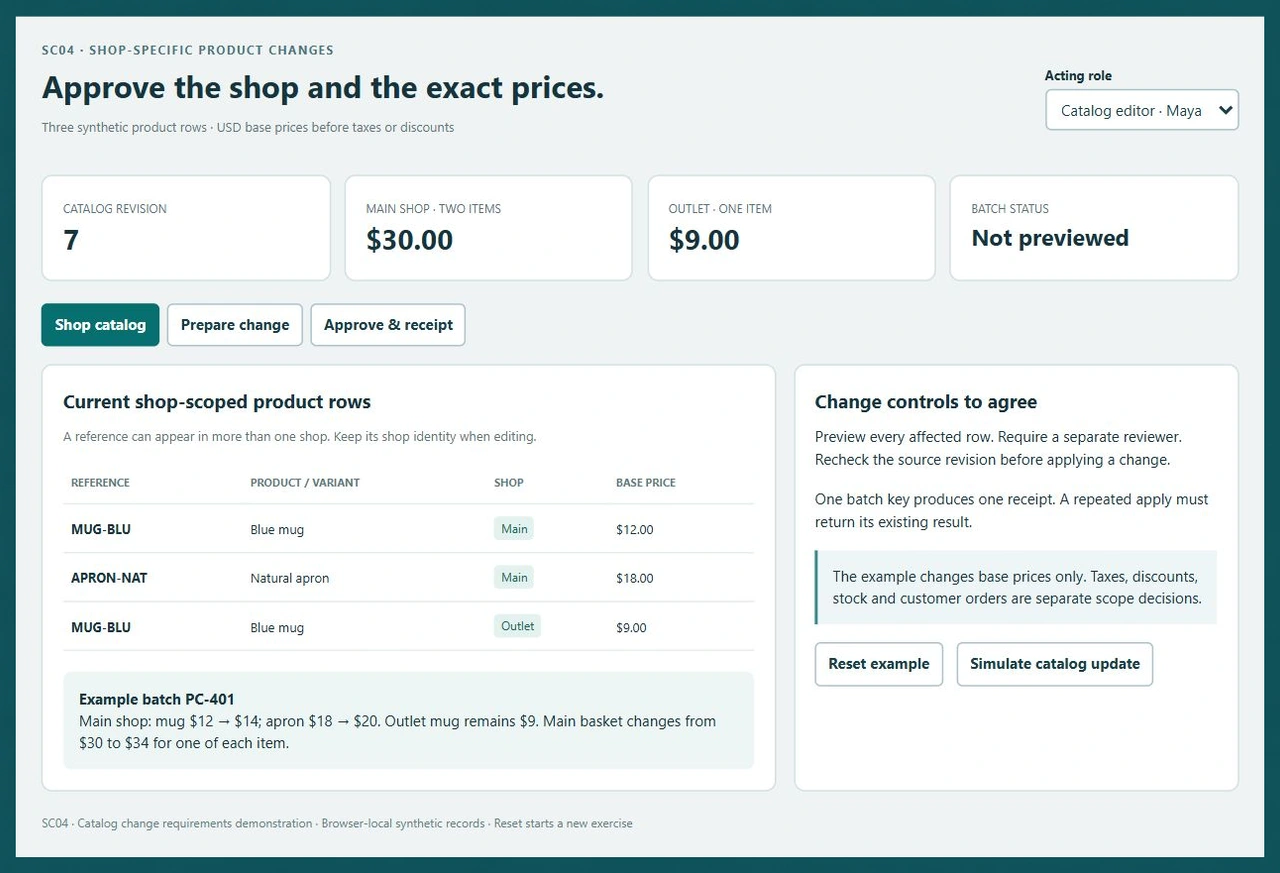
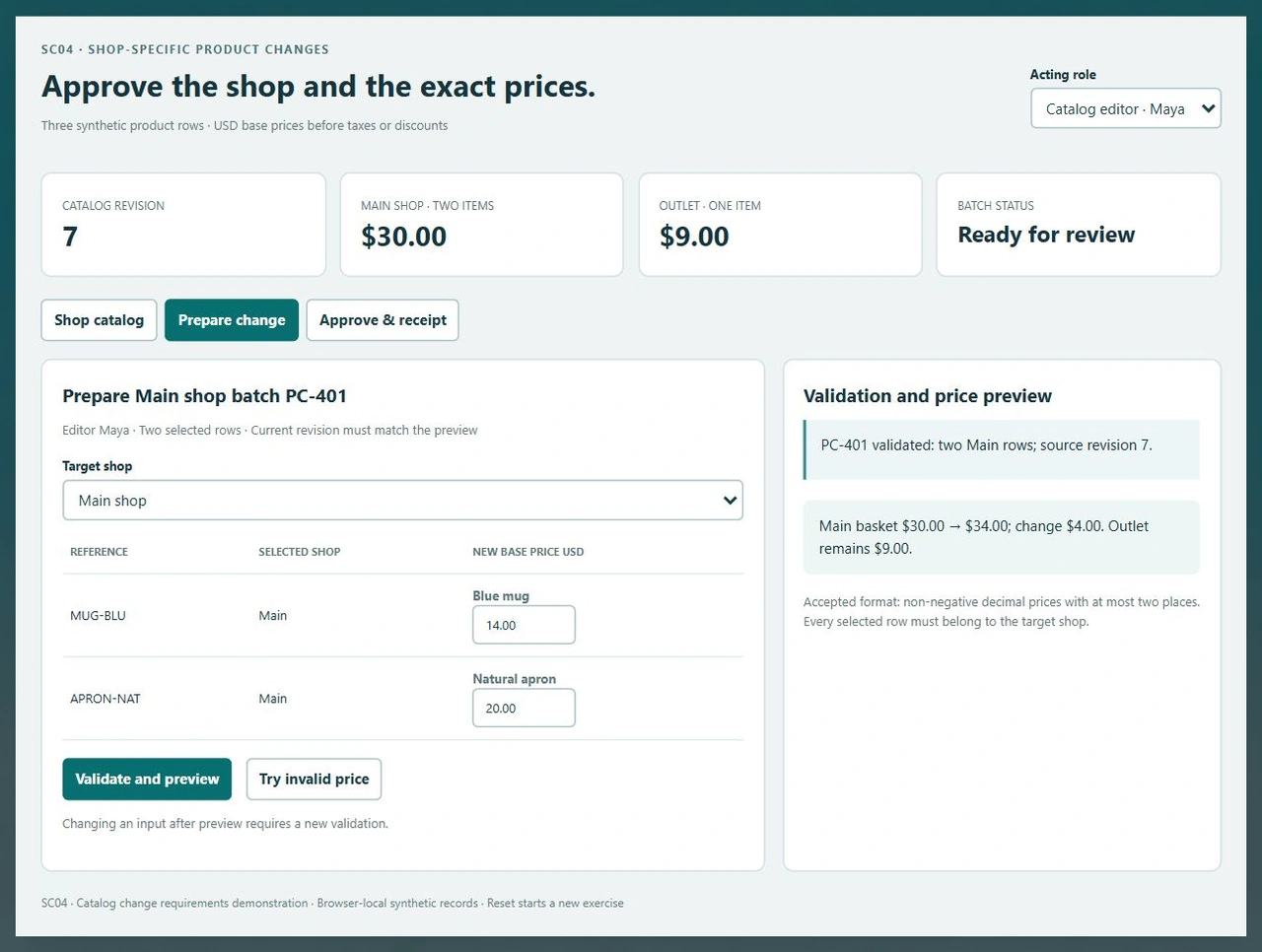
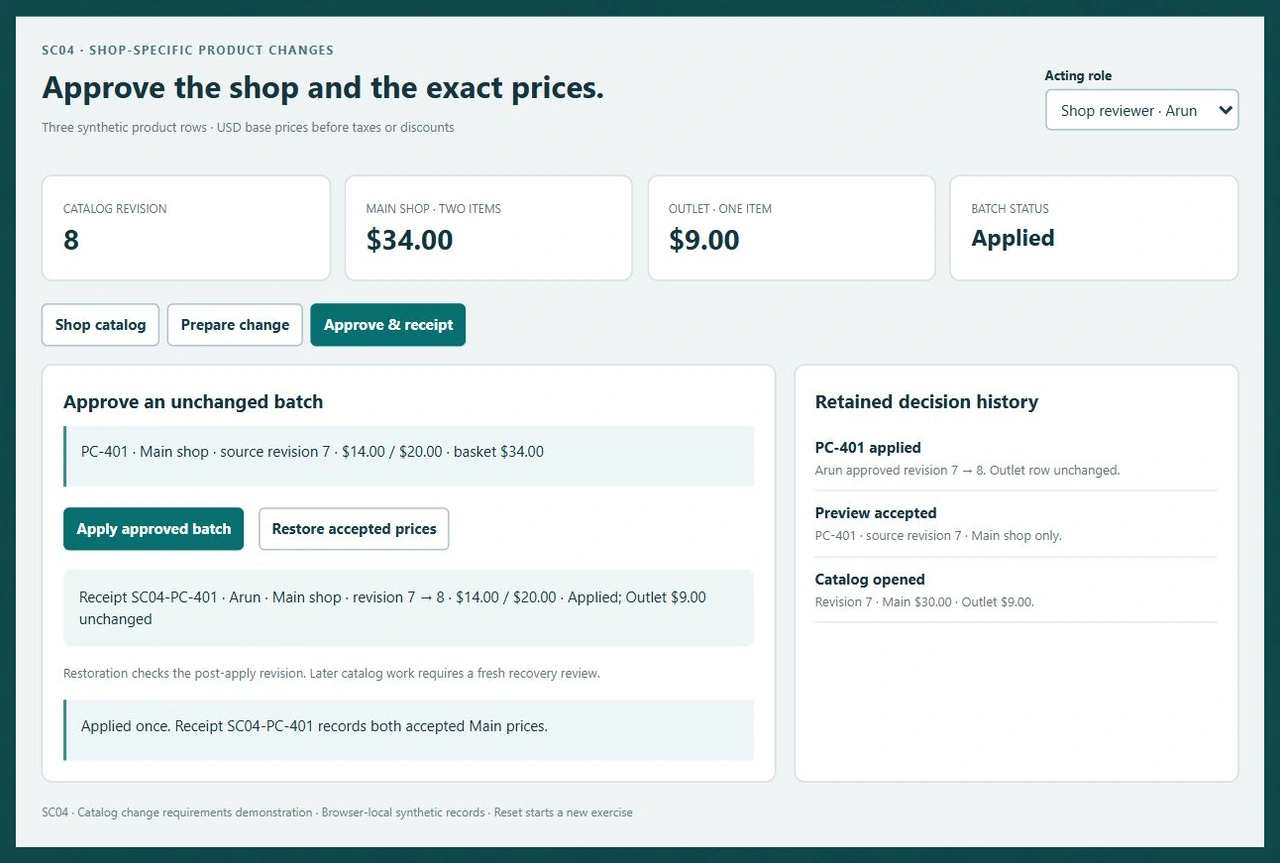
SC04 is an interactive catalog change demo. Two Main shop prices change while the Outlet price stays fixed. Try the validation, separate approval and accepted-price restoration before specifying the work for your store.
Exercise a two-shop price change
Open SC04 and prepare the Main shop batch. Try an invalid price and an Outlet target for the selected Main rows. Validate $14 and $20, then ask the reviewer to apply the batch. Check the untouched Outlet row and the retained receipt.
Try the catalog change demoUse the installation's actual shop context
PrestaShop's primary documentation describes single-shop, shop-group and all-shop contexts. Ask the developer to demonstrate which context the affected code receives and how the requested operation restricts its scope in your installation.
Read PrestaShop's shop-context referenceCheck module configuration by shop
The module documentation explains how configuration can follow the current shop context. Include installation, configuration changes and multistore behaviour in the module's acceptance work, using documentation that matches your PrestaShop version.
Read the multistore module referenceGive data migration its own reconciliation
When the engagement also changes a product import, relational mapping or data transfer, define source ownership, target keys, rejected rows and reconciliation separately. Include any such work explicitly in the store project's estimate.
Review a scoped database development engagementSix decisions for a dedicated PrestaShop engagement
Use the same store boundary from the first quotation through release and follow-up.
Bring a real store change
Identify the current URL or back-office screen and the required outcome. Supply a synthetic product, order or customer example. Separate the requested change from a full rebuild, version upgrade or data migration so the quotation has a clear starting point.
Review installation and allocation
Confirm the PrestaShop and PHP versions, theme, module inventory, source access and deployment process. Agree the developer allocation, named delivery contact, working cadence and start conditions after that review. Record who owns commercial and technical decisions.
Map the affected shop records
List product and combination identifiers, shop associations, languages and any customer-group conditions. For pricing work, distinguish base price from taxes, specific prices, discounts and currency conversion. Decide precisely which values the engagement changes.
Develop against explicit acceptance cases
Use a separate development environment and a reviewable source revision. Exercise ordinary inputs, another shop's identifiers, invalid values and repeated requests. Where an update depends on current data, define how a conflicting intervening change is detected.
Rehearse the storefront and recovery
Verify the affected product, cart and checkout behaviour with the agreed shop, language and customer context. Rehearse authorized schema or data work on a suitable copy. Keep the backup, recovery decision and release sequence with the approved revision.
Release with a retained handover
Have the store owner accept the current evidence and the release operator execute the agreed steps. Check the customer-facing result after activation. Hand over module or theme source, configuration notes, known dependencies and the agreed route for follow-up work.
Send the store materials that determine the estimate
- Provide the installation version, active theme and module list, repository ownership and a reproducible development setup. Describe any existing overrides or locally modified dependencies.
- Show an anonymised example of the desired customer or staff action, including the current outcome and the required result. Identify the shop, language and customer group used in the example.
- List source, hosting and third-party account owners. Arrange appropriate development access through the agreed project channel after the scope and access responsibilities are settled.
- Specify the allocation you want, backlog priorities, review availability and delivery contact. Agree the allocation period, milestones, price and change-request process in the quotation.
Separate module, theme and external-system work
- Locate the behaviour in the relevant theme, module, controller or supported extension point. Agree the smallest maintainable change and its installation or upgrade steps.
- For a price change, name the stored amount, tax treatment and display expectations independently. Include existing promotions, combinations and customer-group rules in the affected-path review.
- For an external connection, document direction, record identity, acknowledgement and failure handling. Quote the connector implementation and any provider-side account work as explicit deliverables.
- Treat version upgrades, payment behaviour and customer-data migration as named work packages. Review compatibility, rehearsal data and recovery conditions before authorizing the production step.
Agree ongoing ownership after the first release
- Define how the developer reports progress and obtains a business decision. Keep a current backlog and acceptance owner so dedicated allocation is tied to the next agreed outcome.
- Require the accepted source revision, changed configuration and verification results in the handover. Include module packaging, licensing ownership and dependency instructions where applicable.
- Record release assistance, post-release checks and the recovery contact. Continuing monitoring, module updates and additional development should have an agreed coverage window and response arrangement.
- Estimate later changes against the current store state. An altered theme, module or external API may require renewed review before an earlier implementation can be extended.
Six records that keep a catalog change within its agreed scope
The SC04 example turns a store request into an exact before-and-after decision. Use the same record discipline when commissioning a module or back-office change.
| Record | Example inputs | Required output and control |
|---|---|---|
| Shop boundary | Main shop; Outlet shop; selected Main rows | Reject an Outlet target for the two selected Main product rows. |
| Product price row | MUG-BLU/Main $12; APRON-NAT/Main $18; MUG-BLU/Outlet $9 | Keep the reference and shop identity together; preserve the unselected Outlet row. |
| Change batch | PC-401; new Main prices $14 and $20 | Accept finite non-negative decimal amounts with at most two places; preview both values. |
| Source revision | Preview at revision 7; current catalog revision | Block approval if an intervening change makes the accepted preview stale. |
| Approval decision | Catalog editor Maya; shop reviewer Arun | Require the reviewer role to apply the current batch; deny the editor's approval. |
| Receipt and restoration | SC04-PC-401; revision 7 to 8; original and accepted prices | Return one receipt for repeated apply; restore originals only against the unchanged post-apply revision. |
SC04 starts with Main prices of $12 and $18, a $30 basket for one of each item, and an Outlet mug at $9. Batch PC-401 previews $14 and $20, bringing Main's basket to $34 while Outlet remains $9. Reviewer Arun applies revision 7 to 8 and retains receipt SC04-PC-401. Repeating Apply returns that receipt without another revision increment. Restoration returns Main to $12 and $18 at revision 9 and keeps the earlier approval. A simulated intervening catalog update blocks a stale preview or an unsafe restoration.
Compare who owns the task, allocation and accepted result.
Give prospective development providers the same store materials and expected outcomes. Ask how their engagement model covers implementation, store checks and handover.
| Option | Published focus | Ask in your demo |
|---|---|---|
| Talmatic | Dedicated developer matching, remote team engagement and store customization. | Who manages the prioritized store backlog, and how is the developer's committed allocation agreed? |
| Webkul | Fixed and hourly development models covering themes, modules and store integrations. | Which shop-specific acceptance cases and release assistance are included in the quoted development work? |
| BelVG | Dedicated PrestaShop development for building, maintaining and upgrading stores. | What source, configuration and recovery materials does the store owner receive with an accepted change? |
Use SC04's unchanged Outlet row, stale-revision rejection and one retained receipt as concrete discussion points. Agree the implementation and its evidence for your own installation rather than relying on a general list of capabilities.
Category reference: PrestaShop primary reference: shop context. This reference describes PrestaShop 9. Use the matching documentation for the store's installed version and verify module compatibility with its actual shop setup.
Connect the change to daily retail operations.
Include the people who maintain the catalog, handle orders and approve storefront changes in the development brief.
Explore retail workflow requirementsSettle the engagement before work starts
Clarify developer allocation, the store boundary and the evidence needed to accept the release.
What does dedicated PrestaShop development mean in the quotation?
Specify the agreed allocation period, delivery contact, work cadence, prioritized backlog and commercial terms. Codeblix reviews the installation and requested work before confirming availability and start conditions. Tie the allocation to deliverables, review decisions and a clear handover.
Can I commission a change to an existing store?
Bring the current source, PrestaShop version, theme and module inventory. Identify the specific customer or staff action and the records involved. The review determines the implementation boundary, neighbouring journeys to preserve and the acceptance cases for the quotation.
How do we keep a change limited to one shop?
Identify the affected shop and any shared product, combination or configuration records. Agree single-shop, group or all-shop behaviour explicitly. Include a second shop in the verification data so the accepted result shows which records changed and which remained untouched.
What can I try in the catalog change demo?
SC04 validates two Main shop prices, rejects invalid amounts and a mismatched target shop, separates editor and reviewer decisions and retains one apply receipt. Main's example basket moves from $30 to $34 while Outlet stays at $9. The browser exercise also blocks stale previews and restoration after another catalog revision.
Will pricing work include taxes, discounts and combinations?
List those requirements separately in the brief. A base-price change may interact with existing taxes, specific prices, promotions, currencies and combination rules. Agree which contexts are in scope and test the corresponding storefront amounts in the actual store environment.
Can the project connect another business system?
Supply the interface specification, sample records, account owner and required transfer direction. Define matching keys, rejection handling, retries and reconciliation. The quotation should identify the connector work and any third-party prerequisites rather than assuming an existing connection is available.
What should I receive when the development task is accepted?
Keep the reviewed source revision, installation or update instructions, configuration changes and store verification results. Include the approved recovery steps, dependency ownership and any module package or operating notes needed by the next maintainer.
How are price, release assistance and follow-up agreed?
Request a quote after the store review. Separate investigation, implementation, storefront verification and release assistance where their responsibilities differ. Confirm milestones, payment terms, review availability and follow-up coverage; estimate wider upgrades or new requirements explicitly.