
Make the publishing decision part of the development scope.
A developer brief becomes useful when the business can say which version should become public, under whose authority and with what recovery record.
Separate editing from public visibility
Record live and draft revisions independently. An editor changing Contact routing should not silently replace the version visitors currently see. Include the current public text and the intended replacement in the acceptance case so the receiving team can check both sides of the change.
Freeze what the publisher is approving
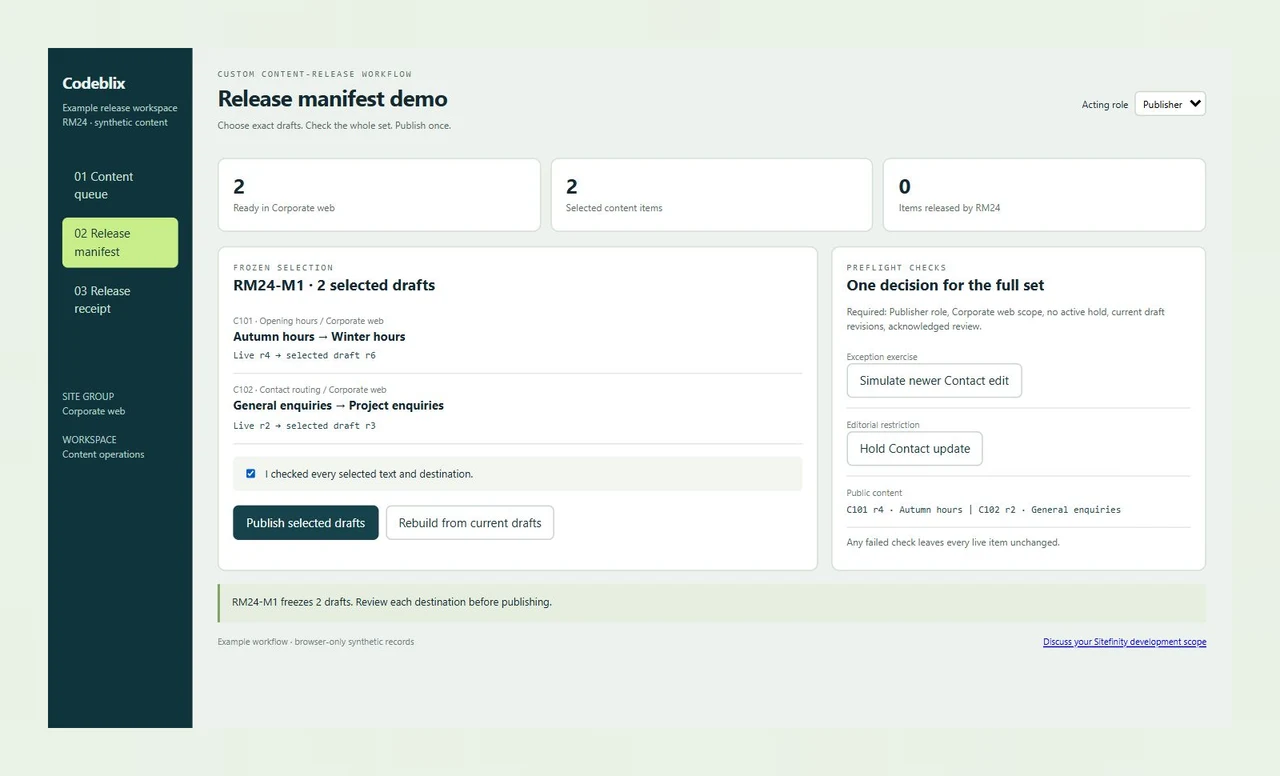
A release manifest identifies the selected content items, site, language and exact draft revisions. If another editor changes a selected draft, the publisher needs a fresh review. RM24 makes that conflict visible before either selected item changes its live version.
Require a clear delivery agreement
Agree the backlog order, developer allocation, review availability and release authority in the quotation. Define what the handoff includes: source changes, configuration details, completed acceptance checks, unresolved items and the owner of continuing maintenance.
Follow selected drafts into an accepted release.
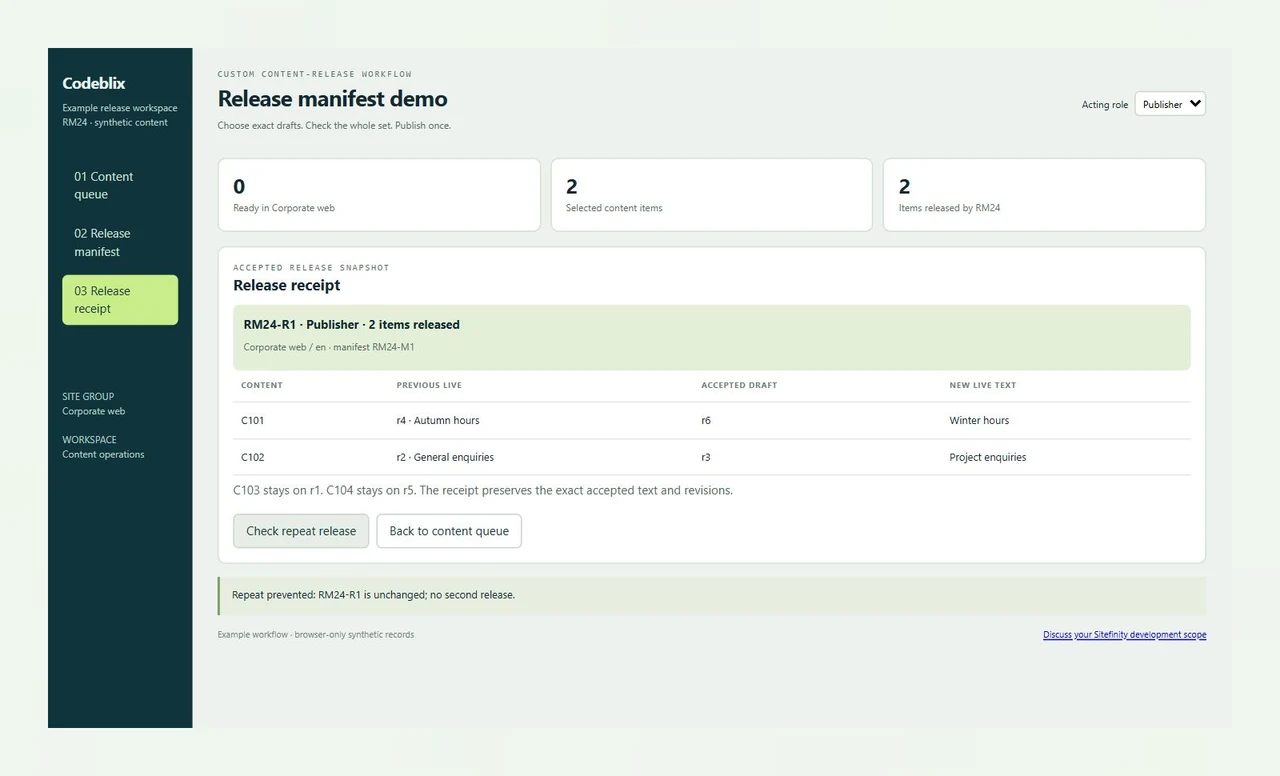
RM24 is a working content-release demonstration. Select content in the Corporate web site, freeze the draft revisions in a manifest and complete the publisher checks. The receipt shows the previous live text, accepted draft and resulting public text for both selected items.
Bring a reproducible publishing decision to the quotation.
Connect the working exercise to the installation, business authority and platform documentation that determine delivery.
Run the two-item release and one rejected case
Build RM24-M1 and check the selected texts before publishing. Reset the example to apply a Contact hold, make a newer edit or include a Partner portal item. Each rejected set preserves both live Corporate web versions. Use the observed outcomes to explain the custom workflow you want commissioned.
Open the release manifest demoMap approval responsibility to the configured workflow
Progress documents approval workflows with different responsible roles and lifecycle steps. Identify the workflow applied to each content type and the users assigned to its approval stages. A custom release action must fit those responsibilities and the installation's security model.
Inspect Progress lifecycle and workflow documentationKeep the public version visible during draft work
The Sitefinity 15.0 status reference distinguishes draft and published content, including a newer draft alongside an older published version. Confirm the equivalent behavior for your installed release, renderer and content type. Include public-page checks in the acceptance plan.
Read the versioned workflow-status referenceScope another CMS as its own engagement
An Umbraco project has its own content model, extension contracts and publishing decisions. Commission that work with its own installation details and acceptance cases while keeping the Sitefinity release manifest attached to this development request.
Discuss a separate Umbraco development scopeSix stages for a Sitefinity development engagement
Use the release example to identify the records and decisions your own project must preserve.
Establish the installation and the commissioned task
Provide the Sitefinity release, renderer, hosting arrangement, custom modules and source access boundary. Name the business change and the person who can accept it. Include relevant licensing and dependency details, then agree whether the work is a defined milestone or an ongoing dedicated allocation.
Inspect drafts beside the versions already public
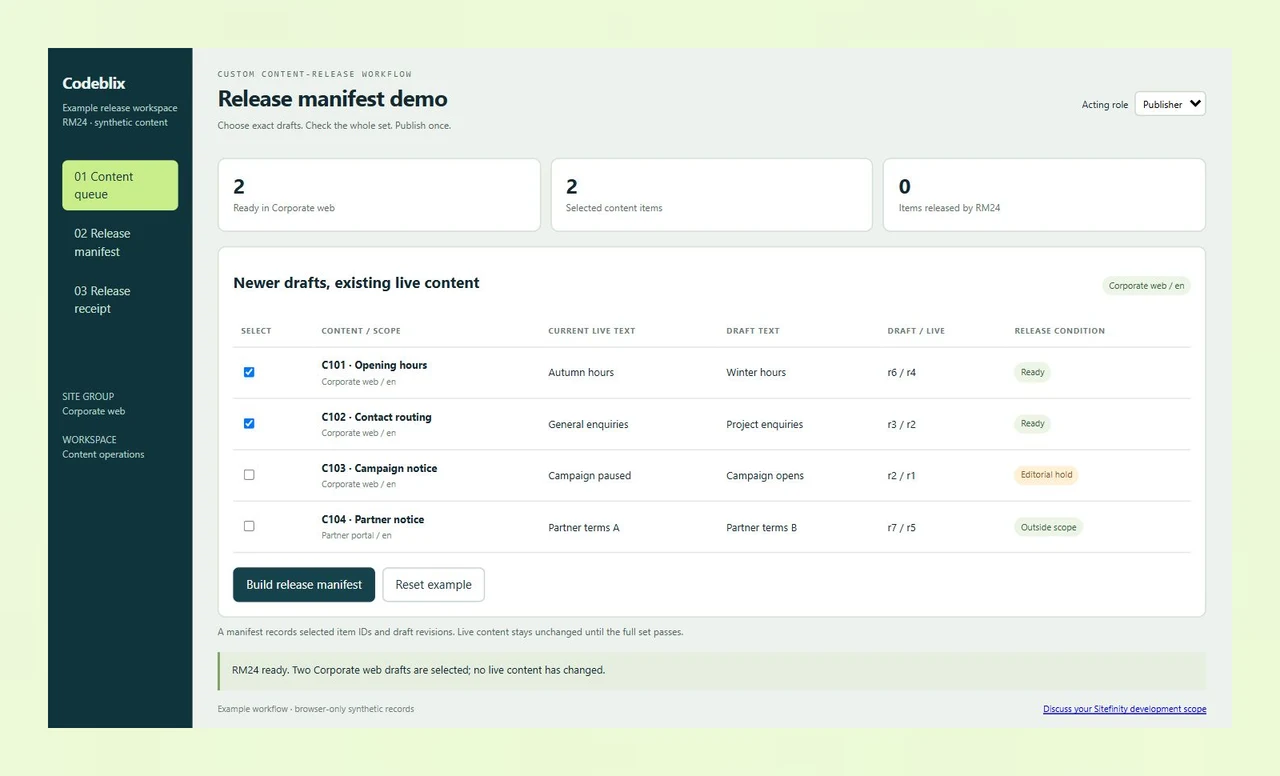
In RM24, C101 has live r4 and draft r6; C102 has live r2 and draft r3. Both belong to Corporate web in English. C103 carries an editorial hold, while C104 belongs to Partner portal. The opening selection includes C101 and C102 only.
Build a manifest of exact revisions
RM24-M1 freezes the two selected records. Opening hours changes from Autumn hours to Winter hours; Contact routing changes from General enquiries to Project enquiries. The manifest records the original live versions and the chosen drafts, giving the publisher a specific set to inspect.
Check authority, scope and intervening edits
The exercise requires the Publisher role, the Corporate web destination, no active editorial hold and a current draft revision for every selected item. A newer Contact edit makes the old manifest stale. Rebuild it and review the changed text before acknowledging the set.
Release the accepted set and inspect its receipt
A clean RM24-M1 release moves C101 to live r6 and C102 to live r3 together. RM24-R1 retains the two previous live versions and both accepted texts. C103 remains live at r1 and C104 at r5. Replaying the completed release preserves the receipt and performs no second update.
Accept the installed implementation and receiving support
Run the agreed cases on a staging installation with its actual workflow configuration, content providers and permissions. Verify persistence, simultaneous requests and public rendering. Accept source changes, release instructions and recovery arrangements, then prioritise the next backlog item with the receiving maintenance owner.
What the Sitefinity quotation needs to cover
- Describe the requested change with stable synthetic content IDs, current live text and desired draft text. Supply the affected content types, site and language combinations, templates and workflow configuration. Remove personal records from examples shared for the initial assessment.
- Name the people who edit, approve and publish. Identify restricted sites, editorial holds and what must happen when a selected draft changes during review. Agree whether the release is one indivisible set, individually accepted items or a scheduled operation.
- Ask for an explicit development allocation, acceptance milestones and review windows. Include source ownership, repository access, dependency licensing, deployment assistance and maintenance responsibility in the commercial agreement. Availability and price follow the technical assessment.
- Specify the record needed after a release: selected IDs, accepted revisions, previous public values, acting authority and outcome. Decide how long operational records are retained and who may inspect them within your own security policy.
Migration, integrations and production release boundaries
- Before a migration, inventory content IDs, relationships, language variants, media references and both live and newer draft versions. Rehearse a representative export and import, reconcile the results and preserve the existing public URLs and redirect requirements.
- For a DAM, CRM or content-feed connection, provide current API documentation and identify the owner of each field. Scope authentication, direction, retry identity and conflict handling. Confirm any licensed connector and required implementation work during the technical review.
- A production implementation of the manifest needs server-side authorisation, persistent revision checks and a defined transaction boundary. Test competing publisher requests, interruptions and retries against the installed content provider. Agree how failures are recovered before authorising the live release.
- Define backup ownership, rollback steps, staging access, release timing and public-render verification. Document how the receiving team reports defects and prioritises later changes. Separate the initial accepted delivery from any continuing support allocation in the quote.
Six records that make a publishing change quotable
Carry these records through the development brief, acceptance session and release handoff.
| Record | Example inputs | Required output and control |
|---|---|---|
| Content identity | C101 Opening hours; C102 Contact routing | Keep the same item identity when a draft replaces its live text. |
| Version pair | C101 live r4 / draft r6; C102 live r2 / draft r3 | Review the specific draft against the previous public content. |
| Destination | Corporate web / en; Partner portal / en | Reject C104 from the Corporate web release set. |
| Editorial conditions | Publisher or Editor; active Contact hold; C103 held | Reject a held item or an unauthorised release without changing any live item. |
| Frozen manifest | RM24-M1 captures C101 r6 and C102 r3 | Detect a newer Contact draft and require a rebuilt, acknowledged set. |
| Accepted receipt | RM24-R1 records two released items and previous live text | Preserve the completed snapshot when the action is repeated. |
The initial selection contains two ready Corporate web drafts. Publishing the clean manifest changes C101 from live r4 to r6 and C102 from live r2 to r3. The ready count falls from two to zero; the released count rises from zero to two. C103's held notice stays on live r1, and C104's Partner portal notice stays on live r5. A rejected manifest changes none of those live versions. If Contact advances to draft r4 before release, rebuild and inspect that new text rather than accepting the earlier r3 manifest.
Ask providers to quote the same release responsibility.
Use the same installation details, release example and receiving owner when requesting development terms.
| Option | Published focus | Ask in your demo |
|---|---|---|
| Credencys | Describes Sitefinity customisation and migration with fixed-cost, time-and-material and offshore engagement models. | Which delivery model includes draft/live reconciliation, the publisher checks and the source handoff? |
| InvoZone | Offers Sitefinity developer matching, dedicated teams and fixed-price engagements with contract onboarding. | Who accepts the release behavior, and how are revision conflicts and deployment responsibilities written into the scope? |
| mDev Group | Publishes Sitefinity migration, template customisation and support alongside dedicated-team engagement options. | How will the receiving team verify the accepted content revisions and recover an interrupted release? |
Use the manifest and checklist to make a specific enquiry. Request named deliverables, an acceptance owner and an agreed allocation alongside the engagement price. The demonstration's whole-set decision is a custom workflow requirement to assess against the installation.
Category reference: Progress primary reference: lifecycle states, approval stages and responsible roles. Map RM24's selection, hold, revision and receipt rules to the content provider, workflows and permissions in the commissioned implementation.
Plan the applications around your content operation.
Explore other scoped software engagements and commission each platform change around its own records and release decisions.
Explore Codeblix marketplace developmentSettle scope and acceptance before reserving development time
Use these answers to prepare a specific Sitefinity project enquiry.
What should I send to request dedicated Sitefinity developers?
Send the installed Sitefinity version, renderer, custom-module list and a prioritised development request. Name the person who accepts the work, preferred allocation and review availability. Include a synthetic example of the content or workflow change and any source, hosting or licensing boundaries needed for the assessment.
Can the engagement cover an existing publishing workflow?
Yes. Describe the current editorial roles, configured approval stages and desired release behavior. Codeblix assesses the technical fit and quotes the agreed customisation, acceptance cases and release support. Include the exact content types, sites and language variants affected by the change.
What can we check in the release manifest exercise?
Inspect live and draft text for four content records, build a two-item manifest and publish it as Publisher after acknowledging the review. Test the Editor role, a Contact hold, an intervening edit and a wrong-site selection. The receipt retains the previous and accepted versions and stays unchanged when repeated.
How should we handle a draft changed after approval?
Agree whether approval attaches to a specific revision or remains valid after selected edits. RM24 freezes exact draft revisions and rejects a changed Contact item until the manifest is rebuilt and reviewed. Include that decision in the installed implementation's server-side checks and acceptance cases.
Will the same approval states apply to every Sitefinity installation?
Review the actual platform release and workflow configuration. Progress documents several approval levels with different responsible roles and statuses. Confirm the workflow attached to the affected content type and the public rendering behavior before specifying a custom release action.
How are the development rate and allocation agreed?
Request a quote after the installation, backlog and acceptance responsibilities have been reviewed. Agree the billing basis, developer allocation, start window and treatment of additional work. Include staging validation, source delivery, deployment assistance and continuing maintenance wherever the engagement requires them.
Can migration or third-party connection work be included?
Include the source systems, current API documentation, content identifiers and field ownership in the request. Quote the mapping, authentication, reconciliation and cutover work after technical review. A migration acceptance set should distinguish the public version from newer drafts and preserve the site's existing URLs.
What should the receiving team get at handover?
Receive the accepted source changes, dependency and configuration details, completed release checks and deployment instructions. Record unresolved issues, backup and rollback responsibility, and the support arrangement. Ask for a clear owner for production validation and later backlog priorities.