
Hire a dedicated X-Cart developer around the store behaviour you need.
Hire a dedicated X-Cart developer through Codeblix for a defined store customisation, module or maintenance engagement. Bring the installed release, affected add-ons and a checkout or administration task that needs changing. We review the technical fit and requested allocation, then quote the implementation and acceptance work. For inventory changes, specify what happens to each variant when an order reserves stock, releases it or completes fulfillment.
Buy a result your operators can reproduce.
A development allocation becomes easier to evaluate when the quote names the records, stock movements and rejected actions involved.
Keep variant availability separate
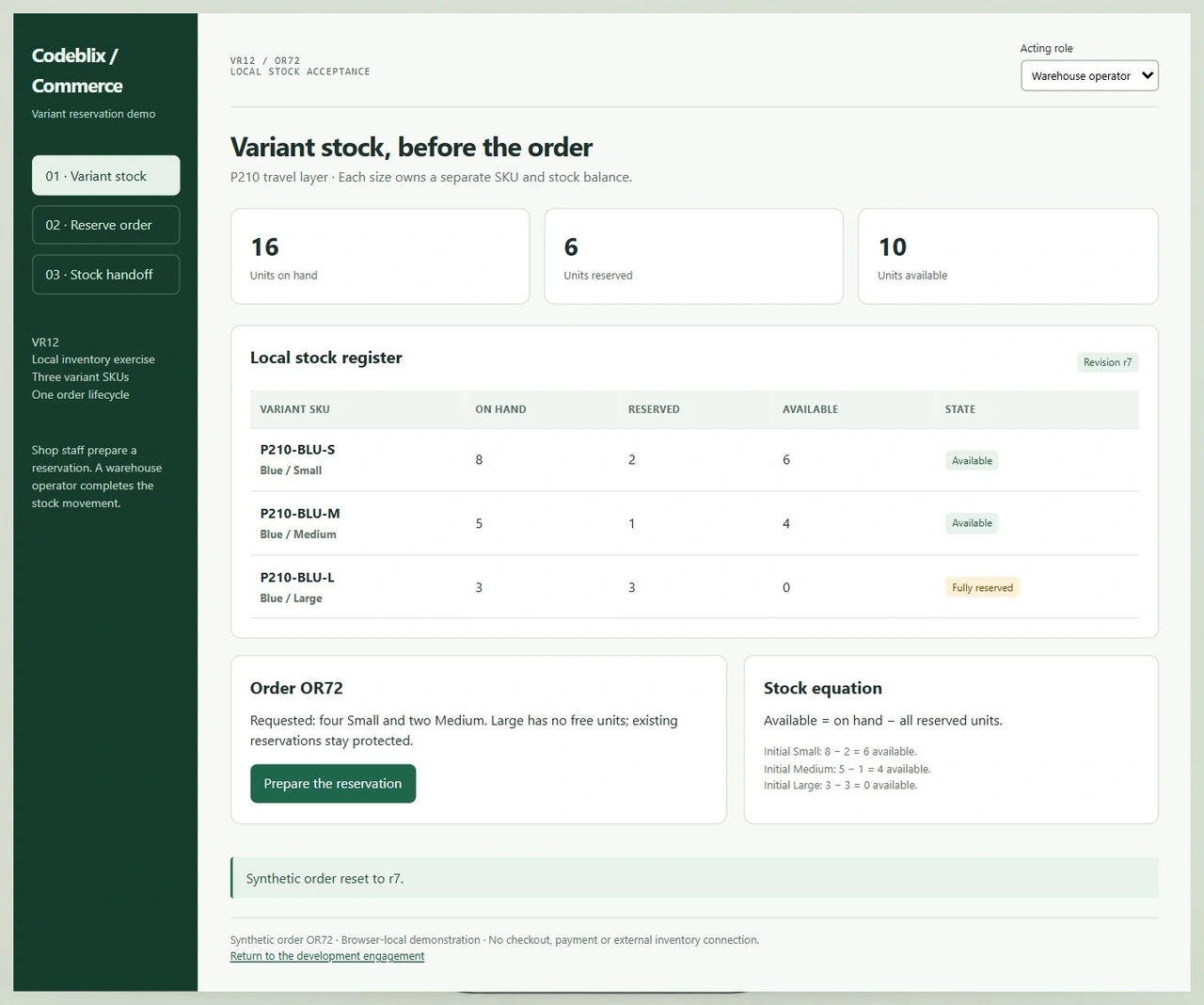
A parent product can have stock while one size is already fully reserved. Identify the SKU selected by the shopper and the stock source responsible for that quantity. Include unavailable combinations in acceptance so a parent total cannot conceal a shortage on the requested variant.
Agree when the stock movement occurs
Write down the order event that creates a reservation and the events that release or consume it. A payment change, cancellation and warehouse handoff may have different responsibilities in your installation. Review those boundaries with the developer before connecting them to automated actions.
Protect against stale and repeated actions
Two requests may start from the same displayed stock. Specify how the implementation rechecks availability and rejects an outdated request. Replaying a completed order action must not reserve or deduct the same units twice. The exercise makes those cases visible before the installed workflow is accepted.
Inspect the quantities behind the order action.
VR12 is a working stock workspace with three variant SKUs and a synthetic order. Reserve four Small and two Medium units, then release the order or fulfill it as the warehouse operator. The register shows which quantities changed and which existing reservations remained protected.
Run the variant reservation exercise
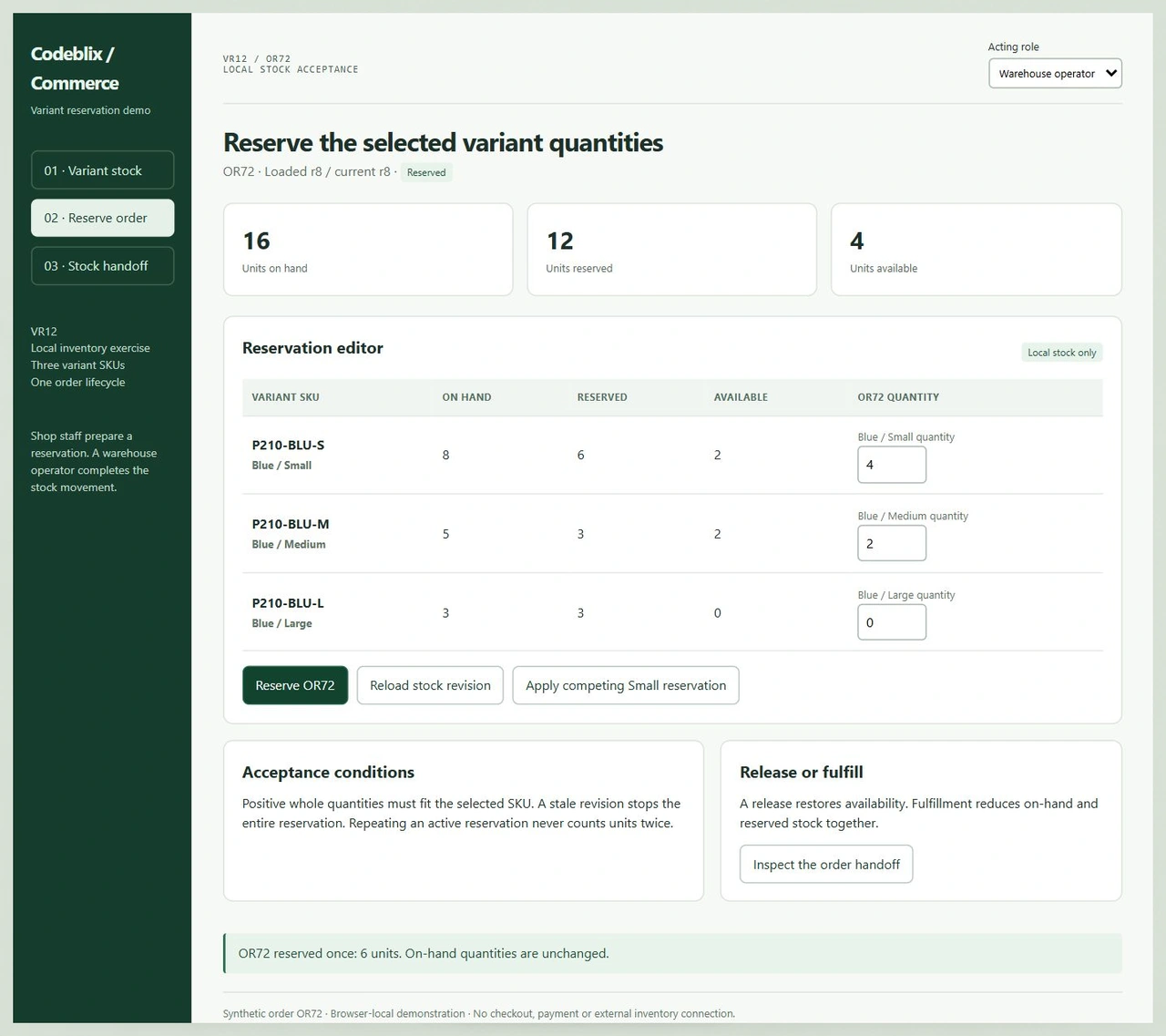
Open VR12 and inspect the three SKUs. Prepare OR72, enter one Large unit and check the rejected shortage. Restore Large to zero, reserve the order and inspect the handoff. Fulfill as Warehouse operator or reset the exercise to test the release branch.
Open the variant reservation demoConfirm SKU and inventory responsibilities
X-Cart’s inventory reference describes SKU-level quantities and distinguishes local inventory from stock refreshed by auto integrations. Its example explains why a supplier quantity may remain unchanged until the next import. Identify the authoritative stock source and refresh policy before requesting a connector or reservation change.
Read X-Cart’s inventory-tracking referenceCheck the version before changing stock sources
The January 2026 X-Cart 5.6.x reference describes quantities across locations and selling from multiple connected stock sources. This differs from its documented 5.5.1.x priority model. Use the installed release when specifying local adjustments, supplier imports and backorder handling.
Inspect inventory management for X-Cart 5.6.xScope a separate store platform separately
If the business also operates a CS-Cart installation, identify its vendor catalog ownership and import rules as a separate project boundary. A vendor’s import receipt and an X-Cart order stock movement require different records and acceptance cases.
Discuss a CS-Cart developer engagementSix milestones from stock rules to store release
Anchor the engagement in one representative order rather than a broad list of module names.
Identify the installed store and allocation
Supply the X-Cart release, PHP version, enabled add-ons and source access arrangements. Describe the module or checkout path to change and who prioritises the work. Include the desired start window, review availability and allocation period in the quotation request.
Capture the variant and stock-source model
Record SKU keys, local stock, existing reservations and any external supplier quantities separately. VR12 starts with Small at 8 on hand and 2 reserved, Medium at 5 and 1, and Large at 3 and 3. Available stock is therefore 6, 4 and 0.
Reserve against a current stock revision
Order OR72 requests four Small and two Medium units. Reserve the complete request only after each line passes a whole-quantity and availability check. The example moves total reserved units from 6 to 12 while keeping all 16 on-hand units unchanged. A Large quantity of one rejects the whole request.
Verify release and fulfillment independently
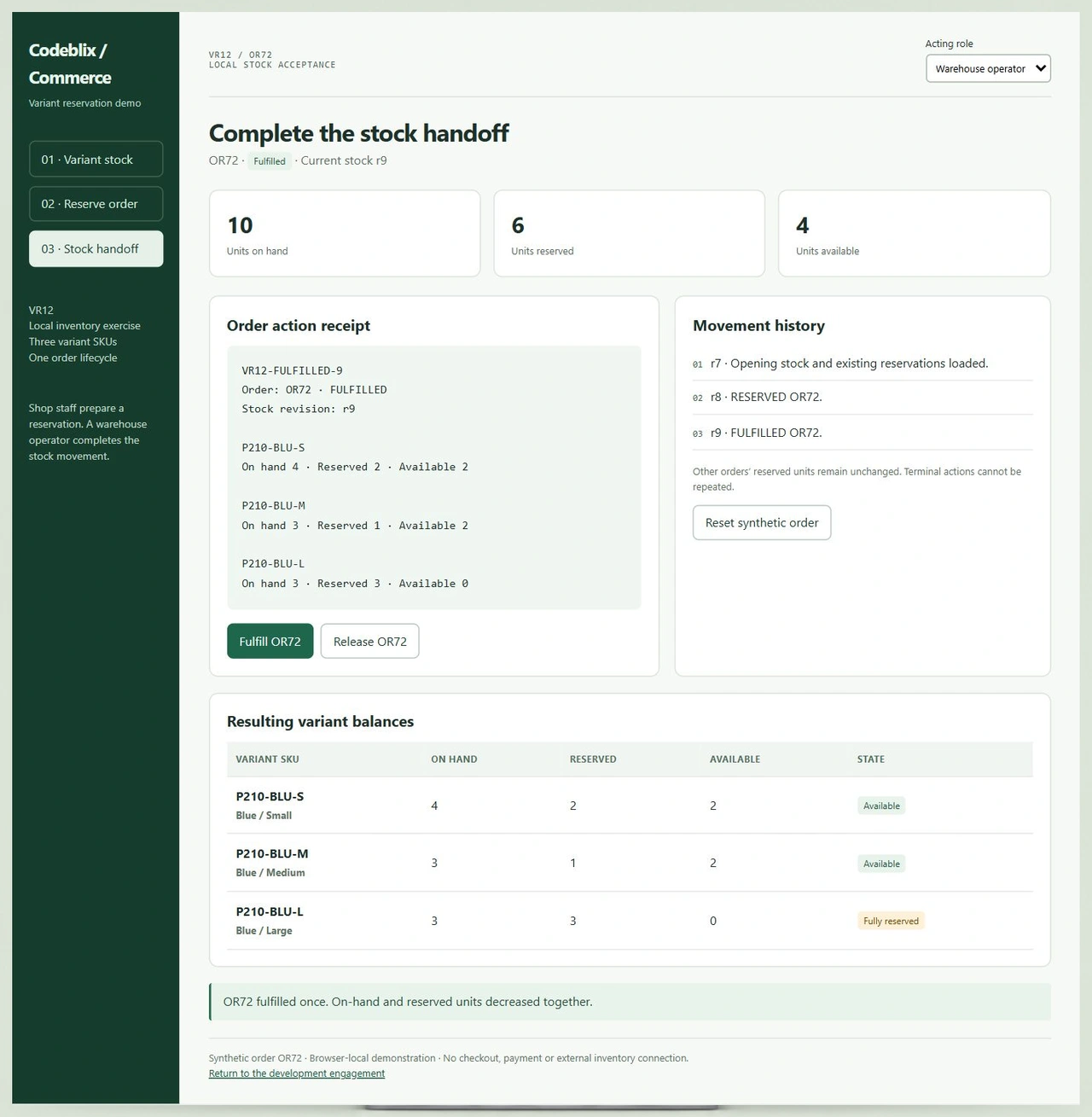
Release restores the six units to availability without changing on-hand stock. Fulfillment consumes those units and clears only OR72’s reservation. In the clean fulfillment path, Small ends at 4 on hand and 2 reserved, Medium at 3 and 1, and Large remains at 3 and 3.
Rehearse concurrency, permissions and retries
Apply the competing Small reservation while OR72 is still a draft. Its loaded stock revision becomes stale, requiring a reload before reservation. Try fulfillment as Shop staff, then as Warehouse operator. Repeat the terminal action and verify that the existing quantities remain intact.
Accept the installed change and hand it over
Replay the agreed cases on the store’s staging environment, including request-level permissions and actual order events. Retain the source changes, add-on dependencies, stock reconciliation checks and release instructions. Agree the receiving owner, deployment assistance and continuing support in the engagement terms.
Bring the details that affect the quotation
- Describe one reproducible store task with synthetic SKUs and expected quantities before and after the change. Include the order statuses, payment outcomes and operator actions that trigger stock handling. State which behaviors must remain compatible.
- List the installed platform release and relevant add-on versions. The legacy Product Variants documentation describes an add-on with distinct SKU, price and stock per variant; confirm the actual variant mechanism in your installation instead of assuming every release uses the same setup.
- Identify local warehouses, supplier feeds and the stock owner for each SKU. Give the developer representative payloads with private information removed, the required refresh frequency and the reconciliation rule when remote quantities differ from the store.
- Specify a bounded milestone or continuing allocation, expected communication overlap and the person accepting the work. Ask the quote to separate implementation, staging review, deployment assistance and support. Capacity and start dates are established during the consultation.
Set delivery and integration boundaries
- For a payment or inventory connection, review the available API, authentication and permitted writes. Agree request direction, event timing, retry identity and failure recovery. The quotation should identify vendor-side work and any add-on or licence required for the integration.
- For migration, retain SKU identity, variant combinations and the origin of opening stock balances. Rehearse a sample transfer, check missing and duplicate keys, and reconcile outstanding orders before a full import. Define who approves the cutover and recovery plan.
- Keep the interface exercise’s roles distinct from production access control. The installed application needs server-side permission and transaction checks, with concurrent requests and repeated callbacks tested against its actual database and order lifecycle.
- Agree source ownership, release access, backup responsibilities and post-launch maintenance. Document how stock discrepancies are reported, who can correct them and which later changes fall outside the accepted milestone.
Six records for a variant-stock development brief
Use an order and its stock movements to describe the outcome independently of interface styling.
| Record | Example inputs | Required output and control |
|---|---|---|
| Variant identities | P210-BLU-S / P210-BLU-M / P210-BLU-L | Map each selection to its own SKU instead of a shared parent balance. |
| Opening local quantities | On hand 8 / 5 / 3; existing reserved 2 / 1 / 3 | Reconcile available quantities of 6 / 4 / 0 before accepting a new order. |
| Order request | OR72: Small 4, Medium 2, Large 0 | Validate all lines together; reject insufficient or non-whole quantities. |
| Stock revision | Clean opening r7; reservation r8; fulfillment r9 | Reload after a competing change before attempting a new reservation. |
| Operator responsibility | Shop staff / Warehouse operator | Permit preparation and release; require the warehouse role for fulfillment. |
| Movement receipt | VR12-FULFILLED-9 with three resulting SKU balances | Keep the completed snapshot and block repeated terminal stock movements. |
At r7, OR72 reserves four Small and two Medium units. Small becomes 8 on hand, 6 reserved and 2 available; Medium becomes 5, 3 and 2. Total on hand remains 16. Fulfill once as Warehouse operator: Small becomes 4, 2 and 2; Medium becomes 3, 1 and 2. Large stays 3, 3 and 0. The final totals are 10 on hand, 6 reserved and 4 available. Reset and release the same reservation instead: all opening quantities return. A competing reservation follows its own branch and must be reconciled using the new revision.
Ask providers to quote the same stock behavior.
Use the selected order and exception cases when discussing allocation, deliverables and acceptance with each provider.
| Option | Published focus | Ask in your demo |
|---|---|---|
| Riseup Labs | Full-time, part-time and hourly X-Cart allocation, with onsite and offshore team options and source-code handover. | Which allocation includes a variant reservation replay, concurrent requests and stock reconciliation at acceptance? |
| YES IT Labs | X-Cart customisation, modules, maintenance, upgrade and migration services with developer enquiry and interview options. | How are local stock, external inventory updates and duplicate order actions tested within the milestone? |
| Addon Solutions | X-Cart website development through part-time, monthly, hourly and fixed-cost arrangements with reporting and documentation. | Who accepts the SKU mapping, release-versus-fulfillment quantities and continuing support responsibilities? |
Have each provider walk through the same three variants and one order. Ask what the current store does, what the commissioned change adds and which stock events the quote covers. VR12 provides an inspectable decision asset; extend it with the installed store’s payment and supplier behavior.
Category reference: X-Cart primary reference: legacy Product Variants, SKU, pricing and stock. The reserve ledger, revision checks and warehouse role in VR12 are concrete acceptance conditions for the custom workflow. Establish their platform implementation during technical scoping.
Connect commerce work with the software your business needs.
Explore other Codeblix marketplace engagements when the store also depends on a separately scoped operational application.
Explore marketplace development servicesResolve the X-Cart engagement before work begins
These answers connect the development request with allocation, stock ownership and release responsibilities.
What should I send when requesting an X-Cart developer?
Name the installed release, affected add-ons and the store task you want changed. Include synthetic product variants, a representative order and the expected before-and-after behavior. Add your preferred allocation period and review window so Codeblix can assess technical fit and quote the engagement.
Can the engagement cover a custom stock or order module?
Describe the stock source, order events and operator actions involved. The technical review establishes the appropriate module boundaries and dependencies for the installed store. Include concurrency, rejected requests and repeat callbacks in the acceptance scope rather than judging the change only by its visible controls.
Does a parent product’s total prove every variant is available?
Availability needs checking for the specific SKU and stock source. In the exercise, the parent has sixteen units on hand, but all three Large units are already reserved. Requesting one Large rejects OR72 even though other sizes still have available stock.
What does the working stock demo let us verify?
You can change variant quantities, reject a shortage, create a competing reservation and reload the stock revision. Reserve OR72, then compare release with permitted fulfillment. Repeating a completed action leaves the balances unchanged. These results make useful cases for the installed implementation.
Can supplier inventory be connected to the store?
Bring the supplier’s API or feed documentation and explain which system owns available quantities. Review mapping, update frequency, authentication and order writeback before quoting. X-Cart’s official documentation distinguishes imported supplier stock from local inventory, so their timing and reconciliation need explicit treatment.
How is a dedicated development allocation priced?
The quote reflects the reviewed backlog, requested allocation and release responsibilities. Agree the billing basis, prioritisation process and how additional requirements are approved. Identify staging acceptance, deployment assistance and maintenance separately where your team needs those services.
What information is needed for an existing-store migration?
Provide source and target versions, stable SKU keys, variant definitions and outstanding order totals. Use a representative export with personal data removed. The migration scope should include mapping checks, opening stock reconciliation, a rehearsal and a recoverable cutover approved by the store owner.
What belongs in the handover after acceptance?
Retain changed source files, dependency and add-on versions, configuration instructions and the accepted stock cases. Identify who owns deployment, backups, discrepancy handling and security updates. Agree the contact and commercial arrangement for maintenance and subsequent enhancements.