
Give editors a deliberate change boundary.
A reusable section needs an explicit answer to which pages change, which fields stay local and who can change its structure.
Share a section without flattening local content
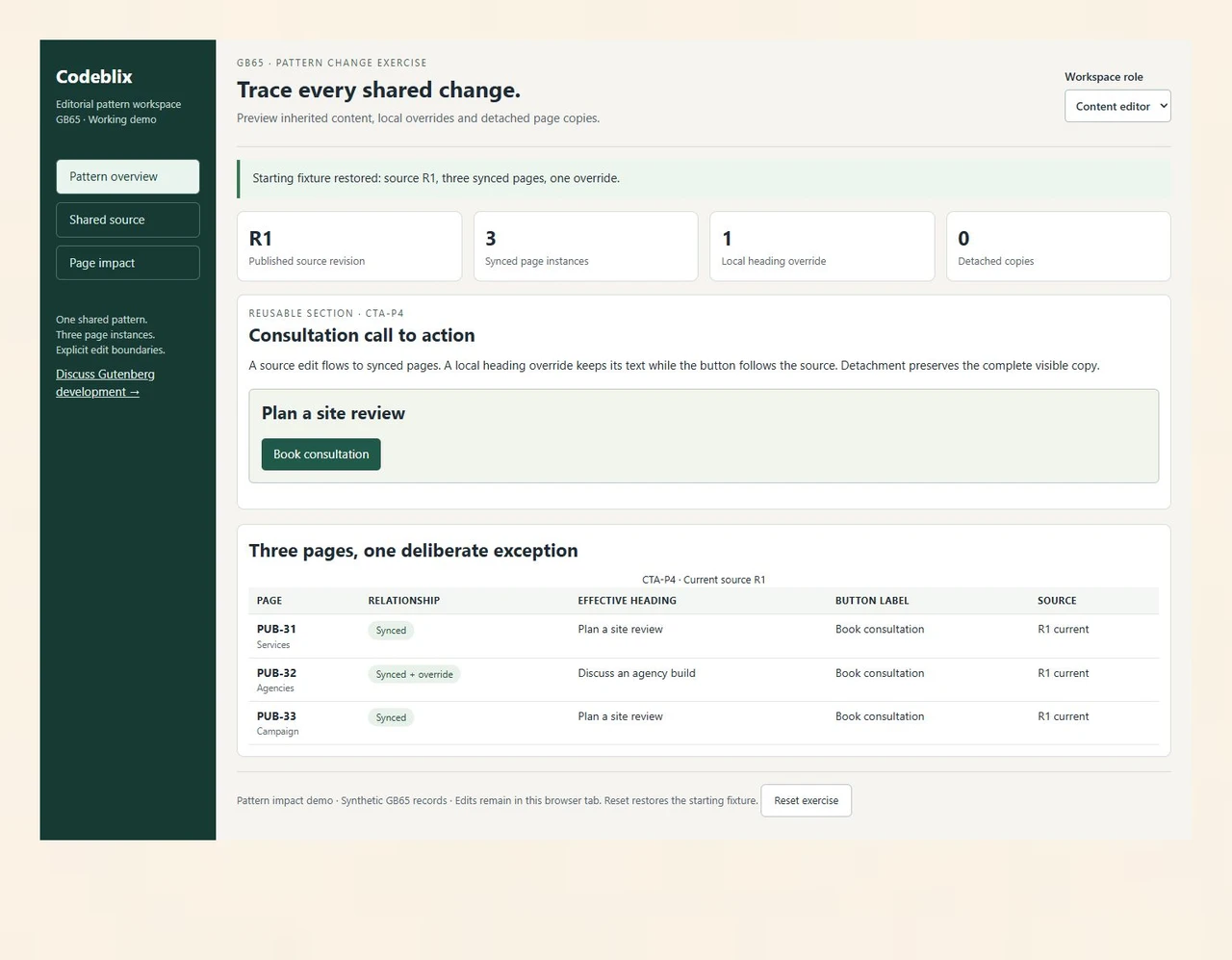
CTA-P4 starts with the heading Plan a site review and the button Book consultation. PUB-31 Services and PUB-33 Campaign inherit both fields. PUB-32 Agencies keeps Discuss an agency build as its local heading, while its button follows the shared source. The three-page register exposes the exception before anyone changes the pattern.
Preview inherited fields after a source revision
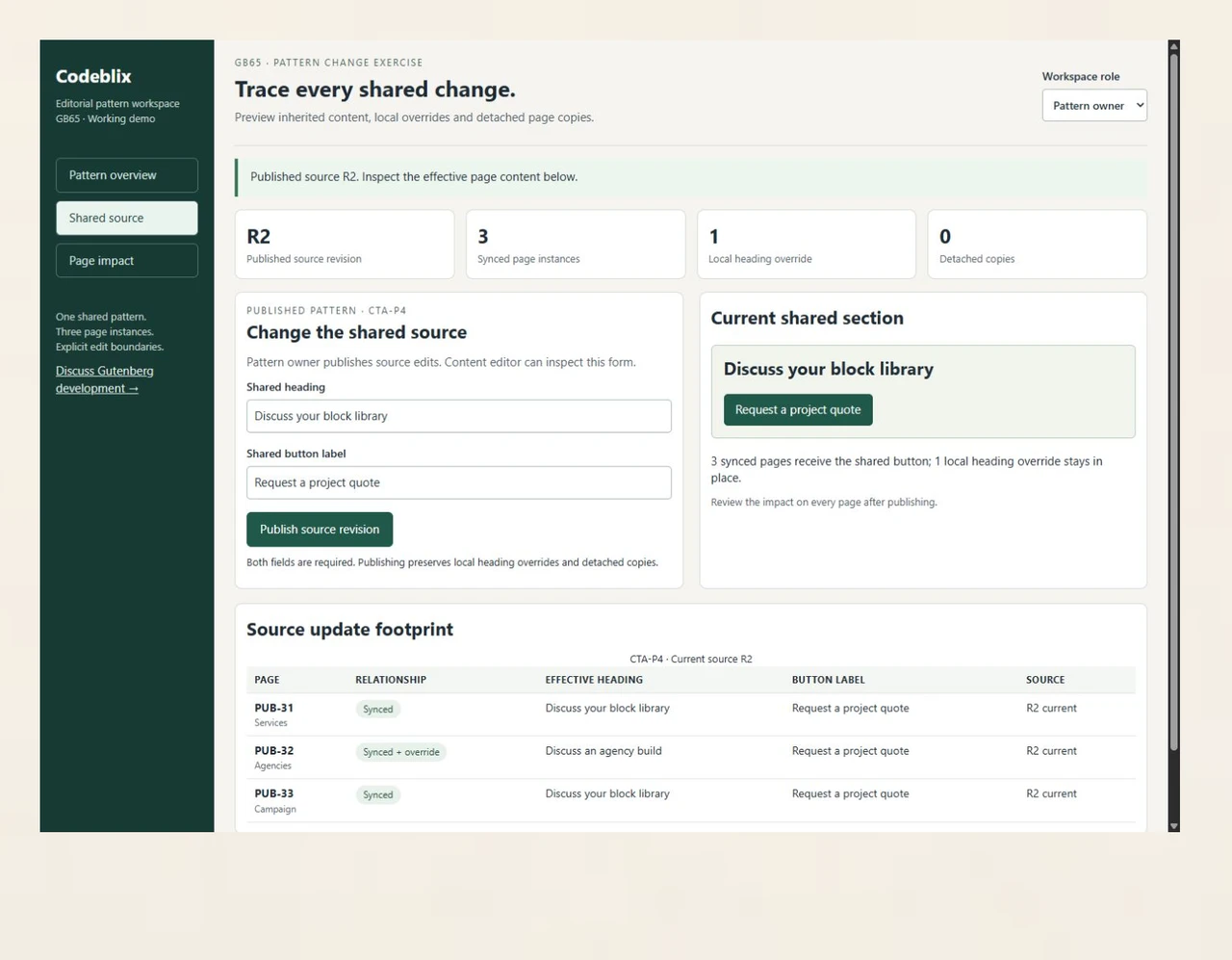
Pattern owner publishes R2 with Discuss your block library and Request a project quote. Services and Campaign receive the new heading. Agencies retains its own heading, and all three pages receive the new button. The shared-source screen puts those effective values beside the source form so the editor can inspect the footprint.
Preserve the content of a detached campaign
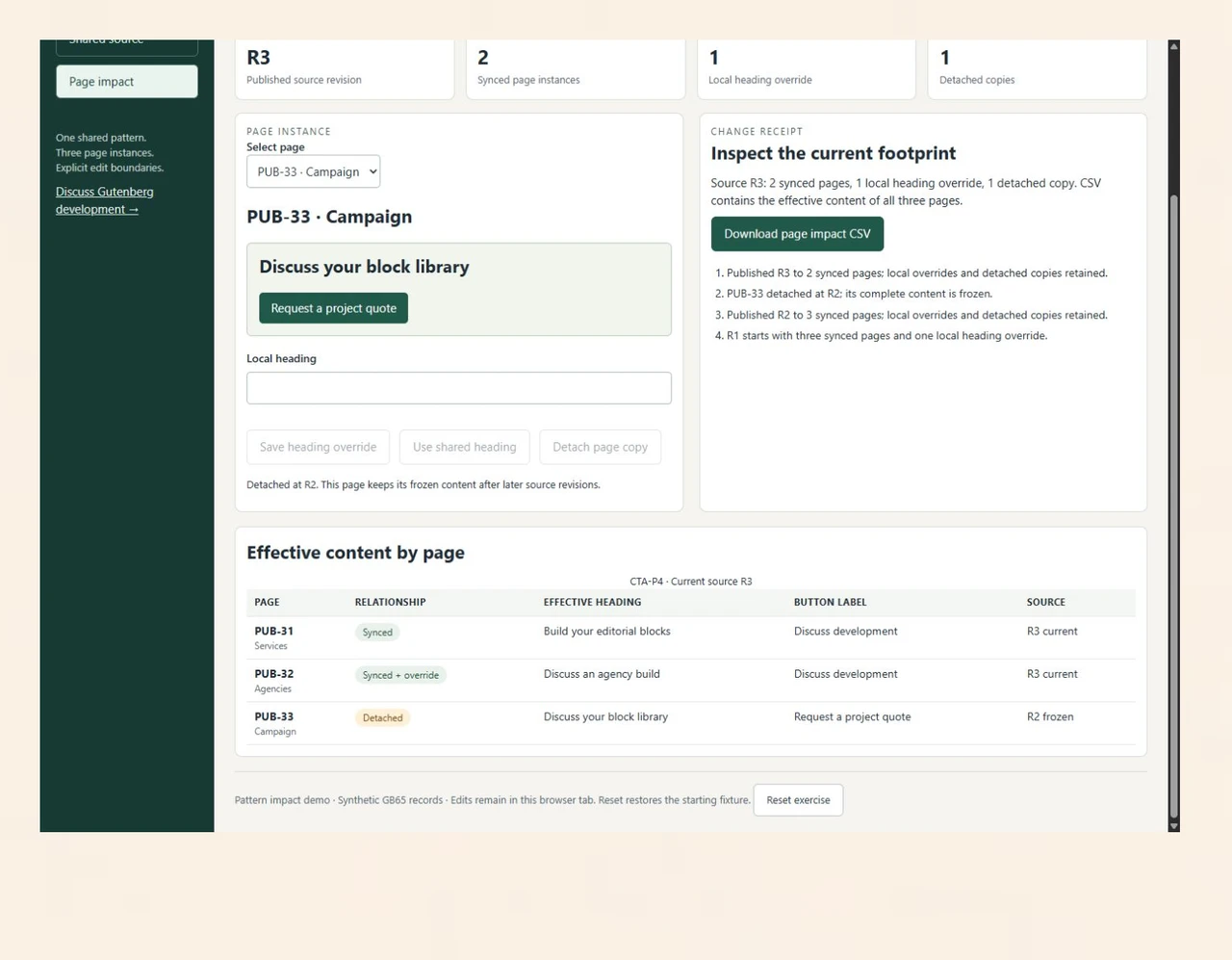
Detach PUB-33 at R2, then publish R3 with Build your editorial blocks and Discuss development. The two synced pages follow the new button; Agencies still keeps its heading. Campaign retains both R2 values. The impact CSV records each page’s relationship, effective revision, heading and button label.
Know which pages a shared edit changes.
The GB65 pattern exercise connects CTA-P4 to Services, Agencies and Campaign pages. Publish a shared revision, keep an agency heading override and detach the campaign copy. Inspect the resulting content on all three pages.
Specify the publishing footprint.
Use the working exercise and the WordPress primary references to make your development request concrete.
Inspect the three-page propagation exercise
Open GB65, switch to Pattern owner and publish a new shared heading and button. Agencies keeps its local heading. Detach Campaign, then publish another revision. Compare the two synced pages with the frozen campaign copy and download the effective content register.
Open the pattern impact demoAgree the lifetime of shared content
WordPress describes synced patterns as reusable sections whose edits appear wherever they are used. Detaching creates independent blocks. Ask the project scope to identify the sections that remain shared and the situations in which a page should become independent.
Consult WordPress documentation on synced patternsConfirm override support for the chosen blocks
The Block Bindings reference documents core/pattern-overrides and the attributes supported by different blocks. Include the WordPress version and exact block attributes in the receiving brief. Have the commissioned library demonstrate the agreed local content rather than assuming every attribute supports the same behaviour.
Review the WordPress Block Bindings referenceConnect dynamic sections to the record source
If a section displays server-managed records, name the authoritative service, allowed fields and fallback values. Define refresh, validation and access rules with the backend owner. Quote the record integration alongside the block development when both are needed.
Discuss the supporting record serviceSix decisions for editorial control
Turn your content inventory into development scope, editor permissions and an observable release result.
Inventory the sections your team repeats
Collect representative pages, content types, media and brand rules. Identify repeated calls to action, service panels and editorial layouts. Name the publishing owner and decide which sections should share future changes. Include the existing WordPress version, theme, plugins and source access in the development enquiry.
Choose the shared and local fields
For each section, mark the source-controlled fields and permitted instance overrides. A heading may stay local while its button follows the source. Decide when an editor may detach a copy and who receives ownership of that independent content. Keep those decisions in the block library brief.
Define the editor’s allowed operations
Specify who edits content, changes shared patterns, alters structure and approves releases. Agree block locking and capability checks separately. The WordPress Block Locking API reference describes controls for movement and removal and configurable locking permissions; receive the actual permissions in your selected WordPress environment.
Build a representative pattern and inspect its reach
Commission one representative section with its agreed fields and styles. Run a shared change across an inherited instance, a heading override and a detached copy. Use the GB65 sequence as a concrete receiving example, then repeat the behaviour with the commissioned blocks and real content relationships in staging.
Move content with a page-level reconciliation
Map existing builder or classic content to the agreed blocks. Record page URLs, shared-pattern membership, media references and exceptions that need manual treatment. Receive a sample migration before the full batch, and compare headings, links, responsive layouts and editorial editing after conversion.
Release the library with an editor handover
Confirm the source package, version requirements and receiving results. Walk the publishing owner through shared updates, local overrides and detachment. Agree the release window, backup and rollback procedure, then document maintenance ownership and the route for future block changes.
Define the editorial build
- Provide the content inventory and representative sections, including long headings, missing images and mobile examples. Identify the number of block types, patterns and templates to commission. Ask the quote to separate reusable development from page-by-page content entry.
- Describe each field’s editing rule: shared source, local override or independent copy. Include default values, required text and link destinations. Name the person who can approve a change affecting several published pages.
- Supply the current WordPress, PHP, theme and plugin versions with a sanitized staging environment. Identify custom blocks and dependencies already in use. Confirm compatibility checks and any required upgrade work in the development scope.
- Set the receiving browsers, screen widths, keyboard tasks and content edge cases. Include editor and public-page checks. Receive headings, focus visibility, link labels, image alternatives and layout behaviour against the agreed design.
Agree migration and ongoing ownership
- For a builder migration, map each existing section to its target pattern and preserve the page URL inventory. Identify content that needs manual rebuilding, legacy shortcodes, embedded forms and media. Agree who reviews the sample and the full conversion.
- For dynamic blocks or external data, define authentication ownership, data fields, caching and fallback content. Include the behaviour when the service is unavailable. Third-party services, licences and credentials stay with their authorized owners.
- Request the delivery milestones, review schedule, capacity and commercial terms in writing. The number of block types, migration effort, integrations and existing dependency condition shape the quotation. Confirm how additional requirements are approved.
- Agree who holds the source, maintains the pattern library and receives defect reports after launch. Include build instructions, supported versions and a rollback procedure. Schedule later compatibility or editorial changes as an explicit maintenance scope.
Six records that explain the publishing footprint
The GB65 fixture separates a shared source from its per-page content decisions.
| Record | Example inputs | Required output and control |
|---|---|---|
| Pattern source | CTA-P4 / revision R1, R2 or R3 | Store the shared heading and button label under one source identity. |
| Page instance | PUB-31 Services / synced | Resolve inherited content from the current pattern revision. |
| Local override | PUB-32 Agencies / heading override | Preserve Discuss an agency build while the shared button changes. |
| Detached copy | PUB-33 Campaign / frozen at R2 | Retain both effective values when the page leaves the shared relationship. |
| Editor operation | Content editor / Pattern owner | Separate local heading edits from shared publication and detachment. |
| Impact export | Pattern ID / page ID / relationship / revision / heading / button | Export three effective records so the publishing owner can reconcile the change. |
Publish R2 with Discuss your block library and Request a project quote. PUB-31 and PUB-33 receive both values; PUB-32 keeps Discuss an agency build and receives the new button. Detach PUB-33 while R2 is current. Publish R3 with Build your editorial blocks and Discuss development. PUB-31 receives both R3 values; PUB-32 preserves its heading and receives the R3 button; PUB-33 remains Discuss your block library with Request a project quote at R2. Download the three-row impact register to inspect the exact result.
Commission the same editorial behaviour.
Give each provider the same content inventory and change sequence when requesting a development quotation.
| Option | Published focus | Ask in your demo |
|---|---|---|
| Codeable | A Gutenberg developer directory and project-posting route that matches buyers to available specialists. | Will the scoped project include a shared-update, local-override and detached-copy receiving exercise? |
| HireWebDeveloper | Custom block libraries, editing patterns, migration and editor onboarding through a scoped quotation. | Which page-level impact register and content exceptions are included in the migration and release handover? |
| ControlF5 | Gutenberg development enquiries covering block-based editing, patterns, custom styles and full-site editing. | How will the commissioned library separate shared-source publication from permitted local content edits? |
Ask for one representative section to be demonstrated with inherited content, an allowed override and an independent copy. Receive the actual block source and observed WordPress behaviour alongside the editorial handover.
Category reference: WordPress primary reference: Block Locking API. Use the selected WordPress version, block support and editor permissions as explicit development inputs. Confirm the resulting workflow in your staging environment.
Connect the block library to its data.
Include the authoritative records and integration boundaries when your editorial sections display dynamic content.
Explore marketplace development servicesAgree your Gutenberg project
Resolve the content model and publishing responsibilities before confirming the project.
What should we send when hiring Gutenberg developers?
Send representative pages, repeated sections, the WordPress and theme versions, current plugins and the publishing owner. Mark shared fields and fields editors may override. A small content sample and a specific change sequence help Codeblix review the project and prepare a development quotation.
Can Codeblix build a custom block library?
Discuss the block types, editorial patterns, styles and page templates your team needs. Agree the source package, supported versions and receiving cases in the project scope. Capacity, milestones and commercial terms are confirmed after reviewing the existing site and dependencies.
Can the project include migration from a page builder?
Include an inventory of pages, builder sections, shortcodes, forms and media. Commission a representative conversion first, then reconcile content and URLs before the full migration. Identify which sections become synced patterns and which remain independent page content.
What does the pattern impact demo demonstrate?
GB65 changes a shared heading and button across three synthetic pages. One page keeps its heading override. After Campaign is detached at R2, an R3 source update affects the two synced pages while Campaign preserves both R2 values. The CSV records the effective result for every page.
Which fields should editors be allowed to override?
Choose fields that need page-specific content, such as an agency heading, while keeping shared brand and structural decisions under the pattern owner. Identify the exact blocks and supported attributes in the selected WordPress version. Receive the agreed override behaviour in the commissioned library.
How should shared changes be approved?
Name a pattern owner and a publishing reviewer. Include a page register, expected inherited fields and exceptions in each representative release check. Confirm WordPress capabilities and locking configuration in staging, together with backup and rollback responsibilities.
What affects the development quotation?
The number of block types, pattern variants, migration volume, dynamic data and compatibility work determine the scope. Editor training, release assistance and ongoing maintenance may add responsibilities. Request milestones, review dependencies and approval terms for additional work.
What should our publishing team receive?
Receive the agreed source, build instructions, version requirements and tested block library. Include an editor walkthrough, shared-versus-local field rules, migration reconciliation and release notes. Assign a maintenance owner and an agreed route for defects or future content-model changes.