
Locker management software
Locker management software connects each compartment with its assigned user, allocation period and physical readiness. Codeblix develops custom locker applications for organisations that need their own eligibility, issue and return rules. Try the working allocation demo and use the selection checklist to compare established platforms with a tailored development project.
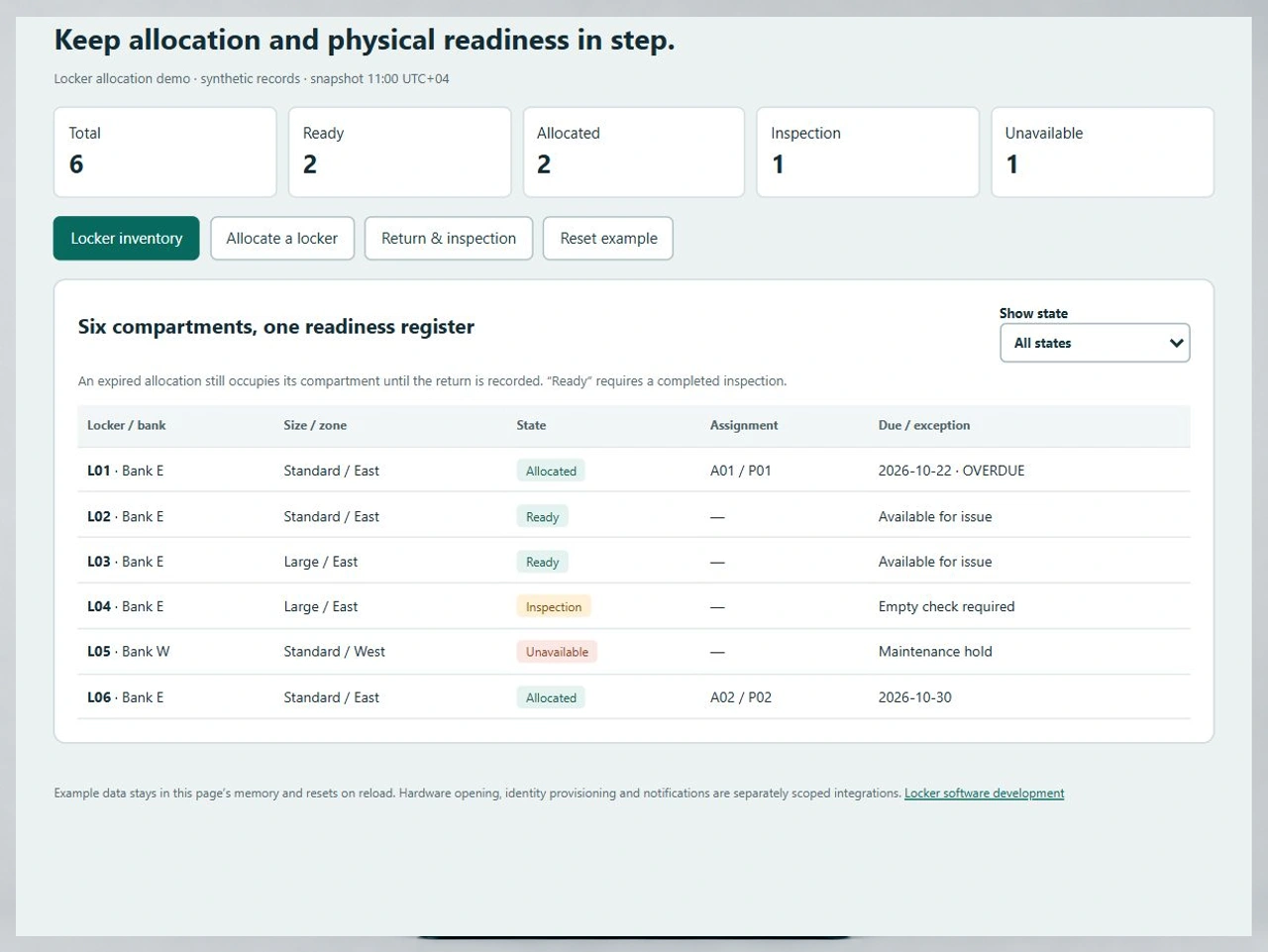
Issue the right compartment and recover it with a clear handoff.
Facilities teams need to know who holds a locker, whether the allocation is overdue and when the compartment can safely return to the available pool.
Match the person with an eligible locker
Define location, compartment size, allocation policy and user eligibility before confirming an assignment. A free standard compartment cannot satisfy a large-compartment requirement. Decide how permanent assignments, day use and temporary exceptions interact.
Separate expiry from a confirmed return
An end date can trigger a follow-up, but it does not prove the locker is empty or a key has been returned. Keep the assignment visible until an authorised operator records the physical handoff. Review any extension without losing the original period.
Restore readiness after inspection
A returned compartment can need cleaning, damage review or a lock change. Route it through an inspection state before offering it again. Keep maintenance holds separate and retain the prior assignment when a locker becomes available.
An expired assignment is still a physical claim.
LK-06 follows six synthetic compartments from the inventory through a size mismatch and a recorded return. Allocation status and readiness stay separate throughout the example.
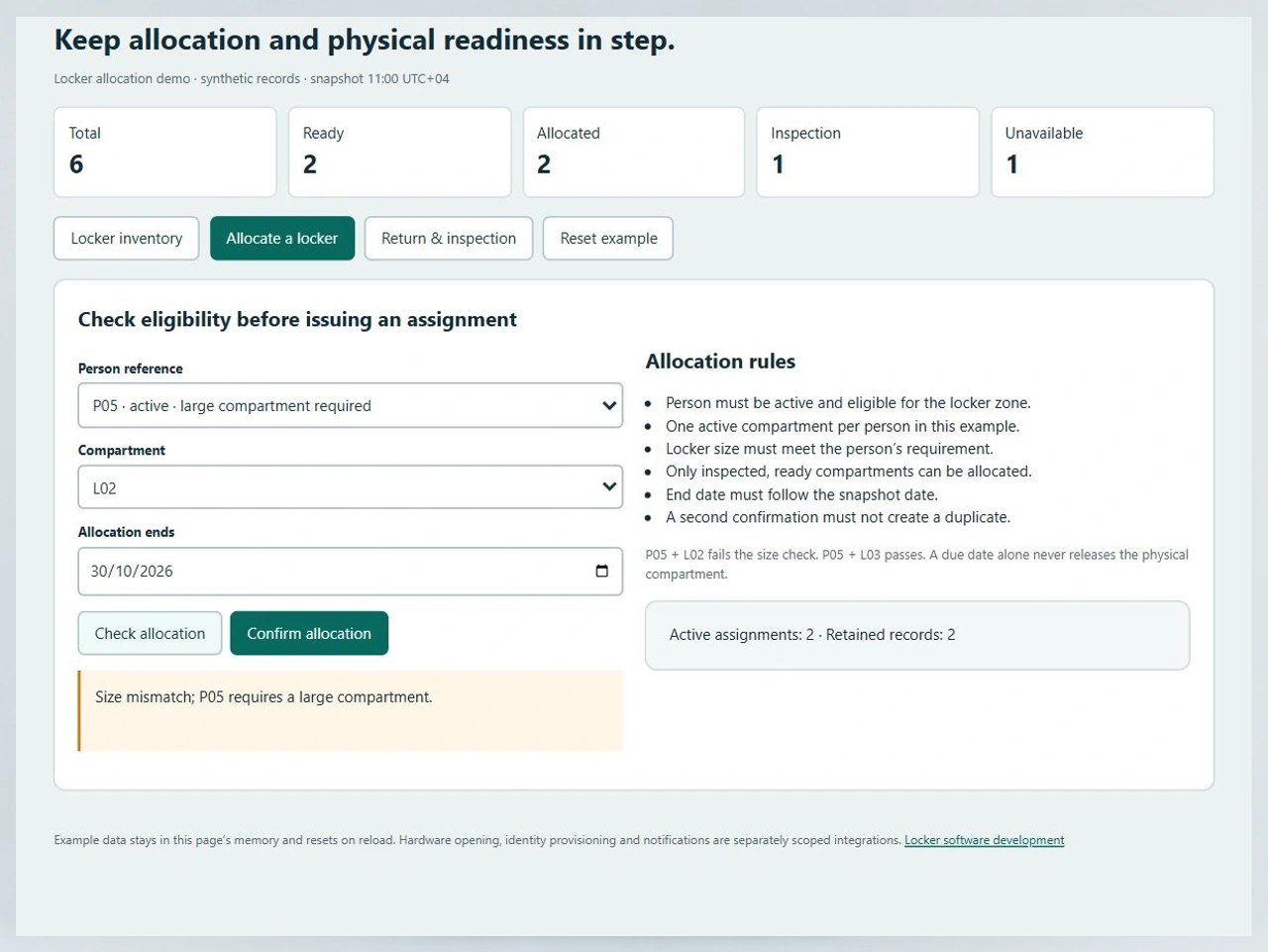
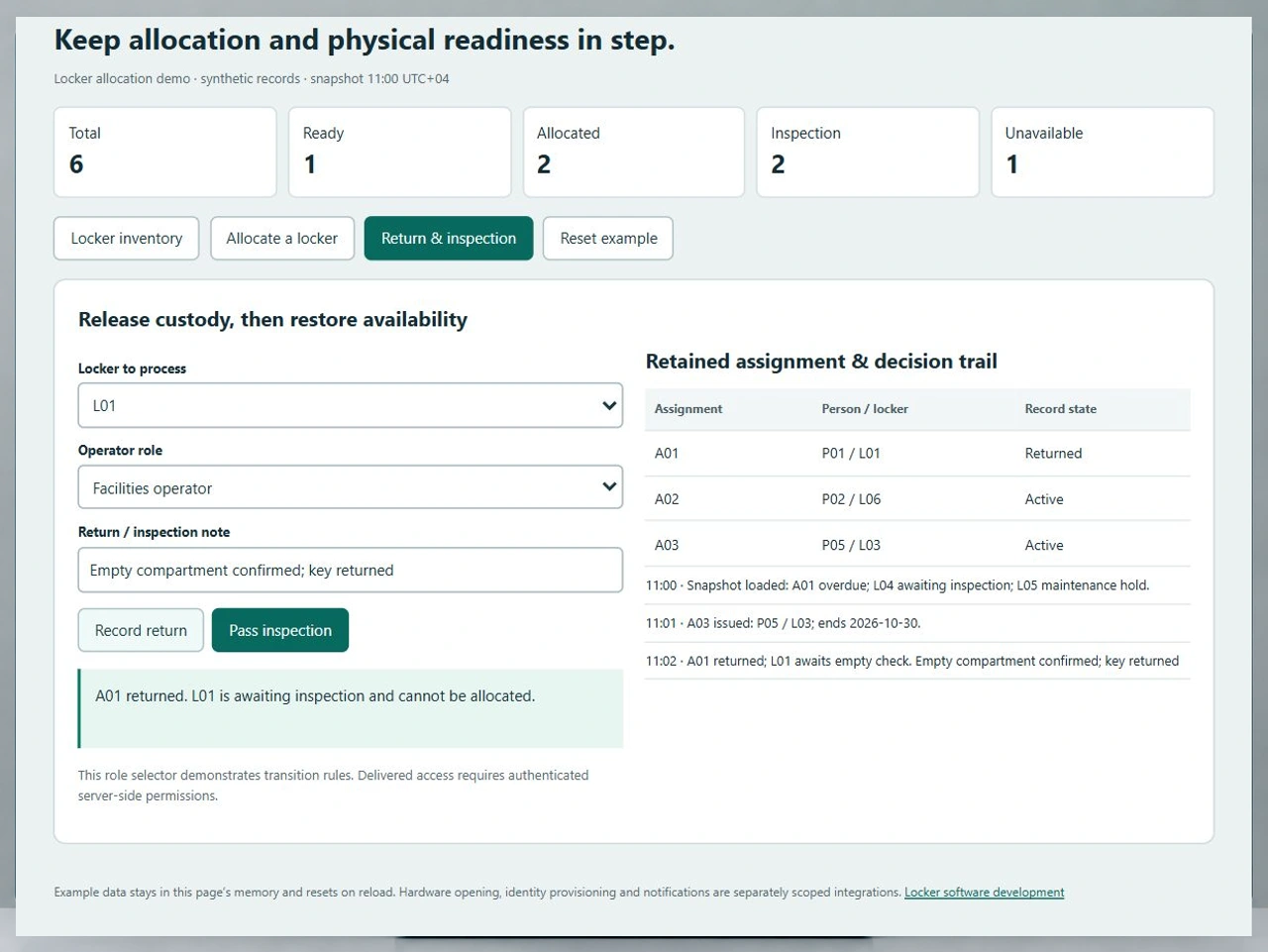
Run the LK-06 issue-and-return example
Check P05 against L02 to see the size mismatch, then allocate large compartment L03. Return overdue assignment A01 from L01: the compartment moves into inspection. Pass the inspection to make L01 ready while keeping A01 in the register.
Open the locker allocation demoKeep workstations and storage policies connected
A desk reservation allocates workspace for an interval; a locker assignment tracks personal storage custody. Coordinate the employee and site identifiers while keeping each inventory’s release rules explicit.
Compare employee desk allocationGive damaged compartments an operational owner
A broken door or failed lock needs a maintenance decision before another issue. Define the service handoff and the authority to restore availability after the repair.
Review facilities service workflowsFrom locker register to the next authorised allocation
Agree these six transitions with the facilities owner, service desk and identity administrator before commissioning the first locker bank.
Create a stable compartment register
Identify the site, bank, locker number, size, zone and lock type. Distinguish ready inventory from assigned, inspection and maintenance states. Use stable IDs so a relabelled door does not become a second physical compartment.
Resolve eligibility and allocation policy
Identify the person through the agreed directory or approved roster. Apply the permitted zone, required size, allocation duration and maximum active assignments. Define who can approve an exception and what evidence the decision needs.
Validate and confirm one assignment
Check both the user’s existing claims and the compartment’s current state. In the delivered application, a transactional reservation service must prevent two simultaneous requests from winning the same locker. Record the assignment ID, period and operator once.
Handle expiry and changes explicitly
List overdue claims for follow-up while preserving physical occupancy. Agree extension authority, reminders, leaver handling and disputed returns. A directory deactivation must not silently erase the responsibility for property still inside a compartment.
Record the return and inspection
Capture the returning assignment, operator, time and handoff note. Move the locker into inspection, then record the empty check, damage decision or lock work. Only an accepted inspection restores ready inventory; unresolved work keeps the compartment unavailable.
Reconcile access and operating history
Where electronic locks are included, distinguish a software assignment from a device acknowledgement and an actual door event. Reconcile failed commands and offline units. Preserve allocation and return history under an agreed retention and support policy.
Roles, access and private information
- Requesters view their permitted allocations; facilities operators issue and receive lockers; supervisors approve policy exceptions.
- Use authenticated server-side permissions for allocation changes, inspections and any emergency-opening action.
- Store only the person reference and operational details needed for the job. Keep lock secrets and private access credentials outside ordinary registers and exports.
- Agree retention, audit access and operator review for overdue claims, property disputes and leaver cases.
Migrate the physical register and live claims
- Reconcile the imported locker count against a physical survey, including broken compartments and inconsistent bank labels.
- Import open assignments with their original identifiers, due dates and unresolved return notes. Resolve duplicates before changing authority.
- Map the exact identity, access-control and hardware interfaces during discovery; specify data direction, supported commands and acknowledgement behaviour.
- Pilot one bank with a cutover register, failed-command recovery and an agreed manual fallback before expanding to other sites.
Compare delivery costs and support responsibilities
- Compare a configured platform and custom development against the same allocation, inspection and access requirements.
- Include lock hardware, installation, licences, identity work, data cleanup, hosting, training and ongoing support where applicable.
- Decide who handles overdue property, damaged doors, lost keys, offline controllers and disputed access events.
- Request a scoped quote with acceptance cases, backup recovery, ownership of data and code, and a support response plan.
Six records for a useful locker software evaluation
Use these records to make supplier demonstrations and custom development estimates comparable. The worked case treats a compartment’s availability as an operating decision with evidence.
| Record | Example inputs | Required output and control |
|---|---|---|
| Compartment | L01–L06; bank, zone, size and lock type | Stable physical identity; one readiness state per compartment. |
| Eligible person | P01–P06; active status, permitted zone and required size | Reject inactive, wrong-zone and undersized allocations; restrict multiple active assignments. |
| Assignment | A01 P01/L01 due 22 Oct; A02 P02/L06 due 30 Oct | Retain an expired claim until return; confirm one new allocation exactly once. |
| Return handoff | Assignment ID, returning operator, time and handoff note | End active custody and move the compartment into inspection without deleting the assignment. |
| Inspection or maintenance | Empty check, condition, key or lock work, authorised decision | Only an accepted inspection changes inspection inventory to ready; preserve maintenance holds. |
| Access acknowledgement and audit | Assignment edition, device command ID, acknowledgement and actor | Keep software permission, physical opening evidence and operating history distinguishable. |
Initially, two of six compartments are allocated, two are ready, one awaits inspection and one is unavailable. P05 needs a large compartment: L02 fails, while L03 can be issued as A03. The counts become three allocated and one ready. Returning A01 leaves two allocated, one ready and two in inspection. Passing L01’s inspection restores two ready compartments. A01 remains a returned record alongside active A02 and A03. The initial assigned share is 2/6, or 33.3%; it is a register-based allocation measure, not a sensor occupancy reading.
Compare allocation platforms and connected locker systems
Start with each supplier’s published focus, then request a demonstration of the same eligibility, return and inspection cases.
| Option | Published focus | Ask in your demo |
|---|---|---|
| LockerGM | Locker inventory, registration, rental payments, renewals and lock rotations for education, recreation and commercial facilities. | Show an expired assignment, a disputed return and the point at which the compartment becomes available again. |
| eLocker | Connected locker hardware, allocation, collection/return event history, exceptions and an API layer. | Distinguish a software allocation, a successful opening command and a confirmed empty-compartment handoff. |
| Bradford Systems | Management software for day-use and smart lockers, including assignments and usage information. | Demonstrate a size or eligibility mismatch and a maintenance hold before issuing the next assignment. |
These questions do not imply a supplier lacks a capability. LK-06 adds a repeatable six-compartment input set, explicit state counts and expected return/inspection results for comparing proposals.
Category reference: eLocker’s primary locker management system overview. The LK-06 working demonstration, entity model, state-count example and acceptance checklist are original Codeblix buyer resources.
Coordinate locker allocation with site operations.
Keep storage custody, facilities service and workplace identities connected through clearly owned handoffs.
Explore software for service operationsQuestions before selecting locker management software
Clarify allocation policy, physical handoffs and hardware responsibility before accepting a proposal.
What does locker management software control?
It records compartments, eligible users, assignments, allocation periods and return decisions. Depending on the selected system and hardware, it may also coordinate access credentials and opening events. Compare those responsibilities separately so a software status does not become unsupported physical evidence.
Can Codeblix build a custom locker allocation application?
Yes. Codeblix offers custom software development for locker allocation and operational handoffs. The first scoping decisions are the inventory, eligible users, assignment policies, return checks and systems that need to exchange data. LK-06 provides a practical starting point for those decisions.
Does a locker become available when its due date passes?
Choose the policy carefully. Expiry can mark an assignment overdue and begin follow-up, but it does not establish that property has been removed. The demonstration preserves the active claim until a return is recorded and requires inspection before reissue.
How should permanent and day-use lockers differ?
Define separate entitlement and duration rules while sharing stable compartment identifiers. Permanent allocations need renewal and leaver handling; day-use assignments need clear expiry, return and recovery procedures. Decide whether either policy can use the same pool and how conflicts are prevented.
Can an existing key or electronic-lock estate be retained?
Review the exact lock types, controller versions and supported interfaces before choosing the connection approach. Manual-key custody and electronic opening acknowledgements need different controls. Hardware assessment, installation and any integration belong in the agreed project scope.
What should happen after a locker is returned?
Record the completed handoff, keep the assignment in history and place the compartment into inspection. Define the empty check, damage decision, cleaning or lock work required to restore readiness. A failed check should leave an accountable exception rather than a free-looking locker.
Who should be allowed to change an assignment or open a locker?
Separate requester, facilities, supervisory and system-administration permissions. Record exceptional decisions and define any emergency access process with the site owner. A delivered application needs authenticated authorisation at the service boundary as well as an understandable interface.
Which locker records help Codeblix scope the project?
Provide site and compartment counts, lock inventory, user source, allocation duration rules, current assignments and difficult return examples. Add hosting, identity, hardware API, migration and support requirements so proposals can be compared against the same pilot and recovery plan.