
Meeting room booking software
Meeting room booking software allocates a shared room to a meeting, checking its capacity, equipment and protected time window before confirmation. Codeblix develops custom room reservation applications for organisations with specific scheduling and approval rules. Use the working recurring-booking demo and selection checklist to compare a configured platform with a tailored development project.
Reserve a usable room for every agreed occurrence.
A meeting needs more than an empty calendar cell. Evaluate the room, the protected interval and the authority behind each reservation.
Include setup and reset in the claim
Store the meeting interval separately from the interval that blocks the room. A 10:00–11:00 meeting with 15 minutes on either side protects 09:45–11:15. A second meeting starting at 11:00 can therefore conflict even when the visible meeting times merely touch.
Explain recurrence one date at a time
Expand a weekly series into dated occurrences before allocating capacity. Show conflicting dates and choose an explicit policy: reject the whole series, reserve the valid dates, or send the exceptions for review. Do not hide skipped dates behind a single successful series message.
Keep holds, approvals and changes connected
An approval request may protect the same room interval as a confirmed booking. Define hold expiry, approver authority and amendment behaviour. Cancelling one occurrence should release that occurrence while keeping its siblings and decision history understandable.
Protect the room before and after the meeting.
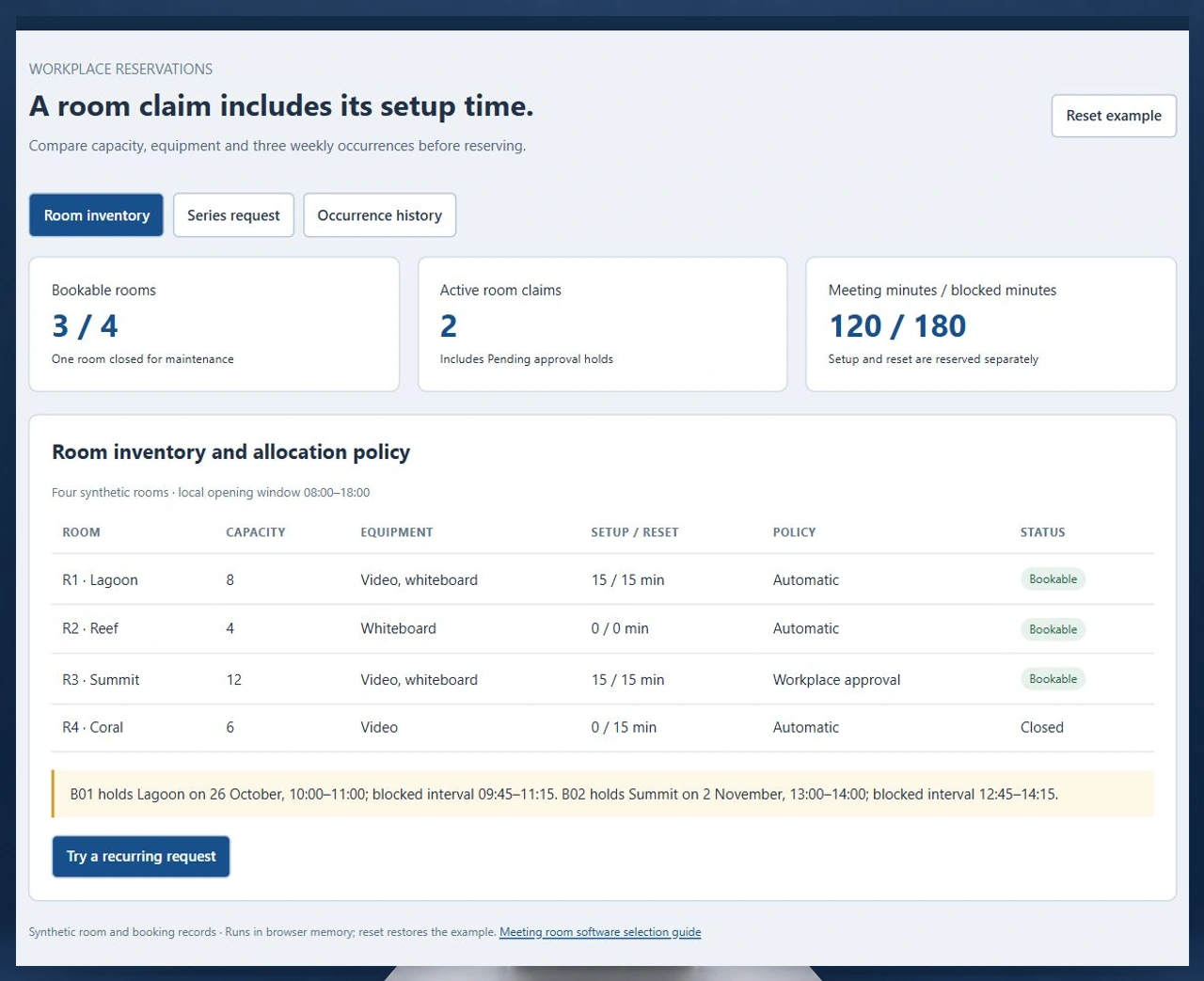
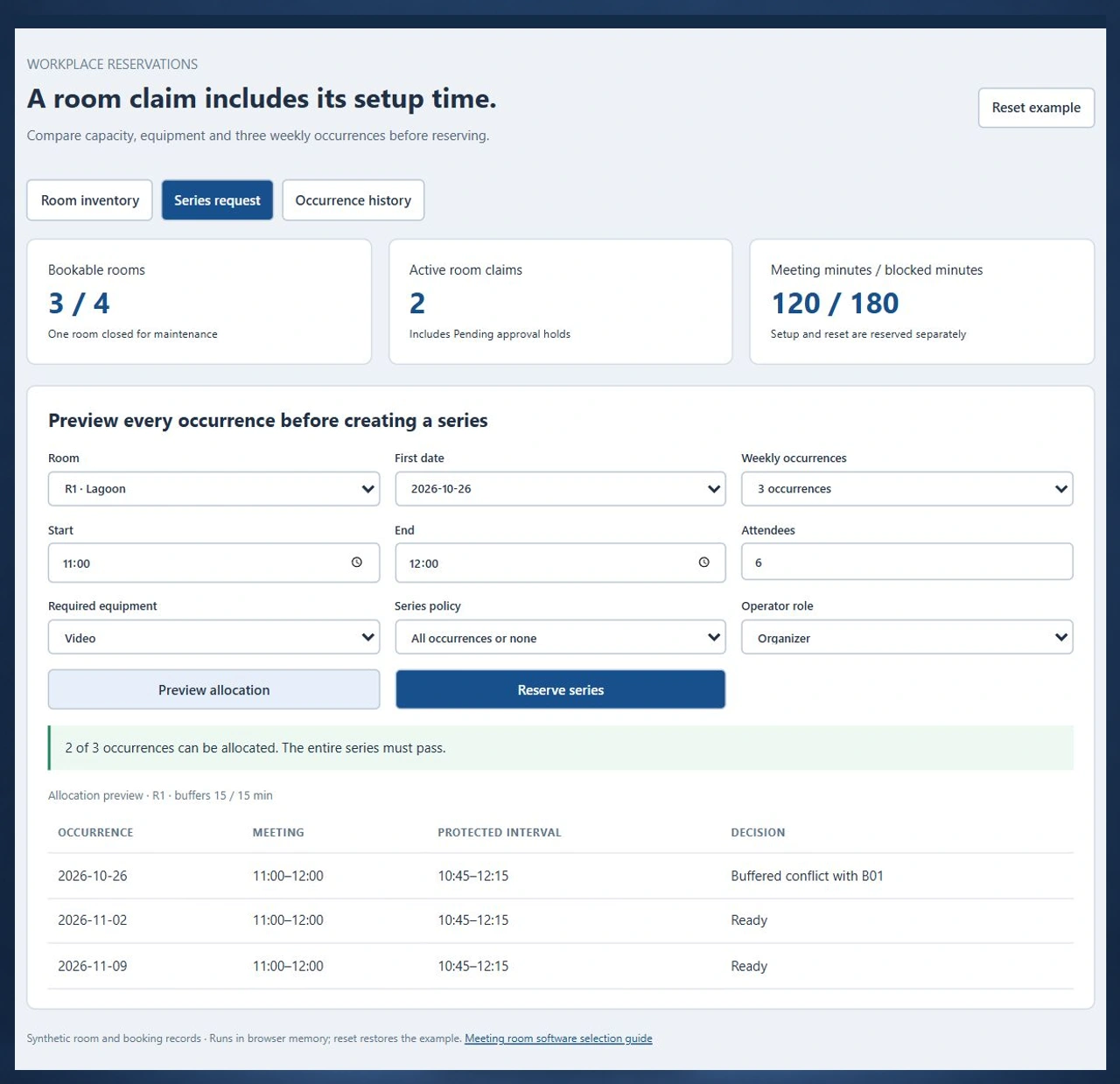
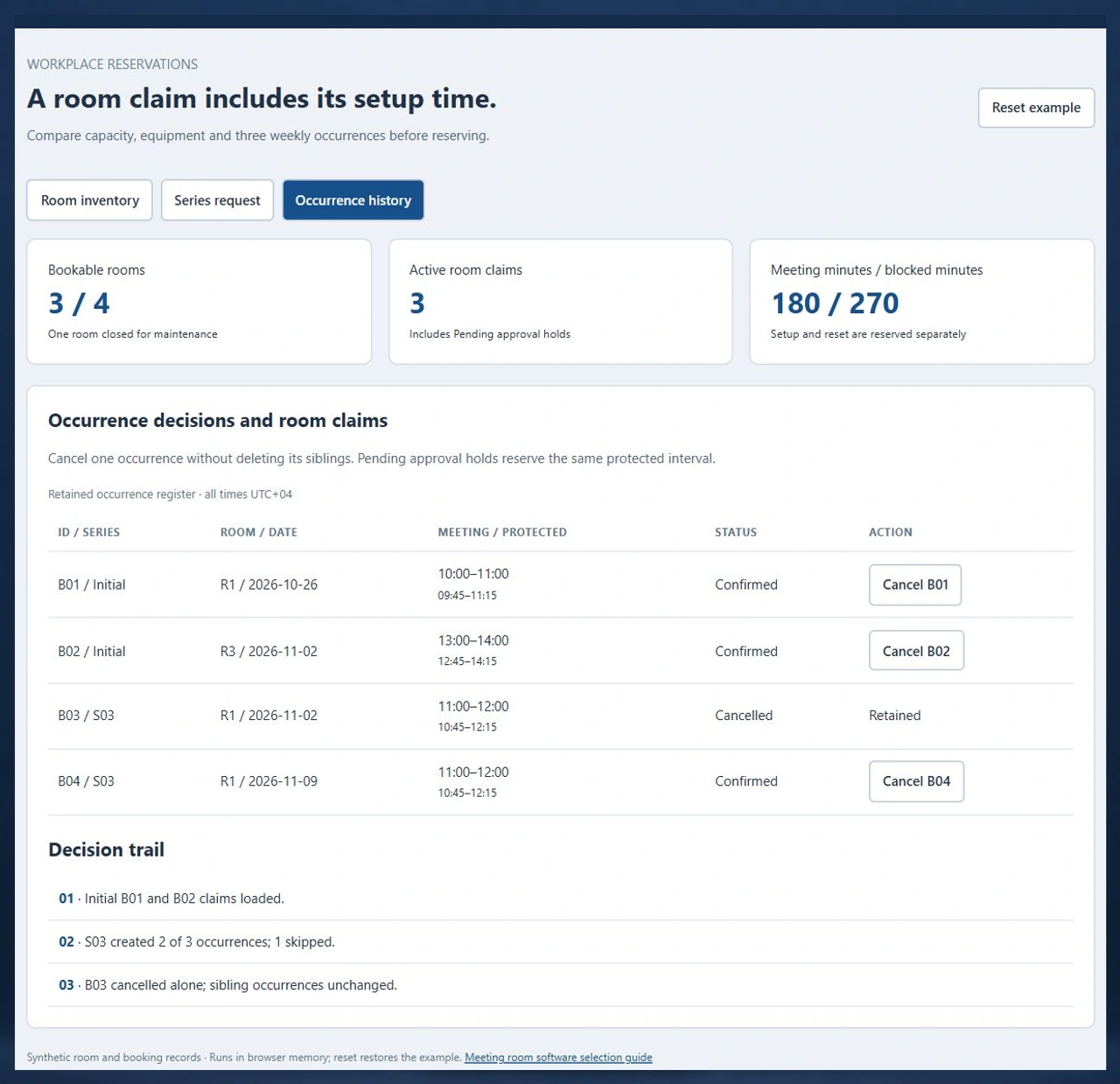
MR-04 follows four synthetic rooms, three weekly dates and a single-occurrence cancellation. The screens show inventory rules, a buffered conflict and the retained decision history.
Run the MR-04 recurring-booking scenario
Preview Lagoon at 11:00–12:00 for three weekly dates. The first date conflicts with B01’s reset buffer. The all-or-none policy creates nothing; the valid-dates policy confirms two occurrences. Cancel B03 and verify that B04 remains reserved.
Open the meeting room planning demoConnect room reservations with desk allocation
Rooms allocate shared meeting capacity; desks allocate individual workstations. A workplace may need both inventories, but the recurrence, equipment and approval decisions should remain explicit for each resource.
Compare employee desk reservationsCoordinate room closures with service owners
A closed room must be excluded from allocation. Where a service request causes the closure, agree who restores availability and how existing organisers receive an actionable resolution.
Review facilities service coordinationFrom meeting requirements to a maintained room schedule
Define these six decisions with workplace operations, calendar administrators and the people who arrange meetings.
Inventory rooms and usable configurations
Give each room a stable ID, capacity, amenities, opening window and availability state. Capture setup and reset durations for the actual layout. Identify rooms that require an authorised approval before confirmation.
Capture the organiser’s actual request
Collect site, time zone, meeting interval, attendee count, equipment needs and recurrence end. Decide delegate permissions and visibility of meeting titles without exposing unnecessary attendee information.
Expand and validate each occurrence
Check every dated occurrence against capacity, equipment, closures and the complete buffered interval. Evaluate existing confirmed claims and active holds. Show the specific blocking claim and offer a deliberate series policy.
Allocate holds or confirmed room claims
The delivered reservation service needs transactional conflict prevention and authenticated authorisation. Decide whether pending approvals hold capacity, how long they last and which operator can approve or decline them. Record one outcome per occurrence.
Reconcile the calendar and service handoff
Agree which system owns the reservation and the calendar resource. Track acknowledgement, update conflicts and retries separately. Include setup teams, catering or reception only when their exact interfaces and operating responsibilities are in scope.
Amend, cancel and report consistently
Distinguish one occurrence from an entire series. Retain the cancelled record and propagate its change to the agreed destinations. Report meeting minutes, protected minutes and attendance evidence with separate definitions and denominators.
Authority, privacy and room access
- Organisers request or amend their permitted meetings; delegates need a defined booking authority.
- Workplace approvers decide requests for controlled rooms; system administrators manage inventory and policies.
- Protect confidential meeting subjects, attendee details and approval notes with role-specific views and retention rules.
- Booking a room and granting physical entry are separate responsibilities; review any access-control interface explicitly.
Migration and calendar ownership
- Import room IDs, capacity, amenities, closures, future occurrences and series exceptions before switching booking authority.
- Map external event IDs, organiser identities and resource mailbox IDs; reconcile duplicate invitations and recurring exceptions.
- Specify exact calendar and identity providers, supported permissions, data direction, retry handling and reconciliation during discovery.
- Use a pilot cutover to prove cancelled occurrences, daylight-saving changes and stale updates without double-booking resources.
Deployment, support and supplier cost
- Compare subscription configuration with custom development using the same rooms, sites, users and exception cases.
- Include room panels, identity/calendar work, migration, hosting, monitoring, backup recovery and training when applicable.
- Agree ownership for approval queues, expired holds, failed notifications and calendar synchronisation incidents.
- Obtain current supplier terms and a scoped development estimate; set acceptance criteria before extending the rollout.
Six records that make room booking proposals comparable
Bring this model to supplier demonstrations and custom development scoping. Its three-date example separates meeting duration, protected room time and series outcomes.
| Record | Example inputs | Required output and control |
|---|---|---|
| Room configuration | R1 Lagoon 8 seats; R2 Reef 4; R3 Summit 12; R4 Coral closed | Check equipment, capacity and availability against the requested configuration. |
| Protected interval | Meeting start/end plus setup/reset minutes; opening window 08:00–18:00 | Block the full interval and allow touching boundaries only after both buffers. |
| Series request | Three weekly dates: 26 October, 2 November and 9 November 2026 | Expand finite occurrences before deciding whether any claims can be created. |
| Occurrence claim | Room, dated interval, series ID, Confirmed/Pending approval/Cancelled | Prevent concurrent conflicts and retain the decision for each occurrence. |
| Approval and organiser authority | Organiser; delegate; workplace approver; controlled-room policy | Authenticate production roles and define hold expiry and amendment review. |
| Calendar acknowledgement and history | Reservation edition, external event ID, delivery state and change reason | Reconcile changes without treating message delivery as a new reservation. |
B01 and B02 initially reserve 120 meeting minutes and 180 protected room minutes. Lagoon at 11:00–12:00 protects 10:45–12:15, overlapping B01’s 09:45–11:15 claim on 26 October. Two later weekly dates pass. Reserving those dates creates B03 and B04: 240 meeting minutes and 360 protected minutes across all four active claims. Cancelling B03 alone leaves three active claims, 180 meeting minutes and 270 protected minutes. These sums span several dates; they are not a room occupancy percentage.
Compare room booking approaches with the same cases
Use these current primary product pages to understand the suppliers’ approach, then ask each to demonstrate the same recurring-series, buffered-time and cancellation decisions.
| Option | Published focus | Ask in your demo |
|---|---|---|
| UnSpot | Room maps, capacity and amenity filters, calendar integration and optional room check-in. | Show a three-date series where setup or reset time conflicts on just one date. |
| AskCody | Outlook-based room selection against Exchange resources, room delegates, setup time and connected service changes. | Show how the room calendar, approval and setup request respond to a single-occurrence amendment. |
| MeetingRoomApp | Room touchscreen reservations, calendar synchronisation, service requests and room reporting. | Trace a cancelled occurrence through the panel, calendar and retained reporting history. |
These are purchasing questions, not statements that a supplier lacks a capability. MR-04 contributes a repeatable input model, explicit buffered intervals and expected occurrence outcomes for comparing proposals.
Category reference: AskCody meeting room booking product overview. The MR-04 demonstration, six-record model, worked interval example and acceptance checklist are original Codeblix buyer resources.
Connect meeting reservations with workplace operations.
Agree the resource, organiser and service handoffs around your first office rollout.
Explore software for service operationsQuestions before choosing meeting room booking software
Settle room allocation, calendar authority and operating responsibility before comparing quotes.
What does meeting room booking software manage?
It assigns a shared room to a dated meeting after checking availability, size, amenities and booking rules. A complete purchasing review also covers recurring requests, buffered room time, approvals, cancellations and calendar ownership.
Can Codeblix develop a custom room reservation system?
Yes. Codeblix offers custom application development for room scheduling workflows. Start with a reliable room inventory and the exceptions your organisation needs to control. The working MR-04 demo helps turn those decisions into a scoped implementation brief.
Are meeting and conference room booking different intents?
For workplace room scheduling, the terms usually describe the same allocation job. Assess the capacity, equipment, recurrence and approval rules together. Conference venue sales and event programmes require a broader operating scope.
Why can two non-overlapping meetings still conflict?
Setup and reset can extend the room’s protected interval beyond the meeting itself. With 15-minute buffers, a meeting ending at 11:00 blocks until 11:15, while a new 11:00 meeting needs the room from 10:45. Compare the protected intervals rather than meeting times alone.
Should a recurring series be partly accepted?
Choose that policy explicitly. Some organisations reject the entire series when one date fails; others reserve valid dates and return a clear list of skipped occurrences. The organiser must see which dates actually have a room.
Can pending approval block room availability?
It can when the agreed policy creates a temporary hold. Define who approves, how long the hold lasts, whether amendments restart review and how expired holds are released. The demo includes pending holds in its conflict checks.
Can the application connect to our existing calendars?
Calendar integration can be included in a development scope after reviewing the exact provider and supported interfaces. Agree the authoritative reservation, resource identifiers, update direction, delegated access, retries and reconciliation before making a delivery commitment.
What affects the project quote and ongoing support?
Room/site counts, approval policies, recurrence complexity, calendars, identity, panels, migration and support requirements affect cost. Request the same pilot cases, recovery responsibilities and acceptance criteria from a configured platform supplier and a custom development team.