
Make the first development task specific.
A component request becomes easier to quote when the author, content item and destination are explicit.
Describe the authoring decision
Identify the page and language, the content fields an author edits and the component that presents them. Include the permitted source locations and placements. This gives the quotation a concrete author journey and an expected presentation result.
Receive the content relationship
SC74 distinguishes a valid CampaignCard from a price table, a partner-site item and a draft campaign. The receiving example carries the selected page, rendering, placeholder, source identity and content state together, rather than accepting only the visible teaser.
Put release ownership in the engagement
Name the person who accepts the content experience and the technical owner who approves installation. Agree source delivery, environment prerequisites, licensing dependencies and support terms alongside the development milestone.
From content source to accepted placement.
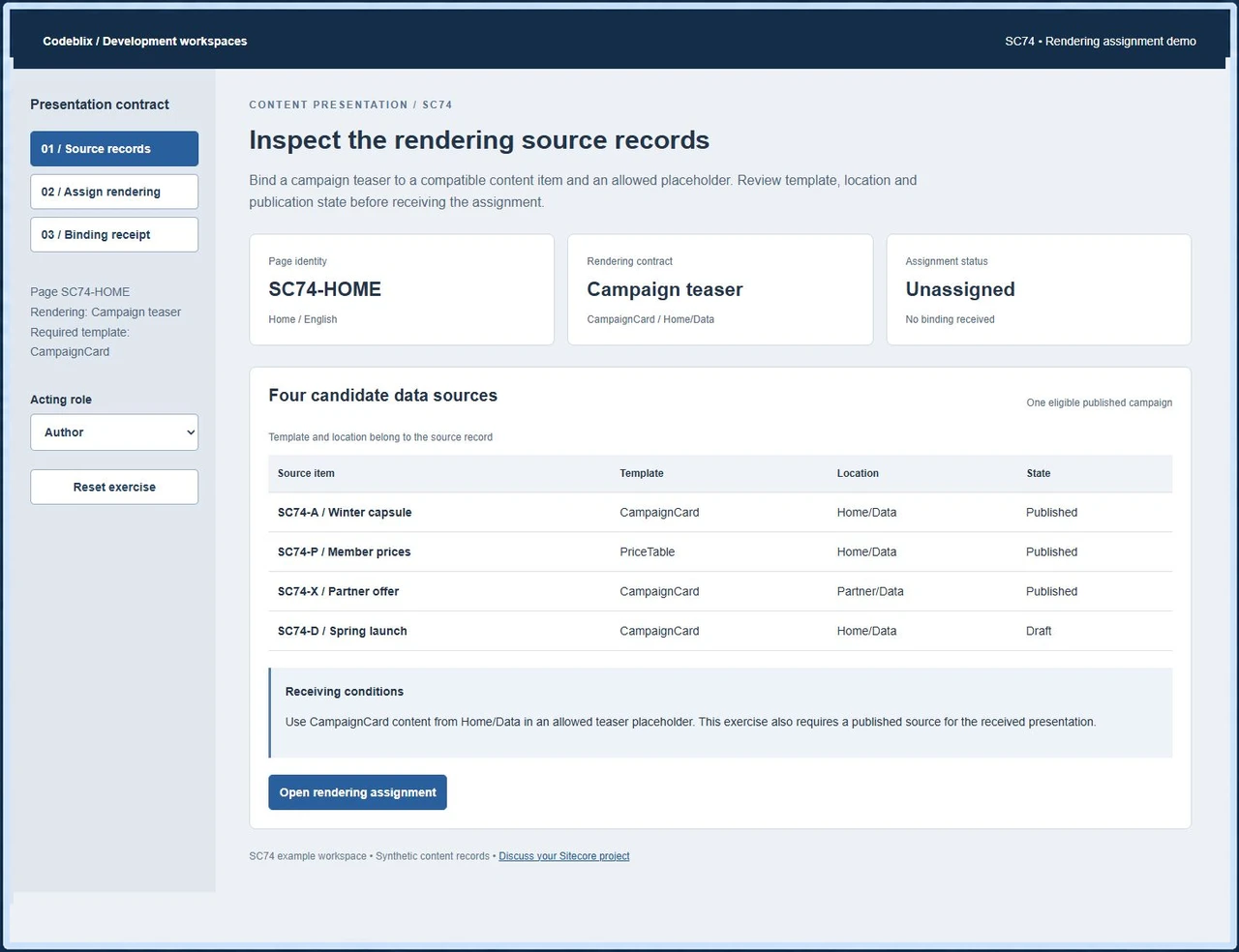
The SC74 workspace connects a page, a campaign rendering and its data source. Inspect four candidate records, review the eligible assignment and receive the complete binding.
Bring the source item and its destination.
Try the assignment exercise, then attach the corresponding records from your own development request.
Exercise the rendering assignment
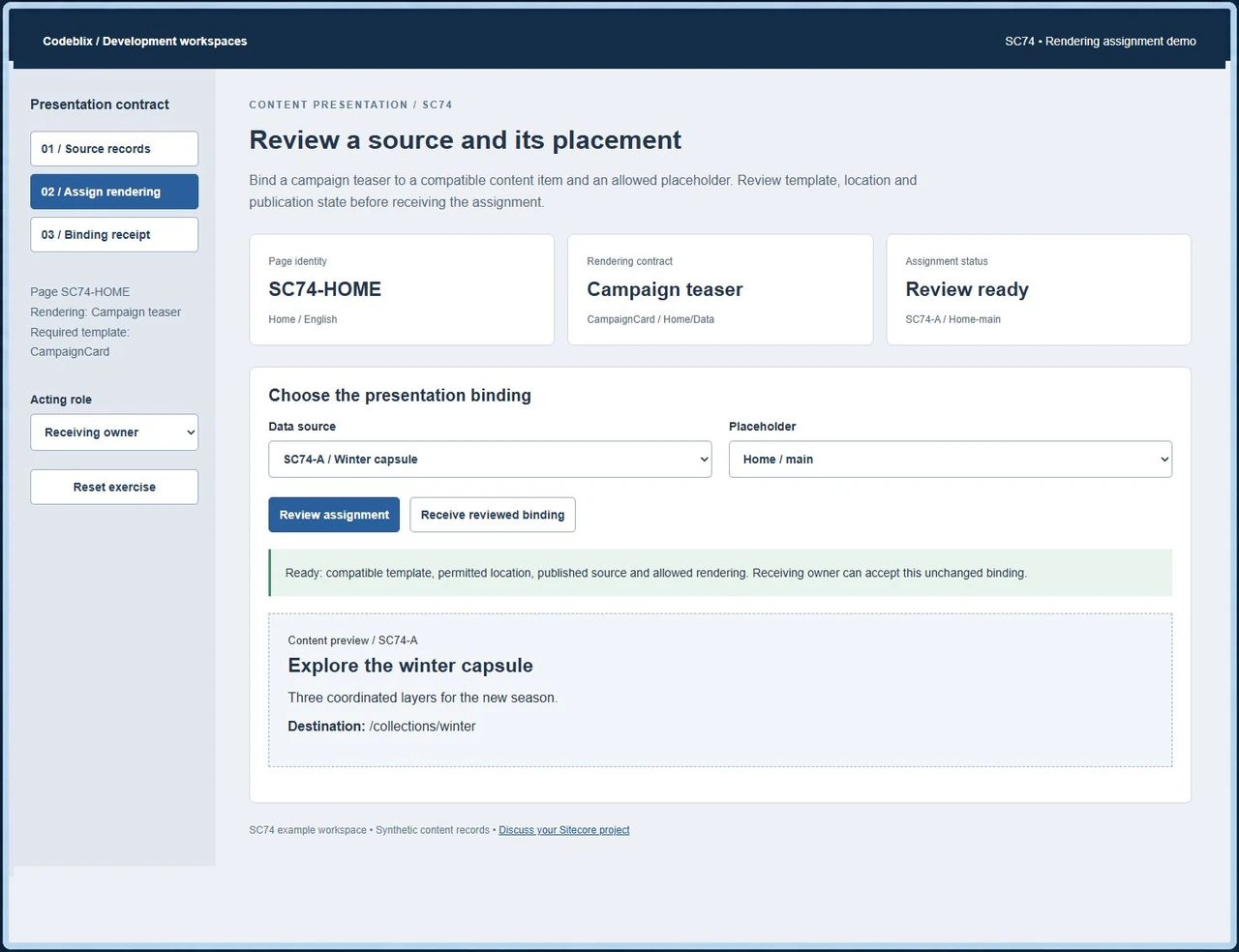
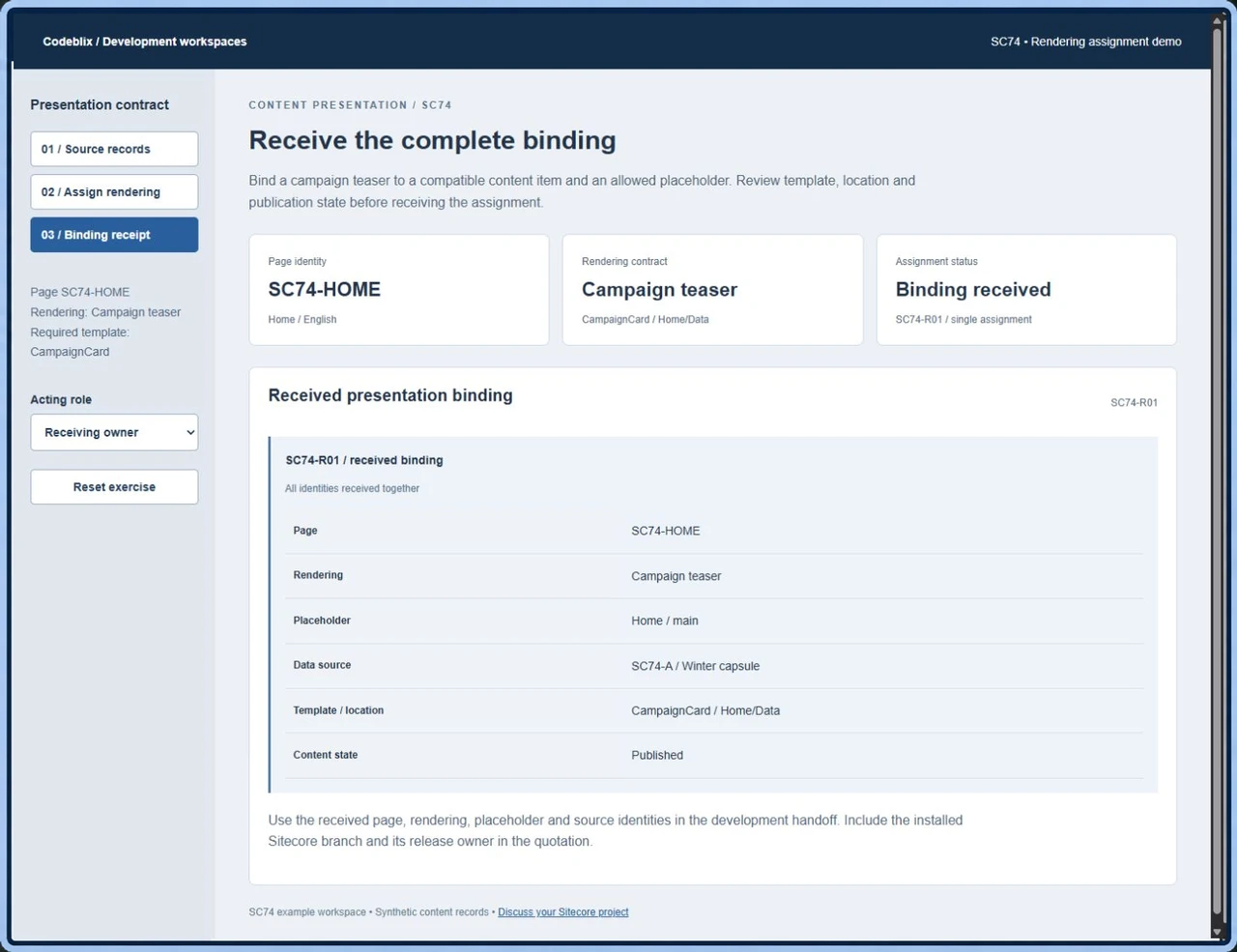
Open SC74 and inspect its four source records. Choose Member prices to see the template hold, Partner offer for the location hold or Spring launch for the publication hold. Review Winter capsule in Home / main, select Receiving owner and receive SC74-R01.
Open the SC74 rendering assignment demoSpecify the data-source contract
The Sitecore SXA 10.3 reference distinguishes source location, template and selected item. Use the documentation for your installed product and version when describing a reusable component. Include any compatible templates and shared-content rules in the development brief.
Primary reference: Sitecore SXA 10.3 data sourcesAgree permitted placements
Sitecore XP 10.4 documents placeholder settings and Allowed Controls. Identify the placeholders where the commissioned rendering belongs, including cases where it must be unavailable. Confirm the equivalent configuration and author permissions for your platform branch.
Primary reference: Sitecore XP 10.4 placeholder settingsSeparate another CMS engagement
If the request also covers a Kentico application, give it a separate platform inventory and acceptance owner. Agree the shared integration boundary while keeping each content application’s source and release responsibilities clear.
Discuss a related Kentico development projectAgree the work from authoring to release.
Use one reproducible content journey to define the first milestone and its receiving evidence.
Identify the platform branch
Supply the exact Sitecore product, release, rendering approach, modules and hosting arrangement. Include the repository, build prerequisites and access owner. Agree a staging workspace and synthetic content before developer access is arranged.
Brief the component and content records
List the page, language, rendering, source template, content fields and intended placeholder. Explain whether the source is local or shared and which author actions should create, select or update it. Add the expected text, media and link behavior.
Define the failure and permission cases
Include a wrong template, an out-of-scope source, an unavailable language version and a disallowed placement. Agree who prepares, reviews and releases the change. Separate authoring permissions from the production publishing decision.
Review the working journey
Inspect the component with the agreed source records. In SC74, changing the source or placeholder clears the review. Agree equivalent checks for changed or deleted content in the commissioned application, including requests made outside the visible editor.
Receive the complete result
Record the accepted page and source identities, configuration, exercised exceptions and resulting presentation. Check the target language, links and media. Resolve any migration or integration reconciliation before the milestone is closed.
Authorize the release handoff
Receive the source changes, configuration instructions and acceptance evidence. Agree staging approval, deployment, backups, rollback and post-release checks with the release owner. Confirm defect handling and the scope of ongoing maintenance in the quotation.
Request a quotation for the actual backlog
- Describe the first component, authoring change, integration or upgrade output and its acceptance owner. State the delivery constraints, review availability and desired collaboration window. Ask Codeblix to confirm the engagement arrangement, capacity and milestones for that scope.
- Provide the installed product and version instead of treating all Sitecore branches as interchangeable. Identify MVC or headless rendering, custom modules, third-party packages, repository access and build requirements. Confirm any compatibility investigation as a separately defined task.
- Identify platform licensing, hosting, external subscriptions and paid modules. Agree who supplies each prerequisite and which costs sit outside the development fee. Scope additions and later platform changes through an agreed change process.
- For content migration, supply the source structure, stable identifiers, language versions, media and links. Agree mapping, sample reconciliation, rehearsal and cutover responsibilities before estimating the full transfer.
Accept the authoring experience and its handoff
- Keep the page identity separate from the data-source identity. Test local and shared content behavior and agree what happens when an item moves, is renamed, is deleted or is unavailable in the requested language.
- Specify publication and workflow rules for the commissioned component. SC74 requires a published source for its receiving exercise; your application’s editing, preview and publishing behavior should follow its own agreed platform configuration.
- For CRM, search or another external service, define supported access, identifiers, input and output fields, authorization and failure ownership. Include retry, duplicate and reconciliation behavior in the integration acceptance cases.
- Receive the repository changes, build and installation instructions, configuration dependencies and exercised cases. Confirm release approval, rollback, support contact, defect terms and ownership of subsequent maintenance.
Receive six linked presentation records.
SC74 makes the component assignment inspectable before the receiving owner accepts it.
| Record | Example inputs | Required output and control |
|---|---|---|
| Page | SC74-HOME / English | Retain the page and language whose presentation is being changed. |
| Rendering | Campaign teaser / CampaignCard | Require content compatible with the component’s expected template. |
| Placeholder | Home / main | Hold Commerce / main because it does not allow this rendering. |
| Data source | SC74-A / Home/Data / Published | Reject PriceTable, Partner/Data and Draft candidate records. |
| Review authority | Author / Receiving owner | Author reviews; receiving requires the owner and an unchanged selection. |
| Binding receipt | SC74-R01 | Receive page, rendering, placeholder and source metadata together once. |
SC74-A is a published CampaignCard under Home/Data. SC74-P uses PriceTable, SC74-X belongs to Partner/Data and SC74-D is a draft. Review SC74-A in Home / main to expose its campaign text and destination. Commerce / main is held even with the valid source. The Author can review but cannot receive. Selecting another source clears approval; the Receiving owner must review the restored valid assignment before receiving SC74-R01. The receipt retains all presentation identities. Include server-side authorization, stale-content handling and repeated requests in the acceptance scope for the commissioned implementation.
Give each provider the same component task.
Ask providers to quote against the same platform branch, content records and acceptance conditions.
| Option | Published focus | Ask in your demo |
|---|---|---|
| ManekTech | Describes Sitecore developer hiring with several engagement models and a meeting enquiry path. | Which component records, compatibility checks and source outputs belong in the first quoted milestone? |
| Addact | Describes component development, migration, integration and dedicated or project-based engagements. | How will the selected platform branch and rendering acceptance cases be included in the project scope? |
| TechBridge | Offers Sitecore staffing and recruiting through employer talent enquiries. | Does the arrangement supply a resource or accept delivery of the component, and who will manage release acceptance? |
Match the hiring arrangement to your need for a defined development output, an embedded resource or recruitment. Confirm who owns the source, component acceptance and production release.
Category reference: Primary reference: Sitecore SXA 10.3 source relationships. Use the corresponding reference for the product and release in your own application.
Connect your content application projects.
Explore related development engagements and identify the application, content records and release owner in your enquiry.
Explore marketplace development servicesArrange your Sitecore development engagement
Send the platform inventory and a concrete first task with your quotation request.
What should we include when requesting a Sitecore project quote?
Send the product and version, rendering approach, repository arrangements and a description of the first change. Include the page, source content, expected result and acceptance owner. State release constraints and any dependencies that require separate access or licensing.
Can we commission a focused component change?
Describe the component, fields, permitted sources and intended placement. Include the authoring action and visible result you want delivered. Agree the platform compatibility, exception cases, source handoff and milestone acceptance with Codeblix in the quotation.
How are the engagement cost and developer allocation agreed?
Request a quotation for your actual backlog, review schedule and delivery requirements. Confirm capacity, collaboration arrangements, milestones and scope-change terms. Identify licensing, hosting and external service costs separately where they apply.
What should our team inspect during acceptance?
Inspect the authoring journey, selected content identities, presentation and failure responses. SC74 offers a concrete example: four candidate sources, an allowed placeholder, a review that clears when changed and a complete receiving receipt. Agree the equivalent cases for your own implementation.
Can the project include migration or external integration?
Include the source system or service, access owner, identifiers and expected data flow in your request. Agree mappings, authorization, failures, reconciliation and cutover responsibilities. Confirm the required migration or integration outputs before accepting the development scope.
How do we agree release and ongoing support?
Name the staging approver and production release owner. Receive source changes, build prerequisites, configuration and acceptance evidence. Agree deployment, backup, rollback and post-release checks, then confirm defect handling, the support contact and maintenance coverage terms.