
Hire a dedicated Kentico developer for your website backlog
Hire a dedicated Kentico developer through Codeblix to turn website requirements into an agreed development engagement. Start with the installed platform, the work waiting in your backlog and the person who accepts delivery. For enquiry forms, make the expected result concrete: show which fields a visitor sees, what reaches the receiving team and how repeated requests are handled. Request a quotation covering developer allocation, implementation, release assistance and support.
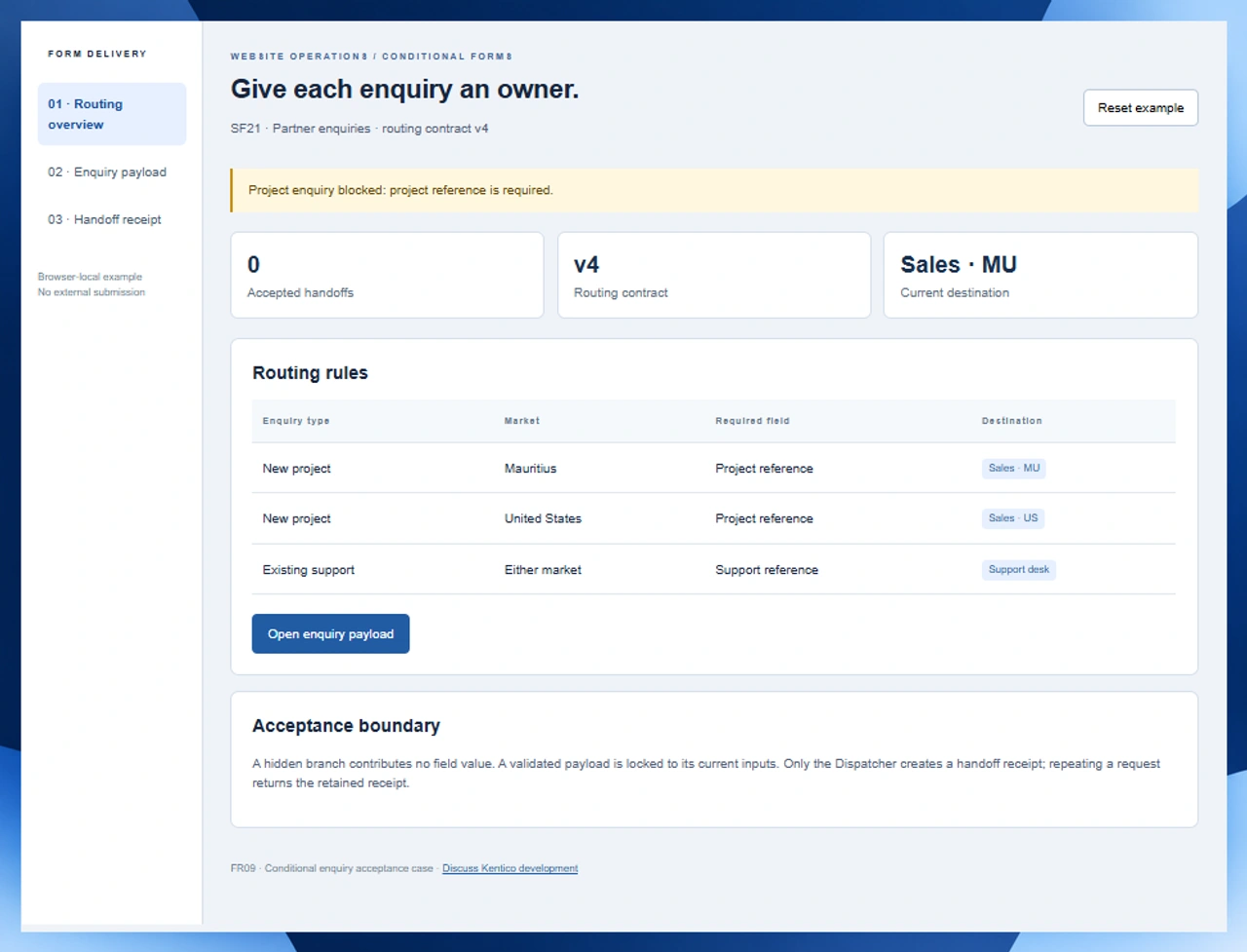
Give the developer a reproducible delivery target.
A clear backlog item connects the visitor action with the information the receiving team actually needs.
Separate the visible form from the accepted payload
List the branch conditions alongside the fields in each branch. Include a completed value that becomes hidden after the visitor changes their choice. Acceptance should inspect the resulting payload, rather than assuming that a field disappearing visually also removes its value.
Assign a destination and a retry rule
Name the receiving sales or support queue and the party responsible for it. Agree what identifies the original request, how errors reach an operator and what happens when the same request arrives twice. Keep a retained result that can be compared with the initial input.
Budget for the complete website change
Allocate time for the platform review, implementation, accessible form behaviour and destination testing. State which team controls staging and release access. Put ongoing response times, licensed services and later improvements into the quotation as explicit commercial items.
Inspect the enquiry before it leaves the website.
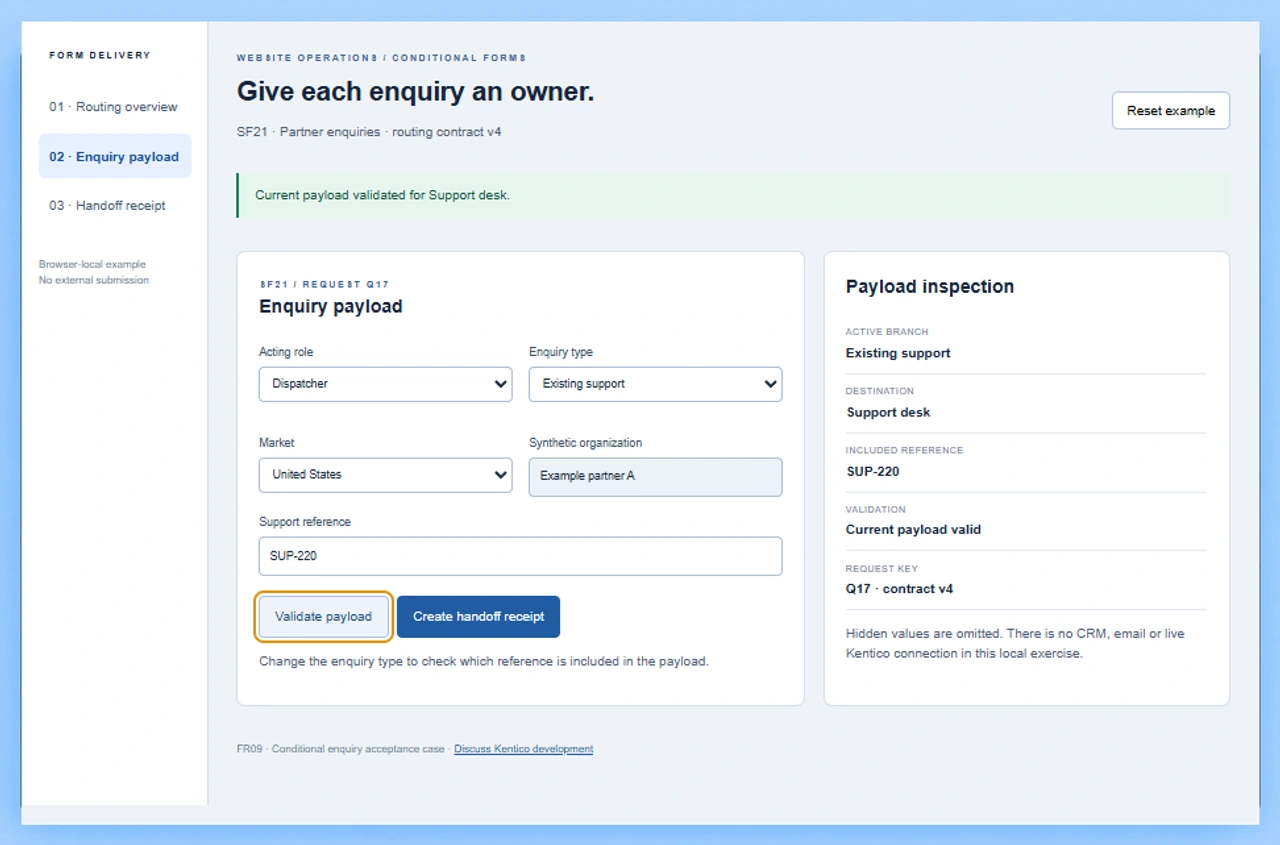
FR09 is a working conditional enquiry demo. Switch between a new project and existing support, inspect the reference included in the payload and validate the destination. Create a handoff as Dispatcher, then repeat the request to see the same retained receipt.
Try a project-to-support branch change
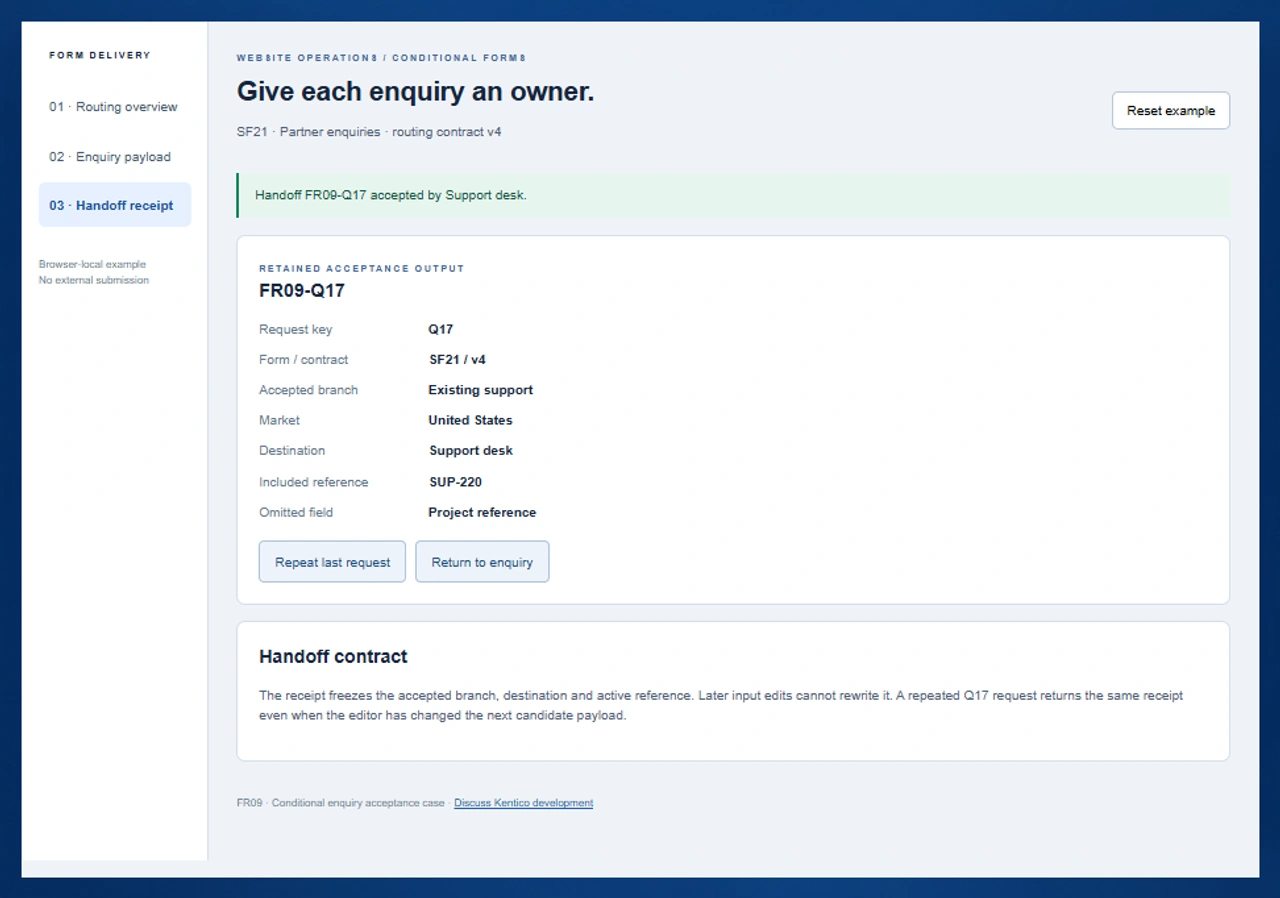
In FR09, enter project reference P-104 and validate it for Mauritius. Change the market to United States and notice that validation must run again. Switch to Existing support: SUP-220 becomes the active reference and the destination becomes Support desk. Create a handoff as Dispatcher and inspect the omitted project field.
Run the conditional enquiry demoCheck the form rules for your Kentico version
The current Xperience by Kentico form reference describes conditional field visibility and required input. It also explains how fields hidden by a visibility condition are treated during submission. Confirm the corresponding behaviour in the installed release before agreeing a custom field component or migration.
Open the primary Kentico form referenceInclude the page that displays the form
Kentico documents the Form widget, its Page Builder prerequisites and the available after-submission display or redirect actions. A development brief should name the website page, editable area, confirmation behaviour and destination ownership alongside the field configuration.
Check the official form placement instructionsKeep multilingual content releases separately testable
When the broader program also involves an Umbraco content team, give its language publication changes a distinct acceptance case. A form routing contract tests enquiry payloads and destinations; a culture release tests the selected language and the content left unchanged.
Plan an Umbraco content-team engagementSix milestones for an enquiry-focused Kentico engagement
Use one form and two enquiry branches to agree the work, then expand the acceptance cases before authorizing the production release.
Identify the platform and the backlog owner
Record whether the website runs Xperience by Kentico or an earlier Kentico Xperience version. Supply its release, .NET target, hosting arrangement and custom components. Name the person who orders the backlog and the person authorized to approve development allocation.
Specify the form as a small decision table
Document enquiry type, market, required branch fields and receiving queue. Add examples for missing input and a visitor changing their selection. In FR09, a project needs a project reference; support uses a support reference and routes to the support desk in either market.
Define the receiving-system boundary
Identify the target CRM, mailbox or service API separately from the website form. Agree field names, authentication ownership, permitted data, response codes and failure handling. Quote any custom adapter and destination-side changes after the actual endpoint has been reviewed.
Implement and inspect accepted payloads
Build the agreed behaviour in a development environment using synthetic records. Check the conditional fields, required values and payload inspection with keyboard input. Keep validation tied to the current inputs so a later market or branch change cannot reuse an earlier decision.
Rehearse authorization and repeated requests
Have the authorized dispatcher create the acceptance handoff. Confirm that another role is blocked and that a retry cannot produce a second downstream action. Retain the original destination and active reference after subsequent edits to the candidate enquiry.
Release with a named operational owner
Agree the production window, configuration transfer, smoke checks and rollback trigger. Provide the form contract, integration settings inventory and support escalation instructions. Accept the milestone against both website behaviour and the receiving system, then start the agreed maintenance arrangement.
Supply these items for an actionable estimate
- Provide the Kentico product and release, custom code inventory, source access arrangements and a staging environment. Identify who can authorize access without sharing credentials through the public enquiry form.
- Describe the form location and each visible field, including its type, required status and visibility condition. Supply anonymized examples of both successful and rejected inputs.
- List the backlog priorities, required allocation period and communication overlap. Confirm developer availability, start conditions and responsibility for project management within the written quotation.
- Identify destination-side administrators, sandbox availability and the expected handoff response. Include operational error ownership, monitoring, code ownership and handover documentation in the acceptance scope.
Decide the migration and support boundaries
- Map existing form field identities and historical submissions before renaming or removing fields. Agree retention and export handling with the website owner, and rehearse changes with synthetic data before touching live records.
- Treat CRM and email delivery as separately verified connections. Define the approved endpoint, field mapping, retry identity and rejected-response behaviour; confirm vendor licensing and access with the relevant account owner.
- Specify consent notices, data minimization and retention requirements with the business owner. The FR09 routing case uses synthetic references and does not establish a compliance position for your production forms.
- Separate development allocation from ongoing operations. Agree release assistance, incident coverage, supported platform versions and the commercial process for additional backlog items.
Six records that make an enquiry handoff inspectable
Use FR09 to give a developer a finite input, decision and output model for the quotation.
| Record | Example inputs | Required output and control |
|---|---|---|
| Form contract | SF21 / Partner enquiries / routing contract v4 | Keep field meaning and receiving rules identifiable through implementation and release. |
| Enquiry choice | New project or Existing support | Evaluate the active branch and omit the reference belonging to the other branch. |
| Market selection | Mauritius or United States | Route new projects to Sales · MU or Sales · US; both support cases use Support desk. |
| Active reference | P-104 for project; SUP-220 for support | Require the selected branch reference and clear validation when any payload input changes. |
| Authorization decision | Form editor / Dispatcher / current validated payload | Allow the Dispatcher to create the handoff only after the current candidate passes validation. |
| Retained receipt | FR09-Q17 / accepted branch, destination and reference | Return the original request receipt on retry and preserve its accepted values after later edits. |
Enter P-104 as a new project reference for Mauritius. Validation identifies Sales · MU. Change the market to United States: the earlier validation is cleared and Sales · US becomes the candidate destination. Switch to Existing support, leaving P-104 in the now-hidden project input. Validate SUP-220 and dispatch as Dispatcher. Receipt FR09-Q17 contains Existing support, United States, Support desk and SUP-220; Project reference is listed as omitted. Repeating Q17 returns that receipt. Editing the next candidate support reference to SUP-999 cannot rewrite the accepted SUP-220 snapshot. Reset the exercise to start a separate acceptance case.
Ask each provider to price the same handoff boundary.
Use provider discussions to confirm allocation, platform responsibility and the observable result included in the quote.
| Option | Published focus | Ask in your demo |
|---|---|---|
| Zenesys | Kentico developer hiring with dedicated resource, team extension and project-based engagement models. | Which model includes form acceptance, destination testing and release ownership for this backlog? |
| IT IDOL Technologies | Dedicated Kentico development, customization and integration services. | Who specifies the accepted payload and handles a destination failure after the form succeeds? |
| Citytech Software | Kentico Xperience developer hiring and website development services. | How will the engagement demonstrate branch changes, authorization and repeat-request behaviour? |
Give providers the same SF21 decision table and ask for a reproducible acceptance rehearsal. FR09 supplies explicit input values and a retained receipt, so the buyer can inspect the included reference and destination after a branch change. Confirm additional delivery and operational responsibilities in the contract.
Category reference: Kentico primary reference: form fields, visibility and validation. The cited documentation concerns Xperience by Kentico. Review the equivalent references for your installed release. FR09 exercises a custom routing and receipt contract for the development discussion.
Connect the website engagement with your wider software scope.
Keep visitor forms, content platforms and marketplace operations linked through accountable project requirements.
Explore Codeblix software engagementsSet the Kentico engagement terms before development starts
Use these questions to agree the allocation, platform work and operational handoff.
What do I send when requesting a dedicated Kentico developer?
Use the consultation form to describe your Kentico product and release, priority backlog item and desired allocation. Include a representative form journey or other website task, its acceptance owner and the intended delivery window. Codeblix reviews the requirements and confirms the scope, capacity and commercial terms in a quotation.
Does dedicated development mean a fixed start date or monthly price?
The requested allocation and the confirmed allocation are agreed in the quotation. Ask for the start conditions, working overlap, billing arrangement, review cadence and treatment of urgent support requests. No generic page estimate can replace a review of your platform and backlog.
Can the developer work on an existing Kentico website?
Bring the existing codebase, installed release, custom components and hosting constraints to the scope review. The engagement can be defined around changes to the current website, with version compatibility, access, staging and release responsibilities agreed before implementation.
What is the conditional enquiry exercise useful for?
It lets a buyer inspect field selection, market routing, current-input validation, dispatcher authorization and a retained request receipt. It provides a small acceptance case for a Kentico development discussion. Reset starts the synthetic example again; it sends no customer enquiry to a receiving service.
How should CRM delivery be included in the project?
Name the receiving platform and approved interface. Agree the allowed fields, mapping, authentication owner, response handling and retry identity after reviewing the actual endpoint. Include destination testing and failure ownership in the quote rather than assuming a form confirmation proves that a CRM record was accepted.
Which details matter when changing existing forms?
Record field identities, current visibility conditions, stored submissions and the pages that display each form. Plan historical-data handling and rehearse the change before deleting or renaming a field. Review contact mapping and visitor notices with the appropriate business owner.
Can the engagement include work beyond enquiry forms?
Describe the other Kentico website tasks in the same prioritized backlog, with separate acceptance cases for templates, content types, custom components or platform changes. The form exercise illustrates how to make one item testable; the quotation defines the actual work and allocation.
What should be handed over when the allocation ends?
Retain the agreed code changes, form and destination contracts, environment configuration inventory, acceptance evidence and release instructions. Name the team taking operational responsibility and agree maintenance coverage or a later allocation for the remaining backlog.