
Commission more than a rotating model.
Make the interaction, numeric rules and receiving record part of one development scope.
Specify the decision in the scene
Identify what the visitor needs to choose: a size, finish, component or position. Describe the permitted values and the visible change each control must produce. Agree the accompanying text and keyboard controls so the task remains understandable beyond the 3D canvas.
Keep geometry and records consistent
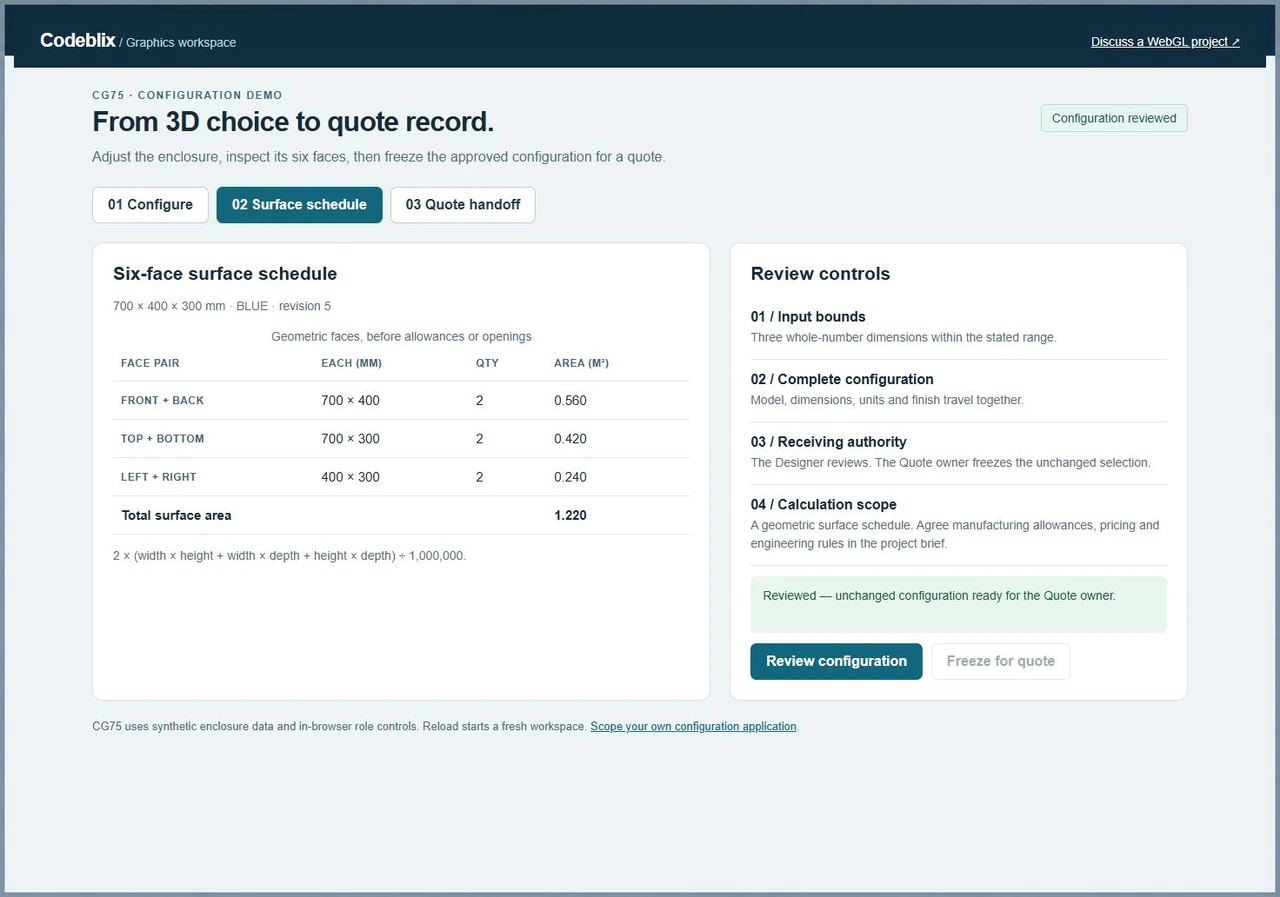
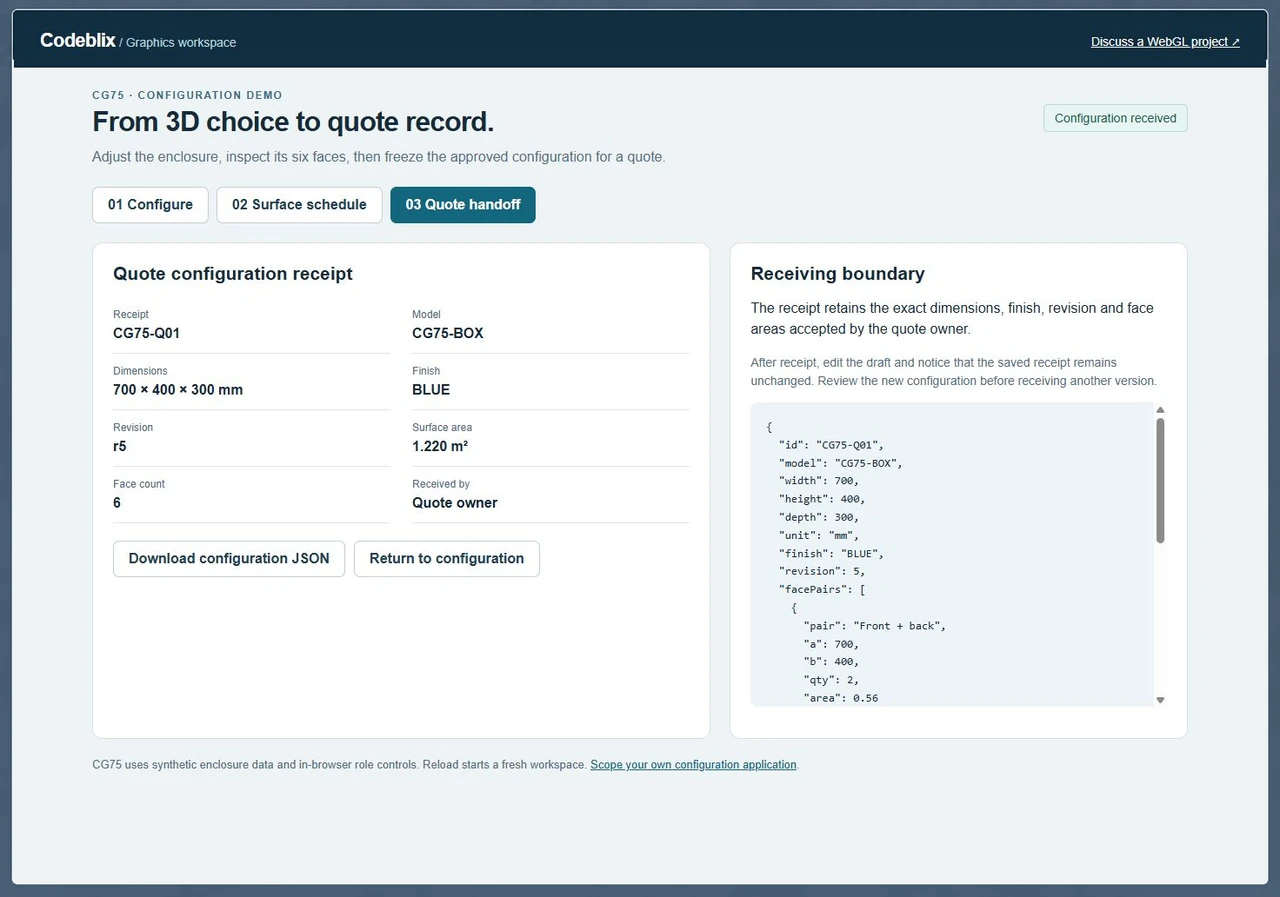
A visual change should carry the right model identity, units, options and calculations into the business record. CG75 turns 700 × 400 × 300 mm into three face pairs totaling 1.220 m². The receiving record retains these values alongside the chosen finish.
Put acceptance ahead of visual promises
Name the target devices, browser versions, source assets and installation owner. Agree loading and interaction budgets using representative scenes on the actual target hardware. Include fallback behavior, source delivery and support responsibilities in the quotation.
Connect the 3D view to its business record.
CG75 links an enclosure preview to editable dimensions, a surface schedule and the exact configuration received by the quote owner. Inspect the working screens, then use the same questions to brief your application.
Try the choice, calculation and receipt.
Use a small complete workflow to expose the requirements behind the visual experience.
Exercise the CG75 configuration
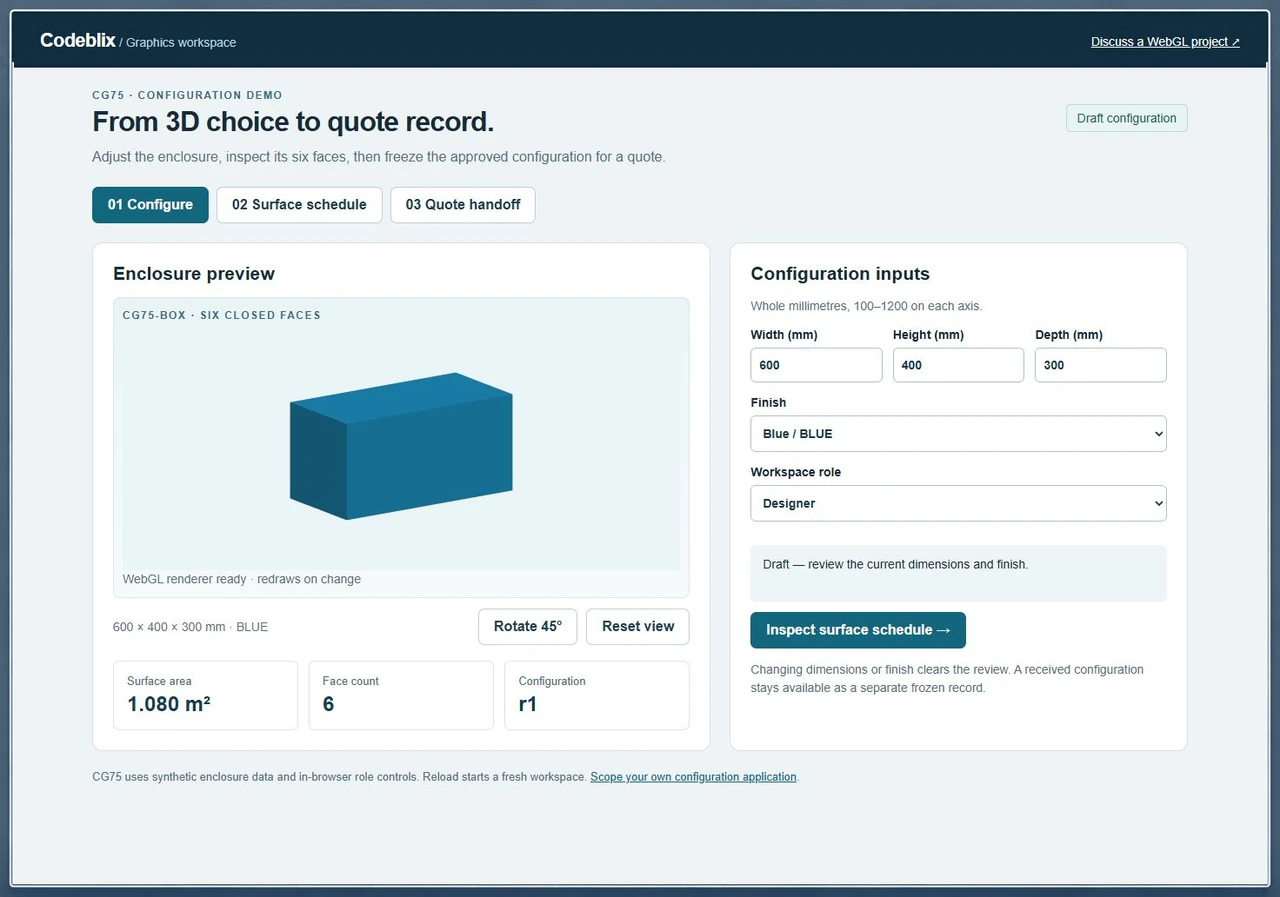
Open the demo, rotate the enclosure and change its finish. Increase the width from 600 to 700 mm, inspect the 1.220 m² schedule and review the configuration. The Designer can review; the Quote owner can freeze the unchanged selection and download its JSON receipt.
Open the CG75 configuration demoDefine the browser rendering boundary
MDN describes WebGL as JavaScript control code and GPU shader code drawing into an HTML canvas on supported browsers. State which parts of your application need that rendering and which remain ordinary interface controls. Specify the text representation and the response when a graphics context is unavailable.
Primary reference: MDN WebGL rendering modelSet a realistic device and memory budget
MDN recommends eliminating graphics errors, budgeting memory and handling context loss. Give providers a representative scene and a named device matrix. Ask for measured loading, interaction and memory evidence, plus an agreed fallback, before accepting the release.
Primary reference: MDN WebGL best practicesScope the configuration record endpoint
When the accepted scene selection must reach a database application, define its stable identifiers, units, revision and permitted writer. Quote the receiving API and reconciliation requirements alongside the interactive frontend.
Discuss a related database application projectAgree the complete interactive journey.
Anchor the engagement in one scene, one business task and an accepted output.
Supply the product and asset inventory
Describe the audience and the decision they must complete. Provide your existing models, textures, product option data and reference images, with ownership and permitted-use details. Identify any asset conversion, cleanup or new 3D production that needs its own estimate.
Write the control and rule contract
Specify units, valid ranges, increments, compatible options and invalid combinations. Link each control to the model change and the data field it affects. Separate visual geometry from manufacturing allowances, engineering approval and commercial pricing rules.
Prove the interaction on target hardware
Agree a representative scene and browser/device matrix. Inspect the real controls, camera behavior, loading state and text equivalent. Measure the agreed performance conditions using that scene before extending the application to the remaining products.
Connect choices to an authorized output
Define the saved configuration, quote request or other receiving record. Include revision checks, permission enforcement, duplicate requests, retries and failure recovery in the commissioned server scope. Decide what may be exported and what must remain private.
Receive the exercised acceptance cases
Check geometry, units, option identity and calculations together. Change a reviewed selection and confirm the required reapproval behavior. Inspect unsupported graphics, interrupted loading, context loss and accessibility cases against the agreed delivery boundary.
Take ownership of the release
Receive the application source, shader code, asset sources and licenses, build instructions and configuration. Assign staging approval and production deployment. Agree backups, rollback, monitoring, defect handling and the support arrangement for future browser or asset changes.
Application and asset scope
- List the product families, scenes, configurable attributes and user journeys included in the first milestone. Identify whether existing assets can be reused and who signs off their dimensions, appearance and legal rights.
- Provide the current website stack and the exact point where the 3D workspace will appear. Specify responsive layout, keyboard access, text equivalents, reduced-motion expectations and any requirement to continue without graphics support.
- For commerce or quote integration, supply the authorized API documentation, record fields, authentication owner and expected response. Agree identifier mapping, revisions, currency rules where applicable, retries and duplicate prevention.
- Ask for a quotation covering development, asset preparation, integration, verification and deployment separately where those responsibilities differ. Confirm capacity, milestones, scope-change handling and third-party license or hosting costs.
Receiving and support scope
- CG75 starts with a 600 × 400 × 300 mm closed enclosure: front/back 0.480 m², top/bottom 0.360 m² and left/right 0.240 m². These are geometric areas. Specify openings, material thickness, tolerances and fabrication allowances separately when your project needs them.
- Use a complete configuration record instead of an image alone. Retain the model, units, dimensions, selected option identities and revision. Decide which reviewer approves it and which authenticated role may send it to the receiving system.
- Agree the allowed mesh and texture sizes, loading strategy and memory budget for your audience. Include behavior for a failed asset, unavailable context, lost context and a device outside the support matrix. Request evidence from the named devices.
- Confirm repository ownership, asset and dependency licenses, installation instructions, release approval and rollback. Define defect coverage, response arrangements and responsibility for later product-data, browser and integration changes.
Receive the configuration behind the preview.
CG75 gives six linked records a clear place in the development brief.
| Record | Example inputs | Required output and control |
|---|---|---|
| Model | CG75-BOX / closed enclosure | Keep a stable identity for the object being configured. |
| Dimensions | Width 700 / height 400 / depth 300 mm | Check whole-number bounds and preserve explicit units. |
| Finish | BLUE or GRAPHITE | Use the same finish identity in the renderer and receipt. |
| Surface schedule | 0.560 + 0.420 + 0.240 = 1.220 m² | Retain all three pairs and the total, rather than only the preview. |
| Review | Unchanged configuration / revision 5 | Clear the approval whenever dimensions or finish change. |
| Quote receipt | CG75-Q01 / Quote owner | Freeze the accepted values and export their JSON record. |
The default 600 × 400 × 300 mm enclosure totals 1.080 m². Changing width to 700 mm produces 0.560 m² for front/back, 0.420 m² for top/bottom and 0.240 m² for left/right. Review that selection, then receive it as the Quote owner. A later 800 mm draft totals 1.360 m² while the earlier receipt keeps its accepted 700 mm configuration. Use the checklist to specify the corresponding permission, revision and receiving behavior for your application.
Ask providers to quote the same interaction.
Give each provider the same scene, product rules, target devices and receiving record.
| Option | Published focus | Ask in your demo |
|---|---|---|
| Alpha Expansion | Describes custom renderers, shader work, GPU visualization, device fallbacks and source handover. | What scene, numeric rules and receiving record will be used to accept your first milestone? |
| Immersive Studio | Offers bespoke browser experiences including configurators, interactive applications and immersive integrations. | Which configuration fields and calculation checks are included in the development quotation? |
| Nexgits | Offers custom WebGL applications, product configuration, development stages and device compatibility testing. | How will the approved configuration, revisions and source assets be handed over to your team? |
Confirm whether the engagement includes only visual development or also asset preparation, the surrounding application and the receiving integration. Request explicit ownership and acceptance for each part.
Category reference: Primary reference: MDN WebGL and canvas. Use your supported browser and device matrix to set the implementation requirements.
Connect the visual workflow to your application.
Explore related development services and define the data, integration and release responsibilities in your project enquiry.
Explore marketplace development servicesArrange your WebGL development project
Attach the first interactive task and its receiving requirements to your enquiry.
What should we send to request a development quote?
Send the business task, product or dataset, current website stack and available 3D assets. Include the controls users need, valid options, target devices and expected saved or exported output. Identify the acceptance owner, desired milestones and any access or licensing dependencies.
Can we commission one product interaction first?
Brief one representative model and a complete user journey, including invalid choices and the receiving output. Agree the scene complexity, device checks, source delivery and acceptance cases for that milestone. Scope later products after the initial interaction has been assessed.
Can our existing models and textures be included?
Provide the source formats, asset sizes and ownership details for assessment. Identify the dimension and appearance approver. Agree any conversion, mesh reduction, texture work or replacement assets as explicit outputs in the quotation.
How do we agree price and delivery time?
Request a scoped quotation for your scenes, rules, assets, integration and supported devices. Confirm the team arrangement and milestone schedule with Codeblix. Separate third-party software, hosting and asset-production charges where applicable, and agree how additions change the estimate.
What should we inspect in the configuration demo?
Change dimensions and finish, rotate the enclosure and inspect the face-pair calculation. Check the invalid-input hold, review reset and quote-owner receiving control. Download the configuration record and compare its model, units, options, revision and total with the accepted screen.
Can the project send a configuration to our quote system?
Include the authorized receiving API, required fields and its technical owner in your request. Agree mapping, permission checks, revision conflicts, retries and duplicate handling. Confirm which system owns pricing and the final commercial quote.
How will devices and accessibility be accepted?
Name the browsers, operating systems and representative hardware your audience uses. Agree loading and interaction budgets, keyboard controls, text equivalents and fallback behavior. Require acceptance evidence on that matrix and assign the owner of later compatibility changes.
What source and support should the engagement include?
Specify application and shader source, editable assets where licensed, dependencies, installation instructions and release configuration. Agree staging approval, deployment, rollback and post-release verification. Confirm defect coverage, support contacts and ongoing maintenance terms in the engagement.