
Fee management software for sale: buy Macro-Manage SaaS
Acquire a focused organisation fee product, with a concrete acceptance file for the transfer.
Request the Macro-Manage SaaS package from Codeblix. Purchase a fee-focused software foundation after checking payment records, organisation access, reports and the agreed domain and source transfer.
Macro-Manage is fee management software for sale through Codeblix, with a domain, application source and product documents to discuss in the transaction. It is a focused SaaS foundation for organisation rosters, monthly fee states, payment records and reporting. Request the current package and sale terms if you want to own and operate that software business.
This purchase ledger separates those jobs. It is written for operators of schools, tutoring centres, clubs, academies and membership organisations, and for buyers considering a fee-focused SaaS business. Macro-Manage is the concrete product example: a starter SaaS for organisation rosters, monthly fee records, partial payments and collection reporting. The practical question is whether that foundation fits the work you need to control, or whether you require a broader payment and administration system.
Buy Macro-Manage as a fee-focused SaaS foundation
Request the Macro-Manage package and contact Codeblix on Flippa →
Macro-Manage is offered through Codeblix for a buyer who wants to own and operate a focused software product. The purchase discussion covers the domain, application source, product documentation and the agreed transfer work. Open the Macro-Manage sale page to reach the current Flippa listing, check availability and price, and request the package details from Codeblix. The fee workflow below gives you a concrete basis for that conversation.
This acquisition is suited to a buyer who can reach organisations with a clear record-keeping need and provide a supported software service. You might already work with tuition centres, clubs or small academies. The product foundation gives that buyer something specific to demonstrate: a roster, monthly fee states, individual payments and collection reports. It does not include a promised customer pipeline or guaranteed subscription income.
Request the repository and service-account handover plan before agreeing the transaction. Ask which setup steps Codeblix will help complete, which external services you must arrange and which changes would be separate work. If you need a broader school or membership product, identify those additions explicitly. The offer is easier to assess when the delivered fee tool is kept distinct from future modules.
Use the current Flippa transaction to confirm the financial representation and included assets. A live product preview can show how the software is positioned; it cannot establish paying organisations or funds collected on their behalf. Make your offer around the verified product package and the operating responsibilities you are prepared to accept. The following acceptance examples are designed to help you ask better purchase questions, rather than sell you an earnings forecast.
Read these three money flows as separate lines
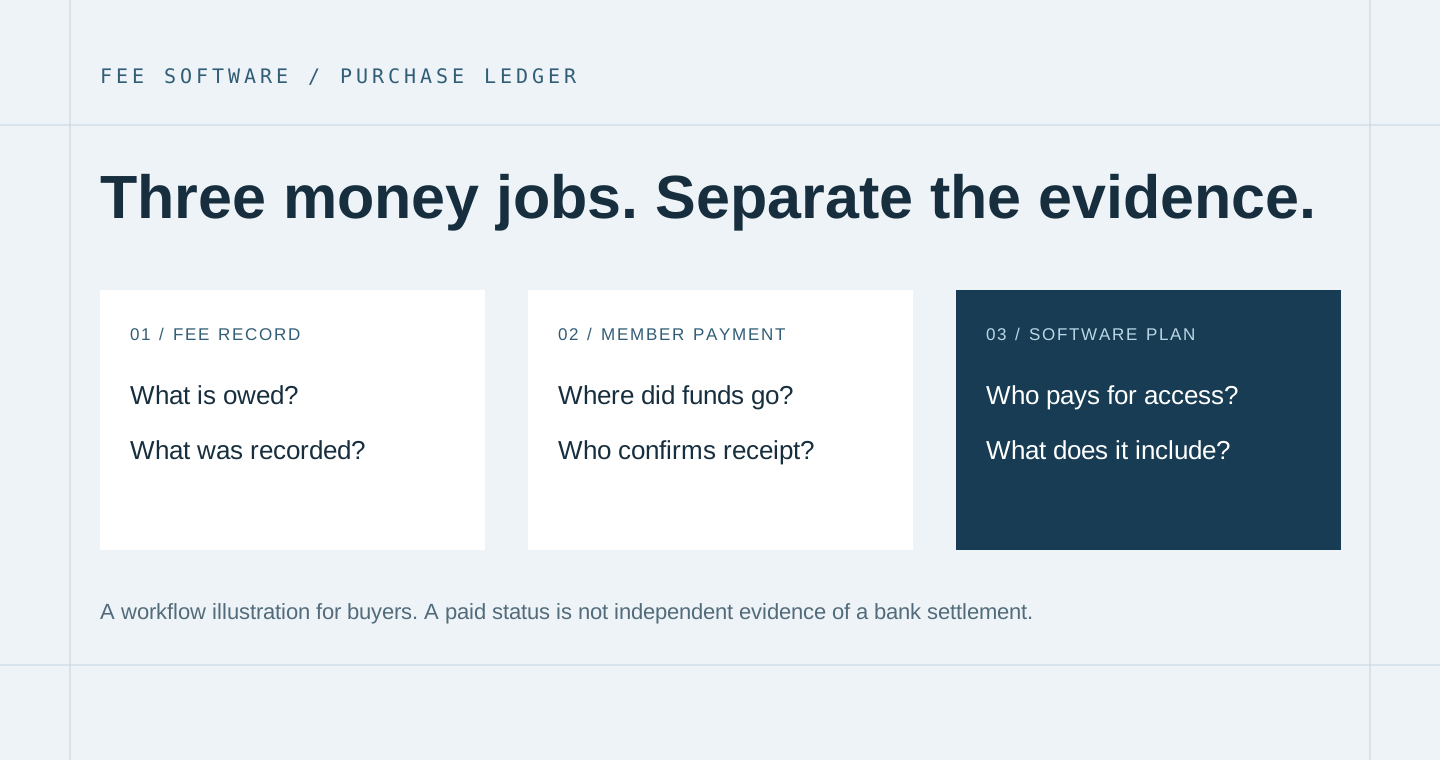
The fee record says what a member or student owes and what the organisation has recorded against it. It may contain the month, amount, status, date, method and a note. It can make an administrator's work much clearer without processing a payment. When reviewing a product, ask what creates the obligation and who may change the record.
The member payment is the actual transfer of funds to the organisation through its chosen method. A payment gateway may handle this, or a person may receive cash or confirm a transfer elsewhere. If the software represents online collection, request a demonstration of the actual payment state and its relationship to the fee record. If it only records payments, that limitation should be explicit.
The software subscription is what the organisation pays to use the platform. A SaaS product can have working subscription checkout for organisation accounts while still recording member payments manually. Do not confuse the two. For a buyer acquiring the software business, the subscription is part of the intended product model; it is not evidence that organisations are already paying for it.
| Evidence shown | What you can conclude | What still needs checking |
|---|---|---|
| A fee cell changes to paid | The application accepted a record change. | Who made it, which payment it represents and whether the organisation received the funds. |
| A payment method appears in history | The record contains a selected method. | Whether that method was independently confirmed or manually entered. |
| The organisation has a software plan | Its account has an assigned product entitlement. | Subscription activation, live billing behaviour and the represented commercial history. |
| An export shows collection totals | The application can produce a report from its records. | The report's period, included states, corrections and reconciliation with external evidence. |
Use one fictional member to test the entire month
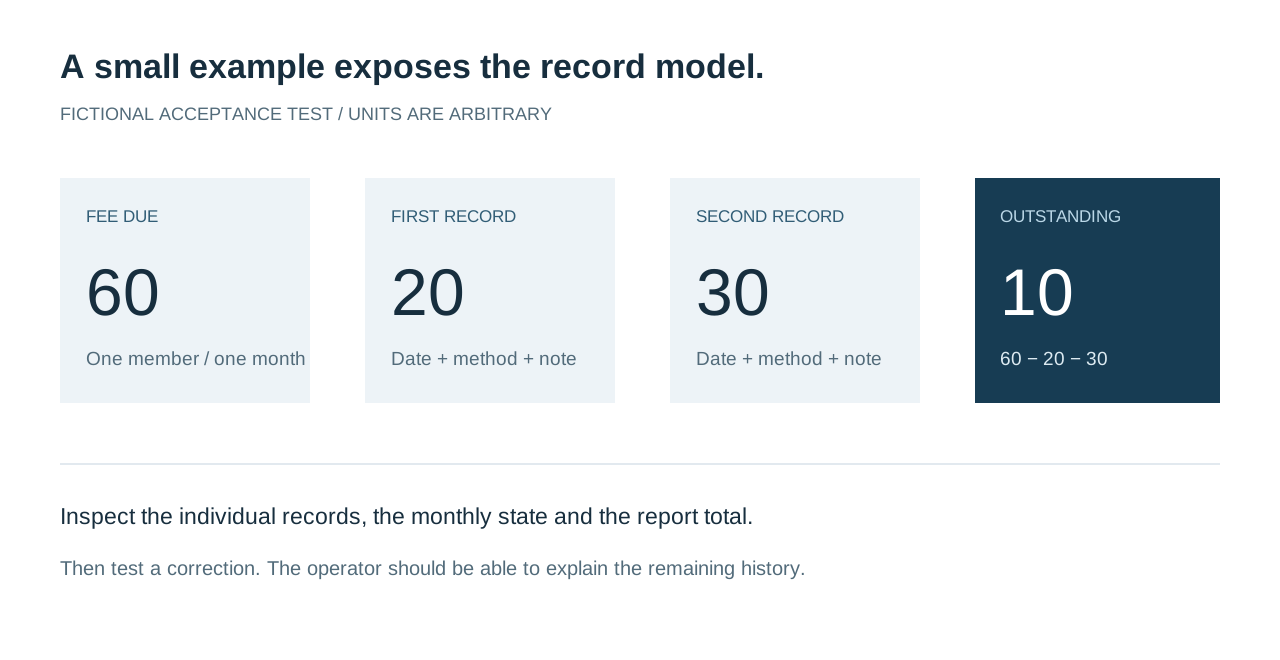
Bring a small acceptance example to the demonstration. Use a fictional member, a single fee period and amounts you can calculate without a spreadsheet. In the example below, a fee of sixty arbitrary units receives two recorded payments of twenty and thirty. The expected outstanding balance is ten. These are test figures, not a claim about a school, club or business income.
Ask the seller to create the record through the normal operator screen. Watch how the period is selected, whether a due amount is explicit, and how the first partial payment appears. Add the second payment and inspect the history. A useful fee tool should make it possible to explain the monthly state from the underlying entries rather than presenting a coloured cell with no accessible context.
Then inspect the relevant report. Is the member included in the expected period? Are the two payments represented correctly in method totals? Does a partial state remain visible while the balance is outstanding? Different products can model the same work differently. The purchase test should show the model you are buying and whether your administrator can use it confidently.
Now make a correction on purpose
Enter a clearly labelled test mistake and ask the operator to correct it using the normal controls. Observe whether the record is edited, deleted or reversed, and what history remains. Do not assume that a payment-history list is an immutable audit trail. Ask the seller to describe the actual behaviour and compare it with the controls your organisation requires.
A small club may accept a documented correction process with limited staff access. A larger organisation may need a more formal review and approval arrangement. The important point is to identify the requirement before purchase. If it would need custom development, keep it separate from the delivered feature set and obtain an explicit scope.
The twelve-month grid is useful only if its calendar matches yours
A monthly grid can be a fast way to see who is unpaid, partially paid or paid. Its usefulness depends on the period definition. Ask what a row represents, which year is active and how a member's history appears when the organisation moves into another year. An academy operating by terms may need a different view from a club collecting a flat monthly fee.
Test the boundary between periods. A payment entered today might relate to a previous month. A member could join part-way through a period or leave with an outstanding amount. The software should either handle the intended case or make the manual procedure clear. A buyer should not discover after transfer that every exception requires staff to reinterpret the meaning of a column.
Macro-Manage's product scope includes a twelve-month fee grid and individual payment records. If your operation needs term invoices, variable session charging, family accounts, attendance-based pricing or automated allocation across several obligations, request evidence for those exact requirements. Do not infer them from the general label “fee management”. A focused product can be the right purchase precisely because it avoids modules you do not need.
Roster quality comes before collection reporting
Collection reports inherit the quality of the roster. Two records for the same person can split their history. An archived member may still need to appear in a historical report. A name change should not make an old payment impossible to find. Before assessing a dashboard, ask how the organisation identifies a member and what happens when their details change.
Use a sample roster with deliberately similar names and one inactive member. Search, edit and archive records while observing the effect on the grid and history. Confirm whether custom fields are descriptive information or whether they drive calculations. This avoids assuming that a flexible roster is automatically a flexible billing engine.
For a software-business buyer, also inspect the separation between organisations. A school's staff should not see another school's roster. A platform owner may need a support view, but that is a separate role with a separate operating purpose. Ask to see the same test under two organisation accounts. Keep the test data artificial and recognisable so an unexpected result is easy to detect.
Macro-Manage: inspect the fee workflow at its actual scope
Macro-Manage is presented as fee management SaaS for schools, clubs, tutors, gyms and academies. The documented foundation includes private organisation workspaces, member or student rosters, a twelve-month fee grid, multiple payments per month, collection reports and CSV export. The product also includes software subscription foundations and a separate platform administration area.
This is relevant to a buyer who wants to own a focused administrative product. It should not be described as a complete school ERP, an automatic debt-collection service or a bank reconciliation system unless those specific workflows are separately demonstrated and agreed. The current product record centres on recording and reviewing fees. The buyer should align their first customer offer with that scope.
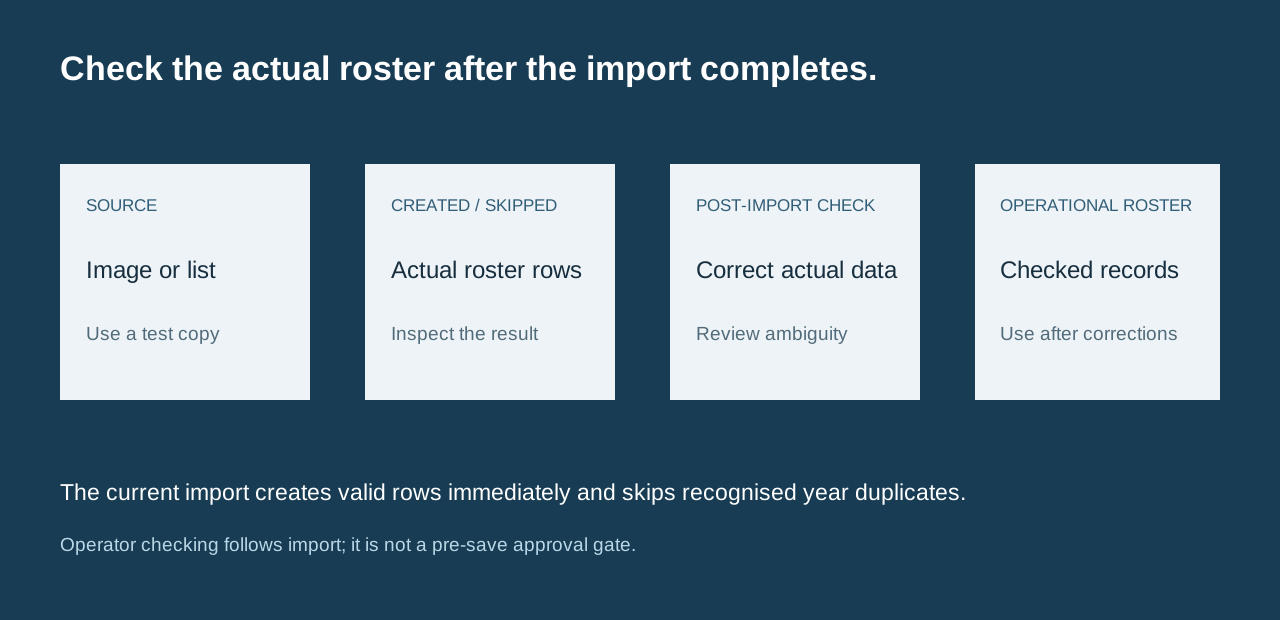
The software includes an AI-assisted image-to-roster import that creates valid rows on completion and skips recognised duplicates within the selected enrollment year. The operator checks and corrects the saved roster before operational use. The technical and user documents linked from the marketplace listing are the starting point for its setup and limitations.

An import demonstration needs deliberately awkward rows
Prepare a small, non-confidential test image with several clear entries, one ambiguous character and a possible duplicate. The current photo import creates valid roster rows on completion and skips recognised duplicate fingerprints within the selected enrollment year. The operator checks the resulting records and corrects them before operational use; this is a post-import procedure rather than a staged approval screen.
Check the fields that matter to your operation. A name can be recognised correctly while another field needs correction. Ask the seller to show the created and skipped result, inspect the actual roster records and demonstrate the correction route. Repeat the controlled source to examine the year-scoped duplicate behaviour. Keep ambiguous variations in the human check instead of treating every possible duplicate as automatically resolved.
A buyer also needs to understand the external service requirement. The application may need an AI account, configuration or usage allowance. Identify who owns that account after transfer and how the operator handles an unavailable service. You can still choose a product with an optional AI import if the core roster workflow remains useful without relying on an unsupported accuracy promise.
Ask what each staff role can actually change
Role labels are a starting point. The buyer needs to know the actions behind them. In a fee-focused product, staff may need different access to rosters, payment entry, corrections, exports, organisation settings and software billing. A viewer role should be assessed through the screens and actions it can reach, not through its name alone.
| Action | Question to answer | Evidence to request |
|---|---|---|
| Enter a payment | Which staff roles may record a received payment? | Sign in as the intended operator and submit a marked test entry. |
| Correct a record | Who can edit or remove a mistaken entry? | Use the actual correction path and inspect the resulting history. |
| Export member information | Which roles may retrieve organisation data? | Open the export with the appropriate account and inspect its scope. |
| Manage software billing | Can ordinary staff change the organisation's subscription? | Review the available controls under each agreed role. |
| Provide platform support | What can the platform owner see or change? | Separate the owner area from organisation staff access. |
Keep the result in a small permission sheet. You are not asking for the largest possible role system. You are deciding whether the available permissions support the people who will use the product. If one employee performs several jobs, the operating procedure should still make those responsibilities clear.
Reporting should reconcile with the records it summarises
Choose a report and ask what each total includes. A collection total might be based on payment dates, fee months or a selected reporting period. An outstanding balance may include active members only or retain archived records. These definitions determine whether the report helps an administrator answer a real question. A number without an explained period and population can be technically correct but operationally misleading.
Reconcile your fictional example through the report and CSV export. Inspect the individual records, not just the final total. Add a payment using a second method and see whether the method breakdown changes as expected. If the application uses a chart, ask to see the underlying rows that explain a change. The goal is an understandable relationship between the grid, payment history and summary.
Exported records may support a separate accounting process, but an export is not automatically a completed integration or an independently verified bank reconciliation. Identify who reviews it, what identifiers the receiving process needs and how corrections are communicated. A fee tool can reduce scattered records while still leaving that wider process outside the product.
Choose between record control and a broader organisation system
A tutoring centre may begin with the immediate problem of unpaid monthly fees. Later, staff may ask for scheduling, attendance, lesson notes, parent communication or instructor pay. A club may ask for access passes, facility bookings or merchandise. List these as separate jobs before choosing the purchase. Otherwise, a focused fee product gets judged against an expanding brief that was never priced.
Decide which jobs must work on the first day and which can remain in an existing process. A buyer could reasonably choose Macro-Manage for the roster and fee grid while keeping scheduling elsewhere. Another buyer may need one integrated system and decide to commission or acquire a broader product. Both decisions can be sensible when the boundary is explicit.
What problem must the purchase solve first?
Price the ownership responsibilities in the SaaS acquisition
A buyer of the software business is choosing more than a feature set. They will decide the first organisation type to serve, the onboarding help to provide and how to support questions about records. The intended commercial model is organisation subscriptions. Actual customer and financial evidence belongs to the current sale listing and should be reviewed independently from the product demonstration.
Ask what the transfer includes: domain, repository, documentation, editable content and the required service configuration. Confirm which services move to buyer-owned accounts. A hosted demonstration may continue to work under seller settings while the new owner still needs to configure authentication, application services and payments. The transfer plan should make that remaining work visible.
Include the recurring costs of operating the platform and the support capacity you intend to provide. The calculator below deliberately contains no revenue assumptions. It totals costs you enter so you can compare a source-code acquisition with other ways of obtaining the required software. Replace every amount with a quote or a clearly labelled planning assumption.
Your first-year operating cost sheet
This planning total does not estimate subscriptions, collections, profit or return on investment.
A first-organisation rehearsal is more useful than a large demo roster
- Create a fictional organisation with an owner and the staff roles you intend to support.
- Add a small roster containing an active member, an inactive member and two similar names.
- Enter one unpaid fee, one partial payment and one fully paid period.
- Correct a marked test mistake through the ordinary operator controls.
- Compare the individual histories, monthly grid, summary report and export.
- Record setup questions and agree which handover tasks belong to the seller or buyer.
Before introducing a real organisation, rehearse the initial setup with fictional data. Create the owner, invite the intended staff roles, enter a small roster, record the test payments and review the reports. Ask the person who will provide onboarding support to perform the exercise from the documentation. This checks whether the purchase package supports a repeatable service rather than a one-off demonstration.
Write down where they needed help. An unclear period choice, an unexplained field or a confusing export can often be addressed through instructions or a small product change. These are useful findings to resolve while the seller can clarify the intended workflow. Keep unimplemented requirements separate from questions about how a delivered feature works.
The same rehearsal helps define your customer offer. You may decide to support a narrow group such as tuition centres with monthly fees or clubs with simple member rosters. A focused offer lets you explain what the product does and where the customer retains responsibility. It also prevents a first sales conversation from becoming a promise to replace every system the organisation uses.
Close the purchase with an evidence ledger
Your final file should contain the fictional member example, the partial-payment history, the corrected entry and the matching report. Add the staff permission sheet, import observations, service-account list and the agreed transfer support. Each unresolved item should identify a question and a responsible person. This is enough to make a small software purchase concrete without pretending that every future operating detail is settled.
What have you verified?
Use the Macro-Manage product page to read its documents and reach the current Flippa listing. If the fee-focused model is not the business you want to operate, compare other SaaS businesses for sale. Buy the scope you can explain, test and support.
Explore the products discussed
Explore related acquisition offers