
Hire a dedicated DotNetNuke developer for your portal changes
Hire a dedicated DotNetNuke developer through a Codeblix development engagement shaped around your DNN installation and delivery backlog. Commission module changes, portal improvements or a defined upgrade project with an agreed allocation and acceptance owner. Bring the installed version, extension inventory and one representative user journey to the consultation. Codeblix will review the technical scope and confirm capacity, milestones, release responsibilities and commercial terms in a quotation.
Order a defined portal outcome with the development allocation.
Translate an access complaint or extension request into the identities, boundaries and evidence needed to accept the work.
Name the portal behind the user journey
A role label alone is an incomplete acceptance condition for a multi-site installation. Identify the target portal, page and module instance, then record the users who should gain access and those who should remain outside the boundary. Carry those identities into the implementation brief.
Inspect the permitted action at each layer
Separate page visibility, module visibility and the action performed inside the module. A visible menu item does not prove that a restricted record or endpoint has the right checks. Include direct requests, inherited settings and privileged accounts in the installation-specific rehearsal.
Tie allocated time to observable deliverables
Ask for a milestone breakdown covering installation review, implementation, permission regression checks and handover. Define how urgent support affects the planned allocation, who accepts each change and which operational responsibilities continue after the engagement.
Make the permission change visible to your acceptance team.
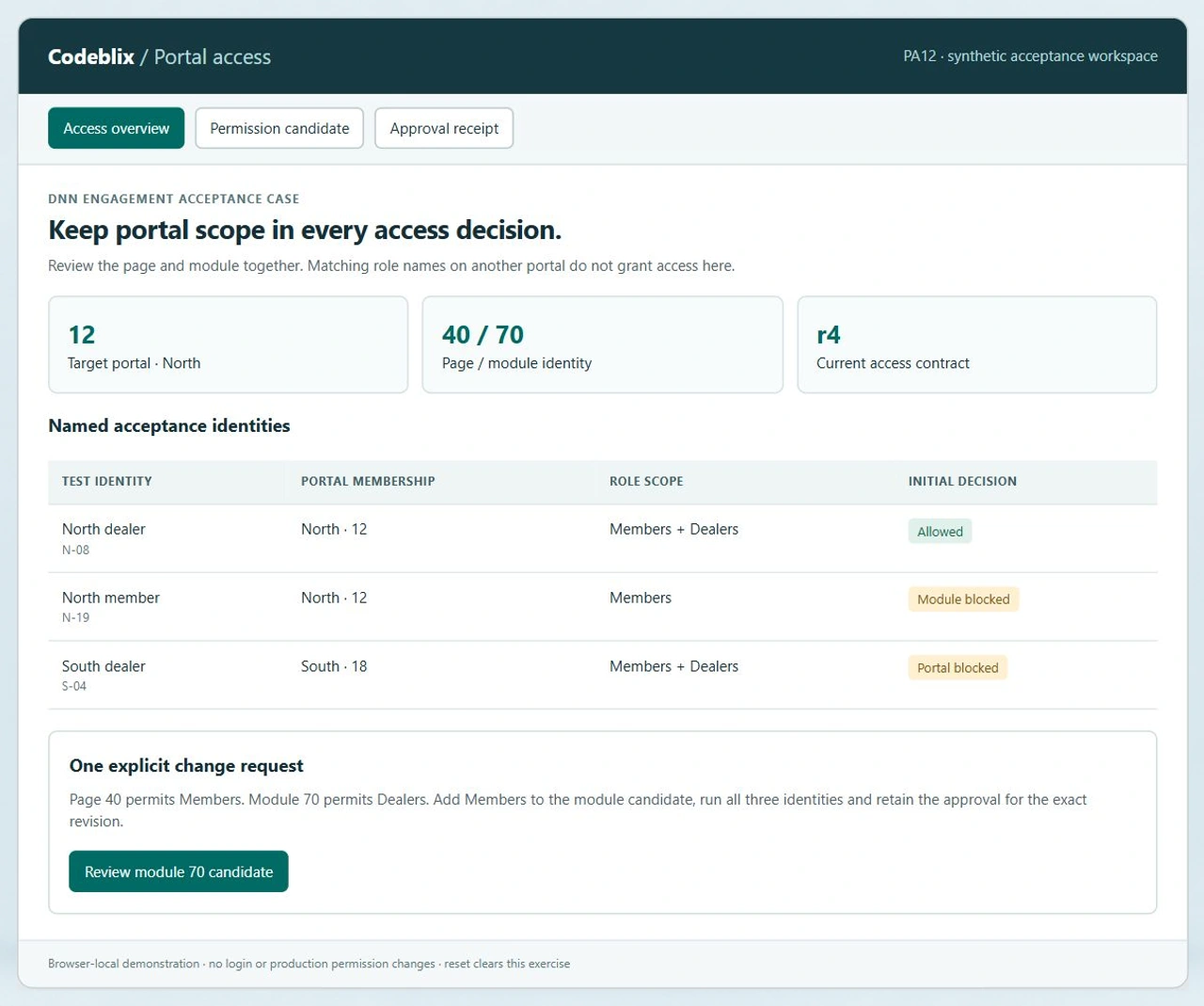
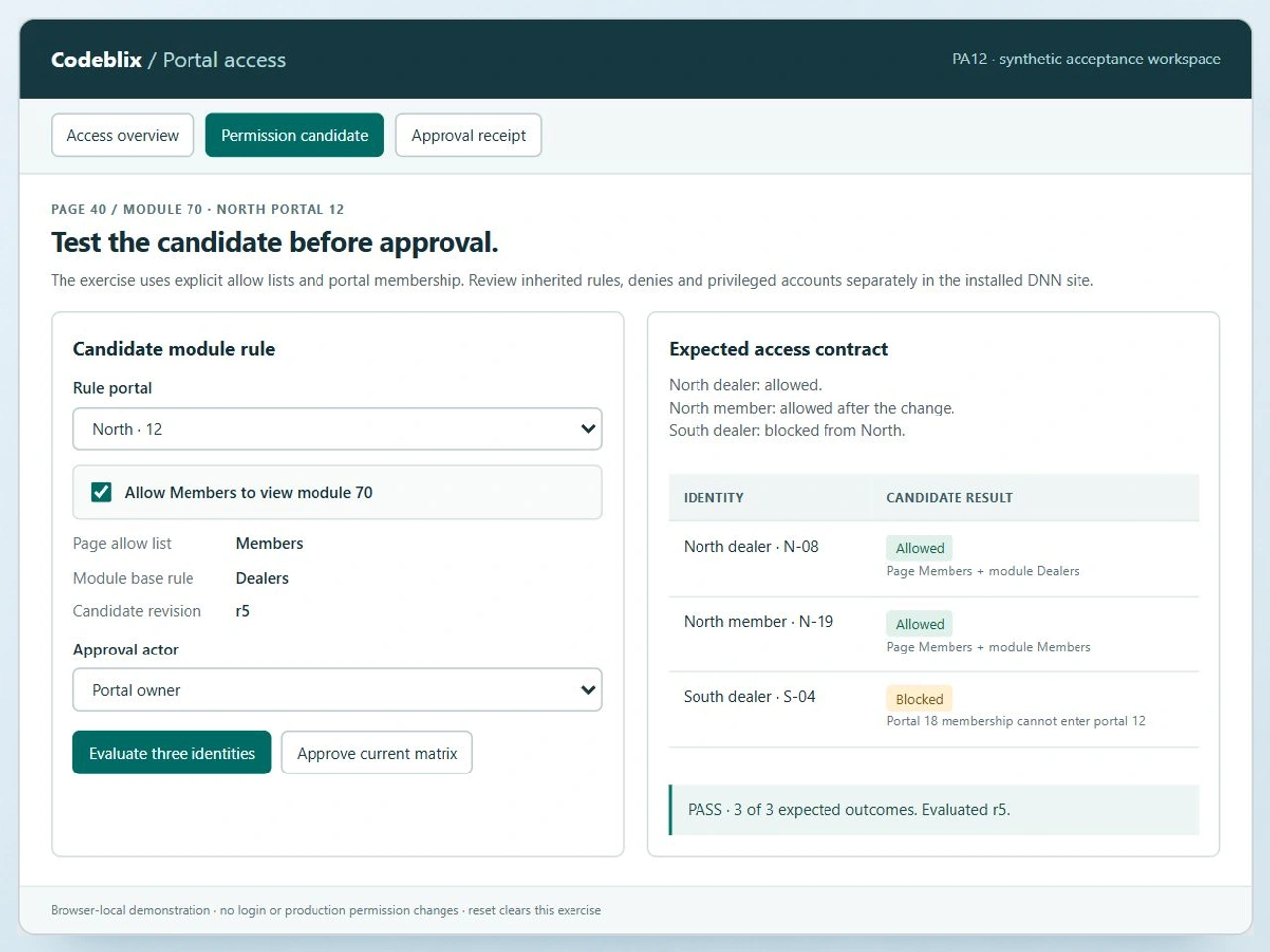
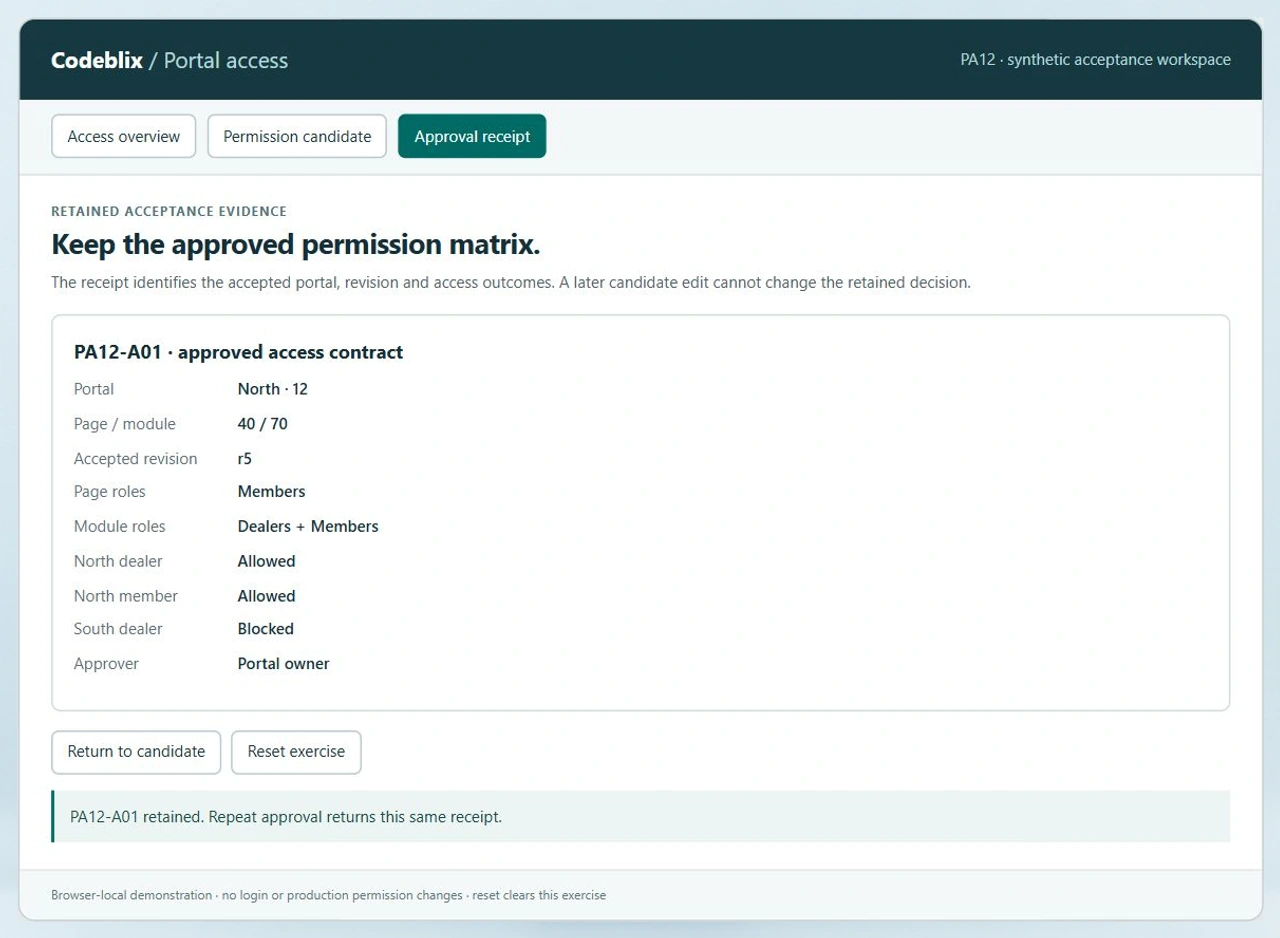
PA12 is a working portal access demo. Inspect the North and South identities, add Members to the module candidate and evaluate the expected outcomes. A Portal owner can approve the passing revision and retain its receipt.
Rehearse the North member change
Open PA12 and inspect page 40 and module 70 on North portal 12. Run the unchanged candidate: North member N-19 is blocked. Enable Members, evaluate again and inspect all three identities. Switch the actor to Portal owner before approving the passing r5 matrix.
Run the portal access acceptance demoUse portal identities in the technical brief
DNN documents its installation, portal, page and module hierarchy and identifies roles as portal-specific. Use the IDs from your own installation in the brief. The PA12 North and South examples show why identical Members and Dealers labels should not be treated as shared authorization.
Read the DNN security hierarchy referenceReview privileged and automatically assigned roles
DNN distinguishes ordinary role membership from administrator and host privileges. Its role documentation also covers public membership and automatic assignment. Include those settings in the installation review; a normal member test does not establish what an elevated or automatically enrolled user can do.
Check the official DNN role-based access documentationCoordinate separate content-platform work
If the same programme includes a Kentico website, keep its developer allocation and enquiry-form acceptance cases identifiable alongside the DNN portal backlog. The receiving team, platform owner and release contract can differ even when both changes support the same business journey.
Explore a Kentico development engagementSix delivery decisions for a DNN portal engagement
Use one access change to agree the development method, then extend the acceptance coverage to the complete backlog.
Inventory the installed DNN estate
Supply the DNN edition and version, .NET and SQL Server dependencies, hosting constraints, portal list and installed extensions. Identify custom modules, source ownership and third-party licences. Agree the access process with the installation owner before the developer starts.
Describe the affected portal journey
Choose the target page and module instance, the action being changed and the business owner accepting it. Record relevant role IDs and portal membership rather than relying on names that recur across sites. Include a negative case from a different portal.
Separate configuration from module code
Inspect page and module settings alongside the custom code path. Establish whether the change concerns an allow list, inheritance, a service endpoint, record filtering or an extension upgrade. Quote the necessary implementation and verification work against the actual installation.
Run an explicit access matrix
Use synthetic accounts in staging to test the agreed permitted and blocked journeys. PA12 starts with one allowed North dealer, one blocked North member and one blocked South dealer. Its candidate adds Members at the module layer while retaining the North portal boundary.
Approve the exact tested revision
Have the designated owner accept the result for the current permission matrix and code version. Re-run affected cases after a rule or membership change. Retain the reviewed identities and outcomes with the release record so a later edit cannot silently replace the accepted evidence.
Hand over the released change
Agree the deployment window, backups, smoke checks and rollback procedure for code and configuration. Provide the changed module sources, permission inventory, acceptance results and operating instructions. Confirm maintenance coverage and the commercial route for future backlog items.
Prepare the information that determines the quotation
- Name the requested allocation period, communication overlap and backlog priority. Agree the developer start conditions, review cadence, commercial model and responsibility for project coordination in the written engagement.
- Provide a version and extension inventory with representative page, module and portal IDs. Describe the current behaviour and the desired result using synthetic accounts rather than sending credentials or personal user exports through the enquiry form.
- Confirm access to module source, build instructions and a staging installation. List external vendors whose packages or licences may affect development, and identify the person authorized to approve their involvement.
- Record the acceptance owner and the specific actions to be checked: viewing, editing, export, direct URL access or API calls. Supply both an allowed user and an intentionally excluded user for each relevant portal.
Price migration, integration and support explicitly
- Before a version upgrade, review module compatibility, skin dependencies and configuration changes. Rehearse the upgrade against a backed-up staging copy and agree how content, role assignments and uploaded files will be preserved.
- For an external identity provider or business API, review the actual interface, authentication ownership, allowed payload and failure cases. Include a separate integration acceptance step and any destination-side work in the quoted scope.
- Treat the PA12 matrix as a small allow-list acceptance case. The installed site also needs checks for inheritance, explicit denies, administrator and host privileges, direct user permissions and module-specific data authorization.
- Agree who operates the site after release, how incidents are raised and which versions remain supported. Separate a planned development allocation from any out-of-hours response or ongoing maintenance commitment.
Six records for an inspectable portal permission change
PA12 gives a DNN engagement discussion a concrete identity and acceptance model.
| Record | Example inputs | Required output and control |
|---|---|---|
| Portal boundary | North 12 / South 18 | Keep portal membership in the decision even when role labels match. |
| Page contract | Page 40 / Members | Record the allowed page role separately from the module rule. |
| Module candidate | Module 70 / Dealers / optional Members | Evaluate the changed module allow list for the current target portal. |
| Test identity | N-08 North dealer / N-19 North member / S-04 South dealer | Assert the two intended North outcomes and the excluded South outcome. |
| Evaluation revision | r4 initial / r5 after Members is enabled | Invalidate the previous evaluation whenever the rule portal or Members setting changes. |
| Approval receipt | PA12-A01 / Portal owner / accepted r5 | Retain one approved matrix and return that receipt on repeated approval. |
Start PA12 at r4. North dealer N-08 is allowed through the Members page rule and Dealers module rule; North member N-19 lacks the module role. South dealer S-04 remains outside North portal 12. Enable Members for module 70 to create r5 and evaluate all three identities: N-08 and N-19 are Allowed, S-04 is Blocked. An Editor cannot approve. Select Portal owner and retain PA12-A01 for r5. Return to the candidate and change the rule portal to South 18; evaluation now fails the expected North outcomes. Repeating approval returns the existing North r5 receipt rather than changing it. Reset begins a separate exercise.
Give shortlisted providers the same portal acceptance case.
Confirm how each proposed engagement covers installation review, module changes and permission evidence.
| Option | Published focus | Ask in your demo |
|---|---|---|
| Clarion Technologies | DNN developer engagement for module work and portal changes. | Which deliverable identifies the affected portal and the allowed and excluded acceptance accounts? |
| ManekTech | Dedicated, part-time, hourly and fixed-cost DNN engagement options. | How do permission regression checks and release assistance fit the selected allocation model? |
| SpryBit | DotNetNuke developer services with a project quote enquiry. | What installation-specific module and authorization evidence will accompany the quotation? |
Ask providers to replay the same three-identity change, including the wrong-portal case and a candidate edit after approval. PA12 contributes a reproducible result and a retained matrix that can be attached to the engagement brief. Confirm the additional DNN security and release cases in the contracted acceptance scope.
Category reference: DNN primary reference: installation, portal, page, module and role scope. DNN product behaviour depends on the installed release and modules. PA12 demonstrates the explicit portal-membership and allow-list contract described above; extend the staging rehearsal to the installation-specific permission paths.
Plan the portal work alongside your wider software engagement.
Keep each platform, user journey and integration boundary visible in the project scope.
View Codeblix marketplace development offersAgree the DNN development engagement before allocation
Use the consultation to settle the technical boundary, commercial arrangement and acceptance responsibility.
What should I include in a dedicated DotNetNuke developer enquiry?
Describe the DNN edition and release, portal count, relevant custom modules and the highest-priority change. Add the desired allocation period, delivery window and person who accepts the result. Codeblix reviews these requirements before confirming the development scope, available capacity and quotation.
Can the engagement cover an existing custom DNN module?
Bring the module source, ownership and licence information, build instructions and the DNN version it runs against. Define the changed action and its affected pages and portals. The quotation can then identify the implementation work, dependency review and acceptance cases required for that module.
How is a dedicated allocation priced?
Pricing follows the reviewed backlog, requested allocation, platform constraints and delivery responsibilities. Ask the quotation to specify the billing basis, start conditions, communication overlap and treatment of additional work. Release assistance and ongoing support should be explicit line items or clearly included responsibilities.
What does the portal access exercise demonstrate?
It evaluates an explicit allow-list contract for three synthetic identities on a North portal page and module. Enabling Members changes the expected North member result while the South dealer remains blocked. Approval requires a passing current revision and the Portal owner actor; the receipt retains the accepted matrix.
Does a passing demo cover all DNN authorization behaviour?
Use the exercise as one finite acceptance case for your development brief. The installation rehearsal should also inspect direct user grants, inherited rules, explicit denies, administrator and host privileges, module service endpoints and record-level filtering wherever they affect the commissioned change.
Can an upgrade or portal migration be included?
Describe the current and target environment, extension dependencies, content and file volumes, and permitted release window. Scope compatibility checks and a staging rehearsal before scheduling production work. The quotation should name backup, recovery, redirect, membership and post-release verification responsibilities.
How should integrations be handled during the engagement?
Identify the receiving system, approved interface and account owner. Agree authentication, field mapping, permitted data and rejected-response behaviour after reviewing the actual endpoint. Any external provider changes or licences should be included in the scope discussion and verified in an authorized test environment.
What belongs in the final handover?
Retain the module and site changes, build and release instructions, environment inventory, permission matrix and acceptance evidence. Name the team operating the released site and agree how incidents, upgrades and future backlog items will be covered once the allocated development period ends.