
Visitor management software
Visitor management software connects an expected guest to their host, arrival requirements, sign-in, departure and reception follow-up. Codeblix develops custom visitor applications for organisations with specific site rules, approval responsibilities or reporting needs. Use the reception demo to compare a failed arrival message, a changed host and a departure with an outstanding badge before scoping your system.
Keep reception decisions attached to the right visit.
Reception teams need more than a list of names. Hosts need a clear decision request, supervisors need an explainable handover and administrators need a defined boundary for visitor information.
Distinguish the invitation from the arrival
An appointment, a delivered message and an approved visit mean different things. Keep the site, intended host and visit purpose with the current arrival decision. A guest waiting for confirmation should remain visible without being counted as signed in.
Separate departure from equipment recovery
A visitor can leave before reception receives the badge. Record the departure event and keep the missing badge as an accountable follow-up task. Requiring both to share one status can leave the visitor count wrong or hide an unreturned item.
Explain the list handed to the next operator
A handover needs a retained record of the visits included when it was captured. Show subsequent departures alongside that list instead of silently removing its rows. Keep operator reconciliation distinct from changing the original arrival or departure event.
See who is expected, recorded onsite and ready for handover.
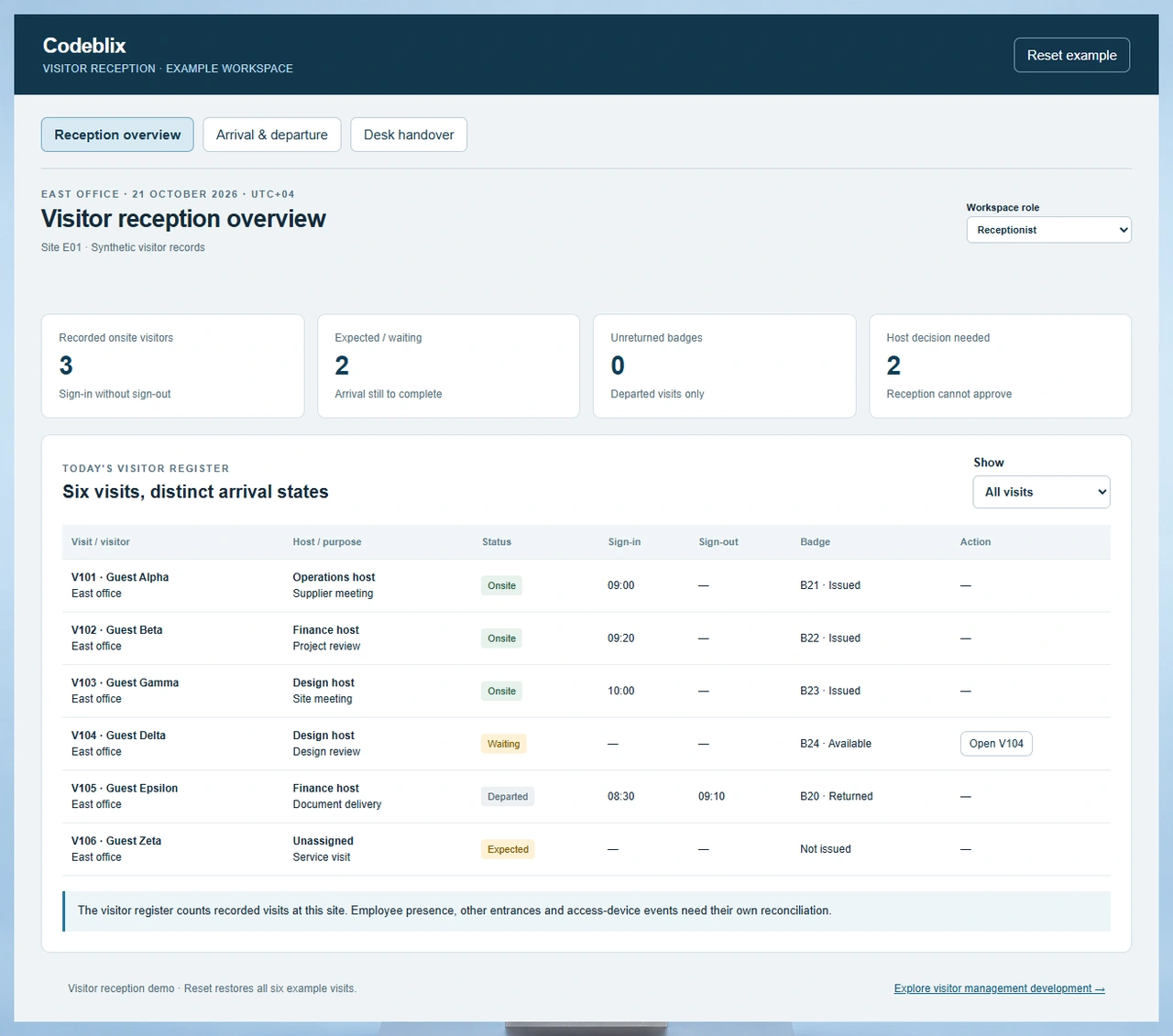
The East office example contains six visitor records. Inspect the daily register, work through Guest Delta’s arrival requirements and compare a captured handover list with the register after departure.
Try the six-visit reception register
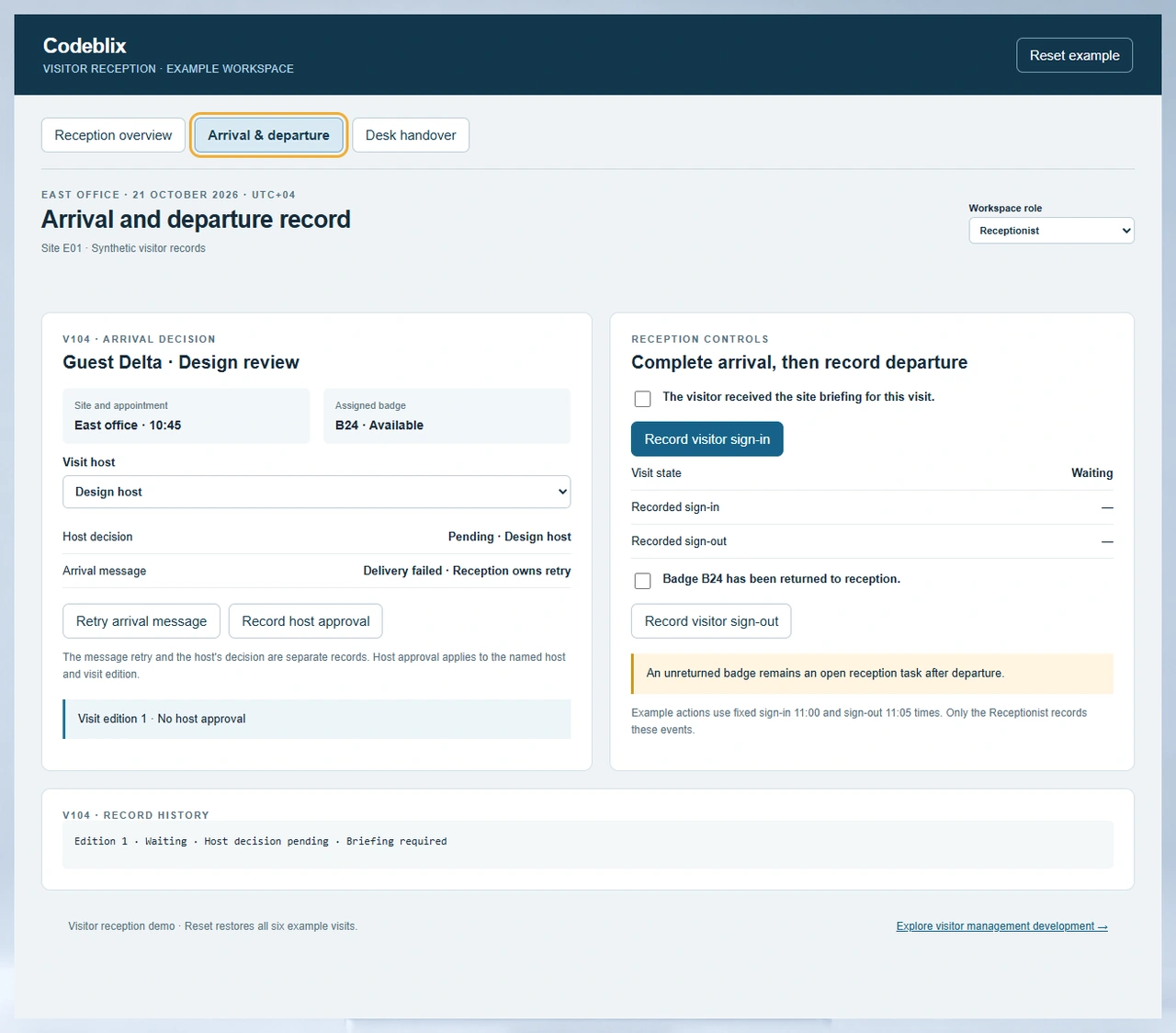
Open the visitor demo. V101, V102 and V103 are recorded onsite; V104 is waiting, V105 has departed and V106 is expected without a confirmed host. Filter the register, then open V104 to inspect the host decision and briefing requirement.
Open the visitor reception demoChange a host after approval
Use the Host role to approve V104, then choose a different visit host. The visit advances to another edition and the earlier approval becomes superseded. In the Receptionist role, sign-in remains held until the current host approves and the briefing is complete. Retrying the arrival message changes delivery status independently.
Compare the current count with a retained list
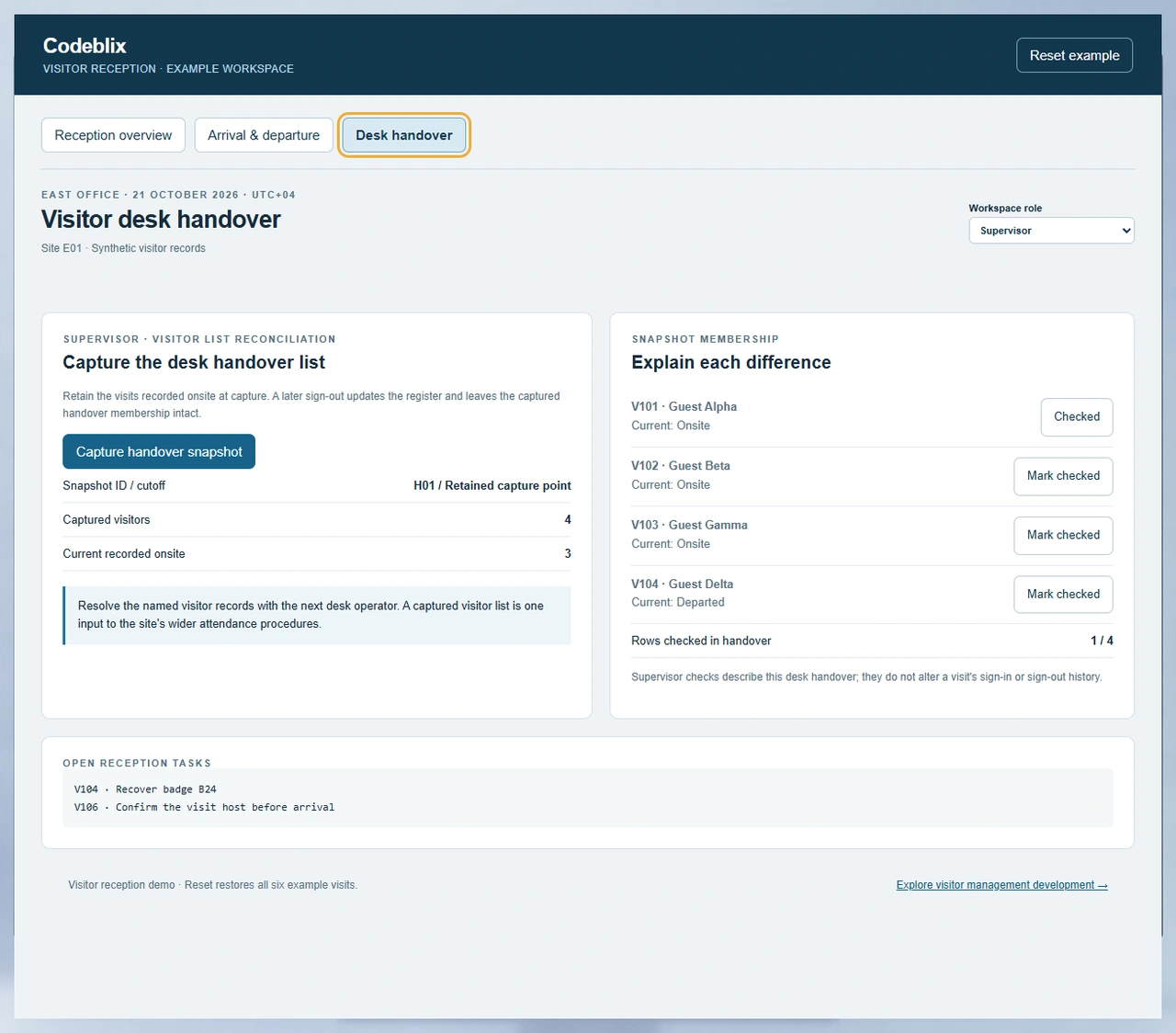
Sign V104 in to increase the recorded onsite count from three to four. As Supervisor, capture the handover snapshot. Then sign V104 out as Receptionist without marking the badge returned. The current count returns to three, the snapshot retains four rows and B24 remains an open task.
Keep visitor reception distinct from contractor job management
A contractor may arrive as a visitor, while their work order, supplier review and project closeout belong to another workflow. Link the visit to that job where useful and preserve which team owns each decision.
Compare contractor job workflowsFrom an expected guest to a reconciled reception record
Define these six stages with the people who invite, welcome and account for visitors at each location.
Define the site and visitor purpose
Capture the location, appointment window, visit category, intended host and required arrival information. Identify who receives a walk-in and how an absent host is handled. Use a visit ID so repeat guests and multiple appointments remain distinguishable.
Obtain the current host decision
Route the arrival decision to the responsible host and retain its outcome. A message delivery receipt is evidence of delivery rather than approval. When the named host changes, determine whether the earlier decision must be replaced before reception can proceed.
Complete the reception requirements
Present the applicable briefing or document requirements and record completion for this visit. Let reception resolve missing information with a named owner. Define the difference between an expected guest, someone waiting at the desk and a completed sign-in.
Record sign-in and badge assignment
Create the arrival event once, attach any badge or temporary credential and show the visit in the recorded onsite register. Scope how concurrent desks, repeated taps and interrupted requests avoid duplicate entries. Confirm the behaviour of each printer or access device separately.
Record departure and outstanding items
Retain the sign-out time independently of badge return or another follow-up task. Assign responsibility for unreturned items and corrections to missed departures. Preserve the original event and the reason for a later correction so the register can be explained.
Reconcile the desk handover
Capture the relevant visitor rows with their site and cutoff, then record which rows the next operator has checked. Display later status changes beside the captured membership. Agree how visitor information contributes to the organisation’s broader attendance and site procedures.
Choose a visitor platform or commission a tailored application
- Compare established visitor platforms when their registration, host communication and site configuration fit your operation. Test the edition and plan you would actually buy, including devices, number of locations, administrator access, exports and support.
- Custom development can suit a distinctive approval chain, location model, restricted reporting view or handover process. Begin with one reception point and a realistic visitor day so the quote reflects the actual decisions and exceptions.
- Ask every shortlisted provider to run a changed-host arrival, a failed notification and a sign-out with an outstanding badge. These exercises expose requirements that a polished welcome screen alone cannot resolve.
Agree roles, data collection and retention
- Define Receptionist, Host, Supervisor and Administrator access separately. Hosts should see the visits assigned to them; reception needs its authorised sites; export and correction rights need explicit ownership. Production permissions require authenticated server enforcement.
- Choose the visitor fields needed for the purpose before adding photographs, identity documents or attachments. Specify who can view them, where they are stored, their retention periods and how authorised deletion or export is handled.
- The working example uses local synthetic records and role-based interaction checks. Include persistent history, authenticated access, concurrency and recovery as acceptance requirements for the commissioned application.
Scope messages, directories and reception hardware
- List the host directory, communication provider, badge printer and access-control equipment involved. For each connection, confirm the documented interface, credentials owner, supported device and information direction before agreeing its scope.
- Define retry ownership when a notification fails and specify what a delivery receipt means. Keep host acknowledgement distinct from successful message transport. Repeated requests should retain the same visit relationship.
- Agree what reception can do during a network or device failure, how activity is reconciled on recovery and which system owns the authoritative arrival record. Hardware, provider subscriptions and custom interfaces belong in the estimate as identifiable items.
Migrate records and prepare the operating handover
- Bring the site list, host directory, visit categories, reception forms and outstanding badge records. Map stable IDs, time zones and duplicate guests; decide which historical records need importing and which should stay in a read-only archive.
- Agree hosting responsibility, backups, restore exercises, administrator training, supported browsers and reception device accessibility. Verify a full visitor day, including corrections, with the people who accept the first release.
- Set support ownership for failed messages, device changes, retention requests and corrections to the register. Estimate application delivery, migration, interfaces, equipment and ongoing maintenance against a written acceptance checklist.
Six linked records for a visitor reception application
Use this record model to ask what survives a changed host, a repeated request or a desk handover after departure.
| Record | Example inputs | Required output and control |
|---|---|---|
| Site and reception rule | E01; East office; time zone; visit categories; arrival requirements | Apply the correct host and briefing rules to each site without merging its visitor register with another location. |
| Visit appointment | V104; Guest Delta; Design review; intended host; visit edition | Keep the visit ID stable and replace dependent approval when the host changes. |
| Host decision and message receipt | Pending or approved; host identity; decision edition; failed or delivered message | Retain approval separately from message transport and give failed delivery an owner. |
| Sign-in and sign-out event | V104; arrival 11:00; departure 11:05; Receptionist | Allow each event once, preserve its order and explain corrections to the recorded onsite register. |
| Badge assignment and return | B24; assigned V104; issued, unreturned or returned | Keep an unreturned badge visible after sign-out and record its eventual recovery independently. |
| Desk-handover snapshot | H01; captured V101–V104; current state; checked rows | Retain four captured members while a later departure changes the current onsite count to three. |
VR-06 begins with three onsite visits, two expected or waiting visits and one departed visit: six total records. Signing V104 in changes those groups to four, one and one. Capturing H01 retains those four onsite rows. Signing V104 out produces three onsite, one expected and two departed visits; H01 still has four members. Checking one H01 row is 1/4, or 25% of that handover list. Badge B24 can remain outstanding without adding V104 back to the current onsite count.
Compare visitor platforms using the same reception exceptions
These primary product pages cover established visitor-management approaches. Use the questions below in a current supplier demonstration and confirm the plan, devices and configuration involved.
| Option | Published focus | Ask in your demo |
|---|---|---|
| Envoy Visitors | Visitor registration, host notifications, screening, badges and access-control integrations. | Change a visit’s host after approval and show how the current arrival decision is established. |
| Lobbytrack | Visitor sign-in, host communication, assisted sign-out, badge workflows and evacuation management. | Record departure before badge return, then reconcile the visit against a previously captured desk list. |
| Greetly | Visitor pre-registration, check-in and check-out, host notification and digital document capture. | Fail an arrival message and demonstrate how delivery status differs from the host’s approval decision. |
The exercises identify buying questions rather than missing-feature claims. Compare the demonstrated response, information controls, device fit, implementation effort and recurring costs for your actual reception sites.
Category reference: Envoy’s visitor management overview. The VR-06 visitor example, handover calculations, working reception exercise and selection checklist are original Codeblix buyer resources.
Connect reception to the people who own the visit.
Define how workplace hosts, front-desk teams and service operators share the records they need.
Explore professional services softwareQuestions before selecting visitor management software
Clarify the arrival decisions, system boundaries and operating responsibilities that will shape your quote.
What should visitor management software handle?
It should connect the expected visit, responsible host, arrival requirements, sign-in and departure. Depending on the site, the scope can also include badge recovery, document handling, reception handovers and controlled reporting. Test how the records change when the visit does not follow the normal path.
Can Codeblix develop a custom visitor management system?
Yes. Codeblix offers custom software development for visitor reception and related operational workflows. Start with the locations, visitor categories, host decisions and equipment involved, then agree a first release and its acceptance cases.
Does a delivered notification mean the host has approved entry?
A delivery receipt confirms the message transport state. Host approval is a separate decision with its own owner and visit context. The demo lets reception retry the message and the Host record approval independently.
What changes when the visitor’s host changes?
The example creates another visit edition and supersedes an earlier approval. Reception obtains a decision from the current host before completing sign-in. Agree the equivalent rule for host substitutions and delegated approval in your own application.
Can a visitor sign out with an unreturned badge?
The reception example records departure and retains the badge as an open task. This keeps the current visitor count accurate while preserving responsibility for recovery. Your site’s credential and access-device rules should determine the commissioned behaviour.
Why can the handover list contain four visitors when three are onsite?
The snapshot retains the four visitor records included at capture. A later departure changes the current register to three and remains visible against the captured list. Handover checks use the snapshot’s four-row denominator and do not change the visitor’s departure record.
Can the system connect to our directory, printers or access controls?
Include the exact provider, device model and available interface in discovery. Confirm the integration path, authentication, information ownership, retries and failure handling before adding it to the quote. Test each connection with the actual equipment and permissions involved.
What affects implementation cost and continuing support?
Locations, reception devices, approval variations, information sensitivity, record migration and external interfaces affect the scope. Include hosting, backups, administrator training, accessibility and ongoing provider or hardware changes. Agree who handles missing departures, failed notifications and badge recovery after launch.