
A balanced plan needs an agreed owner.
A territory can represent geography, a named account list or a combination of attributes. Decide who serves each account and when that responsibility changes.
Compare capacity with the right workload
Account counts alone can hide unequal service demands. Agree a workload measure such as expected visits, service hours or weighted account effort, then compare it with a territory capacity expressed in the same unit. Keep opportunity value and sales targets separate from this operating measure.
Resolve competing ownership rules
A postcode rule, product responsibility and named-account exception can point to different teams. Specify their precedence, identify uncovered or conflicting accounts and record the authority that resolves each exception. An address correction should trigger a review when it would move a protected account.
Release a dated handoff
Prepare a draft coverage edition with its own inputs and changes. Check the outgoing and receiving owners, retain the prior edition and approve the effective date. Reconcile the accepted owner update with the receiving CRM before calling the operational handoff complete.
See what changes before ownership moves.
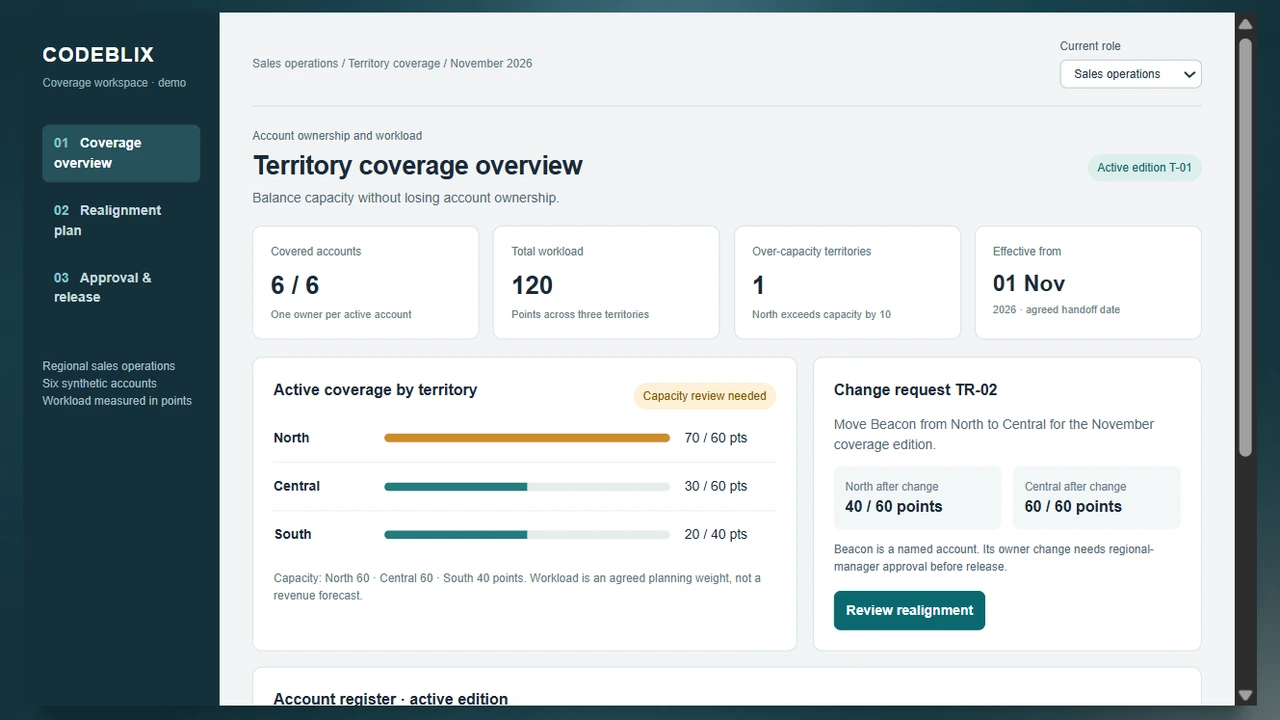
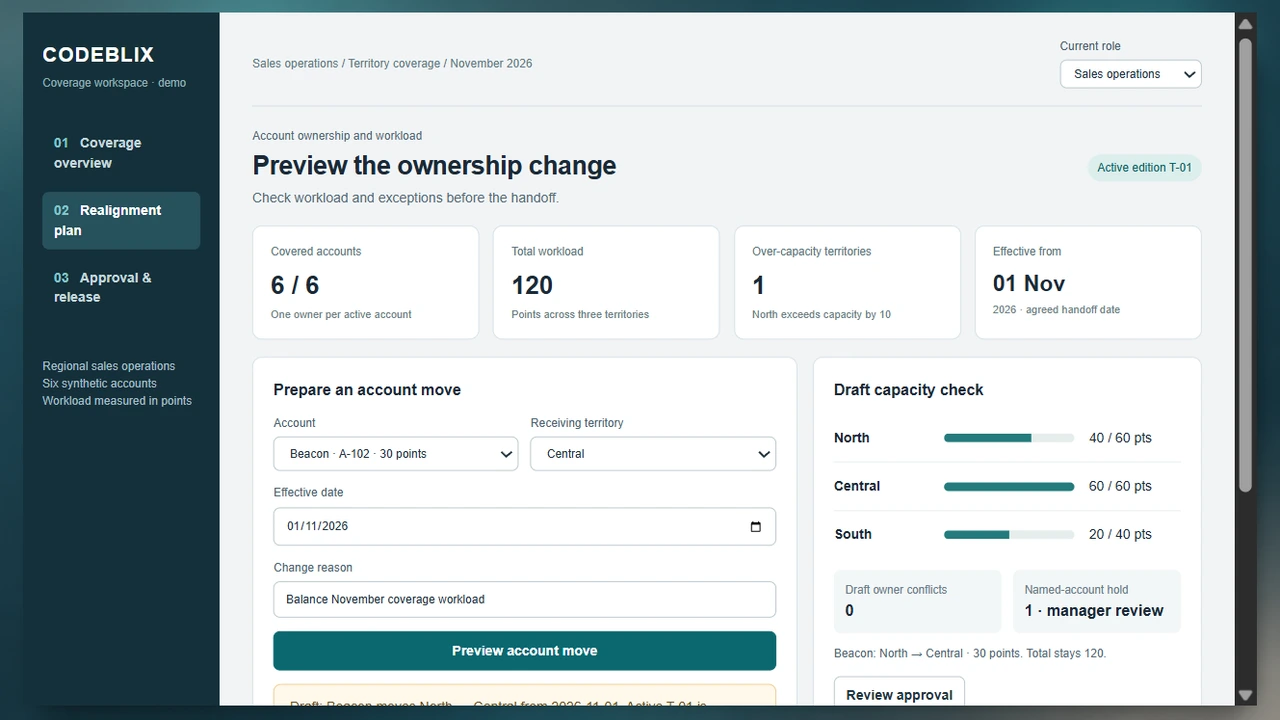
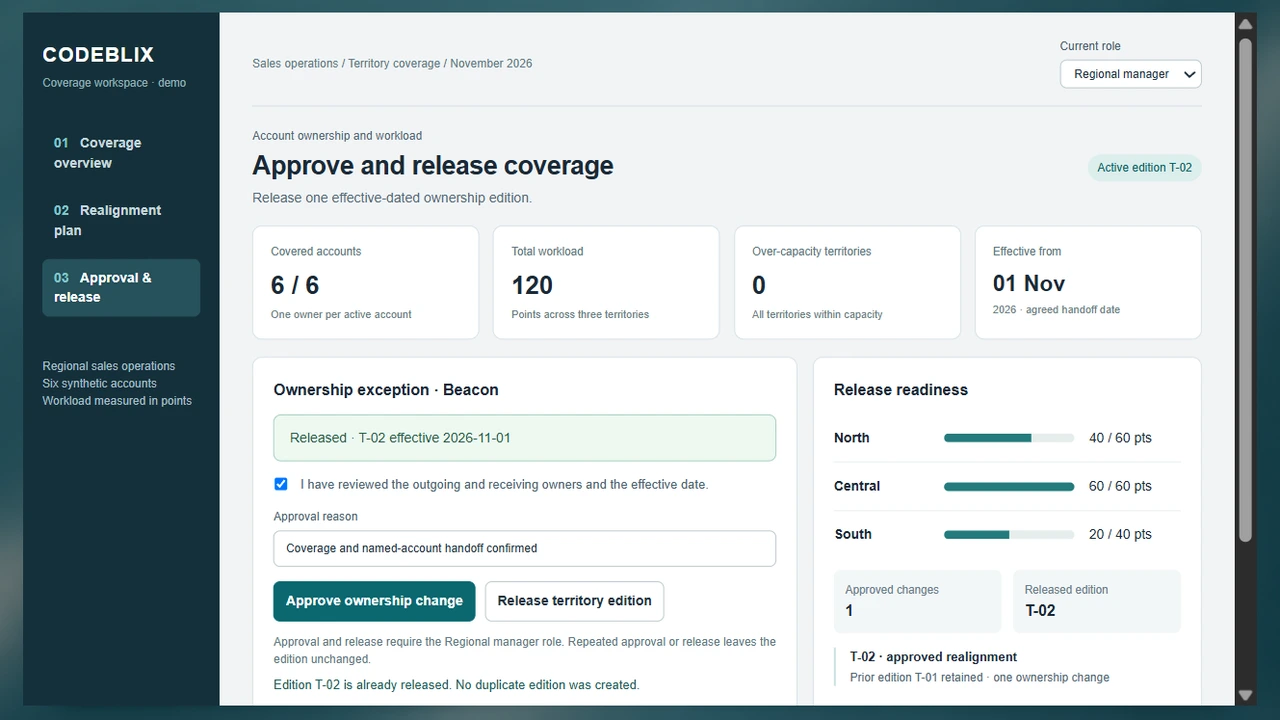
Follow the same six synthetic accounts through the territory planning demo. The overview exposes an overload, the working screen previews a move, and the approval view releases the next coverage edition.
Prepare for a useful product review.
Use these checks to compare fit, evidence and implementation before committing to a product.
Try the protected-account move
Open the example as Sales operations and preview Beacon moving from North to Central. Compare the two capacity totals while active ownership stays at T-01. Switch to Regional manager, acknowledge the handoff, enter a reason and release T-02. Try approving or releasing twice.
Try the territory realignment demoConnect the plan with field execution
Territory design decides the account set and responsible team. Retail execution then coordinates outlet visits, observations and corrective work inside that coverage. Share stable outlet and account IDs while keeping visit completion separate from the territory approval.
Review retail execution workflowsKeep sales estimates traceable after reassignment
Moving an account can change which manager sees its opportunities. Retain the owner and territory edition used by a submitted forecast, then show the reassignment in the next review. A coverage change should not silently replace an earlier period estimate.
Explore sales forecast reviewDevelop the plan inside the customer relationship
After agreeing the team responsible for an account, organize its customer goals, installed services and expansion candidates. A white-space planning workspace connects discovery evidence to the next owned action while keeping the account assignment stable.
Explore strategic account planningCheck when the selling seats become available
A territory may have an assigned team before its planned hires have reached full productivity. Compare the monthly contribution of existing and new selling seats with the target, then review how a delayed start changes the capacity available for that territory.
Explore sales capacity planningFrom account register to an approved territory edition
Use a controlled realignment cycle for new regions, staffing changes or an overloaded patch. Preserve account identities throughout.
Establish the coverage universe
Identify the accounts, sites and sales motions included in the plan. Bring stable IDs, current owners, address quality, account groups, product eligibility and protected relationships. Separate inactive records and unresolved duplicates so the denominator is clear.
Define territory rules and effort
Choose geographic, named-account or hybrid assignment rules and their priority. Record capacity, workload weights and the effective period. Model vacant territories, shared account teams and temporary cover explicitly instead of silently assigning them to a convenient representative.
Preview the realignment
Apply the proposed account or boundary change to a draft edition. Compare old and new ownership, capacity utilization and accounts left uncovered. Check protected accounts and overlapping rules before a planning scenario becomes a release request.
Review the ownership exceptions
Give sales operations a queue of missing addresses, conflicting rules, named-account holds and capacity breaches. Regional managers decide the exceptions within their authority. Record the decision, reason, affected account IDs and planned date; return unresolved rows to their responsible owner.
Approve the receiving-team handoff
Confirm who takes open opportunities, scheduled visits and customer follow-ups. Agree how existing compensation credit is handled by its own rules. Obtain the required approval before releasing an ownership edition, and prevent a repeated click from creating a second change.
Reconcile activation and follow-up
Publish the approved edition through the agreed file or API handoff. Compare requested changes with accepted source-system updates and queue failures for retry. Keep the previous coverage view available for historical reporting and investigate workload assumptions after the new plan is in use.
Roles, visibility and approval authority
- Sales operations prepares drafts and resolves account-data questions. Regional managers approve their coverage changes. Representatives see the accounts and handoffs they are permitted to work on. Administrators maintain access and the assignment-rule editions.
- Specify whether managers may approve moves across regions, who resolves named-account exceptions and who can export full customer lists. A receiving owner needs the right access at activation, not merely a new name in a table.
- Keep import permissions, scenario editing and release authority separate. Record decisions against the draft version so a subsequent edit cannot inherit an approval for different account assignments.
CRM migration, mapping and source ownership
- Start with an anonymised account file, current territory rules, owner IDs, workload assumptions and a sample exception. Reconcile account merges, inactive representatives, duplicate sites and ambiguous locations before migrating ownership history.
- For CRM interfaces, scope the exact object and field ownership, available API permissions, update direction, timing, retry identity and reconciliation output. A customer-account owner update does not automatically determine open-opportunity ownership or compensation credit.
- If geographic maps are needed, include address normalization, geocoding accuracy, map-data licensing and boundary versions in the quote. Test accounts on borders and protect named-account overrides. The table-based demo focuses on assignment controls; map and routing requirements are separately selectable scope.
Pilot, cost and support decisions
- Pilot one region and one realignment cycle. Compare the account totals, named exceptions and receiving-owner acknowledgements with your current process before expanding territories or adding automatic balancing.
- A quote should distinguish the approval workspace, data cleanup, map licensing, CRM interfaces, access configuration, training and hosting. State expected account volume, simultaneous planners and the number of rule hierarchies to price the operating scope.
- Agree monitoring, backup restoration, support hours and responsibility for failed owner updates. Include a rollback procedure that restores the approved ownership edition without discarding subsequent customer activity or unrelated CRM corrections.
Six records for a controlled territory realignment
Use this account model and the capacity example to evaluate a packaged product or prepare a Codeblix development brief.
| Record | Example inputs | Required output and control |
|---|---|---|
| Coverage scope | Included account set, region, planning period, effective date and exclusions | Reconcile the same six accounts before and after a change; explain excluded sites. |
| Account coverage record | Account and site IDs, current owner, territory, location quality and workload points | Preserve account history and the current effective assignment; flag incomplete data. |
| Territory rule edition | Rule ID, geographic or attribute criteria, precedence, capacity and named-account policy | Resolve overlaps and uncovered accounts using an explicit priority and reviewer. |
| Realignment change | Draft ID, account ID, outgoing and receiving territory, date and change reason | Calculate the draft workload without overwriting active ownership. |
| Ownership decision | Change edition, protected-account hold, manager authority, acknowledgement and reason | Approve the exact account move once; invalidate approval when its draft changes. |
| Release and reconciliation | Prior and released edition IDs, effective time, requested and accepted source updates | Prevent duplicate release; retry failed rows and retain the earlier coverage view. |
The demo uses six synthetic accounts and a single illustrative workload index. Atlas (40 points) and Beacon (30) belong to North, which has capacity 60: its 70-point workload is 10 points over. Coral (20) and Dune (10) give Central 30 points against capacity 60. Ember (15) and Fjord (5) give South 20 points against capacity 40. The total is 120 points. Previewing Beacon’s 30-point move produces North 40, Central 60 and South 20, still totaling 120. Beacon is protected by a named-account rule, so the draft holds for manager review even though capacity now fits. The active T-01 account register changes only after the manager acknowledges the handoff, records a reason and releases T-02 effective 1 November 2026. Repeated approval and release do not create another decision or edition. Your organisation defines the real effort weights and capacity; these example points are not sales targets or forecast revenue.
Compare the same account move with each provider
The primary product references below describe different emphases in territory work. Ask for a demonstration using your account data, rule priorities and approval path.
| Option | Published focus | Ask in your demo |
|---|---|---|
| eSpatial | Geographic and account-based territory design, workload balancing and realignment scenarios. | Show a priority account retained by exception while the surrounding territory changes. Which draft and approval identify the final owner? |
| RepMove | Mapped customer coverage, categories and tags, assignment rules and team permissions. | When an account qualifies for two assignment rules, how do we explain the winning owner and preserve the outgoing-team handoff? |
| Salesforce Maps | CRM record visualization, field sales mapping and route planning around customer data. | Which combination of mapping, territory planning and CRM permissions supports our effective-dated account move and reconciliation requirements? |
A mapping tool is useful when geographic visibility is the main gap. A CRM territory feature may fit when your ownership rules and hierarchy already live there. Consider custom development when a dedicated exception queue, cross-system handoff or approval model requires a separate application. Compare the total operating scope, including licenses and data preparation. These evaluation questions identify decisions to test, rather than asserting that a vendor lacks a feature.
Category reference: eSpatial: account and geographic territory design. Primary vendor pages accessed 18 October 2026. The six-account realignment, record model and acceptance checklist are original Codeblix decision aids.
Make territory decisions part of your sales operation.
Link the approved coverage register to the customer records and field activities that depend on account ownership.
Explore connected business softwareQuestions before choosing territory software
Settle the ownership policy and operating constraints before selecting a map or automating assignments.
What does sales territory management software do?
It organizes the accounts or geographic areas assigned to sales teams, supports coverage planning and controls ownership changes. Useful requirements include rule priority, capacity checks, named-account exceptions, effective dates and a reconciled handoff to the system holding customer records.
Can Codeblix develop territory planning around our CRM?
Yes. Codeblix can scope a custom coverage and approval workspace around your account data and sales process. Share the current ownership fields, territory hierarchy, file or API options and access restrictions. Interface behavior, permissions and acceptance checks form part of the development scope.
Are sales territory mapping and territory management the same?
Mapping makes location and coverage visible. Territory management also determines responsibility, rule precedence, capacity and the timing of changes. Many buying evaluations need both. Use the same account-move case to see how a candidate handles the map, the ownership decision and the receiving system.
How should named accounts and overlapping territories be handled?
Define the precedence of named-account, geographic, product and segment rules. Show conflicting or uncovered accounts in an exception queue. Give a named manager authority to resolve each conflict and record the effective assignment without removing the earlier edition.
What should happen to opportunities and commission credit when an account moves?
Agree those policies before activation. The account owner, opportunity owner, servicing team and compensation beneficiary can be different roles. Keep their identities and effective dates explicit, obtain the required approvals and reconcile each receiving system separately.
Does an equal number of accounts create balanced territories?
Not necessarily. Accounts can require different visit frequency, effort or specialist coverage. Use an agreed workload measure and capacity in the same unit. Review the weights with the sales team, and compare commercial potential separately rather than treating an effort score as a revenue prediction.
Can we start with spreadsheets instead of a live CRM integration?
A controlled file pilot can establish the account identities, assignment rules and approval outputs. Use versioned extracts and reconciliation totals. An API interface can then be scoped around confirmed fields, permissions, retries and ownership of updates.
What is needed for a territory software quote?
Provide an anonymised account register, territory rules, workload assumptions, team roles and one awkward reassignment. Add expected account volume, mapping needs, CRM access options, history, hosting and support expectations. Codeblix can separate the pilot, migration, interfaces and ongoing operating costs.